
ASUS SDRW-S08U9M-R
Посібник користувача DVD-приводу ASUS ZenDrive SDRW-08U9M-U
Model: SDRW-S08U9M-R
вступ
This manual provides comprehensive instructions for the setup, operation, and maintenance of your ASUS ZenDrive SDRW-08U9M-U external DVD-Writer. Please read this manual thoroughly before using the device to ensure proper functionality and longevity.
The ASUS ZenDrive SDRW-08U9M-U is a versatile external optical drive designed for reading and writing various CD and DVD formats, including DVD-RAM, DVD±R, and DVD±RW. It supports double-layer media and offers high-speed data transfer for both CD and DVD operations.
Продукт закінченийview

малюнок 1: З верху до низу view of the ASUS ZenDrive SDRW-08U9M-U, showcasing its sleek black finish and compact design. The ASUS logo is centrally located on the top surface.

малюнок 2: The ASUS ZenDrive SDRW-08U9M-U shown with its included USB Type-C and Type-A cables, highlighting its versatile connectivity options. The image also indicates features like Disc Encryption II, Nero Back It Up, and M-DISC Support.

малюнок 3: Illustration of the ZenDrive's dual interface compatibility, showing both a USB-A to Mini-USB Y-cable and a USB-C to Mini-USB cable. This ensures broad compatibility with various computer systems.
Налаштування та встановлення
Системні вимоги
- Операційна система: Multiple Compatible Operating Systems (Windows, macOS).
- Апаратна платформа: Laptop or Desktop PC with available USB port.
- Порт USB: USB 2.0 or higher recommended for optimal performance.
Підключення пристрою
- Переконайтеся, що комп’ютер увімкнено.
- Select the appropriate USB cable (USB-A or USB-C) based on your computer's available ports.
- Connect the Mini-USB end of the cable to the port on the ASUS ZenDrive.
- Connect the other end of the USB cable (USB-A or USB-C) to an available USB port on your computer.
- The operating system should automatically detect and install the necessary drivers. A notification will appear once the device is ready for use.

малюнок 4: The ASUS ZenDrive SDRW-08U9M-U connected to a laptop, illustrating its compatibility with both Mac and Windows operating systems. This image emphasizes the plug-and-play nature of the device.
Операція
Вставлення та виймання дисків
- To open the disc tray, gently press the eject button located on the front of the drive.
- Carefully place the disc onto the tray with the label side facing up. Ensure the disc is seated correctly on the spindle.
- Обережно засуньте лоток для диска назад у дисковод, доки він не клацне.
- To eject the disc, press the eject button again. Alternatively, you can eject the disc through your operating system's file explorer (e.g., right-click on the drive icon and select "Eject").
Читання дисків
Once a disc is inserted and the tray is closed, your operating system should automatically detect the disc. Depending on your system settings, an autoplay prompt may appear. You can also access the disc's contents by navigating to "This PC" or "My Computer" (Windows) or "Finder" (macOS) and selecting the optical drive icon.
Запис та запис дисків
The ASUS ZenDrive supports writing to various CD and DVD formats. To burn data, audio, or video to a disc, you will need compatible burning software. The drive is designed to work seamlessly with popular burning applications. Refer to your chosen software's instructions for detailed steps on creating discs.
- Резервне копіювання даних: Use the drive for archiving important fileі документи.
- Media Creation: Create audio CDs, video DVDs, or photo discs.
- Встановлення програмного забезпечення: Install software from physical media.

малюнок 5: The ASUS ZenDrive SDRW-08U9M-U connected to a laptop, demonstrating its utility as a robust backup solution. Icons indicate features such as full backup, disc encryption, and a simplified 3-step burning process.
Технічне обслуговування та догляд
- Прибирання: Використовуйте м’яку, суху тканину без ворсу для очищення зовнішньої поверхні диска. Не використовуйте рідкі засоби для чищення або абразивні матеріали.
- Обробка дисків: Always handle discs by their edges to avoid fingerprints and scratches on the data surface.
- Зберігання: Store the drive in a cool, dry place away from direct sunlight and extreme temperatures. When not in use, disconnect it from your computer.
- Уникайте перешкод: Do not insert foreign objects into the disc tray or any openings of the drive.
Усунення несправностей
| проблема | Можлива причина | Рішення |
|---|---|---|
| Диск не виявлено комп'ютером. | Нещільне USB-з'єднання, несправний USB-порт, проблема з драйвером. |
|
| Disc not reading or writing. | Dirty or scratched disc, incorrect disc type, faulty disc, drive lens dirty. |
|
| Лоток для дисків не відкривається/закривається. | Power issue, mechanical obstruction. |
|
Технічні характеристики
| Особливість | Деталь |
|---|---|
| Номер моделі | SDRW-S08U9M-R |
| Бренд | ASUS |
| Технологія підключення | USB |
| Підтримувані носії | DVD-RAM, DVD±R, DVD±RW, CD-R, CD-RW, Double-Layer Media |
| CD Read Speed | До 24 разів |
| CD Write/Rewrite Speed | До 24 разів |
| DVD Read Speed | До 8 разів |
| DVD Write/Rewrite Speed | До 8 разів |
| Вага товару | 8.6 унції (245 грама) |
| Розміри продукту (ДxШxВ) | 5.33 x 5.61 x 0.55 дюйми (13.55 x 14.25 x 1.39 см) |
| Колір | чорний |
| Розмір кешу | 512 КБ |
| Швидкість передачі даних | 0.48 Megabits Per Second (USB 2.0 speed) |

малюнок 6: Detailed dimensions of the ASUS ZenDrive SDRW-08U9M-U, showing its ultra-slim profile with measurements of 14.25 cm (length), 13.55 cm (width), and 1.39 cm (height).
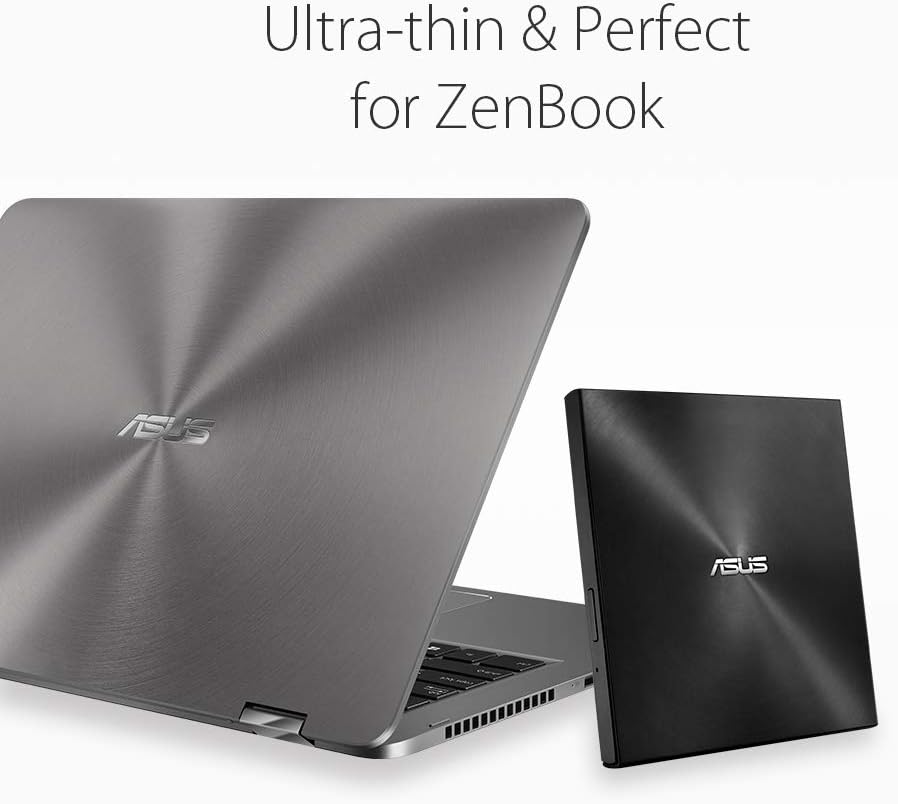
малюнок 7: The ASUS ZenDrive SDRW-08U9M-U positioned next to an ASUS ZenBook, illustrating its ultra-thin design and perfect portability match for slim laptops.
Гарантія та підтримка
For warranty information, technical support, or service inquiries, please visit the official ASUS support website or contact ASUS customer service. Keep your purchase receipt and product serial number handy for faster assistance.
Підтримка ASUS Webсайт: www.asus.com/support/
Пов'язані документи - SDRW-S08U9M-R
 |
Короткий посібник із встановлення зовнішнього оптичного приводу ASUS Надає покрокові інструкції щодо встановлення зовнішніх оптичних приводів ASUS за допомогою роз'ємів USB Type-C, Y-подібного кабелю та адаптера живлення. Містить інструкції з техніки безпеки та інформацію про продукт. |
 |
Короткий посібник із встановлення зовнішнього оптичного приводу ASUS Цей документ містить короткий посібник зі встановлення зовнішніх оптичних приводів ASUS, який охоплює різні моделі та способи підключення. |
 |
Короткий посібник із встановлення зовнішнього оптичного приводу ASUS Короткий посібник зі встановлення зовнішніх оптичних приводів ASUS, у якому детально описані способи підключення за допомогою USB Type-C®, Y-подібного кабелю та USB-кабелю з адаптером живлення. Містить інструкції з безпеки та інформацію про відповідність вимогам. |
 |
Інструкція користувача материнської плати ASUS PRIME B460M-A Comprehensive user manual for the ASUS PRIME B460M-A motherboard, covering installation, BIOS setup, specifications, and troubleshooting. Learn about your ASUS motherboard's features and capabilities. |
 |
Посібник користувача материнської плати ASUS P8P67 - Посібник з встановлення, BIOS та програмного забезпечення Вичерпний посібник користувача для материнської плати ASUS P8P67. Охоплює встановлення обладнання, налаштування BIOS, програмні утиліти, технічні характеристики та усунення несправностей. Незамінний посібник для збирачів ПК та ентузіастів. |
 |
Посібник зі встановлення та налаштування драйверів відеокарти ASUS Вичерпний посібник зі встановлення відеокарт ASUS, підключення дисплеїв та налаштування драйверів. Містить інформацію з безпеки та посилання на підтримку. |
Ask a question about this manual
Ask about setup, troubleshooting, compatibility, parts, safety, or missing instructions. Manuals+ will review the question and use this page’s manual context to help answer it.