
1. Вступ
This manual provides essential information for the safe and efficient operation of your Rigol DS1104Z-S Plus 100 MHz Digital Oscilloscope. Please read this manual thoroughly before using the instrument to ensure proper functionality and to prevent damage. The Rigol DS1104Z-S Plus is a 4-channel digital storage oscilloscope designed for precise signal analysis with a 100 MHz bandwidth and a 1 GSa/s real-time sampставка le.
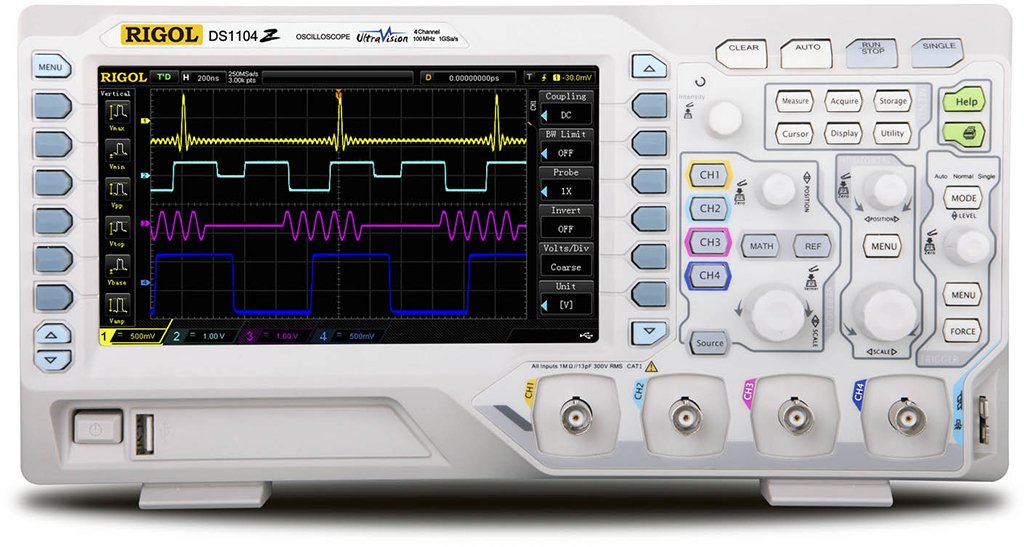
Figure 1: Rigol DS1104Z-S Plus Digital Oscilloscope. This image shows the front panel of the oscilloscope with its display, control knobs, and input channels.
2. Інформація про безпеку
Завжди дотримуйтесь наступних запобіжних заходів, щоб запобігти травмам та пошкодженню інструменту:
- Джерело живлення: Підключайте інструмент лише до джерела живлення із зазначеною потужністюtagе і частота.
- Заземлення: Переконайтеся, що інструмент належним чином заземлений, щоб запобігти ураженню електричним струмом.
- Вентиляція: Не блокуйте вентиляційні отвори. Забезпечте достатню циркуляцію повітря навколо інструменту.
- Середовище: Operate the oscilloscope in a dry, well-ventilated area, away from direct sunlight, high temperatures, and excessive dust.
- зонди: Use only probes designed for the specified voltage та рейтинги частоти.
- Обслуговування: Звертайтеся до кваліфікованого сервісного персоналу для всіх видів обслуговування. Не намагайтеся ремонтувати прилад самостійно.
- Прибирання: Від’єднайте живлення перед чищенням. Використовуйте м’яку губку.amp тканина. Не використовуйте абразивні засоби чи розчинники.
3. Вміст упаковки
Переконайтеся, що ваш пакет містить такі елементи:
- Rigol DS1104Z-S Plus Digital Oscilloscope
- Шнур живлення
- Passive Probes (4 units)
- USB кабель
- Короткий посібник
- Resource CD (User Manual, Programming Manual, Software)
4. Продукт закінчивсяview
The Rigol DS1104Z-S Plus features a user-friendly interface and robust design for various measurement applications.
4.1 Передня панель
The front panel includes the display, control knobs, function buttons, and input connectors for channels 1-4.
- Екран дисплея: Shows waveforms, measurement results, and menu options.
- Вертикальні елементи керування: Налаштуйте гучністьtage per division and position for each channel.
- Горизонтальні елементи керування: Adjust time per division and horizontal position.
- Елементи керування тригерами: Set trigger level, mode, and type.
- Функціональні кнопки: Access various menus such as Acquire, Measure, Storage, Utility, etc.
- Channel Inputs (CH1-CH4): BNC connectors for probe connection.
4.2 Задня панель
The rear panel provides power input, USB host/device ports, and LAN port for connectivity.
- Вхід живлення змінного струму: Для підключення шнура живлення.
- Хост-порт USB: Для підключення USB-накопичувачів.
- Порт USB-пристрою: Для підключення до ПК.
- Порт LAN: Для підключення до мережі та дистанційного керування.
5. Налаштування
5.1 Підключення живлення
- Переконайтеся, що вимикач живлення на задній панелі знаходиться в положенні ВИМК.
- Підключіть наданий шнур живлення до входу змінного струму на задній панелі осцилографа.
- Підключіть інший кінець шнура живлення до заземленої розетки змінного струму.
5.2 Підключення зонда
- Connect the BNC connector of a passive probe to one of the input channels (CH1, CH2, CH3, or CH4) on the front panel.
- Connect the probe's ground clip to the circuit's ground reference.
- Set the attenuation ratio on the probe to match the setting on the oscilloscope (e.g., 1X or 10X).
5.3 Початкове ввімкнення
- Press the power switch on the rear panel to the ON position.
- The oscilloscope will perform a self-test and display the Rigol logo.
- After startup, the default waveform display will appear.
6. Інструкція з експлуатації
This section covers basic operations for acquiring and analyzing waveforms.
6.1 Базове відображення форми хвилі
- Вертикальна шкала (ВОЛЬТИ/ПОДІЛ): Use the vertical scale knob for the active channel to adjust the voltagе чутливість.
- Вертикальна позиція: Use the vertical position knob to move the waveform up or down on the screen.
- Горизонтальна шкала (сек/діл): Use the horizontal scale knob to adjust the time base.
- Горизонтальне положення: Use the horizontal position knob to shift the waveform left or right.
6.2 Запуск
Triggering stabilizes repetitive waveforms and captures single-shot events.
- Рівень запуску: Відрегулюйте ручку рівня запуску, щоб встановити гучністьtage point at which the trigger occurs.
- Trigger Menu: Натисніть Меню тригерів button to configure trigger type (Edge, Pulse, Video, etc.), source, and slope.
- Режим спуску: Select between Auto, Normal, and Single modes.
6.3 Функції вимірювання
The oscilloscope offers various automatic measurement functions.
- Натисніть Виміряти button to display the measurement menu.
- Select desired measurements such as Vpp, Vmax, Vmin, Freq, Period, Rise Time, etc.
- Результати будуть відображені на екрані.
6.4 Збереження даних
Waveforms and settings can be saved to internal memory or a USB storage device.
- Натисніть Зберігання кнопку.
- Select the storage type (Waveform, Setup, Image) and destination (Internal, USB).
- Follow the on-screen prompts to save the data.
7. Технічне обслуговування
7.1 Очищення
To maintain the instrument's appearance and performance:
- Перед чищенням від'єднайте шнур живлення.
- Використовуйте м’яку тканину dampened with mild detergent and water to clean the exterior.
- Не використовуйте абразивні засоби для чищення, розчинники або агресивні хімікати.
- Переконайтеся, що рідина не потрапила всередину інструменту.
7.2 Калібрування
The oscilloscope is factory calibrated. For optimal performance, periodic calibration by qualified service personnel is recommended, typically every 1-2 years, depending on usage.
7.3 Зберігання
When not in use for extended periods, store the oscilloscope in a dry, dust-free environment within the specified operating temperature range.
8. Вирішення проблем
This section lists common problems and their solutions. If the problem persists, contact Rigol customer support.
| проблема | Можлива причина | Рішення |
|---|---|---|
| Після включення живлення дисплей відсутній | Power cord not connected; Power switch off; Faulty power outlet | Перевірте підключення шнура живлення; переконайтеся, що вимикач живлення увімкнено; протестуйте розетку за допомогою іншого пристрою |
| Не відображається хвиля | Probe not connected; Incorrect channel settings; Trigger level incorrect; Input signal too small/large | Connect probe to active channel; Adjust vertical scale and position; Adjust trigger level; Check input signal source |
| Нестабільна форма хвилі | Incorrect trigger settings; Noisy signal | Adjust trigger level and mode; Check signal source for noise; Use averaging acquisition mode |
| Cannot save data to USB | USB drive not formatted correctly; USB drive full; USB drive faulty | Format USB drive to FAT32; Delete unnecessary files; Спробуйте інший USB-накопичувач |
9. Технічні характеристики
Key technical specifications for the Rigol DS1104Z-S Plus Digital Oscilloscope:
- Пропускна здатність: 100 МГц
- Канали: 4 аналогових каналів
- С. в режимі реального часуample курс: До 1 Гвиб/с
- Глибина пам'яті: 12 Mpts (Standard), 24 Mpts (Optional)
- Швидкість захоплення сигналу: До 130 000 осцилографів/с
- Дисплей: 7-дюймовий TFT РК-дисплей (роздільна здатність 800x480)
- Вертикальна чутливість: від 1 мВ/поділ до 10 В/поділ
- Діапазон часової бази: 2 ns/div to 50 s/div
- Типи тригерів: Edge, Pulse, Video, Slope, Alternate, Runt, Window, Delay, Setup/Hold, Nth Edge
- Інтерфейс: USB Host, USB Device, LAN, Pass/Fail, Trigger Out
- Джерело живлення: Провідний електричний
- Вага товару: 1 кілограма
- Відповідність: CE
10. Гарантія та підтримка
Rigol Technologies provides a standard warranty for its products. For detailed warranty terms and conditions, please refer to the warranty card included with your product or visit the official Rigol website. For technical support, service, or inquiries, please contact your local Rigol distributor or Rigol customer service. Contact information can typically be found on the Rigol website or in the documentation provided with your oscilloscope.
Офіційний Webсайт: www.rigol.com