
вступ
The ZAGG Folio Case with Backlit Keyboard is designed to enhance your Verizon Ellipsis 8" HD Tablet experience by providing both protection and increased productivity. This folio features a built-in Bluetooth keyboard with island-style keys and backlighting, a unique hinge design for multiple viewing angles, and a long-lasting battery. This manual provides instructions for setup, operation, maintenance, and troubleshooting to ensure optimal use of your device.
Вміст упаковки
Перевірте наявність усіх предметів у вашій упаковці:
- ZAGG Folio Case with Backlit Keyboard
- USB-кабель для зарядки
- Посібник користувача (цей документ)
Налаштування
1. Inserting Your Tablet
Carefully align your Verizon Ellipsis 8" HD Tablet with the case. Gently press the tablet into the protective shell until it is securely seated. Ensure all ports and buttons are accessible.

Image: The ZAGG Folio Case open with a tablet inserted, showing the backlit keyboard and the tablet screen at an angle.
2. Заряджання клавіатури
Before initial use, fully charge your ZAGG Folio keyboard. Connect the included USB charging cable to the charging port on the keyboard and plug the other end into a USB power source (e.g., wall adapter, computer USB port). The charging indicator light will illuminate during charging and turn off when fully charged. A full charge can provide up to three months of regular use.
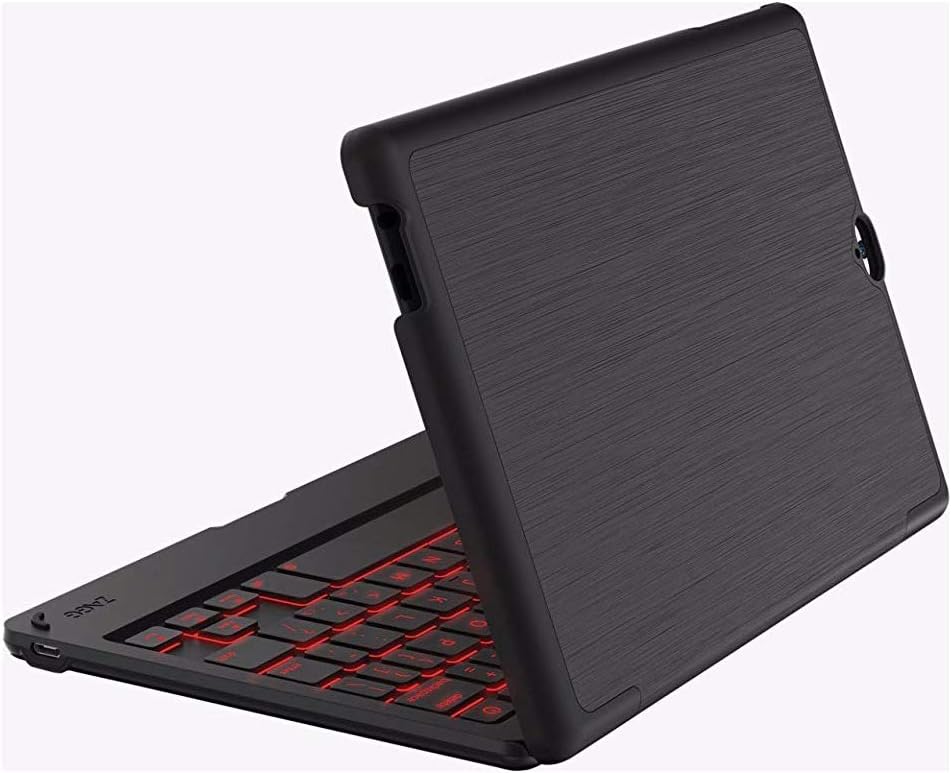
Image: The ZAGG Folio Case in a closed position, showcasing the textured exterior of the case.
3. Підключення Bluetooth
- Ensure your tablet's Bluetooth is enabled.
- On the ZAGG Folio keyboard, locate and press the Bluetooth pairing button (refer to the keyboard layout for exact location, usually near the power button). The Bluetooth indicator light will begin to flash, indicating it is in pairing mode.
- On your tablet, go to Bluetooth settings and search for available devices.
- Select "ZAGG Folio" from the list of available devices.
- Виконайте будь-які підказки на екрані, щоб завершити процес сполучення. Після сполучення індикатор Bluetooth на клавіатурі перестане блимати.
Інструкція з експлуатації
Використання клавіатури
The ZAGG Folio features a full-size, island-style keyboard designed for comfortable and efficient typing. Simply open the case and position your tablet to begin typing.
Клавіші з підсвічуванням
The keyboard includes a backlight feature for typing in low-light conditions. To activate or adjust the backlight, locate the backlight key (often represented by a sun icon or similar) on the keyboard. Pressing this key repeatedly will cycle through brightness levels or turn the backlight off. This model supports single-color backlighting.
Регульована Viewкути нахилу
The unique hinge design allows you to position your tablet at various viewing angles, up to 135 degrees. Adjust the tablet to your preferred angle for typing, viewing, or interacting with the touchscreen.
Sleep/Wake Function
The ZAGG Folio utilizes magnets to automatically put your tablet to sleep when the case is closed and wake it up when opened. This feature helps conserve your tablet's battery life.
Технічне обслуговування
To ensure the longevity and performance of your ZAGG Folio Case:
- Прибирання: Використовуйте м'який, damp cloth to wipe down the exterior of the case and the keyboard. Avoid harsh chemicals or abrasive cleaners.
- Зберігання: When not in use for extended periods, ensure the keyboard is turned off and stored in a cool, dry place.
- Догляд за акумулятором: For optimal battery health, avoid completely draining the battery frequently. Charge the keyboard regularly, especially if it will be unused for several weeks.
Усунення несправностей
If you encounter issues with your ZAGG Folio, try the following solutions:
- Клавіатура не реагує:
- Переконайтеся, що клавіатуру увімкнено.
- Перевірте рівень заряду акумулятора та зарядіть його, якщо необхідно.
- Verify that Bluetooth is enabled on your tablet and the keyboard is paired. If not, re-pair the devices.
- Спробуйте вимкнути та знову ввімкнути клавіатуру.
- Підсвічування не працює:
- Press the backlight key multiple times to cycle through brightness settings.
- Переконайтеся, що клавіатура має достатній заряд батареї.
- Tablet Not Sleeping/Waking:
- Переконайтеся, що планшет правильно розміщено в корпусі.
- Check your tablet's settings to ensure the sleep/wake function is enabled (if applicable).
- Проблеми з підключенням:
- Unpair the keyboard from your tablet and then re-pair it.
- Перезавантажте і планшет, і клавіатуру.
Технічні характеристики
| Особливість | Деталь |
|---|---|
| Номер моделі | E86ZFK-BB0 |
| Сумісні пристрої | Verizon Ellipsis 8" HD Tablet |
| Технологія підключення | Bluetooth |
| Опис клавіатури | Wireless, Island-style keys |
| Особливість | Backlit (Single Color) |
| Тип батареї | 1 літій-полімерний (у комплекті) |
| Термін служби батареї | Up to 3 months between charges (951 mAh) |
| Вага товару | 13.1 унції (приблизно 371 грамів) |
| Розміри продукту (ДxШxВ) | 8.35 x 0.71 x 5.39 дюймів |
| Колір | чорний |
| матеріал | Plastic, possibly polyurethane or leather |
Гарантія та підтримка
For warranty information or technical support, please visit the official ZAGG webсайт або зверніться до служби підтримки клієнтів ZAGG. Зберігайте чек про покупку для гарантійних претензій.
ZAGG Official Webсайт: zagg.com