
1. Вступ
This manual provides detailed instructions for the installation, operation, and maintenance of your Intelbras TS 3112 Cordless Phone system, which includes a main base unit and an additional handset. This system is designed to offer convenient and cost-effective communication for your home or office.
Ключові особливості:
- Free internal calls between handsets.
- Three-way conferencing capability (two internal handsets and one external call).
- Caller ID display for incoming calls.
- Call history log with date and time.
- Підсвічування дисплея для видимості в різних умовах освітлення.
- Ergonomic design for comfortable use during extended calls.
- Expandable system, supporting up to 6 additional handsets (total of 7).

This image displays the complete Intelbras TS 3112 system, featuring two black cordless handsets each resting on its respective charging base. The handsets have a clear display and a standard numeric keypad, indicating a complete communication solution.
2. Вміст упаковки
Будь ласка, перевірте, чи містить ваша упаковка такі предмети:
- 1x Main Base Unit
- 2x Cordless Handsets (one main, one additional)
- 2x AC Power Adapters (for base units)
- 1x телефонний кабель
- Rechargeable Batteries (pre-installed or separate, check packaging)
- Цей посібник користувача
3. Налаштування
3.1. Connecting the Main Base Unit
- Підключіть один кінець телефонного шнура до порту LINE на головній базі.
- Підключіть інший кінець телефонного шнура до телефонної розетки.
- Connect one AC power adapter to the POWER port on the main base unit.
- Підключіть адаптер змінного струму до стандартної електричної розетки.
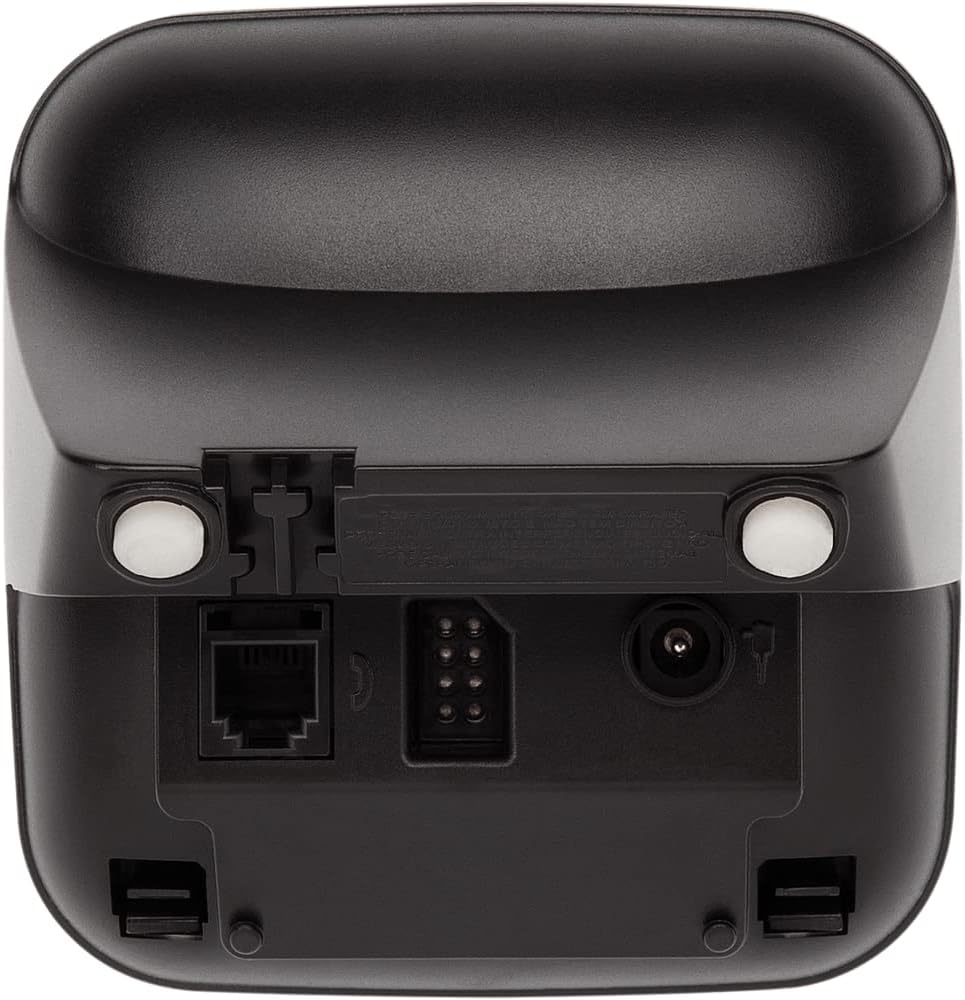
This image shows the back of the Intelbras TS 3112 base unit, highlighting the ports for the telephone line connection (RJ11) and the power adapter input. This illustrates where to connect the necessary cables for initial setup.
3.2. Installing and Charging Handset Batteries
- Відкрийте кришку відсіку для батарейок на задній панелі кожної трубки.
- Вставте акумуляторні батареї, дотримуючись правильної полярності (+ та -).
- Закрийте кришку батарейного відсіку.
- Place each handset on its respective charging base. Ensure the "Charging" indicator (if available) illuminates.
- Allow the handsets to charge for at least 12-15 hours before initial use, even if the display indicates a full charge. This ensures optimal battery performance.
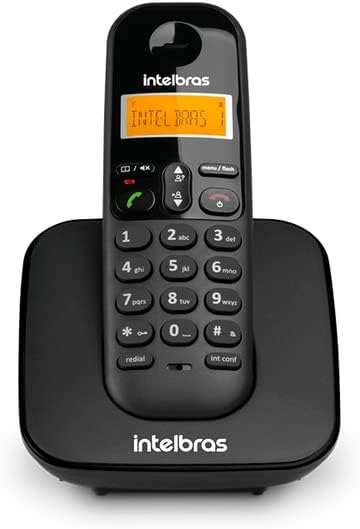
This image shows a single Intelbras TS 3112 cordless handset securely placed on its charging base. This is the correct position for charging the handset's batteries.
3.3. Registering Additional Handsets (if not pre-registered)
Your additional handset may already be registered to the main base. If not, or if you purchase additional handsets (up to 6 total), follow these steps:
- On the main base unit, press and hold the СТОРІНКА button (or similar registration button) for approximately 5 seconds until the base enters registration mode.
- On the handset you wish to register, access the menu and navigate to the "Register Handset" or "Registration" option.
- Enter the PIN code (default is usually 0000 or 1234, refer to the handset display for prompts).
- The handset display will confirm successful registration.

This diagram visually represents the Intelbras TS 3112's capability to support multiple handsets connected to a single base unit, allowing for convenient communication throughout a home or office environment.
4. Інструкція з експлуатації
4.1. Здійснення та отримання дзвінків
- Здійснення дзвінка: Підніміть слухавку, натисніть Розмова/Зелений button, and dial the number. Alternatively, dial the number first and then press the Розмова/Зелений кнопку.
- Отримання дзвінка: Коли телефон дзвонить, натисніть кнопку Розмова/Зелений кнопку для відповіді.
- Завершення дзвінка: Натисніть Кінець/Червоний кнопку або покладіть трубку назад на зарядну базу.

Це зображення надає детальне view of the Intelbras TS 3112 handset, highlighting its backlit display for clear visibility and the well-arranged numeric keypad with function buttons for easy operation.
4.2. Ідентифікація абонента та історія викликів
The handset display will show the caller's number (if available and subscribed to Caller ID service) for incoming calls. You can access a list of recent calls (answered or missed) through the handset menu. Navigate using the arrow keys and press Menu/Flash щоб вибрати опції.
4.3. Intercom and Three-Way Conferencing
- Intercom (Handset to Handset): Натисніть INT CONF button (or similar) on one handset and select the desired internal handset to call.
- Three-Way Conferencing: While on an external call, you can initiate an intercom call to another internal handset. Once the second handset answers, press the INT CONF button again (or follow on-screen prompts) to join all three parties into a conference call.

This image illustrates the DECT 6.0 digital technology used in the Intelbras TS 3112, ensuring clear and secure wireless communication.
5. Технічне обслуговування
- Прибирання: Протріть телефон і базові блоки м’якою ганчіркоюamp тканина. Не використовуйте абразивні засоби чи розчинники.
- Догляд за акумулятором: For optimal battery life, avoid over-discharging the batteries completely. If the phone will not be used for an extended period, remove the batteries.
- Розміщення: Place the base unit in a central location, away from large metal objects, other electronic devices, and heat sources to ensure optimal range and call quality.
6. Вирішення проблем
| проблема | Можлива причина | Рішення |
|---|---|---|
| Немає гудка | Телефонний кабель відключений або несправний. | Check all cable connections. Ensure the telephone line cord is securely plugged into the base unit and the wall jack. Test with another phone if possible. |
| Телефон не заряджається | Handset not properly seated on the base; dirty charging contacts; faulty batteries. | Ensure the handset is correctly placed on the charging base. Clean the charging contacts on both the handset and base with a dry cloth. Replace batteries if old or damaged. |
| Погана якість звуку / Статичні перешкоди | Handset out of range; interference from other electronic devices. | Move closer to the main base unit. Relocate the base unit away from other electronic devices (Wi-Fi routers, microwaves, computers). |
| Не вдається здійснювати або приймати дзвінки | No power to the base unit; handset not registered; telephone line issue. | Verify the base unit is powered on. Ensure the handset is registered to the base (see Section 3.3). Check the telephone line connection. |
7. Технічні характеристики
- Бренд: Intelbras
- модель: TS 3112
- колір: чорний
- матеріал: пластик
- Кількість трубок: 2 (з можливістю розширення до 7)
- Product Dimensions (Base + Handset): Приблизно 10 х 10.5 х 16 см
- Weight (Base + Handset): Приблизно 610 г
- Тип телефону: Бездротовий (DECT)
- Джерело живлення: AC Power Adapter (for base unit), Rechargeable Batteries (for handsets)
8. Гарантія та підтримка
For warranty information, please refer to the documentation included with your purchase or visit the official Intelbras webсайт. Зберігайте чек про покупку для гарантійних претензій.
For technical support, product registration, or to find service centers, please visit the official Intelbras support page or contact their customer service directly. Contact details are typically available on the manufacturer's webсайт.
You can visit the Intelbras store on Amazon for more products and information: Intelbras Store