
ASUS RT-AC86U
Інструкція користувача ігрового Wi-Fi роутера ASUS AC2900 (RT-AC86U)
Model: RT-AC86U | Brand: ASUS
Продукт закінченийview
The ASUS RT-AC86U is a high-performance dual-band Gigabit wireless internet router designed for optimal network performance, especially for gaming and 4K UHD streaming. It incorporates advanced technologies such as 802.11AC MU-MIMO, WTFast game accelerator, Adaptive QoS, and built-in network security powered by Trend Micro.

Рисунок 1: Передня сторона view маршрутизатора ASUS RT-AC86U, демонстраціяasing its sleek black design with red accents and three external antennas.
This router is equipped with a 1.8GHz dual-core processor, 256 MB Flash, and 512 MB RAM, ensuring efficient handling of network traffic. It supports dual-band operation (2.4 GHz and 5 GHz) for data transfer speeds up to 2900 Mbps, making it suitable for demanding online activities.
Вміст упаковки
Перш ніж почати, переконайтеся, що всі предмети присутні у вашій упаковці:
- ASUS RT-AC86U Networking Router
- Кабель RJ-45
- Адаптер живлення
- Короткий посібник
Інструкції з налаштування
Follow these steps to set up your ASUS RT-AC86U router for the first time.
1. Апаратне підключення
- Підключіть антени: Attach the three external detachable antennas to the designated ports on the rear of the router. Ensure they are securely tightened.
- Підключення до модему: Connect one end of the provided RJ-45 cable to the WAN port (blue) on the back of the RT-AC86U router and the other end to your modem's Ethernet port.
- Підключення до комп'ютера: Connect another RJ-45 cable from any of the LAN ports (yellow) on the router to your computer's Ethernet port.
- Увімкнення: Plug the power adapter into the router's DC-in port and then into a power outlet. The power LED indicator on the front of the router should illuminate.
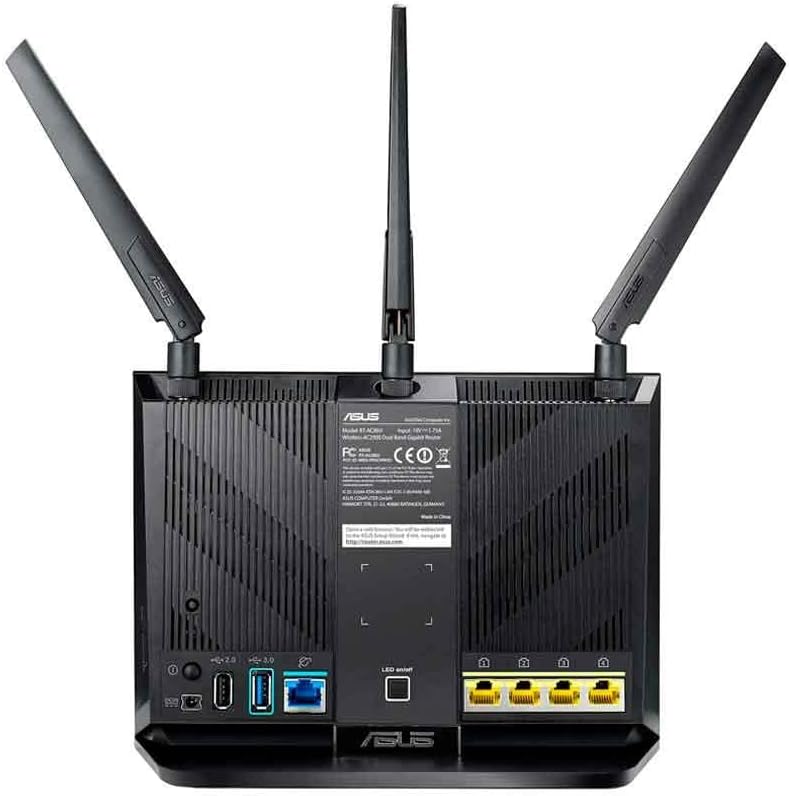
Figure 2: Rear panel of the ASUS RT-AC86U router, highlighting the WAN port (blue), four Gigabit LAN ports (yellow), USB 3.1 Gen1 port (blue), and USB 2.0 port (black).
Ensure all necessary LED indicators on the front of the router are lit, including LAN, Internet, Wi-Fi (2.4GHz and 5GHz), and Power, indicating proper connection and operation.
2. Початкова конфігурація (Web Інтерфейс)
- Маршрутизатор доступу: Відкрийте a web browser on your connected computer and type
router.asus.comв адресний рядок. - Логін: Enter your router's login name and password. The default credentials are often "admin" for both username and password. If you have changed them, use your custom credentials.
- Quick Internet Setup: Follow the on-screen instructions of the Quick Internet Setup wizard to configure your internet connection. This typically involves selecting your connection type (e.g., DHCP, Static IP, PPPoE) and entering any required ISP details.
- Налаштування Wi-Fi: Set up your Wi-Fi network name (SSID) and password for both 2.4 GHz and 5 GHz bands. It is recommended to use strong, unique passwords.
- Повне налаштування: Once the wizard is complete, your router should be connected to the internet, and your Wi-Fi networks will be active.
Експлуатація маршрутизатора
The ASUS RT-AC86U offers various features to enhance your network experience.
Ключові характеристики:
- Dual-Band AC2900 Wi-Fi: Provides high-speed wireless connectivity across 2.4 GHz and 5 GHz bands, ideal for multiple devices.
- WTFast Game Accelerator: Optimizes gaming connections for reduced lag and improved online gaming experience.
- Adaptive QoS (Quality of Service): Prioritizes network traffic for specific applications like gaming or streaming, ensuring smooth performance.
- AiProtection (Trend Micro): Offers built-in network security to protect against external threats and malicious webсайти.
- AiMesh Compatibility: Allows you to create a whole-home Wi-Fi system by connecting multiple AiMesh-compatible ASUS routers.
- USB 3.1 Gen1 & Gigabit LAN Ports: Provides high-speed wired connections for devices and external storage.
Using the ASUS Router App:
Manage your network conveniently from your smartphone or tablet using the ASUS Router App. The app allows you to:
- Set up your network.
- Моніторинг використання мережі.
- Налаштуйте батьківський контроль.
- Отримуйте миттєві сповіщення про події в мережі.

Figure 3: The ASUS RT-AC86U router integrated into a gaming and streaming environment, demonstrating its capability to support high-bandwidth activities.
Технічне обслуговування
Регулярне технічне обслуговування забезпечує оптимальну продуктивність та безпеку вашого маршрутизатора.
Оновлення прошивки:
Keeping your router's firmware up-to-date is crucial for security, stability, and new features. ASUS provides regular firmware updates.
Video 1: This video demonstrates how to update the firmware of your ASUS WiFi Router to the latest version, covering both live and manual update methods.
You can update the firmware via the router's web interface (Administration > Firmware Upgrade) or by downloading the latest firmware from the ASUS support website and manually uploading it. Always ensure a stable power connection during firmware updates to prevent data corruption.
Звичайне перезавантаження:
Періодичне перезавантаження маршрутизатора (наприклад, раз на місяць) може допомогти очистити його пам'ять, вирішити незначні проблеми з мережею та покращити загальну продуктивність.
Усунення несправностей
Ось деякі поширені проблеми та способи їх вирішення.
| проблема | Можливе рішення |
|---|---|
| Немає підключення до Інтернету |
|
| Низька швидкість Wi-Fi |
|
| Cannot connect to 5 GHz Network |
|
| Маршрутизатор Web Інтерфейс недоступний |
|
Для отримання детальнішої інформації про усунення несправностей зверніться до офіційної служби підтримки ASUS. webсайту або зв’яжіться зі службою підтримки клієнтів.
Технічні характеристики
| Особливість | Деталь |
|---|---|
| Назва моделі | RT-AC86U |
| Бренд | ASUS |
| Бездротовий стандарт | 802.11ac (Wi-Fi 5) |
| Клас діапазону частот | Дводіапазонний (2.4 ГГц та 5 ГГц) |
| Швидкість передачі даних | До 2900 Мбіт/с (750 Мбіт/с на частоті 2.4 ГГц, 2167 Мбіт/с на частоті 5 ГГц) |
| Процесор | 1.8GHz 32-bit Dual-Core |
| Пам'ять | 256 МБ Flash, 512 МБ ОЗУ |
| антени | 3 External Detachable Antennas, 1 Internal Antenna |
| Порти | 1x WAN (Gigabit), 4x LAN (Gigabit), 1x USB 3.1 Gen1, 1x USB 2.0 |
| Розміри продукту | 6.2 x 3.3 x 8.66 дюймів |
| Вага товару | 2 фунта |
| Вхідна потужність | AC Input: 110V~240V (50~60Hz) |
| Вихідна потужність | DC Output: 19 V with max. 1.75 A current |
Інформація про гарантію
The ASUS RT-AC86U WiFi Gaming Router typically comes with a 3 рік обмеженої гарантії from the date of purchase. This warranty covers defects in materials and workmanship under normal use. Additionally, the product includes lifetime internet security powered by Trend Micro.
For specific warranty terms and conditions, please refer to the warranty card included in your product packaging or visit the official ASUS support webсайт.
Підтримка
For further assistance, technical support, or to download the latest drivers and firmware, please visit the official ASUS support webсайт:
You can also find additional resources and FAQs on the ASUS support portal.
Ask a question about this manual
Ask about setup, troubleshooting, compatibility, parts, safety, or missing instructions. Manuals+ will review the question and use this page’s manual context to help answer it.