
вступ
The Beurer HM55 Wireless Thermometer and Hygrometer is designed to monitor your indoor climate, providing real-time data on temperature and relative humidity. This device helps you maintain a comfortable and healthy environment within your home by displaying current conditions and allowing long-term monitoring via the Beurer FreshRoom app on your smartphone. This manual provides essential information for the safe and effective use of your HM55 device.
Ключові характеристики
- Monitors and displays current time, temperature, and relative humidity.
- Забезпечує швидкий набірview of indoor environment quality through a colored indicator.
- Bluetooth Smart connectivity for long-term monitoring with the free Beurer FreshRoom app.
- Allows monitoring of temperature and humidity trends over time with easy-to-read graphs in the app.
- Compact and elegant design for discreet placement.
- Multi-room display function enables management of multiple Beurer indoor humidity monitors via the app.
- App features include LED brightness control and time zone settings.
Інформація про безпеку
Будь ласка, уважно прочитайте ці інструкції з безпеки перед використанням пристрою. Зберігайте цей посібник для подальшого використання.
Загальна безпека
- Не піддавайте пристрій впливу прямих сонячних променів, екстремальних температур або високої вологості.
- Keep the device away from water and other liquids. Do not immerse it.
- Не відкривайте та не намагайтеся ремонтувати пристрій самостійно. Звертайтеся до кваліфікованого персоналу для проведення будь-яких робіт з обслуговування.
- This device is not a toy. Keep it out of reach of children.
- Використовуйте пристрій лише за призначенням, як описано в цій інструкції.
Безпека батареї
- Always insert batteries with the correct polarity (+/-).
- Не змішуйте старі та нові батареї або різні типи батарейок.
- Негайно виймайте розряджені батарейки, щоб запобігти протіканню та пошкодженню.
- Якщо пристрій не використовуватиметься протягом тривалого часу, вийміть батареї.
- Утилізуйте батарейки відповідно до місцевих правил. Не викидайте батарейки у вогонь.
Вміст упаковки
Carefully unpack your Beurer HM55 and check that all components are present and undamaged.
- 1 x Beurer HM55 Thermo-Hygrometer
- 2 батарейки 1.5 В ААА
- 1 x Інструкція з експлуатації (цей документ)
Пристрій закінчивсяview
Familiarize yourself with the components of your Beurer HM55 device.
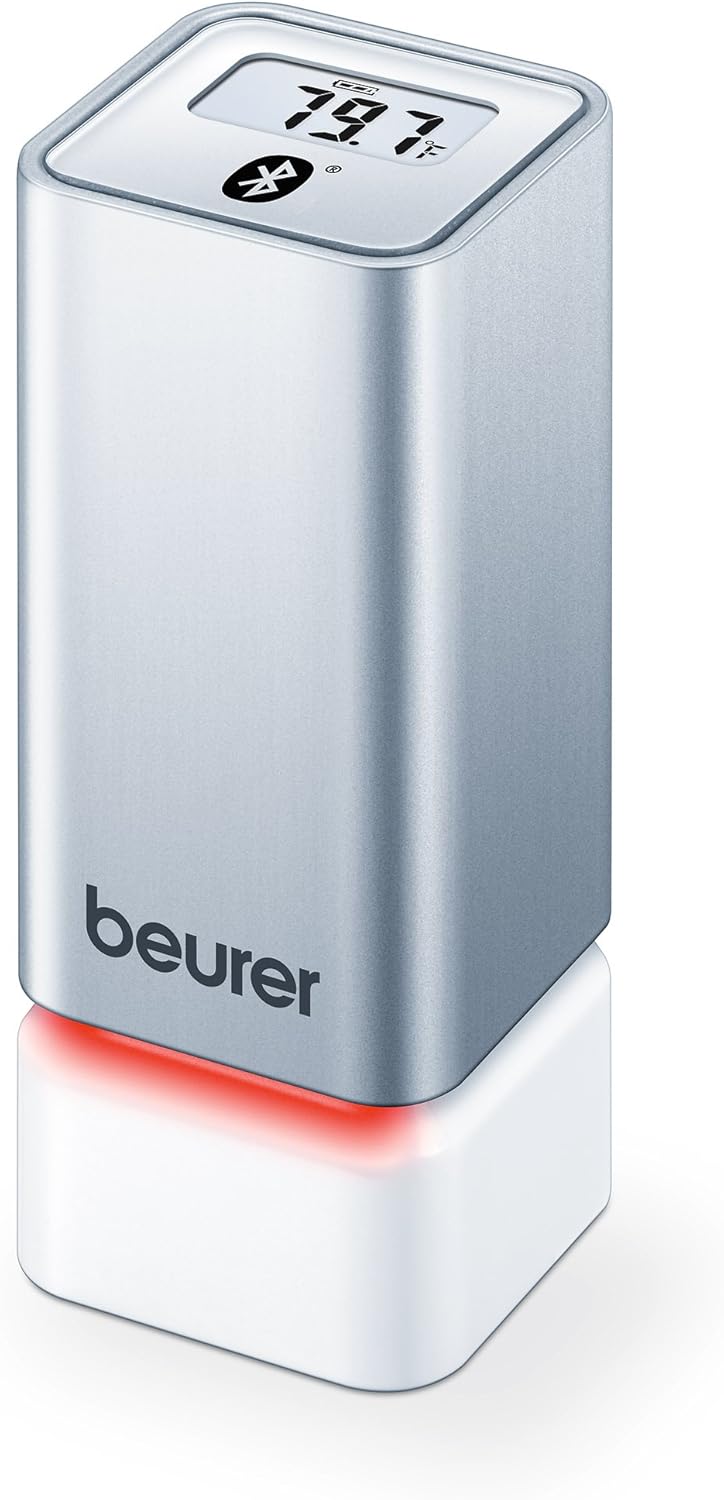
малюнок 1: Фронт view of the Beurer HM55 device, showing the display and Beurer logo.

малюнок 2: Close-up of the HM55 display, indicating temperature, humidity, and Bluetooth icon.

малюнок 3: The compact size of the HM55 device, shown in comparison to a hand.
- Дисплей: Shows current temperature, relative humidity, and time.
- Світлодіодний індикатор: Located at the base, changes color to indicate indoor climate quality.
- Батарейний відсік: Located on the underside of the device.
- Символ Bluetooth: Вказує на активне з’єднання Bluetooth.
Налаштування
1. Встановлення батарей
- Locate the battery compartment on the bottom of the HM55 device.
- Відкрийте кришку батарейного відсіку.
- Insert the two 1.5V AAA batteries, ensuring correct polarity (+/-).
- Close the battery compartment cover securely. The device display should activate.
2. Downloading the Beurer FreshRoom App
The Beurer FreshRoom app is required to utilize the full functionality of your HM55 device, including long-term monitoring and multi-room management. The app is compatible with iOS (version 8.0 or higher) and Android (version 4.4 or higher with Bluetooth 4.0).
- For iOS devices, download the "Beurer FreshRoom" app from the Apple App Store.
- For Android devices, download the "Beurer FreshRoom" app from the Google Play Store.
- Alternatively, scan the QR code provided in the product packaging or visit the official Beurer webсайт для прямих посилань. Beurer Smartphone App Information

малюнок 4: Example of the Beurer FreshRoom app interface on a smartphone.
3. Сполучення зі смартфоном
- Переконайтеся, що Bluetooth увімкнено на вашому смартфоні.
- Open the Beurer FreshRoom app.
- Follow the on-screen instructions within the app to search for and connect to your HM55 device. The app will guide you through the pairing process.
- Once successfully paired, the Bluetooth symbol on the HM55 display will illuminate, and data will begin to synchronize with the app.
4. Початкове розміщення
Place the HM55 in the room you wish to monitor. For accurate readings, avoid placing it:
- Near heat sources (e.g., radiators, direct sunlight).
- Near air conditioning vents or open windows.
- In areas with high airflow or drafts.
- In direct contact with moisture.
Експлуатація пристрою
Розуміння дисплея
The HM55 display provides immediate readings:
- температура: Displays in Celsius (°C) or Fahrenheit (°F). The unit can be changed via the app.
- Відносна вологість: Відображається у відсоткахtagе (%).
- час: Displays the current time, synchronized via the app.
- Значок Bluetooth: Indicates an active connection to your smartphone.
Interpreting the Colored Climate Indicator
The LED light at the base of the HM55 provides a quick visual indication of your indoor climate:
- Зелений: Optimal indoor climate.
- Червоний: Poor indoor climate (e.g., too dry, too humid, or extreme temperature).
- The specific thresholds for these indicators can be customized within the Beurer FreshRoom app.

малюнок 5: HM55 device showing a red LED indicator, signifying a poor indoor climate.

малюнок 6: HM55 device showing a green LED indicator, signifying an optimal indoor climate.
Using the Beurer FreshRoom App
The app provides advanced features for monitoring and managing your indoor climate:
- Дані в реальному часі: View current temperature and humidity readings from your device.
- Історичні дані: Access graphs and logs of temperature and humidity over various periods (e.g., hourlщодня, щотижня, щомісяця).
- Сповіщення: Set custom minimum and maximum thresholds for temperature and humidity. Receive notifications if readings fall outside these ranges.
- Налаштування: Adjust device settings such as temperature unit (°C/°F), LED brightness, and time zone.
Multi-Room Function
If you have multiple Beurer HM55 devices, the FreshRoom app allows you to monitor all of them from a single interface. Each device can be assigned to a specific room for easy identification and tracking.
- Add each additional HM55 device to the app following the pairing instructions.
- Assign a unique name or room designation to each device within the app settings.
- View and compare climate data from all connected rooms on a single dashboard.
Технічне обслуговування
прибирання
- Протріть пристрій м’якою, сухою або злегка вологою ганчіркоюamp тканина.
- Не використовуйте абразивні засоби для чищення, розчинники або агресивні хімікати, оскільки вони можуть пошкодити поверхню або внутрішні компоненти.
- Переконайтеся, що всередину пристрою не потрапила рідина.
Заміна батареї
When the battery low indicator appears on the display or in the app, replace both AAA batteries following the instructions in the "Inserting Batteries" section.
Зберігання
If the device will not be used for an extended period, remove the batteries and store the device in a cool, dry place, away from direct sunlight and extreme temperatures.
Усунення несправностей
If you encounter issues with your Beurer HM55, refer to the following common problems and solutions:
| проблема | Можлива причина | Рішення |
|---|---|---|
| Дисплей пристрою порожній. | Батарейки розряджені або неправильно вставлені. | Перевірте полярність батарейок або замініть їх новими батарейками типу AAA. |
| Додаток не може підключитися до пристрою. | Bluetooth is off on smartphone; device is out of range; app issue. | Ensure Bluetooth is enabled. Move smartphone closer to the device. Restart the app or smartphone. Re-pair the device if necessary. |
| Показники виглядають неточними. | Device placement is suboptimal; environmental factors. | Relocate the device away from direct heat, cold, or drafts. Allow time for readings to stabilize after relocation. |
| LED indicator is always red. | Indoor climate is consistently outside optimal range; app settings. | Check temperature and humidity levels in the app. Adjust environmental conditions (e.g., use a humidifier/dehumidifier, adjust heating/cooling). Review and adjust alert thresholds in the app. |
Технічні характеристики
| Модель | HM55 |
| Бренд | Beurer |
| Джерело живлення | 2 батарейки 1.5 В ААА |
| Підключення | Bluetooth Smart (Bluetooth 4.0) |
| Сумісність програм | iOS 8.0 або вище, Android 4.4 або вище |
| Тип монтажу | Настінне кріплення |
| Колір | Срібло |
| Включені компоненти | Beurer Thermo-Hygrometer |
Гарантія та підтримка
Beurer provides a limited warranty for this product. For detailed warranty terms and conditions, please refer to the warranty card included with your product or visit the official Beurer webсайт.
For technical support, troubleshooting assistance, or to inquire about replacement parts, please contact Beurer customer service. Contact information can typically be found on the Beurer webсайту або в упаковці продукту.
Інтернет-ресурси: For additional information and app support, visit Beurer Smartphone App Information.


