
вступ
The Perixx PERIBOARD-313 is a wired, full-sized keyboard featuring an integrated touchpad and a 3-level LED backlight. Designed for convenience and efficiency, this keyboard combines typing and pointing functionalities into a single device, making it suitable for various computing environments. Its dimensions are approximately 456mm x 160mm x 30mm, with a touchpad measuring 57mm x 40mm.
This manual provides comprehensive instructions for the proper setup, operation, and maintenance of your PERIBOARD-313 keyboard to ensure optimal performance and longevity.
Вміст упаковки
- 1 x Perixx PERIBOARD-313 Wired USB Backlit Keyboard with Touchpad
- Посібник користувача (цей документ)

Image: The Perixx PERIBOARD-313 keyboard, its USB cable, and the user manual shown next to the product packaging.
Системні вимоги
- Операційна система: Windows 7, 8 або 10
- Connectivity: Available USB port
Налаштування
- Розпакуйте клавіатуру: Carefully remove the PERIBOARD-313 from its packaging.
- Підключення до комп'ютера: Підключіть USB-роз’єм клавіатури до вільного USB-порту комп’ютера.
- Встановлення драйвера: The keyboard is plug-and-play. Your operating system will automatically detect and install the necessary drivers. No additional software installation is required.
- Перевірте працездатність: Once connected, the keyboard and touchpad should be immediately functional. Test by typing and moving the cursor.
Інструкція з експлуатації
Розкладка клавіатури
The PERIBOARD-313 features a standard full-size US English QWERTY layout with 104 keys, including a dedicated numeric keypad and function keys.

Image: Detailed diagram illustrating the full QWERTY keyboard layout, including the numeric keypad and integrated touchpad.
Функції тачпада
The integrated touchpad provides precise cursor control and includes two buttons that function as left and right mouse clicks.
- Переміщення курсору: Slide your finger across the touchpad surface to move the cursor on the screen.
- Клацніть лівою кнопкою миші: Press the left button below the touchpad or tap once on the touchpad surface.
- Клацніть правою кнопкою миші: Press the right button below the touchpad or tap with two fingers on the touchpad surface (if supported by OS settings).
- Прокрутка: Use two fingers to scroll vertically on the touchpad (if supported by OS settings).
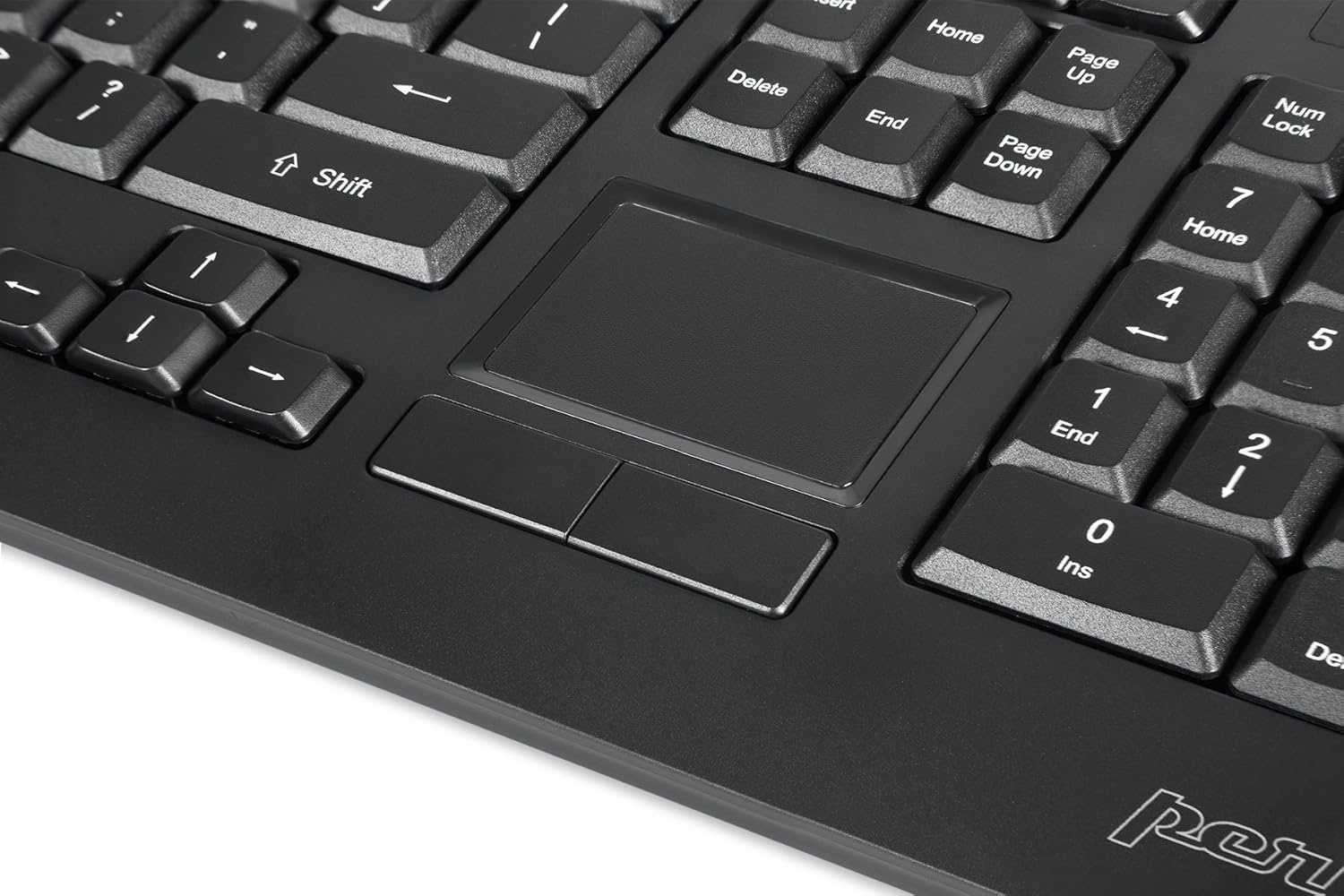
Image: A close-up of the integrated touchpad, highlighting its surface and the two dedicated click buttons.

Image: A user's hand interacting with the touchpad for cursor control.
Керування підсвічуванням
The keyboard features a white LED backlight with three adjustable brightness levels. Use the dedicated backlight control keys to adjust the illumination.
- Увімкнути/вимкнути підсвічування: Натисніть Fn + F12 комбінація клавіш.
- Налаштувати яскравість: Прес Fn + F11 для перемикання між трьома рівнями яскравості.
Мультимедійні клавіші
The PERIBOARD-313 includes 10 multimedia function keys for quick access to media controls and internet features. These functions are activated by holding the Fn клавішу та натискання відповідної функціональної клавіші (F1-F10).
- Fn+F1: Відкрийте медіаплеєр
- Fn+F2: Зменшення гучності
- Fn+F3: Збільшення гучності
- Fn+F4: Вимкнути звук
- Fn+F5: Попередній трек
- Fn+F6: Наступний трек
- Fn+F7: Відтворення/Пауза
- Fn+F8: СТІЙ
- Fn+F9: ВІДЧИНЕНО Web Браузер
- Fn+F10: Відкрийте поштовий клієнт
Інтегровані концентратори USB
The keyboard features two integrated USB 2.0 hubs, allowing you to connect additional USB devices directly to the keyboard for convenience.

Image: The side of the keyboard displaying the two built-in USB 2.0 ports for connecting peripherals.
Технічне обслуговування
- Прибирання: Disconnect the keyboard from your computer before cleaning. Use a soft, damp cloth to wipe the surface. For deeper cleaning between keys, use compressed air to remove dust and debris. Avoid using harsh chemicals or abrasive cleaners.
- Зберігання: Зберігайте клавіатуру в сухому місці, подалі від екстремальних температур та прямих сонячних променів.
- Вплив рідини: This keyboard is not water-resistant. Avoid spilling liquids on it. If liquid exposure occurs, immediately disconnect the keyboard and allow it to dry completely before reconnecting.
Усунення несправностей
| проблема | Можлива причина | Рішення |
|---|---|---|
| Клавіатура не відповідає | Нещільне USB-з'єднання, несправний USB-порт, проблема з драйвером. |
|
| Тачпад не працює | Driver issue, touchpad disabled (unlikely for wired), physical damage. |
|
| Backlight not turning on/off or adjusting | Incorrect key combination, software conflict. |
|
| Мультимедійні клавіші не працюють | Incorrect key combination, software conflict. |
|
Технічні характеристики
| Бренд | Перікс |
| Назва моделі | PERIBOARD-313 US |
| Номер моделі | 11445 |
| Технологія підключення | USB-A (дротовий) |
| Опис клавіатури | QWERTY, Full-sized, Backlit |
| Особливість | Backlit, Integrated Touchpad, USB Hubs |
| Колір | чорний |
| Колір підсвічування клавіатури | Один колір (білий світлодіод) |
| матеріал | ABS пластик |
| Кількість клавіш | 104 |
| Тип перемикача | Мембрана |
| Розміри тачпада | 57 мм x 40 мм (2.24 дюйма x 1.57 дюйма) |
| Розміри клавіатури | 456 мм x 160 мм x 30 мм (17.95 дюйма x 6.30 дюйма x 1.18 дюйма) |
| Вага товару | 1.85 фунта |
| Total USB 2.0 Ports | 2 (Integrated Hubs) |
Image: Technical drawing with key dimensions of the PERIBOARD-313 keyboard.
Гарантія
The Perixx PERIBOARD-313 comes with a 1-річна обмежена гарантія from the date of purchase. This warranty covers manufacturing defects and workmanship under normal use. It does not cover damage caused by misuse, accident, modification, or unauthorized repair. Please retain your proof of purchase for warranty claims.
Підтримка
For further assistance, technical support, or warranty inquiries, please visit the official Perixx webсайті або зверніться до служби підтримки клієнтів. Ви можете знайти більше інформації та контактні дані на Perixx Brand Store on Amazon.