
1. Вступ
Дякуємо за покупкуasing the Kaiser MSA-5708GY Professional 8-inch Amplified Wireless Speaker. This device is designed to provide high-quality audio with versatile connectivity options, including Bluetooth, USB, SD card, and AUX input. It also features a microphone input for public address or karaoke, and dynamic multicolor LED lights. Please read this manual thoroughly before operating the speaker to ensure proper use and to maximize its performance and longevity.
2. Інформація про безпеку
- Джерело живлення: Use only the provided charging cable and adapter. Ensure the power supply matches the speaker's requirements.
- Вода і вологість: Не піддавайте динамік впливу води, дощу або надмірної вологи. Уникайте розміщення предметів, наповнених рідиною, на динаміку або поблизу нього.
- Тепло: Keep the speaker away from heat sources such as radiators, heat registers, stoves, or other heat-producing appliances.
- Вентиляція: Не блокуйте вентиляційні отвори. Забезпечте достатній потік повітря навколо динаміка.
- Прибирання: Від’єднайте живлення перед чищенням. Використовуйте суху м’яку тканину. Не використовуйте рідкі або аерозольні засоби для чищення.
- Обслуговування: Не намагайтеся самостійно обслуговувати цей виріб. Зверніть усі послуги до кваліфікованого обслуговуючого персоналу.
- Батарея: Гучномовець містить акумуляторну батарею. Не піддавайте батарею впливу надмірного тепла або прямих сонячних променів. Утилізуйте батареї відповідно до місцевих правил.
3. Вміст упаковки
Перевірте наявність усіх елементів в упаковці:
- Kaiser MSA-5708GY Amplified бездротовий динамік
- Дротовий мікрофон
- Пульт дистанційного керування
- Charging Cable / Power Adapter
4. Продукт закінчивсяview
Familiarize yourself with the main components and controls of your speaker.
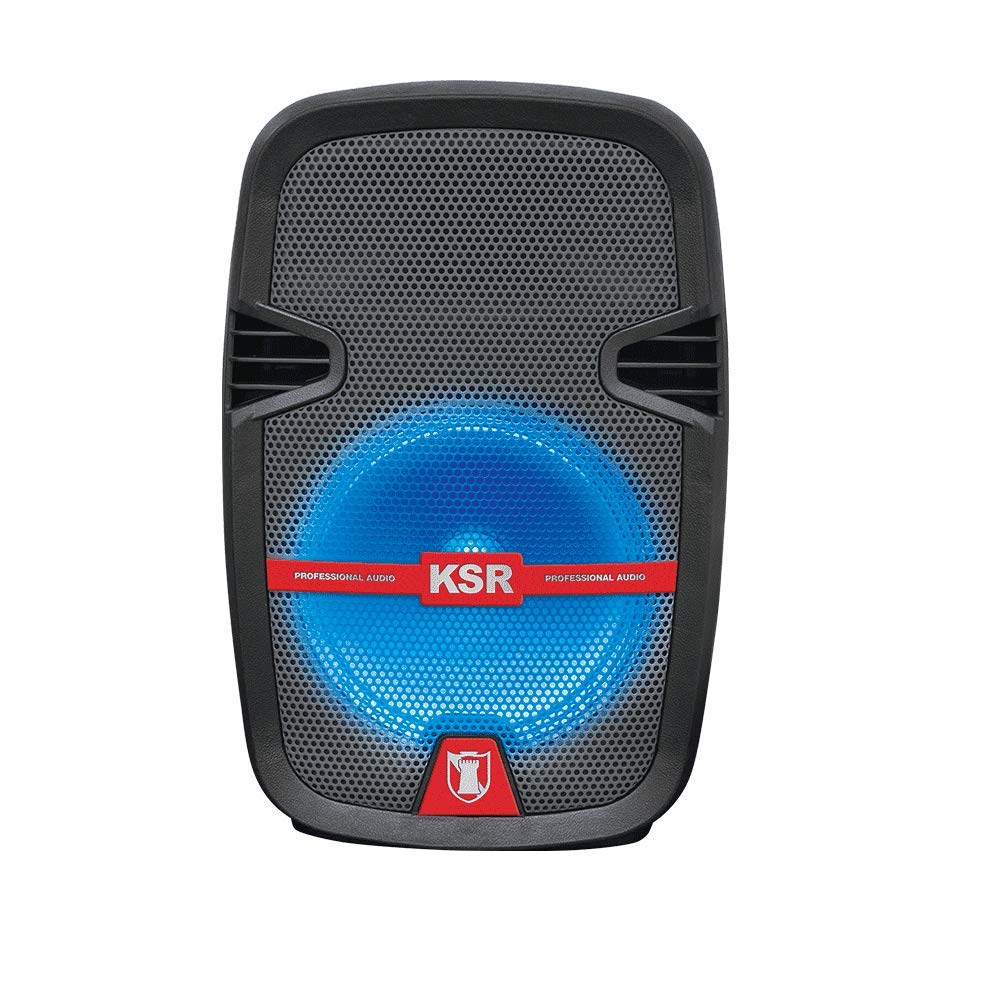
малюнок 1: Фронт view of the Kaiser MSA-5708GY speaker, showing the 8-inch woofer with multicolor LED lights and the control panel.
Функції панелі керування:
- Дисплей: Показує поточний режим, номер треку або FM-частоту.
- Кнопка режиму: Switches between Bluetooth, USB, SD, AUX, and FM Radio modes.
- Кнопка відтворення/паузи: Запуск або призупинення відтворення.
- Кнопки «Попередній/Наступний»: Навігація по треках або FM-станціях.
- Регулятор гучності: Регулює основну гучність.
- Регулятор гучності мікрофона: Adjusts microphone input volume.
- Microphone Bass/Treble Knobs: Adjusts bass and treble for the microphone input.
- Світлодіодний вимикач: Toggles the multicolor LED lights on/off.
Rear Panel / Side Connections:
- Порт USB: Для USB-флеш-накопичувачів.
- Слот для SD-карти: Для карт пам'яті SD.
- Вхід AUX (3.5 мм): Для зовнішніх аудіопристроїв.
- Вхід для мікрофона (6.3 мм): Для підключення дротового мікрофона.
- Порт зарядки: Для підключення адаптера живлення.
- Вимикач живлення: Вмикає або вимикає динамік.
- Stand Mount Socket: For mounting the speaker on a compatible stand.
5. Налаштування
5.1 Заряджання батареї
- Підключіть наданий зарядний кабель до зарядного порту динаміка.
- Підключіть інший кінець кабелю до відповідної розетки.
- The charging indicator light (if present) will illuminate, indicating that the battery is charging.
- Allow approximately 3-4 hours for a full charge. The indicator light may change or turn off when fully charged.
- Від’єднайте зарядний пристрій після повної зарядки, щоб зберегти термін служби акумулятора.
Примітка: For optimal battery performance, fully charge the speaker before first use.
5.2 Увімкнення/вимкнення
- To power on, locate the Power Switch on the speaker and toggle it to the "ON" position.
- To power off, toggle the Power Switch to the "OFF" position.
5.3 Mounting on a Stand
The speaker features a rear knob and a socket for mounting on a compatible speaker stand.
- Ensure the speaker stand is stable and rated for the speaker's weight (4 kg).
- Carefully place the speaker onto the stand's pole, aligning it with the stand mount socket.
- Tighten the rear knob on the speaker to secure it firmly to the stand.
6. Інструкція з експлуатації
6.1 Підключення Bluetooth
- Power on the speaker. The speaker will typically enter Bluetooth pairing mode automatically, indicated by a flashing Bluetooth icon or a voice prompt. If not, press the "Mode" button until "Bluetooth" is selected.
- На мобільному пристрої (смартфоні, планшеті тощо) увімкніть Bluetooth та виконайте пошук доступних пристроїв.
- Select "MSA-5708GY" from the list of devices.
- Once paired, the speaker will confirm the connection, and the Bluetooth indicator will stop flashing.
- You can now play audio from your device through the speaker. Control playback and volume from your device or the speaker's controls.
Примітка: The Bluetooth range is up to 10 meters (33 feet) in open areas.
6.2 Відтворення з USB/SD-карти
- Insert a USB flash drive or an SD card (pre-loaded with MP3 audio files) into the respective port/slot on the speaker.
- The speaker should automatically switch to USB or SD mode and begin playing audio. If not, press the "Mode" button to select "USB" or "SD".
- Використовуйте кнопки «Відтворити/Пауза», «Попередній» та «Наступний» на динаміку або пульті дистанційного керування для керування відтворенням.
6.3 FM-радіо
- Power on the speaker and press the "Mode" button until "FM" mode is selected.
- Press and hold the Play/Pause button to initiate an automatic scan for FM stations. The speaker will scan and save available stations.
- Використовуйте кнопки «Попередній» та «Наступний» для навігації між збереженими FM-станціями.
6.4 Вхід AUX
- Підключіть один кінець аудіокабелю 3.5 мм (не входить до комплекту) до вхідного порту AUX на динаміку.
- Connect the other end of the cable to the headphone jack or audio output of your external audio device (e.g., MP3 player, laptop).
- Press the "Mode" button until "AUX" mode is selected.
- Play audio from your external device. Adjust volume from both the external device and the speaker.
6.5 Використання мікрофона
- Connect the wired microphone to the 6.3mm microphone input jack on the speaker.
- Поверніть ручку «Гучність мікрофона», щоб регулювати гучність мікрофона.
- Use the "MIC BASS" and "MIC TREBLE" knobs to fine-tune the microphone's sound.
6.6 різнокольорових світлодіодних ламп
The speaker features integrated multicolor LED lights that illuminate the woofer.
- To activate or deactivate the LED lights, use the dedicated LED Light Switch on the control panel.
6.7 Робота дистанційного керування
The included remote control allows for convenient operation from a distance. Ensure the remote control has working batteries and is pointed towards the speaker's IR receiver.
- Кнопка живлення: Turns the speaker on/off (standby).
- Кнопка режиму: Switches input modes.
- Гучність +/-: Регулює основну гучність.
- Відтворення/пауза: Початок/пауза відтворення.
- Попередній/Наступний: Перемикає треки або FM-станції.
- EQ: (If available) Cycles through equalizer presets.
- Цифрові кнопки: (If available) Direct track selection in USB/SD mode or FM station input.
7. Технічне обслуговування
7.1 Очищення
- Завжди від’єднуйте динамік від джерела живлення перед чищенням.
- Use a soft, dry, lint-free cloth to wipe the exterior surfaces of the speaker.
- Не використовуйте абразивні засоби для чищення, віск або розчинники, оскільки вони можуть пошкодити покриття.
- Уникайте потрапляння вологи в будь-які отвори.
7.2 Догляд за акумулятором
- Щоб продовжити термін служби акумулятора, уникайте частого повного розряджання акумулятора.
- If the speaker will not be used for an extended period, charge it to about 50% and store it in a cool, dry place. Recharge every 3-6 months to prevent deep discharge.
- Не піддавайте акумулятор дії екстремальних температур.
8. Вирішення проблем
| проблема | Можлива причина | Рішення |
|---|---|---|
| Немає живлення | Battery is drained; Power switch is off; Charging cable not connected properly. | Charge the battery; Ensure power switch is ON; Check charging cable connection. |
| Ні звуку | Volume is too low; Incorrect input mode selected; Device not connected properly (Bluetooth, AUX, USB/SD). | Increase master volume; Select correct input mode; Reconnect device or re-pair Bluetooth. |
| Bluetooth не підключається | Speaker not in pairing mode; Device Bluetooth is off; Speaker is too far from device; Interference. | Ensure speaker is in Bluetooth mode; Enable Bluetooth on device; Move device closer to speaker (within 10m); Avoid obstacles. |
| Відтворення з USB/SD не працює | Невірно file формат; пошкодження USB/SD-карти; вибрано неправильний режим. | Забезпечити files are MP3 format; Try a different USB/SD card; Select USB/SD mode. |
| Мікрофон не працює | Microphone not connected; MIC VOL knob is low; Microphone is faulty. | Ensure microphone is securely connected; Increase MIC VOL; Test with another microphone if available. |
9. Технічні характеристики
| модель: | MSA-5708GY |
| Бренд: | Кайзер |
| Потужність звуку: | 2,500 Вт PMPO / 8 Вт RMS |
| Розмір НЧ-динаміка: | 8 дюйма (20.32 см) |
| Підключення: | Bluetooth, USB, SD, AUX (3.5mm), Microphone (6.3mm) |
| Діапазон Bluetooth: | До 10 метрів |
| Батарея: | Rechargeable, up to 4 hours continuous music playback |
| радіо: | FM-радіо |
| Імпеданс: | 4 Ом |
| Розміри (Д x Ш x В): | 30 х 44 х 25 см |
| вага: | 4 кг |
| Сумісні пристрої: | Ноутбук, Смартфон |
10. Інформація про гарантію
This Kaiser MSA-5708GY speaker comes with a Гарантія 3 місяців з дати покупки. Ця гарантія поширюється на виробничі дефекти за умов нормального використання. Вона не поширюється на пошкодження, спричинені неправильним використанням, нещасними випадками, несанкціонованими модифікаціями або нормальним зносом. Будь ласка, збережіть підтвердження покупки для пред'явлення гарантійних претензій.
11. Підтримка клієнтів
If you encounter any issues or have questions regarding your Kaiser MSA-5708GY speaker that are not addressed in this manual, please contact Kaiser customer support. Refer to the product packaging or the official Kaiser webсайт для отримання найактуальнішої контактної інформації.
When contacting support, please have your product model number (MSA-5708GY) and proof of purchase readily available.