
Rii RK202
Rii RK202 Gaming Keyboard User Manual
Модель: RK202
1. Вступ
The Rii RK202 Gaming Keyboard is designed to provide an enhanced experience for both gaming and general typing. It features a full-size layout with 105 keys, multi-color LED backlighting, and dedicated multimedia functions. This manual provides detailed instructions for setup, operation, maintenance, and troubleshooting to ensure optimal performance and longevity of your keyboard.
2. Налаштування
2.1 Вміст упаковки
- Rii RK202 Gaming Keyboard (with integrated USB cable)
2.2 Підключення клавіатури
- Locate an available USB port on your computer, laptop, gaming console (PS4, Xbox One), Smart TV, or other compatible device.
- Insert the USB connector of the Rii RK202 keyboard firmly into the USB port.
- Клавіатура працює за принципом «підключи і працюй». Ваша операційна система повинна автоматично виявити та встановити необхідні драйвери. Зазвичай не потрібно встановлювати додаткове програмне забезпечення.
The keyboard is compatible with Windows 95/98/XP/2000/ME/VISTA/7/8/9/10, Google Android TV Box, HTPC, IPTV, Mac OS (with limited backlight functionality), Chrome OS, and all versions of Raspberry Pi.

Image: The Rii RK202 Gaming Keyboard connected to a device via its integrated USB cable.
3. Інструкція з експлуатації
3.1 Основні функції клавіатури
The Rii RK202 features a standard QWERTY layout with 105 keys, including a numeric keypad and function keys (F1-F12). It supports 19-key anti-ghosting for accurate input during fast-paced gaming.
3.2 мультимедійних клавіш
The keyboard includes dedicated multimedia functions accessible via the Fn key combined with the F-keys. These shortcuts allow quick control over media playback and system functions.

Image: A visual guide to the multimedia functions (Fn + F1-F12) on the Rii RK202 keyboard.
- Fn+F1: Музичний плеєр
- Fn+F2: Зменшення гучності
- Fn+F3: Збільшення гучності
- Fn+F4: Вимкнути звук
- Fn+F5: Зупинити відтворення
- Fn+F6: Попередній трек
- Fn+F7: Відтворення/Пауза
- Fn+F8: Наступний трек
- Fn+F9: Електронна пошта
- Fn+F10: Web Домашня сторінка
- Fn+F11: Блокування комп'ютера
- Fn+F12: Калькулятор
3.3 Контроль підсвічування
The Rii RK202 keyboard features 7-color LED backlighting with adjustable brightness and various lighting modes.

Image: A visual guide to controlling the LED backlight, including brightness adjustment and mode changes.
- Turn Backlight ON/OFF: Прес Fn + * (asterisk key, located near the right Shift key).
- Налаштувати яскравість: Прес Fn + PgUp щоб збільшити яскравість (4 рівнів). Натисніть Fn + PgDn щоб зменшити яскравість.
- Змінити режим освітлення: Прес Fn + клавіша лампочки (located next to the right Shift key) to cycle through static color, breathing mode, and off.
Примітка: The backlight function is not supported on MacOS systems.
3.4 Автоматичний режим сну
To conserve energy, the keyboard will automatically enter a sleep mode if there is no interaction for approximately 10 minutes. The backlight will turn off. To reactivate the keyboard, simply press any key, and it will return to operational mode.
3.5 Integrated Smartphone Holder
The keyboard features a built-in slot designed to hold a smartphone, providing convenient access to your device while using the keyboard.
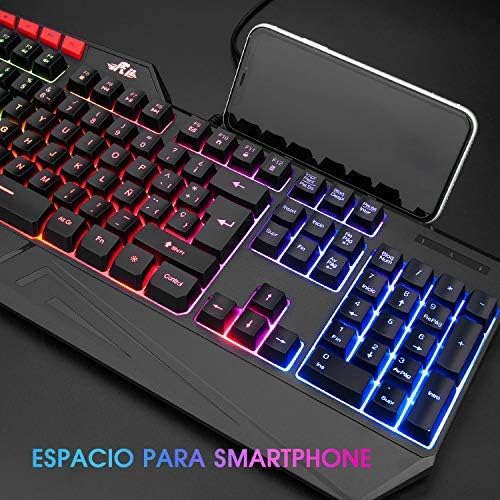
Image: The Rii RK202 keyboard featuring its integrated smartphone holder, with a phone placed in the slot.
4. Технічне обслуговування
4.1 Очищення клавіатури
- Від’єднайте клавіатуру від пристрою перед чищенням.
- Use a soft, dry, lint-free cloth to gently wipe the surface of the keys and the keyboard body.
- Для стійкого бруду або пилу злегка протрітьampen the cloth with water or a mild, non-abrasive cleaning solution. Ensure the cloth is not dripping wet.
- Avoid spraying cleaning solutions directly onto the keyboard. Do not allow any liquid to seep into the key switches or internal components.
- Використовуйте стиснене повітря, щоб видалити пил та сміття між клавішами.
- Ensure the keyboard is completely dry before reconnecting it to your device.
4.2 Загальний догляд
- Avoid exposing the keyboard to extreme temperatures, direct sunlight, or high humidity.
- Do not drop or subject the keyboard to strong impacts.
- Keep liquids away from the keyboard to prevent damage.
5. Вирішення проблем
5.1 Клавіатура не реагує
- Перевірте підключення USB: Ensure the USB cable is securely plugged into both the keyboard and the device. Try unplugging and re-plugging the cable.
- Спробуйте інший USB-порт: Connect the keyboard to a different USB port on your device.
- Тест на іншому пристрої: If possible, test the keyboard on another computer or compatible device to determine if the issue is with the keyboard or your original device.
- Перезавантажте пристрій: Перезавантажте комп’ютер або пристрій.
5.2 Підсвічування не працює
- Активувати підсвічування: Ensure the backlight is turned on by pressing Fn + *.
- Налаштувати яскравість: Збільште яскравість за допомогою Fn + PgUp.
- Check Lighting Mode: Перемикайтеся між режимами освітлення за допомогою Fn + клавіша лампочки.
- MacOS Compatibility: Remember that backlight functionality is not supported on MacOS systems.
5.3 Specific Keys Not Registering
- Чистота під клавішами: Use compressed air to remove any debris or dust that might be lodged under the unresponsive keys.
- Конфлікт програмного забезпечення: Check if any recently installed software or drivers are causing conflicts.
- If the issue persists after trying these steps, contact customer support for further assistance.
6. Технічні характеристики
| Особливість | Деталь |
|---|---|
| Номер моделі | RK202 |
| Розміри (Д x Ш x В) | 47.5 x 21.49 x 3 см (18.7 x 8.46 x 1.18 дюйма) |
| вага | 840 г (1.85 фунта) |
| Підключення | Провідний USB |
| Підрахунок ключів | 105 ключі |
| Anti-Ghosting | 19 ключі |
| Підсвічування | 7-color LED with adjustable brightness and modes |
| матеріал | ABS пластик |
| Термін служби ключа | До 50 мільйонів кліків |
| Сумісність | Windows (95/98/XP/2000/ME/VISTA/7/8/9/10), PC, Laptop, Google Android TV Box, HTPC, IPTV, Smart TV, Mac OS (limited backlight), Chrome OS, Raspberry Pi |
7. Інформація про гарантію
Please refer to the warranty policy provided by your retailer or the manufacturer's official website for detailed information regarding warranty coverage, terms, and conditions. Keep your proof of purchase for any warranty claims.
8. Підтримка клієнтів
For technical assistance, troubleshooting not covered in this manual, or other inquiries, please visit the official Rii website or contact your point of purchase. Ensure you have your product model number (RK202) available when seeking support.
Ask a question about this manual
Ask about setup, troubleshooting, compatibility, parts, safety, or missing instructions. Manuals+ will review the question and use this page’s manual context to help answer it.