
1. Вступ
The Focal Shape 50 is a versatile monitoring loudspeaker designed for professional audio environments. It offers extended low-frequency response and precise control, making it suitable for rooms up to 130 sq ft (12 sq m). This manual provides essential information for the proper setup, operation, and maintenance of your Shape 50 studio monitor.

Рисунок 1.1: Передня сторона view of the Focal Shape 50 Studio Monitor, showcasing its dark walnut finish and speaker components.
2. Вміст упаковки
Before proceeding with installation, please verify that all components are present in the packaging:
- Focal Shape 50 Studio Monitor (1 unit)
- Шнур живлення
- Посібник користувача (цей документ)
3. Налаштування
3.1 Розміщення
The Shape 50 monitor is designed to be placed near a wall due to its port-less design. For optimal listening, position the monitor at a distance of approximately 30 inches (80 cm) from your listening position. Ensure the monitors are placed symmetrically in your room to achieve a balanced stereo image.
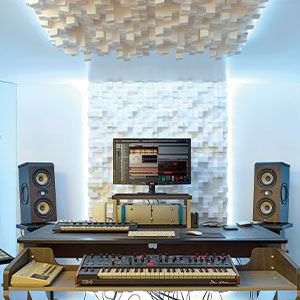
Малюнок 3.1: Впрample of a studio setup with two Focal Shape 50 monitors positioned for optimal sound monitoring.
3.2 Підключення
Connect your audio source to the Shape 50 monitor using an RCA cable. Ensure all connections are secure before powering on the unit.
- Аудіо вхід: Use the RCA input for connecting your audio interface or mixer.
- Потужність: Connect the provided power cord to the monitor's power inlet and then to a suitable electrical outlet.

Figure 3.2: Rear panel of the Focal Shape 50, showing the RCA input, power connection, and various adjustment controls.
3.3 Монтаж
The Shape 50 includes threads for ceiling and wall mount fastening. Mounting accessories are not supplied and must be purchased separately. Consult a professional for proper installation of wall or ceiling mounts.
4. Інструкція з експлуатації
4.1 Увімкнення/вимкнення
To power on the monitor, ensure all audio connections are made, then connect the power cord and flip the power switch located on the rear panel. To power off, reverse this process.
4.2 Налаштування параметрів
The Shape 50 features numerous settings on its rear panel for optimal integration into various acoustic environments and for accurate control of sound reproduction. These include adjustments for high-frequency, mid-frequency, and low-frequency response, allowing you to tailor the sound to your specific room and preferences.
4.3 Flexible Listening Position
The monitor's low directivity tweeter design allows for a flexible listening position, providing consistent sound quality even when slightly off-axis from the monitor.
5. Технічне обслуговування
To ensure the longevity and optimal performance of your Focal Shape 50 monitors, follow these maintenance guidelines:
- Прибирання: Use a soft, dry cloth to clean the exterior surfaces of the monitor. Avoid abrasive cleaners or solvents.
- Вентиляція: Ensure adequate airflow around the monitor to prevent overheating. Do not block the ventilation openings.
- Середовище: Operate the monitor in a stable environment, away from extreme temperatures, humidity, and direct sunlight.
6. Вирішення проблем
If you encounter issues with your Focal Shape 50 monitor, refer to the following common troubleshooting steps:
- Немає звуку:
- Check if the monitor is powered on and the power cord is securely connected.
- Verify that the audio source is active and connected correctly to the monitor's input.
- Ensure the volume levels on both the monitor and the audio source are appropriately set.
- Спотворений звук:
- Зменште рівень вхідного сигналу з аудіоджерела, щоб запобігти обрізанню.
- Перевірте всі кабелі на наявність пошкоджень або нещільних з'єднань.
- Ensure the monitor's rear panel settings are not causing excessive boosting of certain frequencies.
- Гудіння або дзижчання:
- Переконайтеся, що всі аудіокабелі належним чином екрановані.
- Try connecting the monitor to a different power outlet, preferably on a different circuit.
- Check for nearby electronic devices that might be causing interference.
If the issue persists after attempting these steps, please contact Focal customer support.
7. Технічні характеристики
| Особливість | Специфікація |
|---|---|
| Бренд | Осередковий |
| Назва моделі | Форма 50 |
| Номер моделі | 3544059801524DW001 |
| Тип динаміка | Монітор |
| Максимальна вихідна потужність динаміка | 1000 Вт |
| АЧХ | 35000 Гц |
| Технологія підключення | RCA |
| Режим аудіовиходу | Стерео, об'ємний звук |
| Тип монтажу | Wall Mount (accessories not supplied) |
| Матеріал корпусу | Волоський горіх |
| Діаметр сабвуфера | 5 дюймів |
| Діаметр НЧ-динаміка | 5 дюймів |
| Колір | Темний горіх |
| Розміри предмета (Д x Ш x В) | 9.5" Г x 12.3" Ш x 7.5" В |
| Вага товару | 14.33 фунта |
| Джерело живлення | Провідний електричний |
| Кількість аудіоканалів | 2.0 |
| Сумісні пристрої | Смартфон, планшет, MP3-плеєр, настільний комп'ютер, телевізор, проектор, ноутбук |
8. Інформація про гарантію
The Focal Shape 50 Studio Monitor is covered by a 2-річна гарантія виробника з дати покупки. Ця гарантія поширюється на дефекти матеріалів та виготовлення за умов нормального використання. Вона не поширюється на пошкодження, спричинені неправильним використанням, нещасними випадками, несанкціонованими модифікаціями або неправильним встановленням.
Please retain your proof of purchase for warranty claims. For detailed warranty terms and conditions, refer to the official Focal webсайту або зв’яжіться зі службою підтримки клієнтів.
9. Підтримка
For technical assistance, troubleshooting beyond this manual, or warranty inquiries, please contact Focal customer support through their official webсайт або контактну інформацію, надану в документації до вашого продукту.
Інтернет-ресурси: Відвідайте офіційний сайт Focal webсайт для реєстрації продукту, поширені запитання та додаткові допоміжні матеріали.