
1. Вступ
Thank you for choosing the BBC Jadel K100 Gaming Keyboard. This manual provides essential information for setting up, operating, maintaining, and troubleshooting your new keyboard. The Jadel K100 is designed for gaming, office, and daily home use, featuring multimedia keys and a mechanical suspension design for a responsive typing experience.
Будь ласка, уважно прочитайте цю інструкцію перед використанням виробу, щоб забезпечити його належне функціонування та довговічність.
2. Вміст упаковки
Після розпакування переконайтеся, що всі предмети присутні:
- BBC Jadel K100 Gaming Keyboard
- Посібник користувача (цей документ)
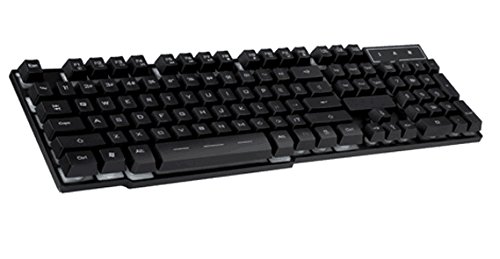
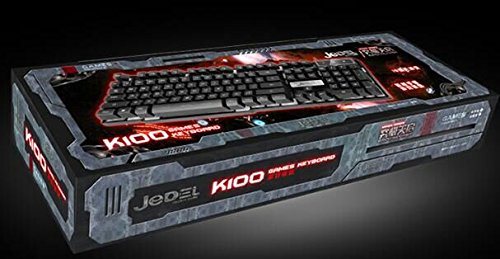
Image 1: The BBC Jadel K100 Gaming Keyboard, showcasinйого дизайн та упаковка.
3. Налаштування
Follow these steps to connect your BBC Jadel K100 Gaming Keyboard to your computer:
- Розпакуйте клавіатуру: Обережно вийміть клавіатуру з упаковки.
- Підключення до комп'ютера: Locate an available USB port on your laptop or desktop computer. Insert the USB connector of the keyboard firmly into the USB port.
- Встановлення драйвера: The keyboard is plug-and-play. Your operating system (Windows, macOS, Linux) should automatically detect and install the necessary drivers. This process may take a few moments.
- Перевірте підключення: Once drivers are installed, the keyboard should be ready for use. Test by typing in a text editor or browser.
Примітка: This keyboard is compatible with laptops and desktop computers running standard operating systems.
4. Інструкція з експлуатації
The Jadel K100 keyboard features a standard 104-key layout, including a numeric keypad and function keys. It also incorporates multimedia functions accessible via the FN ключ.
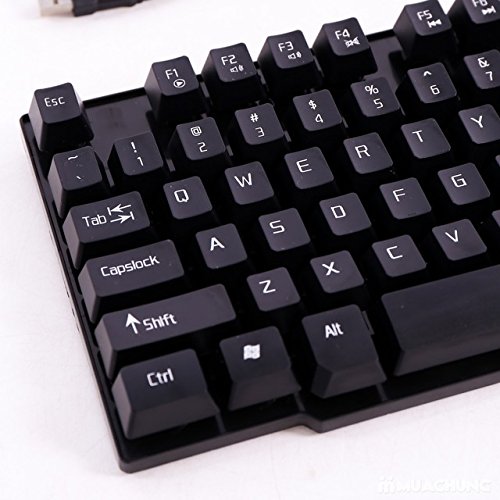
Зображення 2: Крупний план view of the BBC Jadel K100 keyboard's main keys, including Esc, Tab, Caps Lock, Shift, Ctrl, and Alt.
4.1. Standard Key Functions
All standard alphanumeric, symbol, and navigation keys operate as expected on a typical keyboard.
4.2. Multimedia Functions (FN Key)
The Jadel K100 includes an FN (Function) key, similar to those found on laptops, to access multimedia controls. To use these functions, press and hold the FN key, then press the corresponding function key (F1-F12) or other designated keys.
Common multimedia functions typically include:
- FN + F1-F12: Control media playback (play/pause, stop, previous/next track), volume (mute, volume up/down), and other system functions (e.g., open default browser, email client, calculator). Refer to the keycap legends for specific functions.
Зображення 3: Детальний опис view of the BBC Jadel K100 keyboard's F-keys, which often include multimedia shortcuts when combined with the FN key.
4.3. Ігровий досвід
The mechanical suspension design provides a tactile and responsive feel, enhancing the gaming experience. The keyboard is designed for durability and comfort during extended gaming sessions.
5. Технічне обслуговування
Правильне обслуговування забезпечує довговічність та оптимальну роботу вашої клавіатури.
- Прибирання:
- Від’єднайте клавіатуру від комп’ютера перед чищенням.
- Злегка протріть м’якою тканиною без ворсу dampводою або м’яким миючим розчином, щоб протерти ковпачки клавіш і поверхню.
- Для видалення пилу та сміття між клавішами використовуйте стиснене повітря.
- Уникайте використання агресивних хімікатів, абразивних засобів для чищення або розпилення рідин безпосередньо на клавіатуру.
- Зберігання: Зберігайте клавіатуру в прохолодному, сухому місці, подалі від прямих сонячних променів та екстремальних температур, якщо вона не використовується протягом тривалого часу.
- Обробка: Avoid dropping the keyboard or exposing it to excessive force, which can damage internal components or key mechanisms.
6. Вирішення проблем
If you encounter issues with your BBC Jadel K100 keyboard, refer to the following common problems and solutions:
| проблема | Можлива причина | Рішення |
|---|---|---|
| Клавіатура не відповідає | Нещільне USB-з'єднання, несправний USB-порт, проблема з драйвером. |
|
| Певні клавіші не працюють | Debris under keycap, physical damage, software conflict. |
|
| Мультимедійні клавіші не працюють | Incorrect usage of FN key, software conflict. |
|
7. Технічні характеристики
| Особливість | Деталь |
|---|---|
| Бренд | BBC |
| Номер моделі | Jadel K100 |
| Опис клавіатури | Ігри |
| Кількість клавіш | 104 |
| Тип ключа | Механічна підвіска |
| колір | ЧОРНИЙ |
| Сумісні пристрої | Ноутбук, настільний ПК |
| Підключення | USB |
| Стиль | Сучасний |
| Орієнтація руки | Амбідекстр |
| Виробник | bbc |
8. Гарантія та підтримка
Specific warranty details for the BBC Jadel K100 Gaming Keyboard are not provided in this manual. For warranty information, please refer to the product packaging or contact your retailer at the point of purchase.
For technical support or further assistance, please contact the manufacturer or your retailer. Keep your purchase receipt as proof of purchase for any warranty claims.