
1. Продукт закінчивсяview
The GANA HDMI to RCA AV Converter is designed to convert high-quality HDMI video and audio signals into standard-definition AV (CVBS) composite video and FL/FR stereo audio signals. This allows modern HDMI-only devices to connect to older televisions, VHS VCRs, DVD recorders, and other equipment that only support RCA (Yellow, White, Red) inputs. It supports both NTSC and PAL standard TV formats.
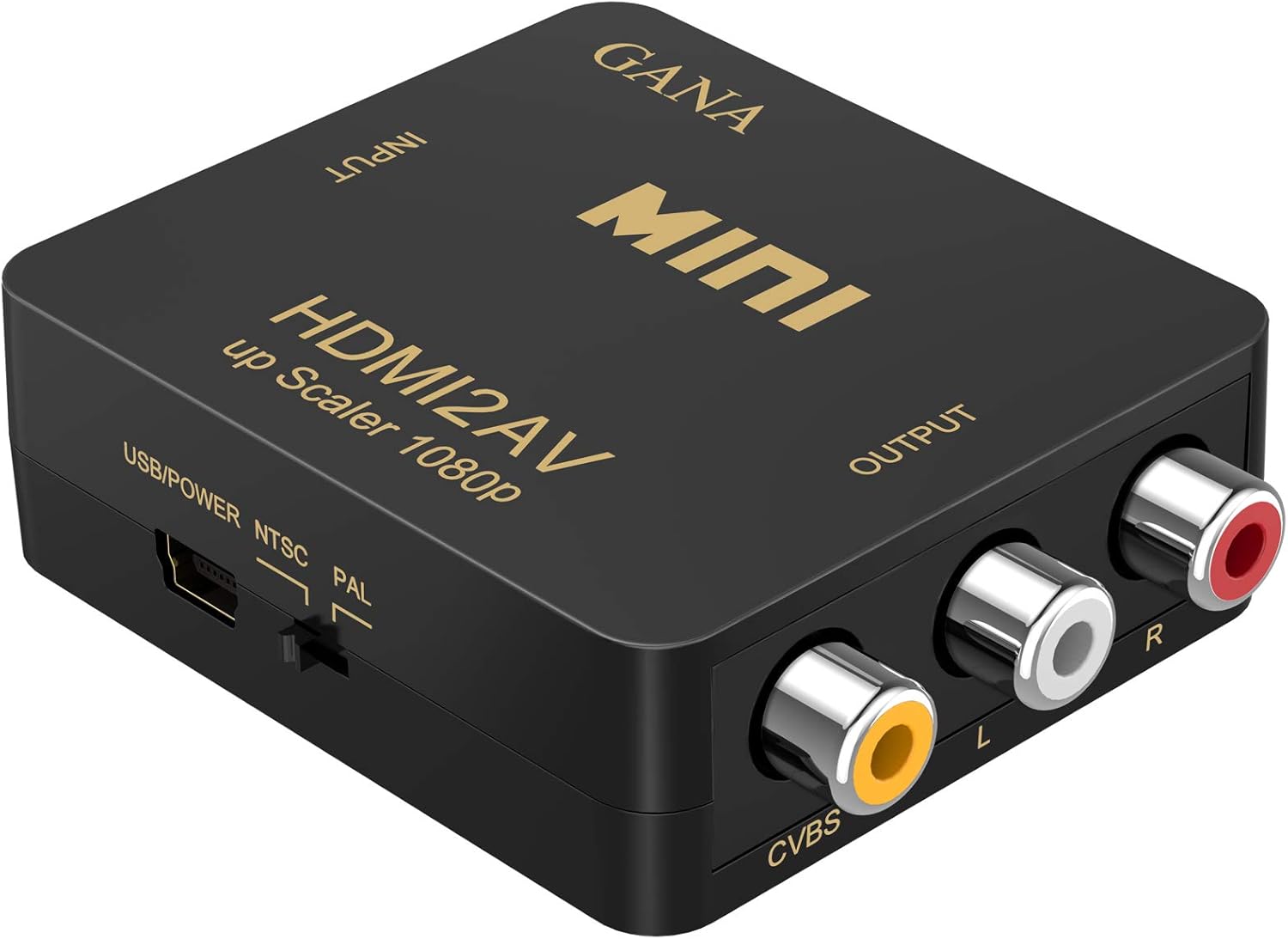
Figure 1: GANA HDMI to RCA AV Converter
2. Ключові характеристики
- Converts high-quality HDMI video signal to normal CVBS (AV) signal (standard-definition 480i, 576i) for compatibility with older TVs, VHS VCRs, and DVD recorders.
- Utilizes advanced video processing and scaler video processing technologies for improved picture brightness, contrast ratio, and color in the CVBS output.
- Compatible with HDMI 1.3 and supports both NTSC and PAL standard TV formats via a selectable switch.
- Features a matte rubber oil painted outer casing for enhanced texture and feel.
- Plug and play operation, requiring no additional drivers.
3. Вміст упаковки
Будь ласка, переконайтеся, що всі предмети присутні в упаковці:
- 1 x GANA HDMI to AV Converter
- 1 x кабель живлення USB
- 1 x Посібник користувача (цей документ)
4. Інструкції з налаштування
- Підключення входу HDMI: Connect your HDMI source device (e.g., PC, laptop, HDTV, DVD player) to the HDMI input port on the GANA converter using an HDMI cable.
- Connect RCA Output: Connect the RCA (Yellow, White, Red) output ports of the GANA converter to the corresponding AV input ports on your display device (e.g., TV, VCR) using an RCA cable. Ensure the colors match: Yellow for video (CVBS), White for left audio (L), and Red for right audio (R).
- Підключіть живлення USB: ВАЖЛИВО: Hook up the included USB power cable to a 5V power source (e.g., a USB wall adapter, a USB port on your TV or computer). The converter requires external power to function correctly.
- Select Output Format: Use the NTSC/PAL switch on the converter to select the appropriate video format for your region. NTSC is commonly used in North America, while PAL is common in Europe and parts of Asia. If the picture appears scrambled, try switching this setting.

Рисунок 2: Схема підключення

Рисунок 3: Типові сценарії застосування
5. Інструкція з експлуатації
Once all connections are made and the converter is powered on, the device operates automatically. The HDMI signal will be converted and output through the RCA ports.
- Ensure your display device is set to the correct AV input channel.
- The output audio is synchronized with the video.
- The converter supports high bandwidth capability up to 1920x1080@60Hz HDMI input, which is then scaled down to standard-definition CVBS output.
Примітка: This converter is generally not compatible with TV Sticks (such as Fire Stick, Roku, Chromecast), mobile phones, and iPad series.
6. Вирішення проблем
Якщо у вас виникли проблеми, зверніться до наступних поширених рішень:
- No Picture or Scrambled Picture:
- Ensure the USB power cable is securely connected to a 5V power source. The device requires external power.
- Verify that the HDMI and RCA cables are correctly and securely plugged into their respective ports.
- Check the NTSC/PAL switch on the converter. If the picture is distorted or black and white, try switching it to the other setting. Some units may have the labels reversed.
- Confirm your display device is set to the correct AV input channel.
- Мерехтіння зображення або переривчастий сигнал:
- Some initial flickering for the first 10 minutes of use can be normal as the device stabilizes.
- Переконайтеся, що всі кабелі у належному стані та не пошкоджені.
- If the issue persists, try a different USB power source or cable.
- Poor Picture Quality (Colors Washed Out, Fuzzy):
- Converting a high-definition HDMI signal to standard-definition RCA will naturally result in a lower resolution and potentially less vibrant colors compared to an HDMI connection. This is an inherent limitation of analog conversion.
- Ensure the HDMI source device's output resolution is compatible with the converter's capabilities (e.g., 1080p, 720p).
- Без звуку:
- Check the white (L) and red (R) RCA audio connections.
- Ensure the volume on your display device is turned up and not muted.
7. Технічні характеристики
| Особливість | опис |
|---|---|
| Бренд | ГАНА |
| Номер моделі | 4330186140 |
| Вхідні порти | 1x HDMI |
| Вихідні порти | 1x RCA (жовтий, білий, червоний) |
| HDMI Input Resolution Support | 640x480@60Hz, 800x600@60Hz, 1024x768@60Hz, 1280x720@60Hz, 1280x1024@60Hz, 1360x768@60Hz, 1600x1200@60Hz, 1920x1080@60Hz. 180i/60Hz, 480p/60Hz, 576i/60Hz, 576p/60Hz, 720p50/60Hz, 1080I50/60Hz, 1080p/60Hz. |
| Вихід CVBS | PAL, NTSC_M, NTSC_J |
| Джерело живлення | USB 5V (cable included) |
| Розміри продукту | 66(D)x55(W)x20(H) mm (approx. 2.6 x 2.2 x 0.8 inches) |
| Вага товару | 110 г (приблизно 3.88 унцій) |
| матеріал | пластик |
| Країна походження | Китай |
8. Гарантія та підтримка
The GANA HDMI to RCA AV Converter typically comes with a 1-year manufacturer's warranty. Some purchases may include an offer for a free 3-year extended warranty upon product registration with the company. Please refer to any included orange card or product inserts for details on how to register your product and extend your warranty.
For technical support, troubleshooting assistance beyond this manual, or warranty claims, please contact GANA customer service through the retailer where you purchased the product or visit the official GANA webсайт для контактної інформації.