
вступ
This manual provides essential information for the installation, operation, maintenance, and troubleshooting of your NVIDIA 699-51030-0501-101 graphics card. This component is designed for desktop computer systems to enhance graphics processing capabilities. Please read this manual thoroughly before proceeding with installation or use.
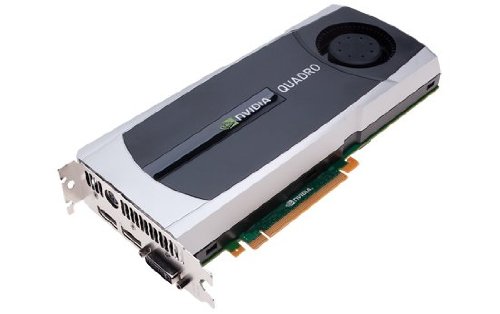
Image: NVIDIA 699-51030-0501-101 Graphics Card. This image displays the graphics card from an angled perspective, showing the cooling fan, heatsink, and the PCIe connector.
Правила безпеки
Дотримуйтесь наступних запобіжних заходів, щоб запобігти пошкодженню виробу або травмуванню себе:
- Завжди відключайте живлення комп’ютера перед встановленням або видаленням будь-яких компонентів.
- Одягайте антистатичний браслет або часто торкайтеся заземленого металевого предмета, щоб знімати статичну електрику.
- Тримайте відеокарту за краї, щоб не торкатися чутливих компонентів.
- Забезпечте належну вентиляцію всередині корпусу комп'ютера, щоб запобігти перегріву.
- Тримайте продукт подалі від вологи та екстремальних температур.
Налаштування
1. Передвстановлювальні перевірки
- Переконайтеся, що ваш блок живлення (БЖ) має достатню потужністьtage and appropriate connectors for the graphics card.
- Ensure your motherboard has an available PCI Express (PCIe) x16 slot.
- Confirm your computer case has adequate space for the graphics card dimensions.
- Підготуйте необхідні інструменти: хрестову викрутку, антистатичний браслет (рекомендовано).
2. Встановлення обладнання
- Вимкнення та відключення: Повністю вимкніть комп’ютер і від’єднайте шнур живлення від розетки.
- Відкрити справу: Зніміть бічну панель корпусу комп'ютера, щоб отримати доступ до материнської плати.
- Знайдіть слот PCIe: Знайдіть вільний слот PCI Express x16 на вашій материнській платі. Зазвичай це найдовший слот.
- Зняти кришку слота: Remove the metal slot cover(s) from the back of your computer case corresponding to the PCIe slot you will use.
- Вставте відеокарту: Carefully align the graphics card with the PCIe slot. Press down firmly and evenly on both ends of the card until it is fully seated in the slot. You should hear a click from the retention clip.
- Безпечна картка: Secure the graphics card to the computer case using the screw(s) removed from the slot cover(s).
- Підключення живлення (якщо застосовується): If your graphics card requires additional power, connect the appropriate PCIe power cables from your PSU to the graphics card. This model (NVIDIA 699-51030-0501-101) may not require external power, but always check the card itself for connectors.
- Закрити справу: Замініть бічну панель корпусу комп'ютера.
- Reconnect Peripherals: Reconnect your monitor cable to one of the display outputs on the new graphics card. Reconnect all other peripherals and the power cord.
3. Встановлення драйвера
- Увімкнення: Увімкніть комп'ютер.
- Завантажити драйвери: Перейдіть до офіційного сайту NVIDIA webсайт (www.nvidia.com/drivers) and download the latest drivers compatible with your NVIDIA 699-51030-0501-101 graphics card and operating system.
- Встановити драйвери: Run the downloaded driver installer and follow the on-screen instructions. It is recommended to perform a clean installation if prompted.
- Перезапуск: Перезавантажте комп'ютер після завершення встановлення драйвера.
Операційна
Once installed and drivers are updated, your NVIDIA 699-51030-0501-101 graphics card will automatically handle graphics processing for your system. You can verify its operation through your operating system's device manager or NVIDIA Control Panel.
- Панель керування NVIDIA: Access the NVIDIA Control Panel (usually via right-click on desktop or through Windows Control Panel) to adjust display settings, 3D settings, and monitor various aspects of your graphics card.
- Оновлення драйверів: Регулярно перевіряйте NVIDIA website for driver updates to ensure optimal performance and compatibility with new software and games.
Технічне обслуговування
Правильне обслуговування забезпечує довговічність та оптимальну продуктивність вашої відеокарти.
- Видалення пилу: Periodically (e.g., every 6-12 months), power off and unplug your computer. Open the case and use compressed air to gently clear dust from the graphics card's heatsink and fan. Hold the fan blades to prevent over-spinning during cleaning.
- Умови навколишнього середовища: Operate your computer in a clean, dry, and well-ventilated environment. Avoid extreme temperatures and humidity.
Усунення несправностей
Якщо у вас виникли проблеми, зверніться до наступних поширених кроків усунення несправностей:
- Немає виводу на дисплей:
- Переконайтеся, що кабель монітора надійно підключений до відеокарти та монітора.
- Перевірте, чи монітор налаштовано на правильне джерело вхідного сигналу.
- Check if the graphics card is fully seated in its PCIe slot.
- If applicable, ensure all PCIe power connectors are securely attached.
- Якщо можливо, протестуйте з іншим монітором або кабелем.
- Проблеми з драйверами:
- Reinstall the latest drivers from the NVIDIA webсайт.
- Try rolling back to a previous driver version if issues started after an update.
- Use Display Driver Uninstaller (DDU) in Safe Mode to completely remove old drivers before installing new ones.
- Проблеми з продуктивністю (низький FPS, заїкання):
- Переконайтеся, що драйвери оновлені.
- Check for overheating using monitoring software (e.g., MSI Afterburner, HWMonitor). Clean dust if necessary.
- Verify that your system meets the minimum requirements for the applications or games you are running.
- Перевірте блок живлення (БЖ)tage; an insufficient PSU can cause performance issues.
- System Instability (Crashes, Blue Screens):
- Check for driver conflicts or corruption.
- Monitor temperatures to rule out overheating.
- Ensure the graphics card is properly seated and secured.
- Запустіть інструменти діагностики пам'яті, щоб перевірити наявність проблем з оперативною пам'яттю.
Технічні характеристики
Key specifications for the NVIDIA 699-51030-0501-101 graphics card:
| Номер моделі | NVIDIA 699-51030-0501-101 |
| Бренд | NVIDIA |
| Графічний співпроцесор | NVIDIA 699-51030 |
| Виробник графічного процесора | NVIDIA |
| Сумісні пристрої | Робочий стіл |
| ASIN | B01NBI92VC |
| Дата першої доступності | 8 грудня 2016 р |
Гарантія та підтримка
This NVIDIA graphics card is covered by the manufacturer's standard warranty. For specific warranty terms, duration, and to register your product, please refer to the official NVIDIA website or contact NVIDIA customer support directly.
For technical assistance, driver downloads, and further support resources, visit the official NVIDIA support portal:
- NVIDIA Support: www.nvidia.com/support