
1. Вступ
The Discover D712 Dual Speaker Wired Office Headset is designed for professional use, offering clear audio for calling environments. This headset is compatible with a wide range of corded desk phones, including models from Avaya, Polycom, Cisco, Shoretel, Yealink, and Mitel. It features a comfortable over-ear design with faux leather ear cushions and a lightweight build, making it suitable for extended wear in office settings. This manual provides comprehensive instructions for setting up, operating, maintaining, and troubleshooting your D712 headset.
2. Що в коробці
Upon unboxing your Discover D712 headset, please verify that all components listed below are present:
- Discover D712 Dual Speaker Wired Office Headset
- Амбушури (попередньо встановлені або окремі)

Figure 2.1: The Discover D712 Dual Speaker Wired Office Headset, showing the headset itself and a diagram illustrating the quick disconnect feature.
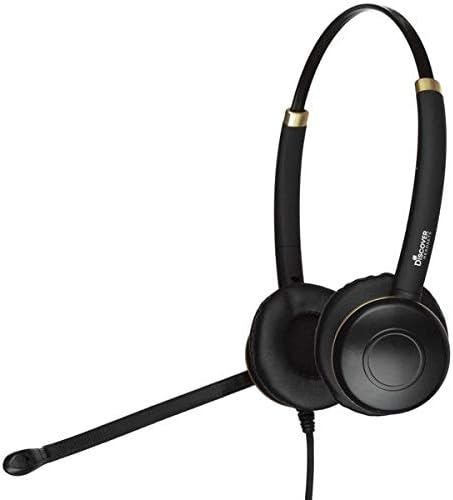
Рисунок 2.2: Сторона А view of the Discover D712 headset, highlighting its dual speakers and microphone boom.
3. Інструкції з налаштування
The Discover D712 headset requires a compatible direct connect cable to function with your specific desk phone. This cable is sold separately and is essential for connectivity. Please ensure you have the correct cable for your phone model before proceeding.
3.1 Підключення гарнітури
- Identify the Quick Disconnect (QD) Cable: The D712 headset features a Quick Disconnect (QD) end, which allows you to easily detach the headset from the direct connect cable without disconnecting the cable from the phone.
- Connect the Direct Connect Cable: Plug the appropriate direct connect cable (sold separately) into the headset port on your desk phone. Refer to your phone's manual for the exact location of the headset port.
- Attach the Headset to the QD Cable: Align the Quick Disconnect end of your D712 headset with the Quick Disconnect end of the direct connect cable. Push them firmly together until you hear or feel a click, indicating a secure connection.
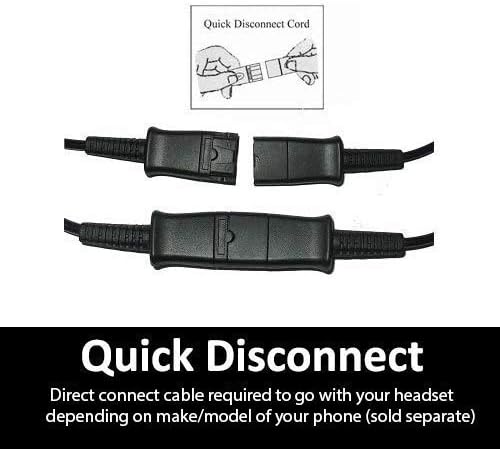
Рисунок 3.1: Детальний view of the Quick Disconnect (QD) cable connection, showing how the two parts snap together.

Figure 3.2: An individual wearing the Discover D712 headset, demonstrating its typical use in an office environment.
3.2 Налаштування для комфорту
- Регулювання оголов'я: Extend or retract the headband to fit comfortably over your head. The headset should feel secure without being too tight.
- Розташування мікрофона: Position the microphone boom approximately two fingers' width from the corner of your mouth. This ensures optimal voice pickup and clarity. The microphone boom is flexible and can be adjusted.
- Ear Cushion Placement: Ensure the ear cushions fully cover your ears for the best audio experience and comfort.
4. Керування гарнітурою
Once connected, the Discover D712 headset is ready for use with your desk phone. The primary controls for calls (answer/end, volume, mute) are typically managed directly on your desk phone or via the inline controls on your direct connect cable (if equipped).
4.1 Здійснення та отримання дзвінків
- Щоб зателефонувати: Lift the handset or press the headset button on your desk phone, then dial the desired number.
- Щоб прийняти дзвінок: Press the headset button on your desk phone or lift the handset when the phone rings.
- Щоб завершити дзвінок: Press the headset button again or replace the handset.
4.2 Регулювання гучності та вимкнення звуку
Volume adjustments and muting the microphone are typically handled by the controls on your desk phone or the inline controls on your specific direct connect cable. Consult your direct connect cable's instructions or your phone's manual for details on these functions.

Figure 4.1: An individual using the Discover D712 headset, illustrating its comfortable fit and professional appearance during a call.
5. Технічне обслуговування та догляд
Proper care and maintenance will extend the lifespan of your Discover D712 headset and ensure optimal performance.
5.1 Інструкції з очищення
- Амбушюри: The faux leather ear cushions can be gently wiped with a soft, damp cloth. Avoid using harsh chemicals or abrasive cleaners. Ensure they are completely dry before use.
- Корпус гарнітури: Wipe the headset body and microphone boom with a dry or slightly damp, soft cloth. Do not immerse the headset in water or any cleaning solutions.
- Вітрове скло мікрофона: If your microphone has a foam windscreen, it can be carefully removed and cleaned with mild soap and water, then air-dried completely before reattaching.
5.2 Зберігання
When not in use, store your headset in a clean, dry place, away from extreme temperatures and direct sunlight. Avoid tangling the cable to prevent damage.
6. Вирішення проблем
If you encounter issues with your Discover D712 headset, please refer to the following common problems and solutions:
| проблема | Можлива причина | Рішення |
|---|---|---|
| No sound from headset / Cannot hear caller |
|
|
| Microphone not working / Caller cannot hear me |
|
|
| Гарнітура незручна |
|
|
If the issue persists after trying these solutions, please contact Discover customer support for further assistance.
7. Технічні характеристики
Below are the technical specifications for the Discover D712 Dual Speaker Wired Office Headset:
| Особливість | Деталь |
|---|---|
| Назва моделі | D712 |
| Технологія підключення | Провідний |
| Гніздо для навушників | 3.5 mm Jack (Note: Requires specific direct connect cable for desk phones) |
| Включені компоненти | Headset, Ear Cushions |
| матеріал | Faux Leather (Ear Cushions) |
| Конкретне використання продукту | Office/Professional Use |
| Рекомендоване використання продукту | Дзвінок |
| Сумісні пристрої | Desk Phones (with compatible direct connect cable) |
| Тип управління | Touch Control (via compatible direct connect cable or phone) |
| Функція кабелю | Retractable (referring to the Quick Disconnect feature) |
| Рівень водонепроникності | Не водостійкий |
| Стиль | Сучасний |
| Форма навушника | На вухо |
| Особливість | Легкий |
| Розміри продукту | 6 x 6 x 4 дюймів |
| Вага товару | 6.9 унції |
| Виробник | Відкрийте для себе |
| Колір | чорний |
| Контроль шуму | Активне шумозаглушення (для мікрофона) |
8. Гарантія та підтримка
For warranty information, technical support, or further assistance with your Discover D712 headset, please contact Discover customer service or visit their official webсайт.
- Інтернет-підтримка: Відвідайте Discover Store on Amazon для отримання інформації про продукт та ресурсів підтримки.
- Політика повернення: This product typically has a 30-day return policy from the date of purchase. Please refer to the retailer's return policy for specific terms and conditions.