
вступ
Thank you for choosing the Aqualin Dual Outlet Irrigation Timer Controller. This device is designed to automate your garden watering, providing convenience and efficient water management. With two independently programmable outlets, you can customize watering schedules for different areas of your garden or lawn. Please read this manual carefully to ensure proper installation, operation, and maintenance of your irrigation timer.
Продукт закінченийview
The Aqualin YL21060 features a clear LCD display, intuitive controls, and robust construction for outdoor use. It offers flexible programming options, including a rain delay function to conserve water.

The Aqualin Dual Outlet Irrigation Timer Controller, shown attached to a faucet, featuring a digital display and two independent water outlets.
Ключові характеристики:
- Dual Independent Outlets: Program two separate watering zones with unique schedules.
- Гнучке програмування: Set desired frequency and duration for each zone.
- Функція затримки дощу: Skip watering sessions during and after rainy days (1-7 days).
- Полив вручну: Initiate immediate watering without interrupting programmed cycles.
- IPX5 водонепроникний: Designed for outdoor durability.
- Легка установка: Features a swivel joint for quick connection to standard faucets (3/4" or 1").
- РК-дисплей: Чіткий цифровий дисплей для легкого програмування та моніторингу.
- Вхідний фільтр: Helps prevent debris from entering the system.

Оверview of the Aqualin timer's features, including manual watering, IPX5 waterproofing, two independent zones, an inlet filter, an LCD display, and a rain delay function.
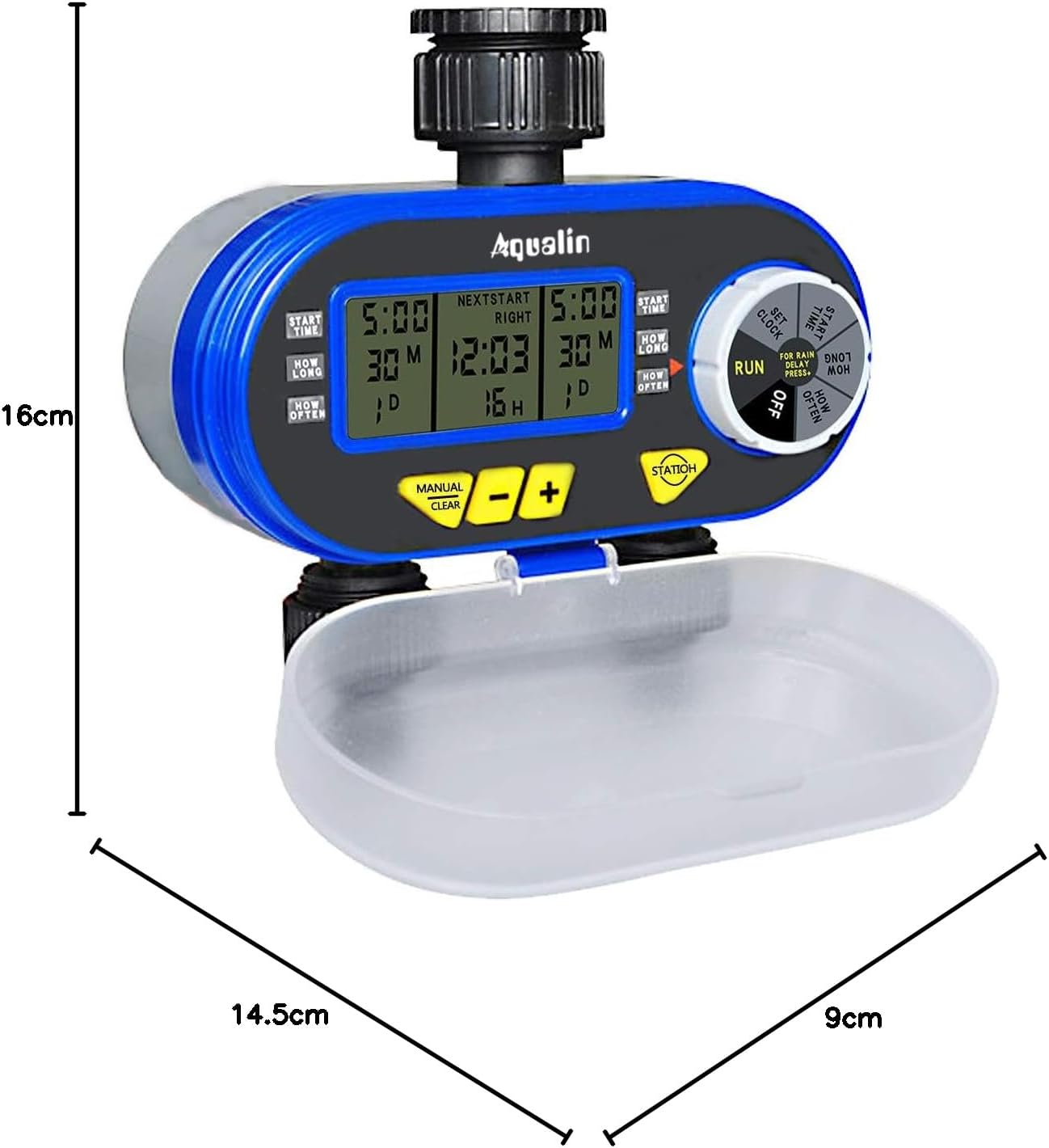
A diagram showing the physical dimensions of the Aqualin timer: 16cm height, 14.5cm length, and 9cm depth.
Налаштування
- Установка батареї:
- Open the battery compartment cover located at the back of the unit.
- Insert two (2) AA alkaline batteries, ensuring correct polarity.
- Надійно закрийте батарейний відсік.
- Connecting to Faucet:
- Attach the timer to a standard 3/4" (19mm) or 1" (25mm) outdoor faucet. The swivel joint allows for easy, tool-free connection.
- Ensure the connection is tight to prevent leaks. Do not overtighten.
- Connect your garden hoses to the two independent outlets at the bottom of the timer.
- Початкове налаштування часу:
- Rotate the main dial to the 'SET CLOCK' position.
- Використовуйте кнопки «+» та «-», щоб налаштувати поточний час.
- Press 'ENTER' to confirm the setting.
- Rain Sensor (Optional):
- If using an external rain sensor, connect it to the designated rain sensor hole.
- Ensure the internal contacts for the rain sensor are not bent if no sensor is connected, as this can prevent watering.

Крупним планом view highlighting the 360-degree anti-leak design, the rain sensor input hole, and the battery compartment cover of the Aqualin timer.
Інструкція з експлуатації
The Aqualin timer offers both automatic and manual watering modes for maximum flexibility.
Video demonstrating the automatic and manual functions of the Aqualin Dual Outlet Irrigation Timer Controller, showing how to set watering schedules and activate manual irrigation.
1. Automatic Function Programming:
The timer allows independent programming for two zones (Zone 1 and Zone 2).

This image illustrates the independent programming capabilities of the Aqualin timer, with separate settings for start time, duration, and frequency for Zone 1 and Zone 2.
- Встановити час початку:
- Rotate the dial to 'START TIME'.
- Use '+' and '-' to set the desired start time for Zone 1. Press 'ENTER'.
- Повторіть для Зони 2.
- Set How Long (Duration):
- Rotate the dial to 'HOW LONG'.
- Use '+' and '-' to set the watering duration for Zone 1 (1 minute to 240 minutes). Press 'ENTER'.
- Повторіть для Зони 2.
- Set How Often (Frequency):
- Rotate the dial to 'HOW OFTEN'.
- Use '+' and '-' to set the watering frequency for Zone 1 (e.g., every 12 hours, every 3 days). Press 'ENTER'.
- Повторіть для Зони 2.
- Run Program:
- Once all settings are configured, rotate the dial to 'RUN'. The timer will now operate according to your programmed schedule.
2. Функція затримки дощу:
To prevent overwatering and save water, use the rain delay feature.

The timer's display showing the Rain Delay feature, which allows skipping irrigation for 1 to 7 days to conserve water.
- While in 'RUN' mode, press the 'RAIN DELAY' button.
- Use '+' or '-' to select the desired delay period (e.g., 24, 48, 72 hours, or up to 7 days).
- Press 'ENTER' to activate the rain delay. Watering will resume automatically after the selected period.
3. Ручний полив:
Щоб поливати негайно, не змінюючи запрограмований графік:

The Aqualin timer in manual watering mode, allowing for immediate irrigation without altering programmed schedules.
- While in 'RUN' mode, press the 'MANUAL/CLEAR' button.
- Use '+' or '-' to set the desired manual watering duration (1 to 360 minutes).
- Press 'ENTER' to start manual watering.
- To stop manual watering, press 'MANUAL/CLEAR' again.
Технічне обслуговування
- Заміна батареї: Replace AA batteries every 1.5 to 3 months, or when the low battery indicator appears on the display, to ensure continuous operation.
- Очищення впускного фільтра: Periodically check and clean the inlet filter to prevent clogging and maintain optimal water flow. Remove the timer from the faucet, unscrew the inlet connection, and rinse the filter under running water.
- Зимоутворення: Before the first frost, disconnect the timer from the faucet and hoses. Drain any remaining water from the unit and store it indoors in a dry, frost-free location.
- Генеральне прибирання: Протріть таймер з оголошеннямamp тканиною, щоб видалити бруд та сміття. Не використовуйте абразивні засоби для чищення або розчинники.
Усунення несправностей
| проблема | Можлива причина | Рішення |
|---|---|---|
| Немає течії води |
|
|
| Витоки з з'єднань |
|
|
| Timer not programming correctly |
|
|
| Застряг акумуляторний відсік | Battery compartment inserted incorrectly. | Ensure the battery compartment is inserted in the correct orientation. Forcing it can cause damage. |
Технічні характеристики
| Особливість | Деталь |
|---|---|
| Бренд | Aqualin |
| Номер моделі | YL21060 |
| матеріал | ABS |
| Розміри (Д x Ш x В) | 14.5 см х 9 см х 16 см |
| Кількість налаштувань | 2 (Independent Zones) |
| Підключення змішувача | 3/4" (19mm) or 1" (25mm) |
| Тривалість поливу | 1 хв. До 240 хв |
| Джерело живлення | 2 батарейки типу АА |
| GTIN | 613869410455 |
Гарантія та підтримка
The Aqualin Dual Outlet Irrigation Timer Controller comes with a standard manufacturer's warranty. For specific warranty details, technical assistance, or to download a detailed PDF instruction manual, please visit the official Aqualin webсайт або зверніться до їхнього відділу обслуговування клієнтів. Зберігайте чек про покупку як підтвердження покупки для гарантійних претензій.
Сценарії використання

This image illustrates the versatility of the Aqualin timer, suitable for various watering applications such as gardens, lawns, farms, and potted plants.