
вступ
This manual provides comprehensive instructions for the setup, operation, and maintenance of your GPX Digital AM/FM Clock Radio, model C224B. Please read this manual thoroughly before using the device to ensure proper functionality and to maximize your user experience. Keep this manual for future reference.
Продукт закінченийview
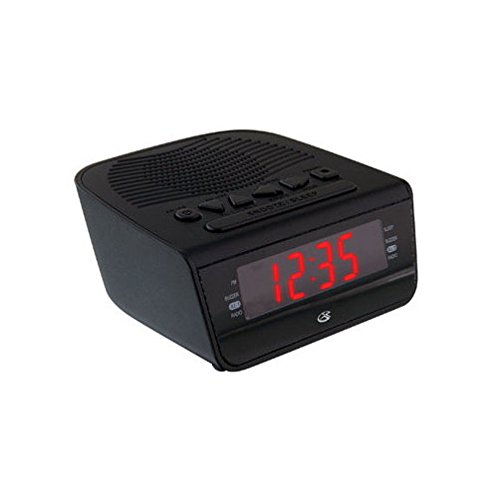
малюнок 1: Фронт view of the GPX Digital AM/FM Clock Radio. This image shows the compact black unit with its digital display and control buttons.
The GPX Digital AM/FM Clock Radio (C224B) is designed for reliable timekeeping and audio entertainment. Key features include a clear multi-display clock, AM/FM radio tuner, dual alarm functionality, and a battery backup option to ensure continuous operation during power interruptions. Its compact and modern design makes it suitable for various indoor settings.
Налаштування
1. Розпакування
Carefully remove the clock radio from its packaging. Ensure all components are present: the clock radio unit and the power adapter.
2. Підключення живлення
- Plug the power adapter into the DC input jack located on the back of the clock radio.
- Plug the other end of the power adapter into a standard wall outlet (AC 120V, 60Hz).
- The display will illuminate, indicating the unit is receiving power.
3. Встановлення резервного акумулятора (необов'язково)
Для резервного живлення під час відпусткиtages, install batteries (not included).
- Знайдіть батарейний відсік на нижній панелі пристрою.
- Відкрийте кришку батарейного відсіку.
- Insert the required batteries (e.g., 2 x AAA, check unit for specific type) according to the polarity markings (+ and -).
- Надійно закрийте кришку батарейного відсіку.
Примітка: Batteries are for backup only and will not power the display or radio functions continuously. They preserve time and alarm settings during a power interruption.
Інструкція з експлуатації
1. Встановлення часу
- Натисніть і утримуйте ВСТАНОВИТИ ЧАС кнопку, доки дисплей не почне блимати.
- Використовуйте ГОДИНА і ХВИЛИНА кнопки для налаштування часу.
- Прес ВСТАНОВИТИ ЧАС ще раз для підтвердження та виходу з режиму налаштування часу.
2. Налаштування будильників (Будильник 1 та Будильник 2)
This unit features dual alarms, allowing you to set two independent wake-up times.
- Натисніть і утримуйте БУДИЛЬНИК 1 НАБОР (або БУДИЛЬНИК 2 НАБОР) button until the alarm time flashes.
- Використовуйте ГОДИНА і ХВИЛИНА buttons to adjust the desired alarm time.
- Прес БУДИЛЬНИК 1 НАБОР (або БУДИЛЬНИК 2 НАБОР) again to confirm the time.
- Immediately after confirming the time, use the РЕЖИМ ТРИВОГИ button to select the alarm source: ЗУНЬ or РАДІО.
- The alarm icon (e.g., AL1 or AL2) will appear on the display, indicating the alarm is active.
To turn off an alarm, press the corresponding БУДИЛЬНИК 1 УВІМК./ВИМК (або БУДИЛЬНИК 2 УВІМК./ВИМК) button. The alarm icon will disappear.
3. Робота AM/FM радіо
- Натисніть УВІМК./ВИМК. РАДІО кнопку, щоб увімкнути радіо.
- Натисніть БЕНД кнопку для перемикання між діапазонами AM та FM.
- Використовуйте НАСТРОЙКА + or МЕЛОДІЯ - кнопки для ручного налаштування на потрібну станцію.
- To automatically scan for the next available station, press and hold НАСТРОЙКА + or МЕЛОДІЯ - на кілька секунд.
- Відрегулюйте гучність за допомогою ОБ'ЄМ + or ОБСЯГ - кнопки.
- Щоб вимкнути радіо, натисніть УВІМК./ВИМК. РАДІО кнопку знову.
4. Функція повтору будильника
Коли лунає будильник, натисніть кнопку СНОЙЗ кнопку , щоб тимчасово вимкнути будильник приблизно на 9 хвилин. Будильник знову задзвонить після періоду повтору.
5. Функція сну
The sleep function allows the radio to play for a set duration before automatically turning off.
- Під час відтворення радіо натисніть кнопку СПАТИ натискайте кнопку кілька разів, щоб перемикатися між доступними часами сну (наприклад, 90, 60, 30, 15 хвилин, ВИМК.).
- Радіо автоматично вимкнеться після вибраного часу.
Технічне обслуговування
1. прибирання
To clean the unit, wipe the exterior with a soft, slightly damp cloth. Do not use abrasive cleaners or solvents, as these may damage the finish. Ensure the unit is unplugged before cleaning.
2. Заміна батареї
If the battery backup function is not working, or if the unit loses time during a power outage, the backup batteries may need replacement. Follow the "Battery Backup Installation" steps in the Setup section to replace them.
Усунення несправностей
| проблема | Можлива причина | Рішення |
|---|---|---|
| Пристрій не вмикається. | Адаптер живлення не підключений або несправна розетка. | Переконайтеся, що адаптер живлення надійно підключено до пристрою та до робочої розетки. Спробуйте іншу розетку. |
| Сигналізація не звучить. | Будильник не налаштовано, гучність будильника занадто низька або будильник вимкнено. | Verify alarm time and source (buzzer/radio) are set correctly. Ensure alarm is activated (icon visible). Increase radio volume if alarm source is radio. |
| Поганий прийом радіо. | Слабкий сигнал або перешкоди. | Adjust the position of the unit or the antenna (if external). Move away from other electronic devices that may cause interference. |
| Втрата часу/налаштувань після відключення живленняtage. | Резервні батареї розряджені або не встановлені. | Install fresh backup batteries or replace existing ones. |
Технічні характеристики
- модель: C224B
- Джерело живлення: AC 120V, 60Hz (main); Battery Powered (backup)
- Тип дисплея: Світлодіодний цифровий дисплей
- Радіо діапазони: AM/FM
- Розміри (прибл.): 5.12 дюйма (Ш) x 5.12 дюйма (В)
- Вага (прибл.): 3 фунта
- колір: чорний
- матеріал: пластик
Гарантія та підтримка
For warranty information or technical support, please refer to the warranty card included with your product or visit the official GPX website. Do not attempt to repair this unit yourself, as this may void your warranty.
GPX Official Webсайт: www.gpx.com