
1. Вступ
This manual provides detailed instructions for the installation, operation, and maintenance of the CP PLUS CP-UVR-1616K1-V3 16-Channel 1080P Digital Video Recorder (DVR). This device supports 16 channels of video input and 16 channels of audio input, offering comprehensive surveillance capabilities. It is designed for reliable performance in various security applications.
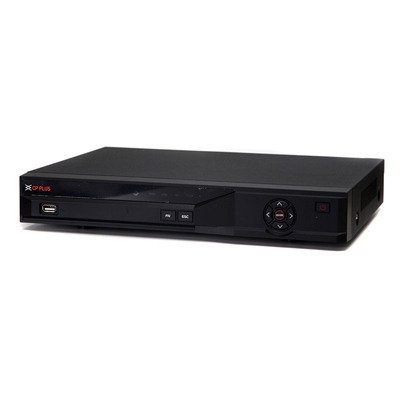
Малюнок 1: Спереду view of the CP PLUS CP-UVR-1616K1-V3 DVR unit.
2. Заходи безпеки
- Забезпечте належну вентиляцію навколо відеореєстратора, щоб запобігти перегріву.
- Не піддавайте пристрій впливу води або вологи.
- Використовуйте лише адаптер живлення, що постачається разом із пристроєм.
- Уникайте розміщення відеореєстратора під прямими сонячними променями або поблизу джерел тепла.
- Поводьтеся з пристроєм обережно, щоб запобігти фізичному пошкодженню.
3. Налаштування та встановлення
3.1 Розпакування
Обережно вийміть усі компоненти з упаковки. Перевірте наявність усіх предметів, перелічених у пакувальному листі.
3.2 Підключення апаратного забезпечення
- Підключення камер: Connect your HDCVI, Analog, or IP cameras to the BNC video input ports (16 channels available) on the rear panel of the DVR.
- Підключення аудіо: Connect audio input devices to the 16 RCA audio input channels. Connect an audio output device to the 1 RCA audio output channel.
- Підключення дисплея: Connect a monitor or television to the HDMI or VGA output port for video display.
- Підключити мережу: Connect an Ethernet cable from the DVR's network port to your router or network switch for remote access and IP camera integration.
- Встановлення жорсткого диска (необов'язково): If not pre-installed, open the DVR casing and connect a SATA HDD (up to 6TB) to the internal SATA port. Secure the HDD with screws.
- Підключіть USB-пристрої: Connect a mouse or USB storage device to one of the two USB 2.0 ports.
- Увімкнення: Connect the power adapter to the DVR and then to a power outlet. The DVR will power on automatically.
4. Інструкція з експлуатації
4.1 Майстер початкового налаштування
Upon first power-on, the DVR will guide you through an initial setup wizard. Follow the on-screen prompts to configure basic settings such as language, date/time, network settings, and user accounts.
4.2 Живий View
Після початкового налаштування відеореєстратор відображатиме прямий ефір view of connected cameras. You can switch between different display splits (1/4/8/9/16 channels) using the on-screen controls or mouse.
4.3 Запис
The DVR supports various recording modes including continuous, motion detection, and scheduled recording.
- Main Stream Recording: 1080P (1~15fps), 1080N/720P/960H/D1/HD1/BCIF/CIF/QCIF (1~25/30fps).
- Extra Stream Recording: CIF/QCIF (1~15fps).
Access the recording settings through the main menu to configure your preferred recording schedule and parameters.
4.4 Відтворення
Повторноview записаний footage, navigate to the Playback menu. You can search for recordings by date, time, and event type.
4.5 Mobile Access
Download the official mobile applications (iCMOB, gCMOB, wCMOB) from your device's app store to access live view and playback remotely. Refer to the app's instructions for setup.
4.6 CMS Software
For centralized management of multiple DVRs, use the KVMS or KVMS Pro CMS software. Install the software on a compatible computer and follow the provided instructions for device addition and management.
5. Технічне обслуговування
- Регулярне прибирання: Keep the DVR free from dust. Use a soft, dry cloth for cleaning. Do not use liquid cleaners.
- Оновлення прошивки: Періодично перевіряйте офіційну інформацію CP PLUS webсайт для оновлень прошивки, щоб забезпечити оптимальну продуктивність і безпеку.
- Стан жорсткого диска: Monitor the health of the installed hard drive through the DVR's system settings. Replace the HDD if errors are detected.
- Backup Recordings: Regularly back up important recordings to an external USB storage device or network storage.
6. Вирішення проблем
| проблема | Можлива причина | Рішення |
|---|---|---|
| Немає відеовиходу на монітор. | Нещільно прикріплений кабель HDMI/VGA, на моніторі вибрано неправильний вхід, відеореєстратор не увімкнено. | Check cable connections, ensure monitor is on correct input, verify DVR power. |
| Камери не відображають зображення. | Loose BNC cable, camera power issue, incorrect camera type selected. | Check camera connections and power, verify camera compatibility and settings in DVR menu. |
| Немає запису. | HDD not installed or faulty, recording schedule not configured, insufficient storage. | Install/check HDD, configure recording schedule, check HDD space. |
| Віддалений доступ не працює. | Network cable disconnected, incorrect network settings, firewall blocking. | Check network cable, verify IP address/gateway/DNS settings, configure port forwarding or P2P. |
7. Технічні характеристики
| Особливість | Деталь |
|---|---|
| Модель | CP-UVR-1616K1-V3 |
| Відео вхід | 16 channel BNC (HDCVI/Analog/IP up to 5Mp) |
| Аудіо вхід/вихід | 16 channel RCA input, 1 channel RCA output |
| Відеовихід | 1 HDMI, 1 VGA (Simultaneous) |
| Роздільна здатність відео | 1080P(1920×1080), 1080N(960×1080), 720P, 960H, D1, HD1, BCIF, CIF, QCIF |
| Стиснення відео | H.264 |
| Стиснення аудіо | G.711 |
| Recording Frame Rate (Main Stream) | 1080P (1~15fps), 1080N/720P/960H/D1/HD1/BCIF/CIF/QCIF (1~25/30fps) |
| Підтримка жорстких дисків | 1 SATA port, up to 6TB |
| Інтерфейс USB | 2 x USB 2.0 |
| Програмне забезпечення для мобільних пристроїв | iCMOB, gCMOB, wCMOB |
| Програмне забезпечення CMS | KVMS, KVMS Pro |
| Розміри | 325 мм x 255 мм x 55 мм |
| вага | 1.5Kg (without HDD) |
8. Підтримка та гарантія
For technical assistance, product support, or warranty inquiries, please contact CP PLUS customer service. Refer to the official CP PLUS website for the most current contact information and warranty terms.
Офіційний Webсайт: www.cpplusworld.com
Зберігайте чек про покупку як підтвердження покупки для гарантійних претензій.