
1. Вступ
Thank you for choosing the Kaidi KD-766 Gaming Headset. This manual provides essential information for the proper setup, operation, and maintenance of your new headset. Please read it thoroughly before use to ensure optimal performance and longevity of the product.
2. Інформація про безпеку
- Уникайте тривалого прослуховування на високій гучності, щоб запобігти пошкодженню слуху.
- Не піддавайте гарнітуру впливу екстремальних температур, вологості або агресивних речовин.
- Тримайте пристрій подалі від води та інших рідин.
- Не намагайтеся розбирати або модифікувати гарнітуру. Це призведе до анулювання гарантії.
- Clean the headset with a soft, dry cloth only.
3. Вміст упаковки
Переконайтеся, що всі предмети присутні в упаковці:
- Kaidi KD-766 Gaming Headset
- Посібник користувача (цей документ)

Image: Retail box of the Kaidi KD-766 Gaming Headset, showing the headset with RGB lighting and the model number KD-766.
4. Продукт закінчивсяview
Familiarize yourself with the components of your KD-766 Gaming Headset.
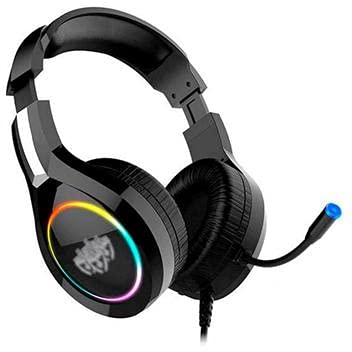
Image: The Kaidi KD-766 Gaming Headset, featuring over-ear cups, an adjustable headband, and a flexible boom microphone.
- Регульоване наголов'я: Для комфортної посадки.
- М'які амбушури: Over-ear design for sound isolation and comfort.
- Гнучкий штанговий мікрофон: Adjustable for clear voice communication.
- Вбудований пульт дистанційного керування: Для регулювання гучності та вимкнення мікрофона.
- 3.5mm Audio Jack (P2): Для аудіовходу/виходу.
- USB-роз'єм: For powering LED lighting.
5. Інструкції з налаштування
5.1 Connecting to a PC/Console
- Аудіоз'єднання: Locate the 3.5mm audio jack (P2) on your computer or gaming console. Plug the 3.5mm connector from the headset into this port. Ensure it is fully inserted.
- USB Power (for LED): If your headset features LED lighting, plug the USB connector into an available USB port on your computer or console. This provides power for the lighting effects.
- Налаштування мікрофона: If your device has separate audio and microphone jacks, you may need a Y-splitter adapter (not included) to use both the headset audio and microphone simultaneously with a single 3.5mm combo jack. For devices with separate ports, plug the 3.5mm audio jack into the headphone port and the microphone jack (if separate) into the microphone port. The KD-766 typically uses a single 3.5mm jack for audio and mic, plus a USB for LED.
- Налаштувати параметри: After connecting, go to your device's sound settings to ensure the headset is selected as the default audio output and input device. Adjust volume levels as needed.
6. Інструкція з експлуатації
6.1 Регулювання гучності
Use the in-line remote control on the headset cable to adjust the volume. Rotate the volume wheel up to increase volume and down to decrease it.
6.2 Використання мікрофона
Position the flexible boom microphone approximately 2-3 cm (1 inch) from your mouth for optimal voice clarity. Use the microphone mute switch on the in-line remote to quickly turn the microphone on or off.
6.3 світлодіодне освітлення
The LED lighting on the earcups will illuminate automatically when the USB connector is plugged into a powered USB port. There are no user-adjustable controls for the LED lighting.
7. Технічне обслуговування
- Прибирання: Wipe the headset with a soft, dry, lint-free cloth. Do not use liquid cleaners or aerosols.
- Зберігання: Store the headset in a cool, dry place when not in use. Avoid direct sunlight and extreme temperatures.
- Догляд за кабелем: Уникайте різких вигинів або надмірного натягування кабелів, щоб запобігти їх пошкодженню.
8. Вирішення проблем
| проблема | Можлива причина | Рішення |
|---|---|---|
| Немає звуку з гарнітури. | Headset not properly connected. Volume too low. Incorrect audio output selected. | Ensure the 3.5mm jack is fully inserted. Increase volume using the in-line control and your device's settings. Check your device's sound settings and select the headset as the default output. |
| Мікрофон не працює. | Microphone muted. Incorrect audio input selected. | Check the microphone mute switch on the in-line remote. Ensure the headset microphone is selected as the default input device in your device's sound settings. |
| Світлодіодні ліхтарі не працюють. | USB connector not plugged in or not receiving power. | Ensure the USB connector is securely plugged into a powered USB port. Try a different USB port. |
| Якість звуку низька. | Loose connection. Audio source issue. | Check all connections. Test the headset with another device to rule out an issue with the audio source. |
9. Технічні характеристики
| Бренд: | Kaidi |
| модель: | КД-766 |
| Розташування вуха: | Circum-aural (Over-ear) |
| Контроль шуму: | Звукоізоляція |
| Чутливість: | 108 дБ |
| Діапазон частот: | 20 Гц - 20 кГц |
| Технологія підключення: | Провідний |
| Вхід для навушників: | Роз'єм 3.5 мм |
| Сумісні пристрої: | Desktops, Notebooks, Gaming Consoles |
| Метод контролю: | Дистанційний (вбудований) |
10. Гарантія та підтримка
For warranty information and technical support, please refer to the warranty card included with your product or contact your local Kaidi distributor or retailer. Keep your proof of purchase for warranty claims.