
1. Продукт закінчивсяview
The ADATA HM900 (model AHM900-6TU3-CEUBK) is a 6TB external hard disk drive designed for high-capacity data storage and transfer. This mechanical hard disk drive offers ample space for extensive data needs and supports simultaneous operations without compromising performance. It connects via USB, making it compatible with various devices, including personal computers and televisions.

Рисунок 1: Передня сторона view of the ADATA HM900 External Hard Drive.
2. Інструкції з налаштування
2.1 Вміст упаковки
Перш ніж продовжити, переконайтеся, що всі предмети присутні в упаковці:
- ADATA HM900 External Hard Disk Drive
- USB кабель для передачі даних
- Адаптер живлення
- Короткий посібник користувача (якщо включено)
2.2 Підключення жорсткого диска
- Підключіть адаптер живлення: Plug the power adapter into the DC IN port on the back of the ADATA HM900. Connect the other end of the power adapter to a wall outlet. The device requires 12 Watts of power.
- Підключіть кабель USB: Insert one end of the provided USB data cable into the USB port (marked 'SS' for SuperSpeed USB) on the back of the hard drive.
- Підключіться до свого пристрою: Plug the other end of the USB cable into an available USB port on your computer, television, or other compatible device.
- Увімкнення: The drive should power on automatically. A status indicator light will typically illuminate to show it is active.
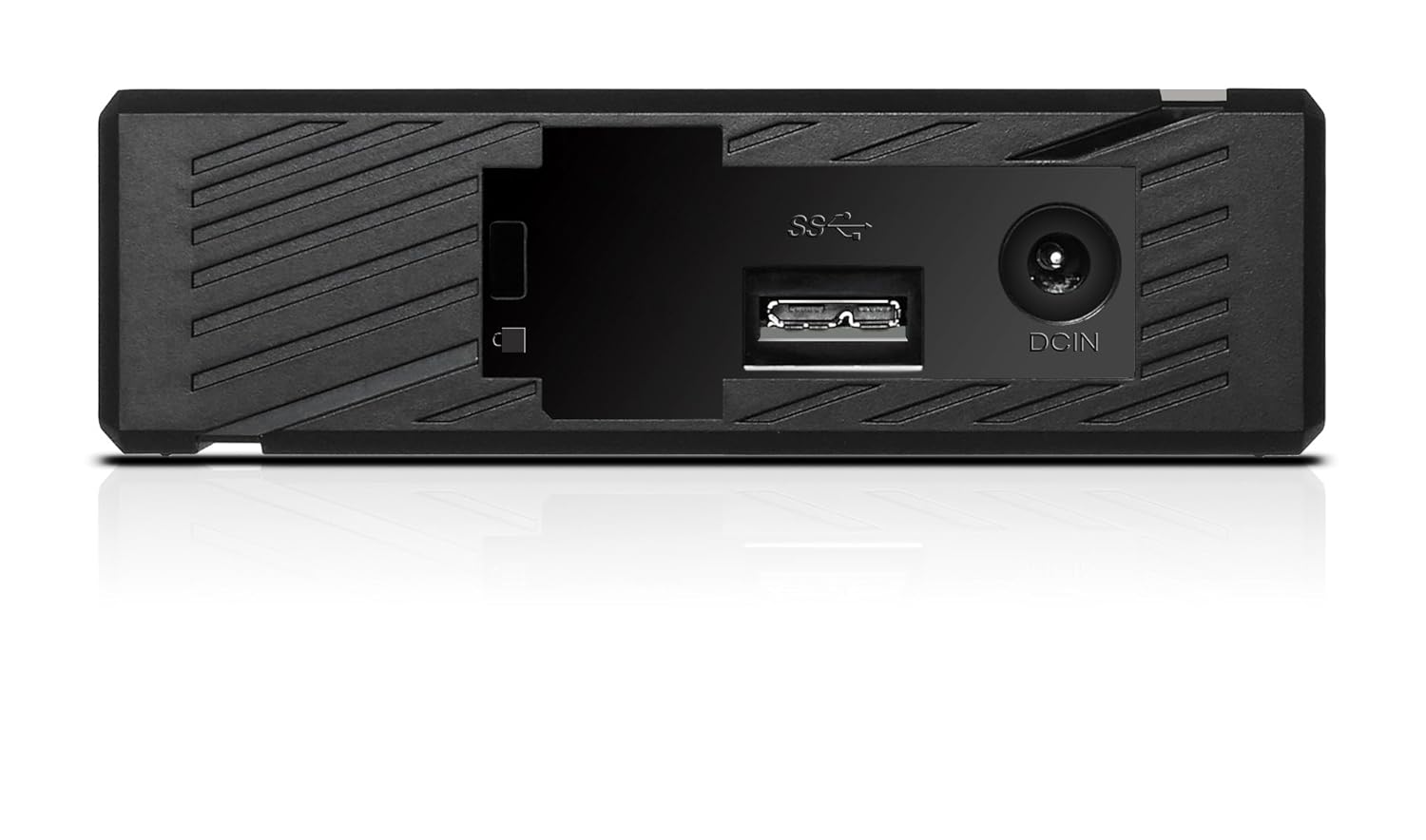
Малюнок 2: Задня частина view of the ADATA HM900, highlighting the USB and DC IN ports for connection.
3. Робота з жорстким диском
3.1 Початкове визнання
Upon first connection, your operating system (Windows, macOS, Linux) or compatible device (e.g., smart TV) should automatically detect the ADATA HM900. For computers, it may appear as a new drive letter or volume in 'My Computer'/'This PC' or 'Finder'.
3.2 Передача даних
Передавати files, simply drag and drop them to and from the HM900 drive icon. For larger transfers, it is recommended to use your operating system's copy/paste functions or dedicated backup software.
3.3 Using with a Television
The ADATA HM900 is compatible with televisions that support external storage devices. Connect the drive as described in Section 2.2. Refer to your television's user manual for specific instructions on how to access and play media files from an external USB drive.
4. Технічне обслуговування та догляд
Proper care ensures the longevity and reliability of your ADATA HM900 external hard drive:
- Безпечне відключення: Always safely eject or unmount the hard drive from your operating system before physically disconnecting the USB cable or power. This prevents data corruption.
- Фізичний захист: Avoid dropping or subjecting the drive to strong impacts, as it contains a mechanical hard disk that can be damaged.
- Умови навколишнього середовища: Зберігайте та експлуатуйте привід у прохолодному, сухому місці, подалі від прямих сонячних променів, екстремальних температур та високої вологості.
- Прибирання: Використовуйте м’яку суху тканину для очищення зовнішньої частини диска. Не використовуйте рідкі засоби для чищення або розчинники.
5. Вирішення проблем
5.1 Диск не виявлено
- Перевірте підключення: Ensure both the power adapter and USB cable are securely connected to the drive and your device.
- Спробуйте інший порт USB: Connect the drive to a different USB port on your computer or device.
- Перевірити потужність: Confirm the power adapter is plugged into a working electrical outlet and the drive's indicator light is on.
- Перезавантажте пристрій: Restart your computer or television and try connecting the drive again.
- Check Disk Management (Windows) / Disk Utility (macOS): For computers, check if the drive appears in disk management tools, even if it doesn't have a drive letter assigned.
5.2 Повільна швидкість передачі даних
- Використання порту USB 3.0: Ensure the drive is connected to a USB 3.0 (or higher) port on your device for optimal speeds. USB 2.0 ports will result in slower transfers.
- Avoid Other USB Devices: Disconnect other high-bandwidth USB devices during large transfers.
- Check Drive Health: Run a disk check utility on your computer to ensure the drive is healthy.
6. Технічні характеристики
| Особливість | Специфікація |
|---|---|
| Бренд | ADATA |
| Номер моделі | AHM900-6TU3-CEUBK |
| Ємність цифрового зберігання | 6 ТБ |
| Опис жорсткого диска | Механічний жорсткий диск |
| Форм-фактор жорсткого диска | 2.5 дюймів |
| Технологія підключення | USB |
| Розміри виробу (ДхШхВ) | 19 х 12.1 х 3.65 сантиметрів |
| Вага товару | 998 г |
| Wattage | 12 Вт |
| Сумісні пристрої | Television, Personal Computers |
| Перша доступна дата | 11 листопада 2016 р |
7. Гарантія та підтримка
Для отримання детальної інформації про гарантію, будь ласка, зверніться до гарантійного талона, що додається до вашого продукту, або відвідайте офіційний веб-сайт ADATA website. Support resources, including drivers and firmware updates, may also be available on the ADATA support portal.