
вступ
Дякуємо за покупкуasing the QUMOX L165U 2.4GHz Wireless Gamepad. This high-quality game controller is designed for use with PC and Android devices, offering a reliable 2.4GHz wireless connection for an enhanced gaming experience. Please read this manual carefully to ensure proper setup and operation of your new gamepad.

Figure 1: QUMOX L165U Gamepad with included USB adapter and OTG connection kit.
Вміст упаковки
Переконайтеся, що всі предмети присутні у вашій упаковці:
- 1x QUMOX L165U Gamepad
- 1x 2.4GHz USB Wireless Adapter
- 1x OTG Connection Kit (Micro USB to USB-A adapter)
Налаштування
1. Встановлення батареї
The QUMOX L165U Gamepad is powered by 2 AAA batteries (not included). To install the batteries:
- Знайдіть відсік для батареї на задній панелі геймпада.
- Відкрийте кришку акумулятора.
- Вставте 2 батарейки типу AAA, дотримуючись правильної полярності (+/-).
- Надійно закрийте кришку акумулятора.

Figure 2: Open battery compartment for AAA battery installation.
2. Підключення до ПК
- Plug the 2.4GHz USB Wireless Adapter into an available USB port on your PC.
- Turn on the gamepad by pressing the 'START' button. The gamepad will automatically attempt to connect.
- The PC should recognize the gamepad and install necessary drivers automatically.
- If the gamepad does not connect, press the 'MODE' button on the gamepad to cycle through connection modes until it is recognized by your PC.
3. Connecting to an Android Device (with OTG support)
- Connect the OTG Connection Kit to your Android device's Micro USB port.
- Plug the 2.4GHz USB Wireless Adapter into the USB-A end of the OTG Connection Kit.
- Turn on the gamepad by pressing the 'START' button. The gamepad will automatically attempt to connect.
- Your Android device should recognize the gamepad.
- If the gamepad does not connect, press the 'MODE' button on the gamepad to cycle through connection modes until it is recognized by your Android device.
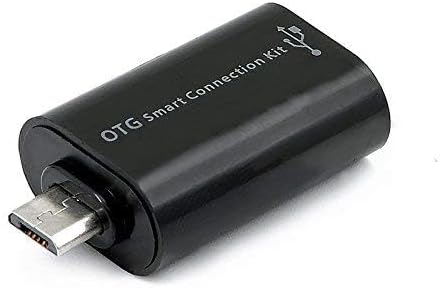
Figure 3: OTG Connection Kit for Android device connectivity.
Інструкція з експлуатації
Once connected, your QUMOX L165U Gamepad is ready for use. The layout is standard for most game controllers.
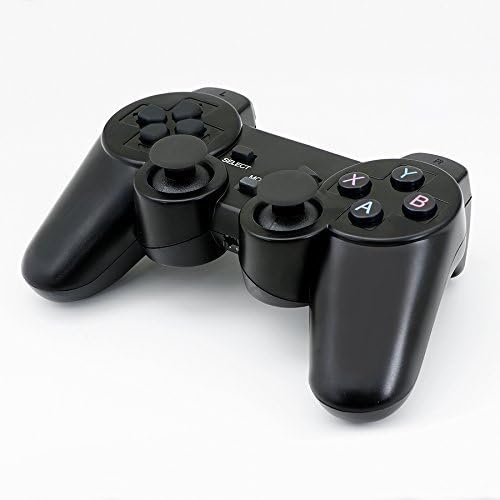
Малюнок 4: Верх view of the QUMOX L165U Gamepad, highlighting button layout.
- Спрямований джойстик (D-Pad): Для точного введення напрямку.
- Аналогові джойстики: Два аналогові джойстики для руху на 360 градусів та керування камерою.
- Кнопки дій (A, B, X, Y): Стандартні кнопки дій для ігрових команд.
- Плечові кнопки (L1, R1) та тригери (L2, R2): Located on the top of the gamepad for additional actions.
- Кнопка ВИБІР/НАЗАД: Зазвичай використовується для навігації по меню або для певних ігрових функцій.
- Кнопка ПУСК: Used to pause games or confirm selections.
- Кнопка MODE: Cycles through different operating modes (e.g., Android, PC) if automatic detection fails.
Відео демонстрація
Відео 1: Надсилання від продавцяview of a 2-pack wireless controller, demonstrating its features and compatibility. While showing a similar product, it illustrates general wireless controller usage and setup.
Технічне обслуговування
- Прибирання: Використовуйте м’яку суху тканину для очищення геймпада. Уникайте використання агресивних хімікатів або абразивних матеріалів.
- Зберігання: Зберігайте геймпад у прохолодному, сухому місці, подалі від прямих сонячних променів та екстремальних температур.
- Догляд за акумулятором: Remove batteries if the gamepad will not be used for an extended period to prevent leakage.
Усунення несправностей
| проблема | Можлива причина | Рішення |
|---|---|---|
| Gamepad does not connect. | Low batteries, incorrect mode, adapter not properly inserted. | Replace batteries. Press the 'MODE' button to cycle through modes. Ensure USB adapter is fully inserted into PC or OTG adapter. |
| Кнопки або джойстики не реагують. | Connection issue, game incompatibility, physical damage. | Reconnect the gamepad. Check game settings for controller support. If issue persists, contact support. |
| Android device does not recognize gamepad. | Android device lacks OTG support, OTG adapter issue. | Verify your Android device supports OTG. Ensure OTG adapter is functioning correctly. |
Технічні характеристики
| Особливість | Деталь |
|---|---|
| Номер моделі | Л165У |
| Технологія підключення | 2.4GHz Wireless (via USB Adapter) |
| Сумісні пристрої | PC, Android (with OTG support) |
| Джерело живлення | 2 батареї AAA |
| Вага товару | 5.3 унції |
| Розміри упаковки | 8.07 x 5.63 x 2.95 дюймів |
| Колір | чорний |
Гарантія та підтримка
For warranty information or technical support, please refer to the contact details provided with your purchase or visit the official QUMOX webсайт. Зберігайте чек про покупку для будь-яких гарантійних претензій.