
Coby CVG-02-RC
Coby CVG-02-RC Virtual Reality Goggles User Manual
Model: CVG-02-RC
вступ
This manual provides essential instructions for the safe and effective use of your Coby CVG-02-RC Virtual Reality Goggles. Please read this manual thoroughly before using the device and retain it for future reference.
The Coby CVG-02-RC transforms your smartphone into a 3D virtual reality headset, offering an immersive experience for compatible VR applications and content. It features adjustable optics and comes with a wireless remote control for enhanced interaction.
Інформація про безпеку
- Do not use the VR goggles while operating a vehicle or machinery, or in situations requiring full attention to your surroundings.
- Take frequent breaks during use to prevent eye strain, dizziness, or discomfort. If you experience any discomfort, discontinue use immediately.
- Ensure your surroundings are clear of obstacles to avoid injury while immersed in virtual reality.
- Тримайте пристрій подалі від прямих сонячних променів, високих температур та вологи.
- Не намагайтеся розбирати або модифікувати пристрій. Це призведе до анулювання гарантії та може призвести до пошкодження.
- This device is not suitable for children under 13 years of age. Adult supervision is recommended for younger users.
Вміст упаковки
Перевірте наявність усіх елементів в упаковці:
- Coby CVG-02-RC Virtual Reality Goggles
- Бездротовий пульт дистанційного керування
- Посібник користувача (цей документ)
Продукт закінченийview
Familiarize yourself with the components of your Coby VR Goggles.
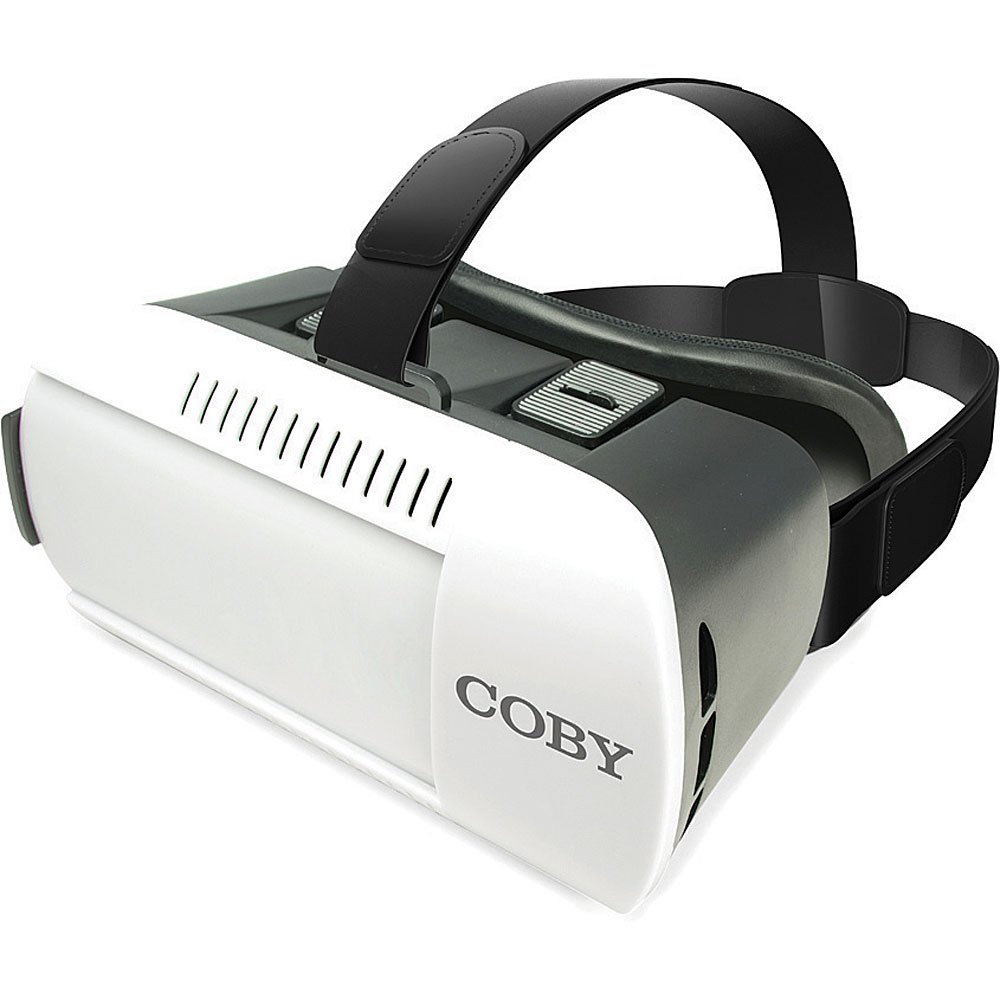
малюнок 1: Фронт view of the Coby CVG-02-RC Virtual Reality Goggles. This image shows the main body of the goggles, including the adjustable head strap, the padded face cushion, and the lenses visible from the user's perspective. The top features adjustment sliders for lens positioning.
Goggles Components:
- Регульований головний ремінь: Secures the goggles to your head.
- Padded Face Cushion: Provides comfort and blocks external light.
- Spherical Lenses: Provide the 3D virtual reality view.
- Lens Adjustment Dials/Sliders: Located on top, these allow for focus and interpupillary distance (IPD) adjustments.
- Smartphone Tray/Compartment: Front section where the smartphone is inserted.
Бездротовий пульт дистанційного керування:
The remote control typically includes buttons for navigation, selection, and volume, enhancing interaction within VR applications. Refer to the remote's specific instructions for detailed button functions.
Налаштування
1. Вставлення смартфона
- Open the front cover of the VR goggles. This usually involves unlatching or sliding the front panel.
- Place your smartphone into the designated tray or holder. Ensure the phone is centered and securely held. The screen should face the lenses.
- Надійно закрийте передню кришку.
- Примітка: The goggles are compatible with smartphones up to 6 inches in screen size.
2. Adjusting the Head Straps
- Place the goggles on your head.
- Adjust the side and top straps to achieve a comfortable and secure fit. The goggles should feel snug but not overly tight, and the image should be centered in your vision.
3. Сполучення бездротового пульта дистанційного керування
- Переконайтеся, що Bluetooth на вашому смартфоні увімкнено.
- Turn on the wireless remote control (refer to the remote's specific instructions for power on/off).
- On your smartphone, search for available Bluetooth devices.
- Select the remote control from the list (e.g., "VR-Remote" or similar) to pair.
- Once paired, the remote can be used to navigate within VR applications.
4. Завантаження VR-додатків
For the best experience, download virtual reality applications from your smartphone's app store:
- Для пристроїв iOS: Відвідайте Apple App Store and search for "VR games," "3D split screen," or "virtual reality."
- Для пристроїв Android: Відвідайте Google Play Store and search for "VR games," "3D split screen," or "virtual reality."
Many VR apps are designed for split-screen viewing, which is necessary for these goggles.
Операційна
Using the VR Goggles
- Launch a VR application on your smartphone. The screen should display a split-screen view.
- Insert your smartphone into the goggles as described in the "Setup" section.
- Put on the goggles and adjust the head straps for comfort.
- Use the lens adjustment dials/sliders on the top of the goggles to achieve a clear and focused image. Adjust both the focus (distance from lenses to screen) and the interpupillary distance (IPD - distance between the centers of the lenses) until the image is sharp and comfortable for both eyes.
- Use the wireless remote control to interact with the VR application.
Adjusting Lenses
The Coby CVG-02-RC features adjustable dual optics to optimize your viewдосвід роботи:
- Регулювання фокусу: Slide the dials on the top of the goggles forward or backward to adjust the clarity of the image. This compensates for different vision needs.
- IPD (міжзінична відстань) Регулювання: Slide the dials left or right to adjust the distance between the lenses. This aligns the lenses with your eyes for a single, clear 3D image.

малюнок 2: Топ view of the Coby CVG-02-RC Virtual Reality Goggles, highlighting the lens adjustment sliders. These sliders allow users to fine-tune the focus and interpupillary distance for optimal viewкомфорт та ясність.
Технічне обслуговування
- Очищення лінз: Use a soft, dry microfiber cloth specifically designed for optical lenses. Do not use abrasive cleaners or paper towels.
- Cleaning Goggles Body: Протріть зовнішню частину м’якою, злегкаamp тканиною. Уникайте потрапляння вологи в будь-які отвори.
- Зберігання: Store the goggles in a cool, dry place away from direct sunlight and dust. Use the original packaging or a protective case if available.
- М'яка подушка: The foam padding can be gently wiped with a damp тканиною та м’яким милом, якщо необхідно. Перед використанням переконайтеся, що він повністю висох.
Усунення несправностей
| проблема | Можлива причина | Рішення |
|---|---|---|
| Зображення розмите або не у фокусі. | Incorrect lens adjustment. | Adjust the focus and IPD dials/sliders on top of the goggles until the image is clear. |
| Double vision or eye strain. | Incorrect IPD adjustment; phone not centered. | Adjust the IPD dials to match your eye distance. Ensure your smartphone is perfectly centered in the tray. Take a break. |
| Remote control not connecting. | Bluetooth not enabled; remote not powered on; remote not paired. | Ensure Bluetooth is on your phone. Power on the remote. Re-pair the remote via your phone's Bluetooth settings. Check remote battery. |
| No 3D effect or distorted image. | App not designed for VR; phone not properly seated. | Ensure the app displays a split-screen VR view. Re-seat your smartphone securely and centered in the goggles. |
| Перегрів смартфона. | Extended use of demanding VR apps. | Remove the phone from the goggles and allow it to cool down. Reduce usage time for demanding applications. |
Технічні характеристики
- модель: CVG-02-RC
- Поле в View (FOV): 98-99 градусів
- Тип об'єктива: High Transparency Spherical Lens
- Сумісність зі смартфонами: Up to 6 inches screen size (iOS/Android)
- Connectivity (Remote): Bluetooth
- Розміри продукту: 13 x 14 x 20 дюймів (приблизно, згідно з даними продукту)
- Вага товару: 1.2 фунтів (приблизно, згідно з даними продукту)
- Виробник: Кобі
Гарантія та підтримка
For warranty information and technical support, please refer to the warranty card included with your product or visit the official Coby webсайт. Зберігайте чек про покупку як підтвердження покупки.
For further assistance, you may contact Coby customer service through their official channels.
Ask a question about this manual
Ask about setup, troubleshooting, compatibility, parts, safety, or missing instructions. Manuals+ will review the question and use this page’s manual context to help answer it.