
вступ
The Cooler Master Hyper 212 LED is a high-performance CPU cooler designed to efficiently dissipate heat from your processor. It features a PWM (Pulse Width Modulation) Red LED fan, four direct contact heat pipes, and funnel-shaped aluminum fins for optimized cooling. The universal bracket design ensures compatibility with various CPU platforms, providing a straightforward installation process.
Вміст упаковки
Перед початком встановлення переконайтеся, що всі компоненти присутні:
- Hyper 212 LED CPU Cooler (Heatsink and Fan Assembly)
- Універсальні монтажні кронштейни (для сокетів Intel та AMD)
- Mounting Hardware (screws, standoffs, backplate)
- Термопаста
- Additional fan clips (for optional second fan)
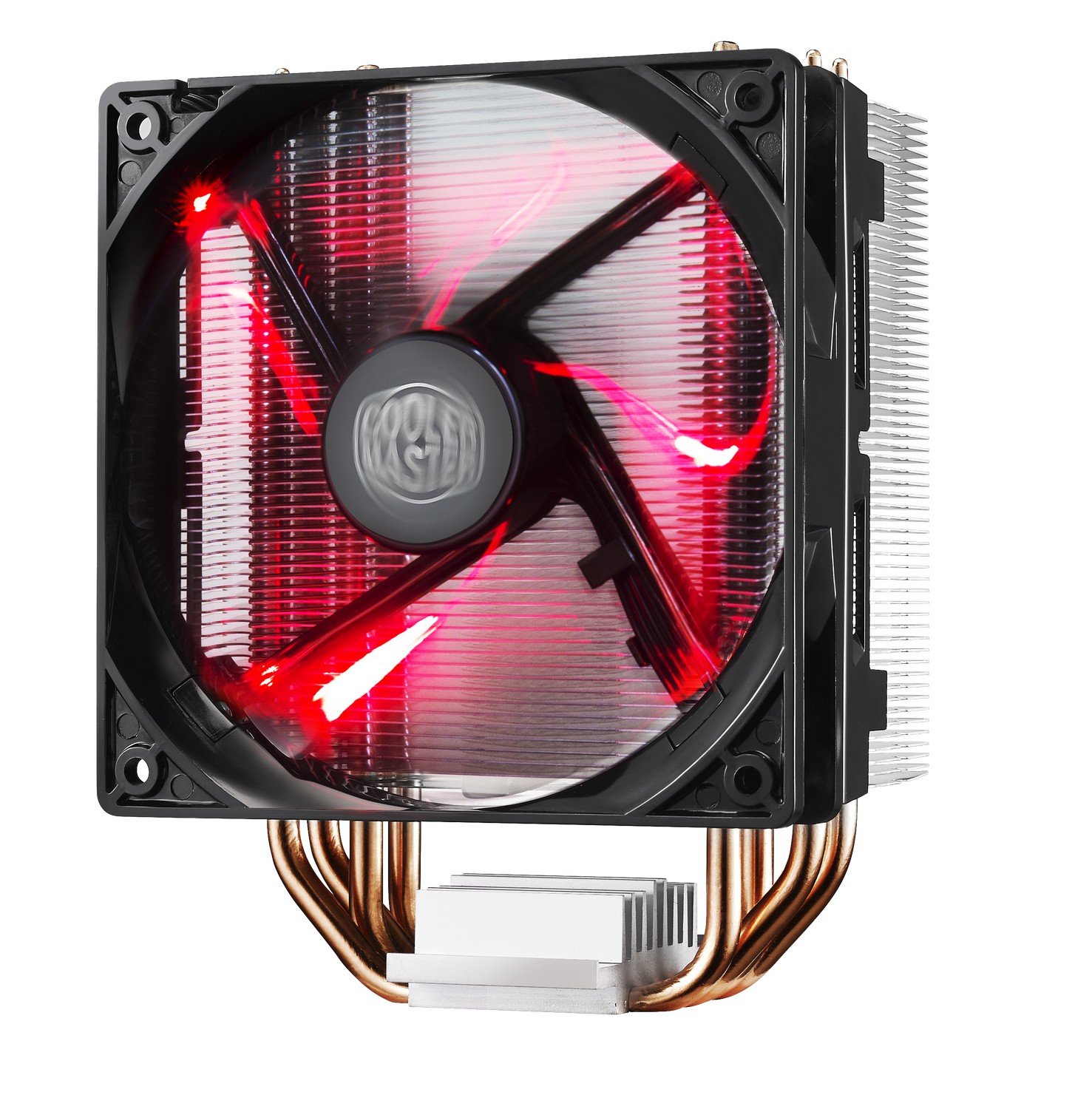
Image: The Cooler Master Hyper 212 LED CPU Cooler, showing the heatsink, fan, and copper heat pipes.
Налаштування та встановлення
Proper installation is crucial for optimal performance. Please follow these steps carefully. Refer to the official installation video for visual guidance.
- Підготуйте материнську плату: Depending on your CPU socket (Intel or AMD), select the appropriate backplate and mounting studs. Secure the backplate to the rear of your motherboard.
- Нанесіть термопасту: Clean the surface of your CPU and the cooler's base. Apply a small, pea-sized amount of the included thermal paste to the center of your CPU's integrated heat spreader (IHS). Do not spread it manually; the pressure from the cooler will distribute it evenly.
- Mount the Cooler: Carefully align the cooler with the mounting studs on the motherboard. Place the cooler onto the CPU, ensuring the heat pipes make direct contact. Secure the cooler using the provided screws, tightening them in a diagonal pattern until snug. Avoid over-tightening.
- Підключення кабелю вентилятора: Підключіть 4-контактний кабель ШІМ-вентилятора до роз'єму CPU_FAN на материнській платі.
- Check RAM Clearance: Due to the cooler's size, verify that it does not obstruct your RAM modules. If necessary, adjust RAM placement or consider low-profile ОЗУ.
Video: Official Cooler Master installation guide for the Hyper 212 LED CPU Cooler. This video demonstrates the step-by-step process of mounting the cooler onto a motherboard, including backplate installation, thermal paste application, and securing the heatsink.

Зображення: Альтернатива view of the Cooler Master Hyper 212 LED CPU Cooler, highlighting its dimensions and fan design.
Інструкція з експлуатації
The Hyper 212 LED operates automatically once installed and connected to the CPU_FAN header. The PWM function allows the motherboard to control the fan speed based on CPU temperature, ensuring efficient cooling and reduced noise levels during lighter loads.
- ШІМ-керування вентилятором: The fan speed adjusts dynamically to maintain optimal CPU temperatures.
- Red LED Illumination: The fan features integrated red LEDs that illuminate when the fan is operational. These LEDs are always on when the fan is running and cannot be independently controlled or disabled without modification.
- Напрямок потоку повітря: Ensure the fan is oriented to draw cool air through the heatsink and exhaust warm air towards your case's rear or top exhaust fans for effective system cooling.
Технічне обслуговування
Регулярне технічне обслуговування допомагає забезпечити довговічність та оптимальну продуктивність вашого процесорного кулера.
- Очищення від пилу: Periodically inspect the heatsink fins and fan blades for dust accumulation. Use compressed air or a soft brush to gently remove dust. Ensure the fan is not spinning during cleaning to prevent damage.
- Термопаста: If you remove the cooler for any reason, it is recommended to clean off the old thermal paste from both the CPU and the cooler base and apply fresh thermal paste before reinstallation.
Усунення несправностей
If you encounter issues with your Hyper 212 LED CPU Cooler, consider the following:
- Високі температури процесора:
- Переконайтеся, що кулер надійно закріплений і належним чином контактує з процесором.
- Переконайтеся, що термопаста нанесена правильно та рівномірно.
- Check that the fan cable is securely connected to the CPU_FAN header on the motherboard.
- Confirm fan is spinning. If not, check connections or consider fan replacement.
- Забезпечте належну циркуляцію повітря всередині корпусу ПК.
- Шум вентилятора:
- Перевірте, чи немає кабелів або перешкод, що торкаються лопатей вентилятора.
- Переконайтеся, що вентилятор надійно закріплений на радіаторі.
- Dust accumulation can cause increased noise; clean the fan and heatsink.
- Складнощі з встановленням:
- Refer to the detailed installation video and diagrams. Pay close attention to backplate orientation and screw placement.
- Ensure correct mounting hardware is used for your specific CPU socket.
Технічні характеристики
| Номер моделі | RR-212L-16PR-R1 |
| Розміри продукту (Д x Ш x В) | 0.9 см (Д) x 4.7 см (Ш) x 4.7 см (В) |
| матеріал | Aluminum (Heatsink), Copper (Heat Pipes) |
| Спосіб охолодження | Fan, Heat Pipes |
| Тип вентилятора | PWM Red LED Fan |
| Максимальна швидкість обертання | 1800 об / хв |
| Потужність повітряного потоку | 66.3 кубічних футів за хвилину (CFM) |
| Рівень шуму | 31 децибелів (дБ) |
| Тип роз'єму живлення | 4-контактний |
| томtage | 12 вольт |
| Wattage | 2.28 Вт |
| Сумісні пристрої | Desktop CPUs (Universal Socket Support) |
| Вага товару | 1.7 фунта |
Інформація про гарантію
This Cooler Master Hyper 212 LED CPU Cooler comes with a 1 роки гарантії. For warranty claims or detailed terms and conditions, please refer to the official Cooler Master webсайту або зв’яжіться зі службою підтримки клієнтів.
Підтримка
For further assistance, technical support, or to download the latest drivers and manuals, please visit the official Cooler Master webсайт:
You may also contact Cooler Master customer service directly for product-specific inquiries.