
1. Вступ
This manual provides detailed instructions for the installation, operation, and maintenance of your Thomson 512331 720p WiFi IP Camera. This wireless security camera features 720p HD resolution, advanced night vision, motion detection, and remote viewing capabilities via a smartphone or tablet application. Designed for outdoor use, it boasts an IP66 weather-resistant rating and a durable metal construction.
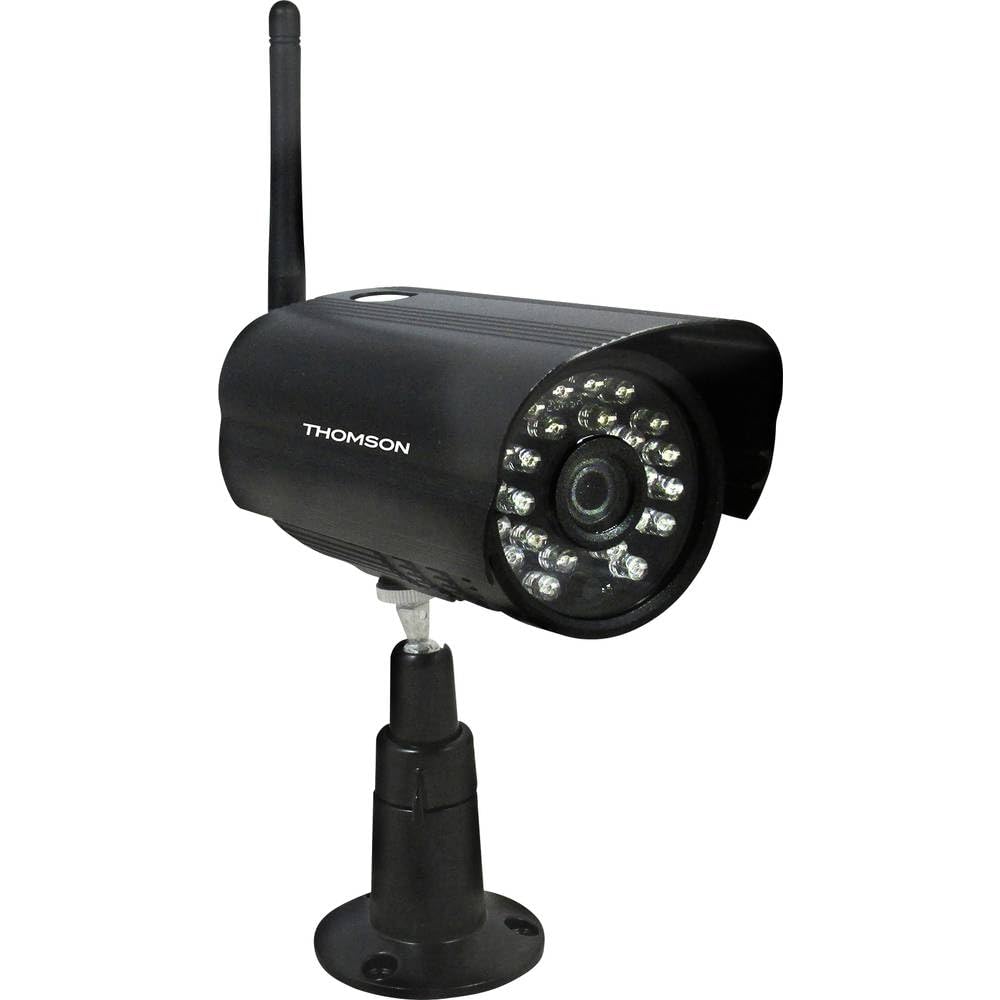
малюнок 1: Фронт view of the Thomson 512331 720p WiFi IP Camera. This image shows the camera's main body, lens, and antenna connection point, highlighting its compact and robust design suitable for outdoor surveillance.
2. Вміст упаковки
Будь ласка, перевірте, чи всі перелічені нижче предмети входять до вашої упаковки. Якщо будь-які предмети відсутні або пошкоджені, зверніться до служби підтримки клієнтів.
- Thomson 512331 IP Camera
- Power Adapter (230VAC/12VDC 500mA)
- WiFi антена
- Монтажний комплект (гвинти та дюбелі)
- Посібник користувача (цей документ)
3. Продукт закінчивсяview
The Thomson 512331 camera is designed for reliable surveillance with the following key features:
- Об'єктив: 3.6mm fixed lens for a wide field of view.
- роздільна здатність: 1280x720 (720p) HD video capture.
- Нічне бачення: Infrared night vision with 24 LEDs, providing a range of up to 20 meters. Features color night vision capability.
- Аудіо: Integrated microphone for audio acquisition.
- Підключення: Wireless Wi-Fi connectivity for flexible placement.
- Стійкість до погодних умов: IP66 rated for outdoor use, protecting against dust and powerful water jets.
- матеріал: Міцний металевий корпус.
- Потужність: 12VDC 500mA power input, maximum consumption 5W.
- Стиснення відео: H.264 for efficient storage and streaming.
- Зберігання: Supports SD card for local storage (SD card not included).
4. Налаштування
4.1 Фізичне встановлення
- Виберіть місце розташування: Select a suitable outdoor location for the camera, ensuring it has a clear view області, яку ви хочете контролювати, і яка знаходиться в межах дії вашої мережі Wi-Fi.
- Встановити камеру: Use the provided mounting kit to securely attach the camera to a wall or other stable surface. Drill pilot holes if necessary, insert wall plugs, and fasten the camera bracket with screws.
- Підключіть WiFi антену: Screw the WiFi antenna firmly onto the designated port on the camera.
- Підключіть живлення: Connect the power adapter to the camera's 12VDC input port and plug the adapter into a suitable power outlet. Ensure the power outlet is protected from weather if installed outdoors.
4.2 Network Configuration and App Setup
- Завантажте додаток: шукати the official Thomson IP Camera application on your smartphone's or tablet's app store (iOS or Android). Download and install the application.
- Створити обліковий запис: Відкрийте програму та дотримуйтесь інструкцій на екрані, щоб створити новий обліковий запис користувача або увійти, якщо у вас вже є обліковий запис.
- Додати камеру: In the app, select the option to "Add Device" or "Add Camera." Follow the in-app wizard to connect your camera to your Wi-Fi network. This typically involves scanning a QR code on the camera or entering your Wi-Fi credentials.
- Налаштувати налаштування: Once connected, you can configure various settings such as motion detection sensitivity, recording schedules, and alert notifications within the app.
5. Інструкція з експлуатації
5.1 Живий View
Open the Thomson IP Camera app on your smartphone or tablet. Select your camera from the device list to view the live video feed. You can typically switch between standard and HD resolution, and access controls for audio and recording.
5.2 Виявлення руху та сповіщення
The camera is equipped with motion detection. When motion is detected, the camera can trigger recordings and send push notifications to your connected device. Adjust motion detection sensitivity and alert preferences in the app's settings.
5.3 Нічне бачення
The camera automatically switches to infrared night vision in low-light conditions, providing clear black and white video. It also supports color night vision in certain conditions. The 24 built-in IR LEDs illuminate up to 20 meters.
5.4 Запис і відтворення
If an SD card is installed (not included), the camera can record video locally. Recordings can be triggered by motion or set on a schedule. Access recorded footagчерез функцію відтворення в додатку.
6. Технічне обслуговування
- Прибирання: Періодично очищуйте об'єктив і корпус камери м'якою губкоюamp тканиною, щоб видалити пил і бруд. Не використовуйте агресивні хімікати або абразивні засоби для чищення.
- Оновлення прошивки: Check the app regularly for firmware updates. Keeping your camera's firmware up-to-date ensures optimal performance and security.
- Джерело живлення: Переконайтеся, що адаптер живлення та кабель у належному стані та не пошкоджені.
- Wi-Fi підключення: Verify your Wi-Fi signal strength periodically to ensure a stable connection for continuous surveillance.
7. Вирішення проблем
- Камера не підключається до Wi-Fi:
- Переконайтеся, що камера знаходиться в зоні дії вашого Wi-Fi роутера.
- Перевірте, чи правильно введено пароль Wi-Fi у додатку.
- Перезавантажте роутер і камеру.
- Переконайтеся, що ваша мережа Wi-Fi працює на частоті 2.4 ГГц, оскільки мережі 5 ГГц можуть не підтримуватися.
- Без відеопотоку:
- Перевірте, чи камера увімкнена.
- Confirm a stable internet connection on both the camera and your viewпристрій.
- Перезапустіть камеру та програму.
- Виявлення руху не працює:
- Check motion detection settings in the app; ensure it is enabled and sensitivity is adjusted correctly.
- Переконайтеся, що немає перешкод, що блокують камеру view.
- Погана якість нічного бачення:
- Очистіть об’єктив камери, щоб видалити будь-який бруд або плями.
- Ensure there are no reflective surfaces close to the camera that might interfere with IR illumination.
8. Технічні характеристики
| Назва моделі | 512331 |
| Бренд | Томсон |
| Розміри (Д x Ш x В) | 50 х 50 х 28 см |
| вага | 500 грами |
| Технологія підключення | Бездротовий, Wi-Fi |
| Особливість | Нічне бачення |
| Сумісні пристрої | Планшет, Смартфон |
| Джерело живлення | AC Power (12VDC 500mA adapter) |
| Тип контролера | iOS (via application) |
| Тип монтажу | Настінне кріплення |
| Особливості продукту | Нічне бачення, Виявлення руху |
| матеріал | метал |
| Рівень водонепроникності | IP66 (водонепроникний) |
| Тип сповіщення | Motion only |
| Тип джерела світла | LED |
| Спосіб контролю | застосування |
| Споживана потужність | 5 Вт |
| Потрібні батареї | немає |
| Кількість каналів | 1 |
| Тип фокусування | Автофокус |
| Технологія оптичного датчика | BSI CMOS |
| Роздільна здатність відео | 720p (1280x720 пікселів) |
| Діапазон нічного бачення | 20 метрів |
| Тип нічного бачення | Infrared with Color Night Vision capability |
| Тип флеш-пам'яті | SD (for local storage) |
9. Гарантія та підтримка
For warranty information and technical support, please refer to the documentation provided with your purchase or visit the official Thomson webсайт. Зберігайте чек про покупку для гарантійних претензій.
Інтернет-ресурси: www.thomson.eu