
1. Вступ
Thank you for choosing the UNIC UC18 Mini Projector. This compact and portable projector is designed to provide a versatile viewing experience for home entertainment, presentations, and more. Featuring an LED lighting system, built-in speaker, and multiple input options, the UC18 offers convenience and functionality. Please read this manual thoroughly to ensure proper setup, operation, and maintenance of your device.
2. Інформація про безпеку
- Джерело живлення: Використовуйте лише зазначений адаптер живлення. Переконайтеся, що гучністьtagвідповідає вимогам проектора.
- Вентиляція: Не блокуйте вентиляційні отвори. Забезпечте достатній простір навколо проектора для належної циркуляції повітря, щоб запобігти перегріву.
- вологість: Keep the projector away from water, rain, and excessive humidity. Do not operate with wet hands.
- Прибирання: Disconnect power before cleaning. Use a soft, dry cloth. Avoid liquid or aerosol cleaners.
- Обробка: Поводьтеся з проектором обережно. Уникайте падінь та сильних ударів.
- Захист очей: Не дивіться безпосередньо в об'єктив проектора, коли він увімкнений.amp увімкнено, оскільки яскраве світло може спричинити перенапруження очей або їх пошкодження.
- Розбирання: Не намагайтеся розбирати або ремонтувати проектор самостійно. Звертайтеся до кваліфікованого персоналу для проведення будь-яких технічних робіт.
3. Вміст упаковки
Будь ласка, перевірте вміст упаковки після розпакування. Якщо будь-які елементи відсутні або пошкоджені, зверніться до продавця.
- UNIC UC18 Mini Projector
- Кабель живлення
- 3-в-1 AV-кабель
- Remote Control (requires lithium battery, not included)
- Посібник користувача
4. Продукт закінчивсяview
Схема проектора
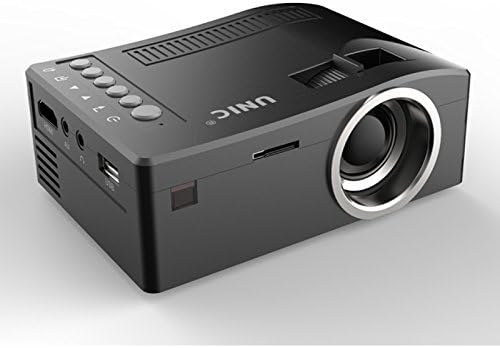
Спереду і збоку view of the UNIC UC18 Mini Projector, showing the lens, ventilation, and various ports.
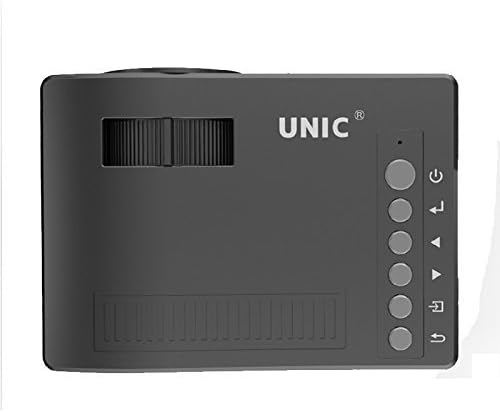
Топ view of the UNIC UC18 Mini Projector, highlighting the control buttons and focus wheel.
Порти та елементи керування
The UNIC UC18 Mini Projector features a range of ports and controls for easy connectivity and operation:
- Об'єктив: Проектує зображення на екран.
- Колесо фокусування: Ручне налаштування для чіткості зображення.
- Кнопка живлення: Вмикає або вимикає проектор.
- Кнопка меню: Доступ до меню налаштувань проектора.
- Кнопки навігації (Вгору/Вниз/Вліво/Вправо): Використовується для навігації по меню та налаштування параметрів.
- Кнопка ОК: Підтверджує вибір у меню.
- Кнопка джерела: Selects the input source (HDMI, USB, AV, TF).
- Порт USB: Підключення USB-накопичувачів для відтворення медіафайлів.
- Порт HDMI: Connects to HDMI-enabled devices like laptops, gaming consoles, or media players.
- AV-порт: Connects to devices using the included 3-in-1 AV cable.
- Слот для картки TF: Inserts a TF (Micro SD) card for media playback.
- Гніздо для навушників 3.5 мм: Connects external headphones or speakers.
- ІЧ-приймач: Отримує сигнали від пульта дистанційного керування.
5. Налаштування
5.1 Підключення живлення
- Підключіть кабель живлення до вхідного порту живлення проектора.
- Підключіть інший кінець кабелю живлення до відповідної розетки.
- Індикатор живлення на проекторі засвітиться.
5.2 Підключення пристроїв введення
- HDMI: Connect an HDMI cable from your source device (e.g., laptop, DVD player) to the projector's HDMI port.
- USB: Вставте флеш-накопичувач USB у порт USB.
- AV: Use the provided 3-in-1 AV cable to connect to devices with AV output. Match the yellow, white, and red connectors.
- Картка TF: Insert a TF (Micro SD) card into the TF card slot.
5.3 Розташування проектора
Place the projector on a stable, flat surface. For optimal image quality, position the projector perpendicular to the projection surface (wall or screen). The throw distance can range from 0.48 to 2.43 meters, producing a picture size from 12 to 66 inches.
6. Інструкція з експлуатації
6.1 Увімкнення/вимкнення
Press the Power button on the projector or the remote control to turn the device on or off.
6.2 Налаштування фокусу
After powering on, if the image appears blurry, rotate the manual focus wheel located near the lens until the image becomes clear and sharp.

Close-up of the manual focus wheel on the UNIC UC18 Mini Projector, located near the lens.
6.3 Вибір джерела вхідного сигналу
Press the 'Source' button on the projector or remote control. Use the navigation buttons to select your desired input source (HDMI, USB, AV, TF) and press 'OK' to confirm.
6.4 Навігація по меню
Press the 'Menu' button to access the projector's settings. Use the navigation buttons to browse options and 'OK' to select. Press 'Menu' again to exit.
6.5 Аудіовихід
The projector has a built-in speaker. For private listening or connecting to external audio systems, plug headphones or external speakers into the 3.5mm headphone jack.
7. Технічне обслуговування
7.1 Очищення об'єктива
Use a soft, lint-free cloth specifically designed for optical lenses. Gently wipe the lens to remove dust or smudges. Avoid using abrasive materials or harsh chemicals.
7.2 Очищення корпусу проектора
Wipe the exterior of the projector with a soft, dry cloth. Do not use liquid cleaners or solvents.
7.3 Зберігання
Якщо проектор не використовується протягом тривалого часу, зберігайте його в прохолодному, сухому місці, подалі від прямих сонячних променів та екстремальних температур. Закрийте об'єктив, щоб захистити його від пилу.
8. Вирішення проблем
| проблема | Можлива причина | Рішення |
|---|---|---|
| Не відображається зображення | Power not connected; Incorrect input source; Loose cable connection | Check power cable; Select correct input source; Reconnect cables securely |
| Зображення розмите | Фокус не налаштовано; Проектор занадто близько/далеко | Adjust the focus wheel; Reposition the projector within recommended throw distance |
| Ні звуку | Volume too low; Muted; Audio cable not connected; Source device audio issue | Increase volume; Unmute; Check audio cable connection; Verify audio output on source device |
| Пульт не працює | Batteries low/incorrectly inserted; Obstruction between remote and projector | Replace batteries (lithium battery required); Ensure clear line of sight to IR receiver |
| Проектор перегрівається | Blocked ventilation; Prolonged use in hot environment | Ensure ventilation openings are clear; Operate in a well-ventilated area; Allow to cool down |
9. Технічні характеристики
Технічні характеристики
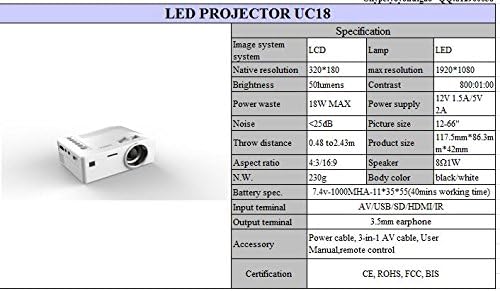
Detailed technical specifications for the UNIC UC18 Mini Projector, including resolution, contrast, and dimensions.
| Особливість | Специфікація |
|---|---|
| Бренд | UNIC |
| Назва моделі | UC18 |
| Технологія дисплея | QVGA (LCD) |
| Рідна роздільна здатність | 320 x 240 пікселів |
| Максимальна підтримувана роздільна здатність | 1920 x 1080 пікселів (1080P) |
| Яскравість | 50 люменів |
| Коефіцієнт контрастності | 500:1 |
| Співвідношення сторін | 16:9 (also supports 4:3) |
| Відстань кидка | 0.48 м - 2.43 м (1.57 фута - 7.97 фута) |
| Розмір зображення | 12 - 66 дюймів |
| Вхідні термінали | AV, USB, SD (TF), HDMI, IR |
| Вихідний термінал | Роз'єм для навушників 3.5mm |
| Особливості | Вбудований динамік, портативний |
| Споживана потужність | 24 Вт (макс. 18 Вт) |
| Джерело живлення | 12V 1.5A / 5V 2A |
| Рівень шуму | <25 дБ |
| Розміри продукту (Д x Ш x В) | 117.5 мм x 86.3 мм x 42 мм |
| Вага нетто | 230г |
| Тип монтажу | Настінне кріплення |
| Пульт дистанційного керування | Yes (battery not included) |
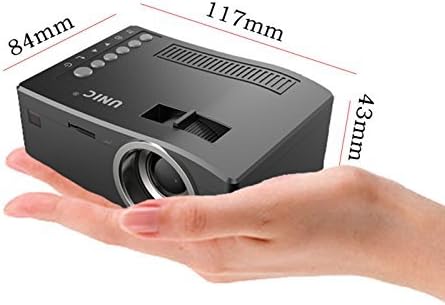
The UNIC UC18 Mini Projector held in a hand, illustrating its compact size and dimensions (117mm x 84mm x 43mm).
10. Гарантія та підтримка
Щоб отримати інформацію про гарантію або технічну підтримку, зверніться до документації, наданої під час покупки, або зверніться до продавця. Зберігайте чек про покупку для будь-яких гарантійних претензій.