
UNIC UC30 (IDSP-004)
Інструкція користувача міні-проектора UNIC UC30 LED
Model: UC30 (IDSP-004)
1. Вступ
The UNIC UC30 LED Mini Projector is a compact and versatile multimedia device designed for home theater projection. It supports a wide range of input sources and file formats, making it suitable for various entertainment and presentation needs.
Ключові особливості:
- Multiple Input Interfaces: AV, VGA, HDMI, USB, SD, and TV input.
- Екстенсивний File Format Support: Compatible with various video, audio, image, and e-book formats.
- Keystone Correction: Adjusts image distortion for optimal viewінж.
- Integrated Speaker: Built-in 2.0W *2 stereo speakers for audio output.
- Flexible Projection: Supports front and rear projection models.

Малюнок 1: Спереду view of the UNIC UC30 LED Mini Projector, showcasinйого компактний дизайн та об'єктив.
2. Налаштування
2.1 Розпакування та розміщення
Carefully remove the projector and all accessories from the packaging. Place the projector on a stable, flat surface. Ensure adequate ventilation around the unit to prevent overheating.
2.2 Підключення живлення
- Підключіть адаптер живлення до вхідного порту живлення проектора.
- Підключіть адаптер живлення до відповідної електричної розетки.
2.3 Підключення пристроїв введення
The UC30 projector offers multiple input options. Connect your desired source device (e.g., laptop, DVD player, game console, USB drive) to the corresponding port on the projector.

Малюнок 2: Задня частина view of the white UNIC UC30 projector, showing various input ports including AV, VGA, HDMI, and USB.
- HDMI: Для цифрового відео та аудіо високої чіткості.
- VGA: For connecting computers or laptops.
- AV: For standard definition video and stereo audio (using the included 3-in-1 AV cable).
- USB: Для відтворення медіа files безпосередньо з флеш-накопичувача USB.
- SD-карта: Для відтворення медіа fileбезпосередньо з карти пам'яті SD.
- телевізор: For connecting to a TV signal source (if applicable to your region/model).
2.4 Фокусування та корекція трапецієподібних спотворень
After powering on the projector, adjust the focus ring around the lens until the projected image is clear. Use the keystone correction feature (usually a dial or button on the projector) to correct any trapezoidal distortion in the image, ensuring a rectangular projection.
3. Інструкція з експлуатації
3.1 Увімкнення/вимкнення живлення
Press the power button on the projector or the remote control to turn the unit on or off. Allow a few seconds for the projector to warm up or cool down.
3.2 Вибір джерела вхідного сигналу
Use the "Source" button on the projector or remote control to cycle through the available input options (HDMI, VGA, AV, USB, SD, TV) until your desired source is displayed.
3.3 Відтворення медіафайлів (USB/SD)
When a USB drive or SD card is inserted, the projector's media player interface will typically appear. Navigate through the menus using the directional buttons on the projector or remote to select and play your desired files.
- Підтримувані формати відео: AVI, MOV, VOB, DAT, MPEG, MPG, RM, RMVB (encoding: MPEG1/MPEG2/MPEG4/DivX/Xvid).
- Підтримувані аудіоформати: MP3, WMA, WAV.
- Підтримувані формати зображень: JPEG, BMP, GIF, PNG.
- Supported E-book Format: TXT.

Figure 3: The UNIC UC30 projector displaying a video of a man in a soccer jersey, demonstrating its video playback capability.
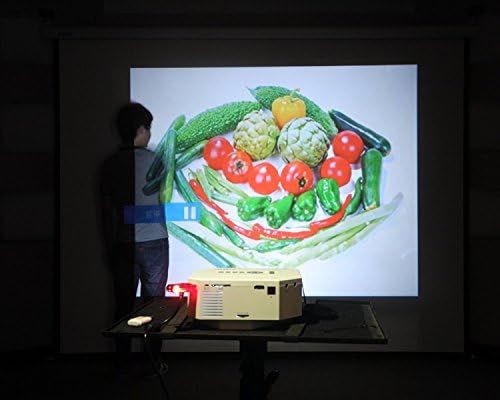
Figure 4: The UNIC UC30 projector displaying a vibrant image of vegetables, showcasing its image display quality.
3.4 Аудіовихід
The projector has built-in stereo speakers. For private listening or connecting to external audio systems, use the stereo earphone output terminal.
3.5 Projection Model
The projector supports both front and rear projection. This setting can typically be adjusted in the projector's menu to suit your setup (e.g., projecting from behind a translucent screen).
4. Технічне обслуговування
4.1 Очищення об'єктива
Використовуйте м’яку тканину без ворсу, спеціально призначену для оптичних лінз, щоб обережно протерти об’єктив проектора. Уникайте використання абразивних засобів для чищення або надмірного зусилля, які можуть подряпати об’єктив.
4.2 Очищення корпусу проектора
Протріть зовнішню частину проектора м’якою сухою тканиною. Для стійких плям злегкаamp Можна використовувати тканину, але переконайтеся, що рідина не потрапила у вентиляційні отвори.
4.3 Вентиляція
Ensure the projector's ventilation ports are clear of dust and obstructions. Proper airflow is crucial for maintaining optimal operating temperature and extending the lifespan of the LED lamp.
5. Вирішення проблем
5.1 No Image or "No Signal" Message
- Check if the projector is powered on and the power indicator light is active.
- Verify that the input cable (HDMI, VGA, AV) is securely connected to both the projector and the source device.
- Ensure the correct input source is selected on the projector (use the "Source" button).
- If using a computer, ensure its display output is enabled (e.g., press Fn + F8 or similar key combination).
5.2 Розмите зображення
- Повертайте кільце фокусування навколо об'єктива проектора, доки зображення не стане чітким.
- Переконайтеся, що відстань проекції знаходиться в межах рекомендованого діапазону (1-3.5 метрів).
- Очистіть об'єктив проектора, якщо він брудний.
5.3 Немає звуку
- Перевірте рівень гучності як на проекторі, так і на пристрої-джерелі звуку.
- Якщо ви використовуєте HDMI, переконайтеся, що вихідний пристрій передає звук через HDMI.
- Якщо ви використовуєте аудіовідео, переконайтеся, що червоний та білий аудіокабелі правильно підключені.
- If external speakers are connected, ensure they are powered on and functioning correctly.
5.4 Image Distortion (Trapezoid Shape)
- Adjust the keystone correction feature on the projector to square the image.
- Ensure the projector is placed on a level surface and is as perpendicular to the screen as possible.
6. Технічні характеристики
Below are the detailed technical specifications for the UNIC UC30 LED Mini Projector:
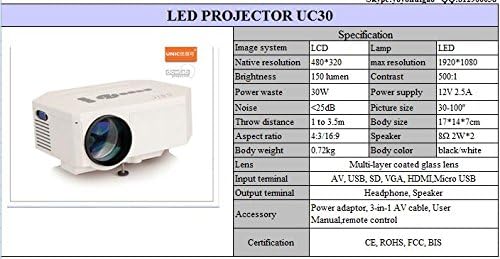
Figure 5: Official specification table for the UNIC UC30 LED Mini Projector, detailing its technical characteristics.
| Особливість | Деталь |
|---|---|
| Система зображення | ЖК |
| Рідна роздільна здатність | 480 x 320 пікселів |
| Підтримка максимальної роздільної здатності | 1920 x 1080 (Full HD) |
| Яскравість | 150 LUX (150 lumen) |
| Коефіцієнт контрастності | 500:1 |
| Споживана потужність | 30 Вт |
| Джерело живлення | 12В 2.5А |
| Рівень шуму | <25 дБ |
| Відстань кидка | Від 1 до 3.5 метрів |
| Розмір зображення | 30-120 дюймів |
| Співвідношення сторін | 4:3 / 16:9 |
| Вага тіла | 0.72 кг |
| Розмір тіла | 17 х 14 х 7 см |
| Спікер | 2.0W *2 Stereo |
| Об'єктив | Multi-layer coated glass lens |
| Вхідні термінали | AV, USB, SD, VGA, HDMI, Micro USB |
| Вихідні термінали | Stereo Earphone, Speaker |
| Аксесуари в комплекті | Power adapter, 3-in-1 AV cable, User Manual, Remote control |
| Сертифікати | CE, ROHS, FCC, BIS |
7. Гарантія та підтримка
For information regarding warranty coverage, technical support, or service, please refer to the warranty card included with your product or contact the retailer or manufacturer directly. Keep your purchase receipt as proof of purchase.
Ask a question about this manual
Ask about setup, troubleshooting, compatibility, parts, safety, or missing instructions. Manuals+ will review the question and use this page’s manual context to help answer it.