
Основи Amazon K001575
Amazon Basics LCD Computer Monitor Stand Riser User Manual
Модель: K001575 | Бренд: Amazon Basics
1. Вступ
This user manual provides comprehensive instructions for the assembly, operation, maintenance, and troubleshooting of your Amazon Basics LCD Computer Monitor Free-Standing Desk Stand Riser. Designed to enhance your ergonomic workspace, this stand allows for flexible adjustment of your monitor to achieve optimal viewкути нахилу та комфорт.

Малюнок 1.1: Спереду view of the Amazon Basics LCD Computer Monitor Stand Riser.
2. особливості
- Регулювання висоти: Set the height of your LCD for a comfortable computing experience.
- Multi-directional Movement: With fingertip effort, raise or lower your display, pan left/right, tilt, and rotate.
- Вага: Supports monitors weighing between 6-16 pounds.
- Сумісність з розміром екрана: Designed for screens up to 24 inches.
- Vertical Height Adjustment: Offers 5 inches of monitor height adjustability.
- Обертання: Monitor can be used in portrait or landscape orientation (360° rotation).
- Діапазон нахилу: +25/-5 degree tilt capability.
- Діапазон сковородок: 270° right/left pan from the base.
- Сумісність з VESA: Supports VESA 100 x 100 mm and 75 x 75 mm mounting patterns.
- Управління кабелем: Integrated cable pass-through channel near the base keeps cables organized.
3. Вміст упаковки
Будь ласка, переконайтеся, що всі компоненти присутні перед початком складання:
- Monitor Stand Base and Arm Assembly
- Монтажна пластина VESA
- Mounting Screws (various sizes for VESA 75x75mm and 100x100mm)
- Allen Key (for adjustments and assembly)

Figure 3.1: Typical components included with the monitor stand.
4. Інструкції з налаштування
- Підготуйте стенд: Place the monitor stand base on a stable, flat surface. Ensure the Allen key is accessible, often stored at the bottom of the base.
- Приєднайте пластину VESA до монітора: Carefully lay your monitor face down on a soft, clean surface to prevent scratches. Align the VESA mounting plate with the screw holes on the back of your monitor. Use the appropriate mounting screws (M4 or M5, depending on your monitor) to secure the plate to the monitor. Do not overtighten.
- Кріплення монітора на підставку: With the VESA plate attached to your monitor, carefully lift the monitor and slide the VESA plate onto the arm of the stand. Ensure it clicks securely into place.
- Adjust Tension (if necessary): If the monitor sags or is too stiff to adjust, use the included Allen key to adjust the tension screws on the arm. These are typically located near the VESA plate attachment point or along the arm's pivot points. Turn clockwise to increase tension (stiffer movement) and counter-clockwise to decrease tension (looser movement).
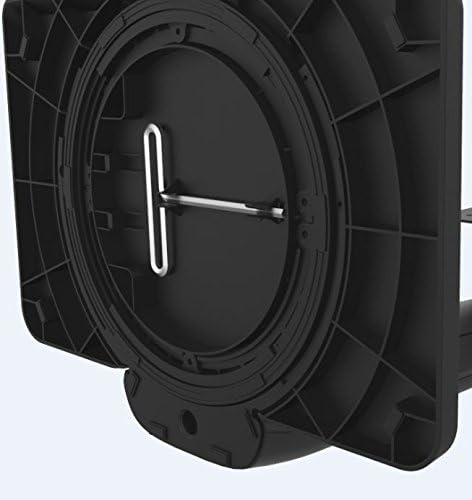
Figure 4.1: Allen key storage on the underside of the stand base.
5. Інструкція з експлуатації
The Amazon Basics LCD Monitor Riser offers a range of adjustments for optimal viewкомфорт:
- Регулювання висоти: Gently push or pull the monitor up or down to your desired height. The stand is designed to hold its position once released.
- Регулювання нахилу: Grasp the top and bottom edges of your monitor and gently tilt it forward or backward to achieve the perfect viewкут.
- Регулювання панорамування: Rotate the entire stand base left or right on your desk for horizontal viewвнесення змін.
- Обертання (портрет/альбом): Rotate the monitor 360 degrees to switch between landscape and portrait orientations. Ensure no cables are tangled during rotation.

Figure 5.1: Monitor on stand in landscape orientation.

Figure 5.2: Monitor on stand in portrait orientation, side view.
5.1. Офіційне відео продукту
Video 5.1: An official product video demonstrating the features and adjustments of the Amazon Basics LCD Monitor Stand Adjustable Riser.
6. Технічне обслуговування
- Прибирання: Використовуйте м’яку суху тканину для протирання підставки. Для стійких плям злегкаamp Можна використовувати тканину з м’яким милом, а потім висушити. Уникайте абразивних засобів для чищення або розчинників.
- Регулярні перевірки: Periodically check all screws and connections to ensure they are secure. Retighten if necessary using the provided Allen key.
- Управління кабелем: Ensure cables are routed neatly through the cable pass-through channel to prevent strain or damage.
7. Вирішення проблем
- Monitor Sags or Won't Stay Up:
This indicates that the tension on the arm is too loose. Use the Allen key to tighten the tension screws on the arm until the monitor holds its position securely. Refer to Section 4, Step 4 for guidance.
- Monitor is Too Stiff to Adjust:
The tension on the arm may be too tight. Use the Allen key to loosen the tension screws slightly until movement is smooth but still holds position.
- Коливання монітора:
Ensure the stand is placed on a stable, flat surface. Check that all assembly screws are tightened securely, including those attaching the VESA plate to the monitor and the monitor to the stand.
- Cables are Tangled:
Utilize the integrated cable pass-through channel at the base of the stand to route cables neatly. This prevents tangling and keeps your workspace tidy.
8. Технічні характеристики
| Атрибут | Значення |
|---|---|
| Номер моделі | K001575 |
| Бренд | Основи Amazon |
| матеріал | Алюміній |
| Колір | чорний |
| Вага товару | 5 фунта (2.27 кг) |
| Розміри продукту (ДxШxВ) | 12 x 10.2 x 15.8 дюйми (30.5 x 25.9 x 40.1 см) |
| Максимальний підтримуваний розмір екрана | 24 дюймів |
| Weight Adjustable Range | 6-16 pounds (2.7-7.2 kg) |
| Регульована висота | 5 дюйма (12.7 см) |
| Кут нахилу | +25/-5 градусів |
| Пан Кут | 270 degrees (right/left from base) |
| Обертання | 360 degrees (portrait/landscape) |
| Сумісність VESA | 75х75 мм, 100х100 мм |
9. Гарантія та підтримка
This product is backed by an Amazon Basics 1-Year Limited Warranty. For detailed warranty information or technical support, please refer to the official Amazon Basics webсайт або зверніться безпосередньо до служби підтримки клієнтів Amazon.
Інтернет-підтримка: Відвідайте Служба підтримки клієнтів Amazon
Ask a question about this manual
Ask about setup, troubleshooting, compatibility, parts, safety, or missing instructions. Manuals+ will review the question and use this page’s manual context to help answer it.