
1. Вступ
The COTEC SP-4000-148 is a high-frequency pure sine wave inverter designed to convert 48VDC battery power into 120VAC household electricity. This inverter delivers a continuous output of 4000W, making it suitable for various applications requiring stable and clean AC power. Its robust design and advanced features ensure reliable performance and protection for your connected devices.
Ключові характеристики:
- Чистий синусоїдальний вихід для чутливої електроніки.
- Power ON / OFF remote control capability (Green Terminal).
- Input & output fully isolated for enhanced safety.
- Temperature & load controlled cooling fan.
- User-friendly interface with 3-color LED status indicators.
- Output frequency (50/60 Hz) selectable via DIP switch.
- Вихід обtage selectable via DIP switch.
- Power saving mode adjustable via variable resistor.
- Comprehensive input protections: Reverse Polarity (Fuse), Under Voltage, Over Voltage.
- Extensive output protections: Short Circuit, Overload, Over Temperature.
- Type 1 Indoor Aluminum Enclosure.
- E13 / UL / CE / FCC approved.
2. Інформація про безпеку
Read all instructions and warnings carefully before installing or operating the inverter. Failure to follow these instructions may result in electric shock, fire, serious injury, or death.
Загальні заходи безпеки:
- Небезпека ураження електричним струмом: Цей інвертор виробляє високу гучністьtage AC power. Treat the output terminals with the same respect as any utility AC outlet.
- Кваліфікований персонал: Встановлення та обслуговування повинні виконуватися лише кваліфікованими фахівцями.
- Вентиляція: Забезпечте належну вентиляцію навколо інвертора. Не блокуйте вентиляційні отвори. Перегрів може призвести до пошкодження або пожежі.
- Середовище: Do not expose the inverter to rain, snow, spray, or any liquids. Do not operate in areas with flammable fumes or gases.
- Заземлення: The inverter must be properly grounded. Refer to the installation section for grounding instructions.
- Безпека батареї: Work near lead-acid batteries is dangerous. Batteries can generate explosive gases. Ensure proper ventilation and wear eye protection.
- Вхід постійного струму: Connect the DC input cables with correct polarity. Reverse polarity will blow the internal fuse and void the warranty.
- Перевантаження: Do not exceed the inverter's rated output power. Overloading can damage the inverter and connected appliances.
- Технічне обслуговування: Before performing any maintenance or cleaning, disconnect all power sources (DC and AC).
3. Продукт закінчивсяview
The COTEC SP-4000-148 inverter features a robust aluminum enclosure and clearly labeled connection points for ease of installation and operation. Familiarize yourself with the components before proceeding with installation.

Рисунок 3.1: Загалом view of the COTEC SP-4000-148 Pure Sine Wave Inverter. This image shows the blue aluminum casing and the grey end caps with ventilation slots.
Front Panel (AC Output Side):
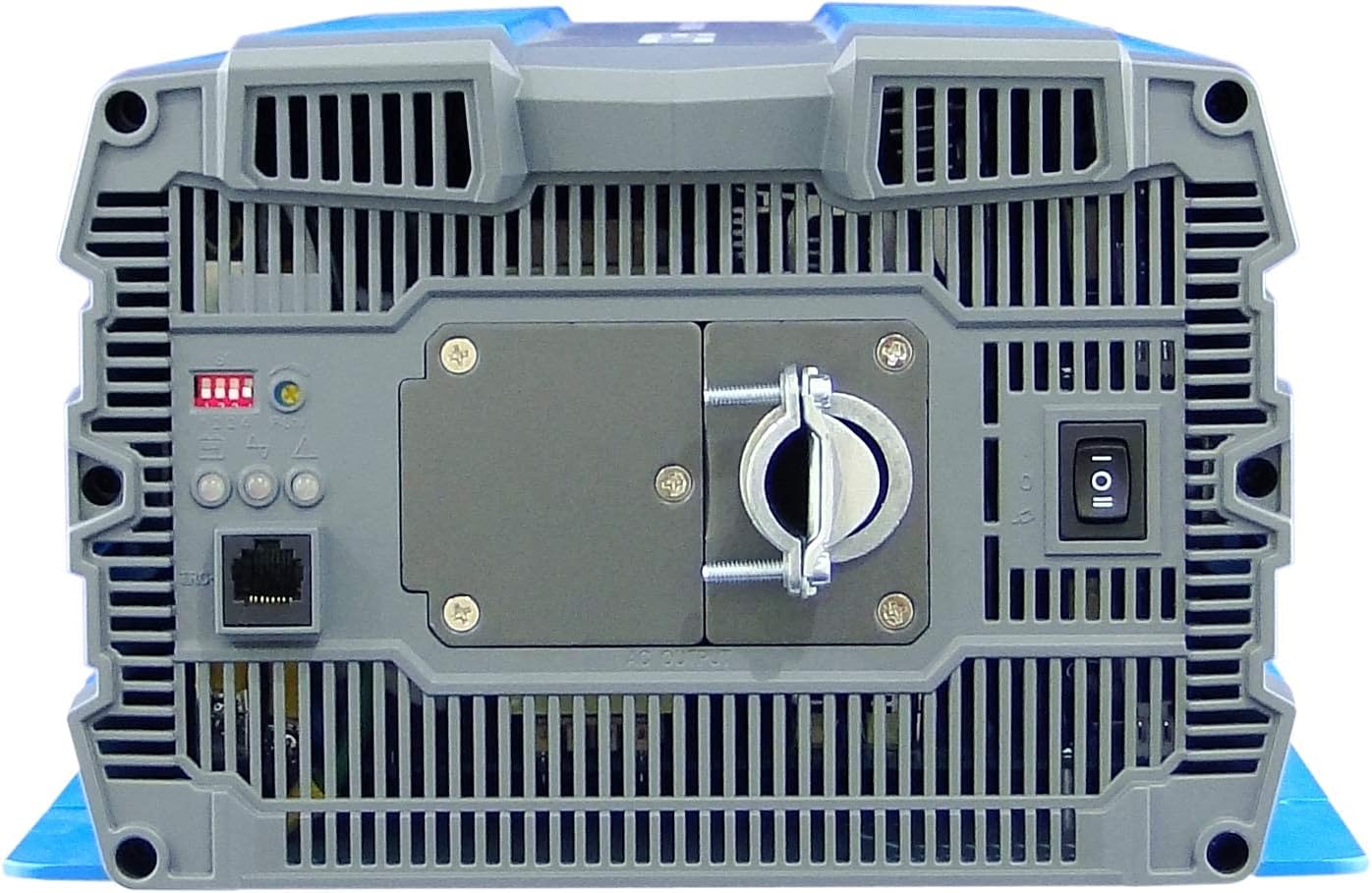
Figure 3.2: Front panel of the inverter. This view highlights the AC output terminal, the remote control terminal (green), LED status indicators, DIP switches, and the main power switch.
- Вихідний термінал змінного струму: Hardwire connection for 120VAC output.
- Remote Control Terminal (Green): For connecting an optional remote ON/OFF switch.
- Світлодіодні індикатори стану: Provide visual feedback on inverter status (Power, Fault, Overload).
- DIP-перемикачі: Used to select output frequency (50/60 Hz) and output voltage.
- Power Saving Mode Resistor: Adjustable resistor for fine-tuning power saving mode.
- Головний вимикач живлення: Керує потужністю інвертора.
Rear Panel (DC Input Side):

Figure 3.3: Rear panel of the inverter. This view shows the DC input terminals (red for positive, black for negative) and the chassis ground connection point.
- Вхідні клеми постійного струму: Heavy-duty terminals for connecting to the 48VDC battery bank. Ensure correct polarity (Red for Positive, Black for Negative).
- Chassis Ground Terminal: Для підключення інвертора до заземлення.
- Cooling Fan Vents: Ensure these vents are not obstructed for proper heat dissipation.
4. Монтаж
Правильне встановлення є вирішальним для безпечної та ефективної роботи вашого інвертора. Уважно виконайте ці кроки.
4.1 Встановлення інвертора
- Оберіть сухе, добре провітрюване місце подалі від прямих сонячних променів, джерел тепла та вологи.
- Mount the inverter on a non-combustible surface.
- Ensure there is at least 6 inches (15 cm) of clear space around all sides of the inverter for proper airflow.
- Use appropriate fasteners to secure the inverter firmly to the mounting surface.
4.2 Вхідне підключення постійного струму
УВАГА: Ensure the battery bank is disconnected or isolated before making any connections. Use appropriately sized cables and fuses/breakers.
- Connect the positive (+) DC cable (typically red) from your 48VDC battery bank to the red positive (+) terminal on the inverter's rear panel.
- Connect the negative (-) DC cable (typically black) from your 48VDC battery bank to the black negative (-) terminal on the inverter's rear panel.
- Ensure all DC connections are tight and secure to prevent loose connections and arcing.
- Install an external DC fuse or circuit breaker between the battery bank and the inverter's positive terminal, as close to the battery as possible. Consult the specifications for appropriate fuse sizing.
4.3 Підключення виходу змінного струму
The SP-4000-148 uses a hardwire AC output connection.
- Ensure the inverter is OFF and all DC power is disconnected.
- Connect your AC load wiring to the designated AC output terminal block on the front panel.
- Follow all local electrical codes for AC wiring.
- Ensure all AC connections are secure.
4.4 Заземлення
The inverter chassis must be properly grounded.
- Connect a ground wire from the chassis ground terminal on the inverter's rear panel to a reliable earth ground point.
- Ensure the ground connection is secure and meets all local electrical codes.
4.5 Підключення пульта дистанційного керування (додатково)
If using an optional remote control, connect it to the green terminal block on the front panel according to the remote control's instructions.
5. Операція
Once the inverter is properly installed and all connections are secure, you can begin operation.
5.1 Увімкнення/вимкнення
- Ensure all DC and AC connections are correct and secure.
- If an external DC breaker is installed, ensure it is closed (ON).
- Flip the main power switch on the inverter's front panel to the 'ON' position.
- The LED indicators will illuminate, and the cooling fan may briefly activate.
- Щоб вимкнути живлення, перемкніть головний вимикач живлення у положення «ВИМК.».
5.2 світлодіодні індикатори стану
The inverter features 3-color LED indicators to display its operational status:
- Зелений світлодіод: Вказує на нормальну роботу.
- Жовтий світлодіод: Indicates a warning or abnormal condition (e.g., low battery, minor overload). Refer to troubleshooting.
- Червоний світлодіод: Indicates a fault or critical error (e.g., severe overload, over-temperature, short circuit). The inverter will typically shut down. Refer to troubleshooting.
5.3 Налаштування DIP-перемикачів
The DIP switches on the front panel allow configuration of output frequency and voltage. Refer to the detailed specifications or the label on the inverter for specific switch positions for desired settings.
- Вихідна частота: Select between 50 Hz or 60 Hz.
- Вихідний випtage: Select desired AC output voltagе (наприклад, 100 В, 110 В, 115 В, 120 В).
ПРИМІТКА: Always power off the inverter before changing DIP switch settings.
5.4 Режим енергозбереження
The power saving mode can be adjusted via the variable resistor on the front panel. This mode reduces standby power consumption when no load or a very light load is detected. Adjust the resistor to set the threshold for entering/exiting power saving mode.
6. Технічне обслуговування
Регулярне технічне обслуговування забезпечує довговічність та оптимальну продуктивність вашого інвертора.
- Прибирання: Періодично очищуйте зовнішню частину інвертора сухою м’якою тканиною. Переконайтеся, що вентиляційні отвори вільні від пилу та сміття. Не використовуйте рідкі засоби для чищення.
- Перевірки підключення: Annually inspect all DC and AC connections for tightness. Loose connections can cause overheating and damage.
- Технічне обслуговування батареї: Follow the battery manufacturer's recommendations for maintenance, including checking electrolyte levels (for flooded batteries) and terminal cleanliness.
- Середовище: Переконайтеся, що температура та вологість робочого середовища залишаються в межах зазначених діапазонів.
7. Вирішення проблем
У цьому розділі наведено рішення поширених проблем, з якими ви можете зіткнутися під час використання інвертора.
| проблема | Можлива причина | Рішення |
|---|---|---|
| Inverter does not turn on (No LEDs) | No DC input power; Blown DC fuse/breaker; Loose DC connections; Reverse polarity. | Перевірте об'єм батареїtage; Check external DC fuse/breaker; Verify DC connections are tight and correct polarity. |
| Red LED illuminates, inverter shuts down | Overload; Short circuit on AC output; Over-temperature; Input over/under voltage. | Reduce AC load; Check AC wiring for short circuits; Allow inverter to cool down; Verify battery voltage знаходиться в межах робочого діапазону. |
| Yellow LED illuminates, intermittent operation | Minor overload; Low battery voltage warning; High temperature warning. | Reduce AC load; Recharge batteries; Ensure adequate ventilation. |
| No AC output, Green LED is on | AC output wiring issue; Faulty AC appliance. | Check AC output connections; Test with a different AC appliance. |
| Cooling fan runs constantly or loudly | High ambient temperature; Heavy load; Obstructed vents. | Ensure proper ventilation; Reduce load if possible; Clean vents. |
8. Технічні характеристики
The following table details the technical specifications for the COTEC SP-4000-148 Pure Sine Wave Inverter.

Figure 8.1: Detailed technical specifications for the COTEC SP-4000 series, including input, output, protection, and environmental parameters.
| Специфікація | Значення |
|---|---|
| Бренд | COTEK |
| Назва моделі | Серія SP |
| Wattage | 4000 Вт |
| Вхідний об'ємtage | 48 вольта постійного струму |
| Вихідна потужність | 4000 Вт |
| Вихідна частота | 60 Hz (Selectable) |
| Загальна кількість розеток | 1 (Hardwire) |
| Standby Power Shutoff | High Efficiency (Adjustable) |
| Тип корпусу | Type 1 Indoor Aluminum Enclosure |
| Дозволи | E13 / UL / CE / FCC |
| UPC | 648152674771 |
| Номер запчастини виробника | SP-4000-148 |
Механічні креслення:

Figure 8.2: Mechanical drawings providing dimensions for the COTEC SP-4000 series inverter, useful for installation planning.
9. Гарантія та підтримка
COTEK products are manufactured to high-quality standards. This product is covered by a manufacturer's warranty against defects in materials and workmanship. Please refer to the warranty card included with your product or visit the official COTEC webсайт для отримання детальних гарантійних умов.
Підтримка клієнтів:
For technical assistance, troubleshooting, or warranty claims, please contact COTEC customer support through their official channels. Have your product model number (SP-4000-148) and purchase information ready when contacting support.
- Webсайт: www.cotek.com.tw (Вихampле, будь ласка, перевірте офіційну інформацію webсайт)
- Електронна пошта: support@cotek.com (Exampле)
- телефон: +1-XXX-XXX-XXXX (Exampле)