
1. Продукт закінчивсяview
The Excelvan Wireless Weather Station (Model AOK-5061A) is designed to provide accurate indoor and outdoor temperature and humidity readings, along with weather forecasts and an alarm clock function. It features a large, colorful LCD display with LED backlight for easy readability.
Ключові характеристики:
- Indoor/Outdoor Temperature and Humidity Measurement
- Weather Forecast with 5 Icons (Sunny, Partially Sunny, Cloudy, Rain, Heavy Rain)
- DCF Radio-Controlled Clock with Manual Setting
- Alarm with Snooze Function
- Large Color LCD Display with LED Backlight
- DST (Daylight Saving Time) Automatic Update
- Wireless Outdoor Sensor with up to 50m range

Малюнок 1: Спереду view of the Excelvan Wireless Weather Station main unit, displaying weather forecast, outdoor/indoor temperature and humidity, and time.
2. Посібник із налаштування
2.1 Вміст упаковки
Перш ніж продовжити налаштування, переконайтеся, що всі елементи присутні в упаковці:
- 1 основний блок метеостанції
- 1 x Бездротовий пульт дистанційного керування
- 1 х адаптер змінного струму
- 1 х посібник користувача

Figure 2: The complete package contents, including the main weather station unit, wireless remote sensor, power adapter, and user manual.
2.2 Живлення головного блоку
- Battery Installation (Optional): Open the battery compartment on the back of the main unit. Insert 3 x 1.5V AA batteries (not included), ensuring correct polarity. The LED backlight will stay on for 5 minutes when powered by batteries.
- AC Power Adapter (Recommended): For continuous backlight, connect the provided AC power adapter (4.5V, 150mA) to the main unit's power input and then plug it into a wall outlet.

Малюнок 3: Задня частина view of the main unit showing the battery compartment with the cover removed, ready for battery insertion.

Малюнок 4: Задня частина view of the main unit with the AC power adapter connected, illustrating the power input port.
2.3 Powering the Wireless Remote Sensor
- Open the battery compartment of the wireless remote sensor.
- Insert 2 x 1.5V AAA batteries (not included), ensuring correct polarity.
- Надійно закрийте батарейний відсік.

Figure 5: The wireless remote sensor, showing its display and the battery compartment on the back.
2.4 Розміщення датчика
- The main unit is intended for indoor use only.
- Place the wireless remote sensor outdoors in a sheltered area, away from direct sunlight and rain, to ensure accurate readings.
- Ensure the sensor is within 50 meters (open space) of the main unit for optimal signal reception.
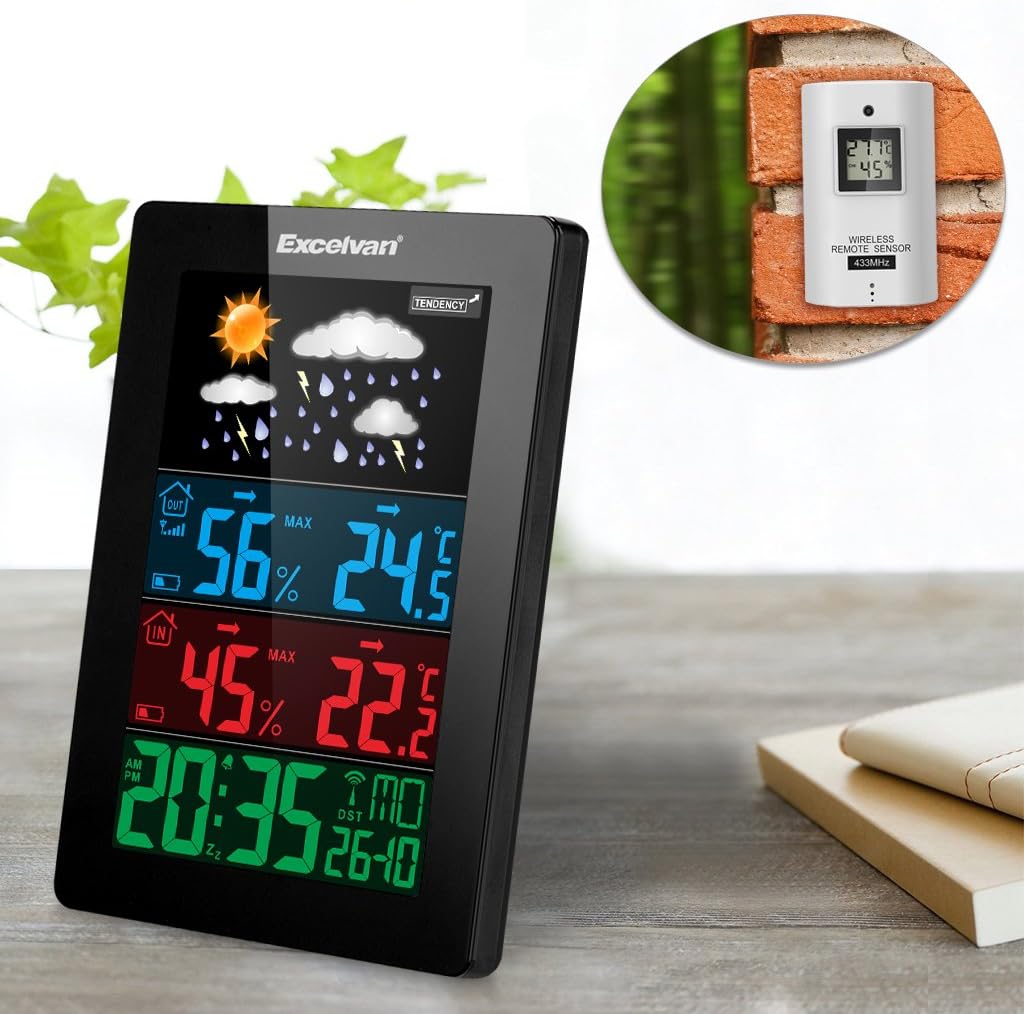
Figure 6: An illustration showing the main weather station unit indoors and the wireless remote sensor mounted on an outdoor wall.

Figure 7: A diagram highlighting the effective wireless transmission distance of 50 meters between the main unit and the remote sensor.
3. Інструкція з експлуатації
3.1 Початкова синхронізація
After powering both units, the main unit will automatically attempt to synchronize with the remote sensor and receive the DCF radio-controlled time signal. This process may take a few minutes.
3.2 Дисплей закінчивсяview
The large LCD display shows various information:
- Верхній розділ: Weather forecast icons (sunny, cloudy, rainy, etc.) and weather tendency indicator.
- Middle-Top Section (Blue): Outdoor humidity and temperature.
- Middle-Bottom Section (Red): Indoor humidity and temperature.
- Bottom Section (Green): Current time (12/24 hour format), day of the week, and date.
Figure 8: Close-up of the main unit's display, illustrating the different data sections for weather, outdoor/indoor conditions, and time.
3.3 Ручне налаштування часу та дати
While the unit is radio-controlled, manual adjustments can be made:
- Натисніть РЕЖИМ button to cycle through display modes.
- Тримайте РЕЖИМ button for a few seconds to enter time setting mode.
- Використовуйте + і - кнопки для налаштування значень.
- Прес РЕЖИМ again to confirm and move to the next setting (e.g., hour, minute, year, month, day, language for day of week).
3.4 Функції будильника та повтору
- Натисніть ТРИВОГА кнопку до view or set the alarm time.
- Тримайте ТРИВОГА кнопку для входу в режим налаштування будильника. Використовуйте + і - налаштувати.
- Щоб увімкнути/вимкнути будильник, натисніть кнопку ТРИВОГА коротко натисніть кнопку. На дисплеї з’явиться/зникне значок тривоги.
- Коли пролунає будильник, торкніться СНУЗ / СВІТЛО button on top of the unit to activate the snooze function. The alarm will sound again after a few minutes.
- To stop the alarm completely, press any other button.

Figure 9: Top edge of the main unit, highlighting the "SNOOZE/LIGHT" touch-sensitive button for alarm snooze and backlight activation.
3.5 Вибір одиниці температури
Натисніть - кнопка для перемикання між одиницями вимірювання температури за Цельсієм (°C) та Фаренгейтом (°F).
3.6 Прогноз погоди
The weather station predicts weather conditions based on atmospheric pressure changes. The icons (sunny, partially sunny, cloudy, rain, heavy rain) indicate the forecast for the next 12-24 hours, not the current weather.
4. Технічне обслуговування
- Прибирання: Протріть основний пристрій і датчик м’якою тканиноюamp тканина. Не використовуйте абразивні засоби чи розчинники.
- Заміна батареї: Replace batteries in both the main unit and the remote sensor when the low battery indicator appears on the display. Ensure correct polarity.
- Розташування датчика: Periodically check the outdoor sensor's placement to ensure it remains sheltered and within range.
- Зберігання: Якщо пристрій зберігатиметься протягом тривалого часу, вийміть усі батарейки, щоб запобігти витіканню.
5. Вирішення проблем
| проблема | Можлива причина | Рішення |
|---|---|---|
| Немає показників зовнішньої температури/вологості. |
|
|
| Неправильне відображення часу. |
|
|
| Дисплей тьмяний або порожній. |
|
|
6. Технічні характеристики
| Особливість | Деталь |
|---|---|
| Радіокерований годинник | DCF77 |
| Діапазон температур у приміщенні | Від 0 ° C до +50 ° C (від 32 ° F до 122 ° F) |
| Діапазон зовнішніх температур | Від -20 °C до +60 °C (від -4 °F до 140 °F) |
| Точність вимірювання температури | ±2 °C |
| Діапазон вологості в приміщенні/на вулиці | 20-90 % відносної вологості |
| Дозвіл вологості | 1% |
| Wireless Sensor Frequency | 433 МГц |
| Діапазон бездротового сигналу | До 50 метрів (відкритий простір) |
| Probe Cable Length (for external probe, if applicable) | 1 м |
| Waterproof Level of Sensor | IPX3 |
| Main Station Power | 3 x 1.5V AA batteries (not included) or 4.5V, 150mA AC adapter (included) |
| Живлення дистанційного датчика | 2 батарейки 1.5 В ААА (не входять в комплект) |
| Main Station Dimensions | 148 × 110 × 30 мм |
| Main Station Weight (without batteries) | 242 г |
| Remote Sensor Dimensions | 60 × 100 × 20 мм |
| Remote Sensor Weight (without batteries) | 50 г |
| Мови дня тижня | German, English, Italian, French, Dutch, Spanish, Danish |
7. Гарантія та підтримка
For warranty information or technical support, please refer to the documentation provided with your purchase or contact Excelvan customer service through their official webсайту або вашого роздрібного продавця.
Note: This manual is for informational purposes only. Specifications are subject to change without notice.