
1. Вступ
This manual provides essential instructions for the proper setup, operation, and maintenance of your YI YAS.1616.INT 4K Action Camera Kit. Please read this manual thoroughly before using the product to ensure optimal performance and safety. Keep this manual for future reference.
2. Продукт закінчивсяview
2.1 Вміст набору
The YI YAS.1616.INT 4K Action Camera Kit includes the following components:
- YI 4K Action Camera
- YI Monopod
- Bluetooth віддалений
- Акумуляторна батарея
- USB кабель
- Інструкція з експлуатації

Image 2.1: Contents of the YI 4K Action Camera Kit.
2.2 Функції камери
The YI 4K Action Camera is designed for high-quality video and photo capture, featuring:
- 4K/30fps Video Recording: Captures video at 60mbps, offering 4 times the quality of standard 1080p.
- Advanced Imaging Hardware: Equipped with an Amarelle A9SE75 chip, Sony IMX377 image sensor, and 7-layer optical glass lenses with an F2.8 large aperture for enhanced light intake.
- 2.19" LCD Touchscreen: A 640 x 360 high-resolution display with Gorilla Glass Retina for easy previewing, shooting, and scratch resistance.
- Тривалий термін служби батареї: A 1400mAh 4.4V lithium-ion battery provides up to 120 minutes of 4K/30fps video recording on a single charge.
- Ефективна система охолодження: Prevents overheating during extended recording sessions.
- Підключення: Built-in Wi-Fi for smartphone app control and Bluetooth for remote control.
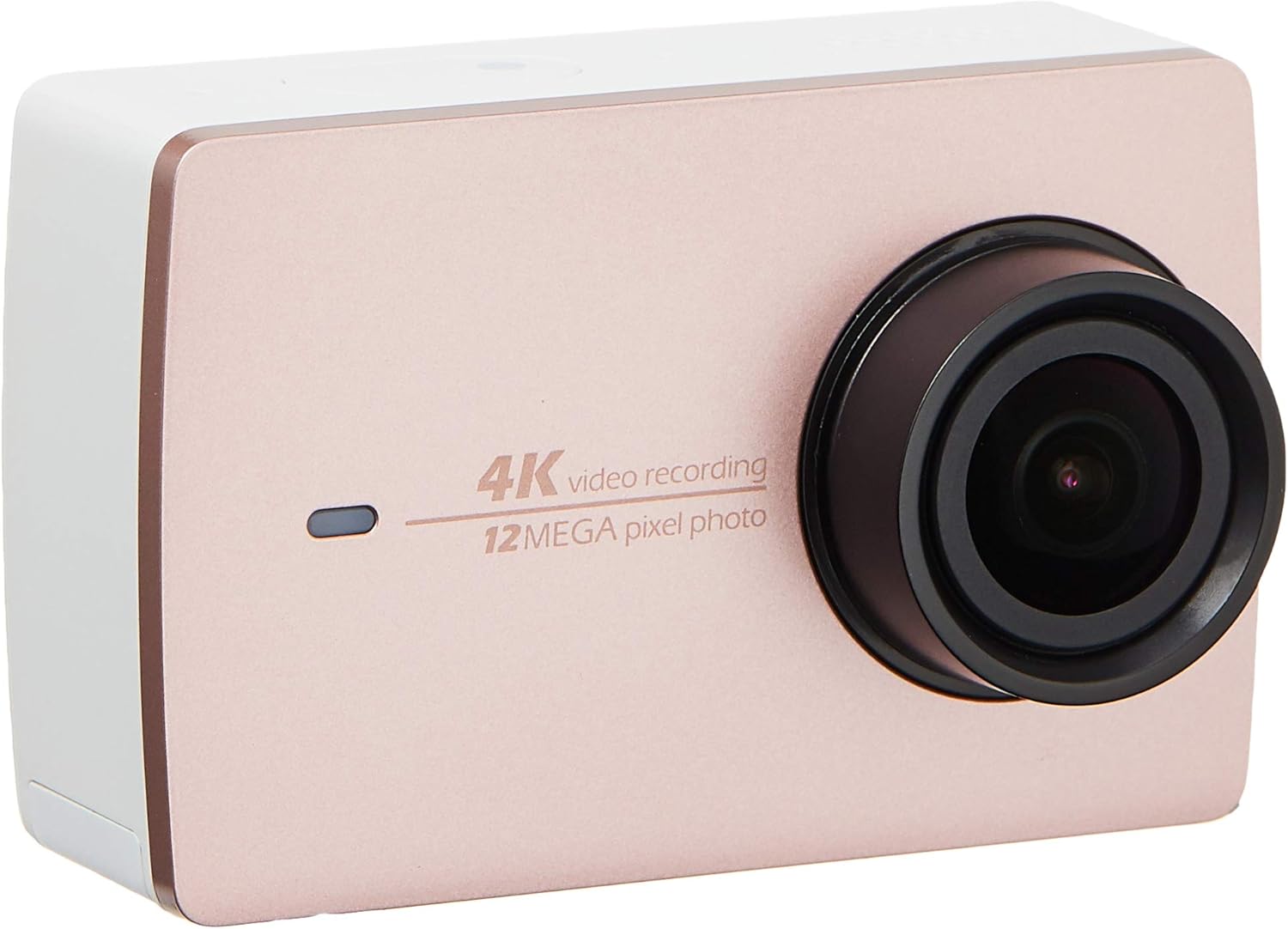
Зображення 2.2: спереду view of the YI 4K Action Camera.
3. Налаштування
3.1 Встановлення та заряджання акумулятора
- Знайдіть батарейний відсік на камері.
- Insert the 1400mAh lithium-ion battery, ensuring correct polarity.
- Надійно закрийте батарейний відсік.
- Connect the camera to a power source using the provided USB cable for charging. The charging indicator will illuminate.
3.2 Встановлення карти пам'яті
The YI 4K Action Camera supports SDHC and SmartMedia flash memory types.
- Відкрийте кришку гнізда для карти пам’яті.
- Insert a compatible memory card (not included) into the slot with the contacts facing the correct direction. Push until it clicks into place.
- Закрийте кришку гнізда для карти пам’яті.
3.3 Увімкнення/вимкнення
- Щоб увімкнути: Натисніть і утримуйте кнопку живлення, доки екран не підсвітиться.
- Щоб вимкнути: Натисніть і утримуйте кнопку живлення, доки камера не вимкнеться.
3.4 Connecting the Bluetooth Remote
The included Bluetooth remote allows for convenient control of the camera.
- Переконайтеся, що камеру ввімкнено.
- Activate Bluetooth pairing mode on the camera via the settings menu.
- Follow the remote's instructions to enter pairing mode.
- Once paired, the remote can be used to switch between video and photo modes and trigger recording/capture.

Image 3.1: The YI Monopod, included in the kit.
4. Робота з камерою
4.1 Навігація за допомогою сенсорного екрана
The 2.19" LCD touchscreen provides intuitive control:
- Проведіть пальцем: Navigate through different modes (Video, Photo, Time-lapse, etc.) and settings.
- Торкніться: Select options, adjust settings, or start/stop recording.
- попередньоview: View ваш захоплений footage and photos directly on the screen.
4.2 Відеозапис
- Select the Video mode on the touchscreen.
- Adjust video resolution (e.g., 4K/30fps) and other settings as desired.
- Press the Shutter button or tap the record icon on the screen to start recording.
- Press the Shutter button or tap the record icon again to stop recording.
4.3 Фотозйомка
- Select the Photo mode on the touchscreen.
- Adjust photo settings such as resolution, exposure, and white balance.
- Press the Shutter button or tap the capture icon on the screen to take a photo.
4.4 Підключення до Wi-Fi та використання програм
The camera's built-in Wi-Fi allows connection to a smartphone app for remote control, live preview, and content management.
- Download the official YI Action Camera app from your device's app store.
- Увімкніть Wi-Fi на камері через меню налаштувань.
- Connect your smartphone to the camera's Wi-Fi network (SSID and password displayed on camera screen).
- Open the YI Action Camera app to control the camera, view фуtagе, та перенесення files.
5. Технічне обслуговування
5.1 Очищення
- Use a soft, lint-free cloth to clean the camera body and touchscreen.
- Для лінз використовуйте спеціальну серветку та розчин для чищення лінз. Уникайте абразивних матеріалів.
- Переконайтеся, що всі порти чисті від пилу та сміття.
5.2 Зберігання
- Зберігайте камеру в прохолодному, сухому місці, подалі від прямих сонячних променів та екстремальних температур.
- Вийміть батарею, якщо зберігаєте її протягом тривалого часу, щоб запобігти витіканню.
5.3 оновлень мікропрограми
Periodically check the official YI website or the YI Action Camera app for available firmware updates. Keeping your camera's firmware updated ensures optimal performance and access to new features.
6. Вирішення проблем
6.1 Поширені проблеми та рішення
- Камера не вмикається: Переконайтеся, що акумулятор повністю заряджений та правильно вставлений.
- Запис несподівано припиняється: Check if the memory card has sufficient space or if it's a high-speed card suitable for 4K recording. Ensure the battery is not depleted.
- Сенсорний екран не реагує: Try restarting the camera. If the issue persists, ensure the screen is clean and dry.
- Пульт дистанційного керування Bluetooth не підключається: Ensure both the camera and remote are in pairing mode and within range. Check the remote's battery.
- Проблеми з підключенням Wi-Fi: Verify the camera's Wi-Fi is enabled and your smartphone is connected to the correct network. Try restarting both devices.
For further assistance, refer to the official YI support resources.
7. Технічні характеристики
| Виробник | YI |
| Номер моделі | 90010 |
| Розміри продукту | 6.6 х 3 х 4.3 см |
| вага | 96.39 г |
| Технологія фотосенсора | CMOS |
| Роздільна здатність захоплення відео | 4K |
| Максимальна фокусна відстань | 1 |
| Максимальна діафрагма | 2.8 міліметрів |
| Тип флеш-пам'яті | SDHC, SmartMedia |
| Формат захоплення відео | MP4 |
| Підтримуваний аудіоформат | AAC, MP3 |
| Розмір екрана | 2.19 дюймів |
| Технологія підключення | Wi-Fi |

Image 7.1: YI 4K Action Camera with monopod, illustrating approximate dimensions.
8. Гарантія та підтримка
8.1 Інформація про гарантію
Цей продукт поставляється з a 1 рік місцевої (Сінгапурської) гарантіїБудь ласка, збережіть чек про покупку для гарантійного обслуговування. Гарантія поширюється на виробничі дефекти за нормальних умов використання.
8.2 Підтримка клієнтів
For technical support, service, or warranty inquiries, please visit the official YI Technology website or contact their authorized service centers in Singapore. Contact information can typically be found on the product packaging or the official webсайт.