
1. Вступ
Дякуємо за покупкуasing the Axess SPBT1041 Portable Bluetooth Speaker. This device is designed to provide high-quality audio playback from various sources, including Bluetooth-enabled devices, USB drives, SD cards, and auxiliary input. It also features an FM radio function and a built-in microphone for hands-free calls. Its portable design with an adjustable strap makes it suitable for both indoor and outdoor use.
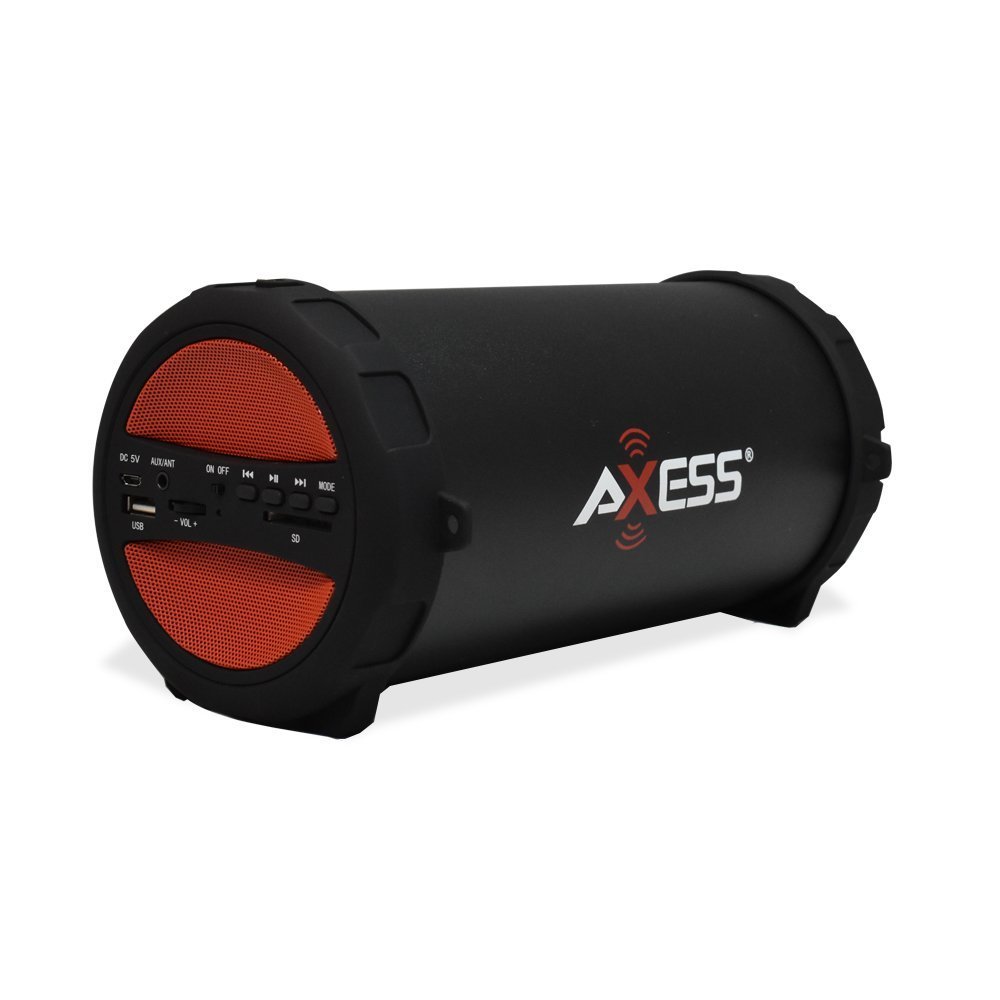
Figure 1: Axess SPBT1041 Portable Bluetooth Speaker (Red variant).

Figure 2: Key features of the SPBT1041 speaker, including FM Radio, USB Input, and AUX Input.
2. Вміст упаковки
Будь ласка, перевірте упаковку на наявність наступних предметів:
- Axess SPBT1041 Portable Bluetooth Speaker
- USB-кабель для зарядки
- Допоміжний аудіокабель
- Регульований плечовий ремінь
- Інструкція з експлуатації
3. Пристрій закінчивсяview
Ознайомтеся з елементами керування та портами динаміка.

Figure 3: Control panel and ports of the Axess SPBT1041 speaker.
- Порт DC 5V: Для зарядки колонки.
- AUX/ANT Port: For auxiliary audio input or connecting an external FM antenna.
- Перемикач ON/OFF: Вмикає або вимикає динамік.
- Порт USB: Для відтворення аудіо з USB-флеш-накопичувача.
- Слот для SD-карти: For playing audio from an SD memory card.
- Volume Control (-VOL +): Регулює гучність динаміка.
- Кнопка попереднього треку/перемотування назад: Skips to the previous track or rewinds.
- Кнопка відтворення/паузи: Plays or pauses audio. Also answers/ends calls in Bluetooth mode.
- Кнопка «Наступний трек/Швидке перемотування вперед»: Перехід до наступного треку або перемотування вперед.
- Кнопка MODE: Перемикання між режимами входу Bluetooth, FM-радіо, USB, SD та AUX.
4. Налаштування
4.1 Заряджання динаміка
Before first use, fully charge the speaker. Connect the provided USB charging cable to the DC 5V port on the speaker and the other end to a USB power source (e.g., computer USB port, USB wall adapter). The charging indicator light will illuminate during charging and turn off when fully charged.

Figure 4: The speaker can be played while charging, featuring a 1500 mAh battery.
4.2 Увімкнення/вимкнення
Посуньте УВІМК./ВИМК switch to the 'ON' position to power on the speaker. Slide it to 'OFF' to power off.
5. Інструкція з експлуатації
5.1 Режим Bluetooth
- Увімкніть динамік. Він автоматично перейде в режим сполучення Bluetooth, про що повідомить звуковий сигнал.
- Увімкніть Bluetooth на своєму мобільному пристрої (смартфоні, планшеті тощо).
- шукати available Bluetooth devices and select "SPBT1041" from the list.
- Once paired, the speaker will confirm with an audible sound. You can now play audio from your device through the speaker.
- To disconnect, disable Bluetooth on your device or press the MODE button on the speaker to switch modes.
5.2 Режим USB/SD-карти
- Вставте USB-флеш-накопичувач у USB-порт або SD-карту у гніздо для SD-картки.
- Динамік автоматично розпізнає пристрій зберігання даних і почне відтворювати аудіо files. Якщо ні, натисніть кнопку РЕЖИМ button to switch to USB or SD mode.
- Use the Previous/Next Track buttons to navigate and the Play/Pause button to control playback.
5.3 Режим FM-радіо
- Увімкніть динамік і натисніть РЕЖИМ button until you hear the FM radio prompt.
- For better reception, connect the auxiliary audio cable to the AUX/ANT port; it acts as an external antenna.
- Натисніть і утримуйте Відтворення/Пауза кнопку для автоматичного сканування та збереження доступних FM-станцій.
- Use the Previous/Next Track buttons to switch between saved stations.
5.4 Режим входу AUX
- Connect one end of the auxiliary audio cable to the AUX/ANT port on the speaker and the other end to the audio output of your external device (e.g., MP3 player, laptop).
- Натисніть РЕЖИМ кнопку, доки динамік не перейде в режим AUX.
- Керуйте відтворенням та гучністю зі свого зовнішнього пристрою.
5.5 Call Function (Bluetooth Mode)
- When a call comes in during Bluetooth mode, press the Відтворення/Пауза кнопку для відповіді.
- Натисніть Відтворення/Пауза ще раз, щоб закінчити дзвінок.
Video 1: Demonstration of the Axess Portable Bluetooth Speaker's portability and ease of use in an outdoor setting. This video showcases the speaker's design and how it can be carried with its strap, highlighting its suitability for various activities.
6. Технічне обслуговування
6.1 Очищення
Wipe the speaker with a soft, dry cloth. Do not use abrasive cleaners or solvents. Avoid exposing the speaker to excessive moisture.
6.2 Догляд за акумулятором
To prolong battery life, avoid fully discharging the speaker frequently. Recharge the battery when the low battery indicator or audible prompt is heard. If storing the speaker for an extended period, charge it to approximately 50% every few months.
6.3 Зберігання
Зберігайте динамік у прохолодному, сухому місці, подалі від прямих сонячних променів та екстремальних температур.
7. Вирішення проблем
- Немає живлення: Ensure the speaker is charged. Connect the USB charging cable and try again.
- Немає звуку: Check the volume level on both the speaker and your connected device. Ensure the correct input mode is selected (Bluetooth, USB, SD, AUX).
- Bluetooth не підключається: Ensure the speaker is in Bluetooth pairing mode. Disable and re-enable Bluetooth on your device, then search for "SPBT1041" again. Make sure the speaker is within the 30-foot operating range.
- Поганий прийом FM-сигналу: Extend the auxiliary audio cable and position it for better signal reception. Try scanning for stations again.
- USB/SD Card Not Playing: Ensure the USB drive or SD card is inserted correctly and contains compatible audio files (наприклад, формат MP3).
8. Технічні характеристики
| Особливість | Деталь |
|---|---|
| Назва моделі | SPBT1041 |
| Тип динаміка | Зовнішній, Портативний |
| Технологія підключення | Bluetooth |
| Технологія бездротового зв'язку | Bluetooth |
| Максимальна вихідна потужність динаміка | 10 Вт |
| Діаметр сабвуфера | 3 дюймів |
| Ємність акумулятора | 1500 міліamp Години (літій-іонний) |
| Джерело живлення | Працює від батареї |
| Розміри продукту | 7" Г x 8" Ш x 12" В |
| Вага товару | 2.1 фунта |
| матеріал | пластик |
| Рівень водонепроникності | Не водостійкий |
| Включені компоненти | Акумулятор |
9. Гарантія
The Axess SPBT1041 Portable Bluetooth Speaker comes with a Full Warranty. Please refer to the warranty card included in your package or contact Axess customer support for details regarding warranty terms and conditions.
10. Підтримка
For further assistance, technical support, or inquiries regarding your Axess SPBT1041 speaker, please visit the official Axess webсайт або зверніться до їхнього відділу обслуговування клієнтів. Контактну інформацію зазвичай можна знайти на упаковці продукту або на сайті виробника webсайт.