
вступ
This manual provides detailed instructions for the installation, operation, and maintenance of your INIM Alien/SN Touchscreen User Interface. Please read this manual thoroughly before using the device to ensure proper functionality and to prevent damage. Keep this manual for future reference.
Продукт закінченийview
The INIM Alien/SN is a 4.3-inch touchscreen user interface designed for i-bus systems. It integrates several features for enhanced control and monitoring within your environment.
Ключові характеристики:
- 4.3-inch Touchscreen Display
- Датчик наближення
- Датчик температури навколишнього середовища
- Integrated Microphone and Speaker
- Інтерфейс USB
- Слот для SD-карти
- Designed for i-bus systems
Компоненти:
- INIM Alien/SN Touchscreen User Interface
- SD Card (included)
- Mounting hardware (not specified, typically included with wall-mount devices)
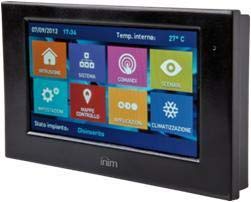
На цьому зображенні показано передню частину view of the INIM Alien/SN Touchscreen User Interface, featuring its sleek black design and the 4.3-inch display.
Налаштування
Follow these steps for the initial setup of your INIM Alien/SN Touchscreen User Interface.
1. Монтаж пристрою:
- Виберіть місце розташування: Choose a suitable wall location, ensuring it is within reach of the necessary electrical cabling and i-bus connection.
- Підготовка проводки: Ensure all power and i-bus wiring is safely routed to the mounting location.
- Безпечне кріплення: Use appropriate wall-mounting hardware to securely attach the device's backplate or mounting bracket to the wall.
- Підключіть проводку: Connect the electrical power cable and i-bus communication cables to the designated terminals on the device. Refer to the wiring diagram provided with your i-bus system documentation for specific connections.
- Підключити пристрій: Carefully attach the touchscreen unit to the mounted backplate, ensuring it clicks securely into place.
2. Початкове ввімкнення:
- Once mounted and wired, apply power to the device. The touchscreen should illuminate.
- Follow any on-screen prompts for initial configuration, such as language selection or network settings.
3. SD Card and USB:
- The included SD card is typically used for firmware updates, configuration backups, or data logging. Insert it into the designated slot if not already pre-installed.
- The USB interface can be used for direct connection to a computer for advanced configuration or diagnostics using INIM software.
Інструкція з експлуатації
The INIM Alien/SN features an intuitive touchscreen interface for easy navigation and control.
1. Touchscreen Navigation:
- Торкніться: Lightly touch the screen to select icons, buttons, or menu items.
- Проведіть пальцем: Drag your finger across the screen to scroll through lists or switch between screens.
- Датчик наближення: The screen may automatically activate or adjust brightness when you approach it.
2. Контроль системи:
- Access various functions of your i-bus system, such as arming/disarming security zones, viewing system status, or controlling connected devices.
- Specific menu structures and options will depend on your i-bus system configuration.
3. Audio Functions:
- The integrated microphone and speaker allow for two-way audio communication, typically used for intercom functions or alarm verification within the i-bus system.
- Adjust volume settings through the on-screen menu.
4. Моніторинг температури:
- The ambient temperature sensor displays the current room temperature.
- If configured as a thermostat, you can view and adjust temperature setpoints for HVAC systems directly from the interface.
Технічне обслуговування
Regular maintenance ensures the longevity and optimal performance of your touchscreen user interface.
Прибирання:
- екран: Злегка протріть м’якою тканиною без ворсу dampводою або неабразивним засобом для чищення екранів. Не розпилюйте засіб для чищення безпосередньо на екран.
- Casing: Wipe the plastic casinм’якою сухою тканиною. Уникайте використання агресивних хімікатів або абразивних матеріалів.
Оновлення програмного забезпечення:
- Periodically check the INIM Electronics website or consult your system installer for available firmware updates.
- Updates can be applied via the USB interface or by loading files onto the SD card, as per specific instructions provided with the update.
Усунення несправностей
If you encounter issues with your INIM Alien/SN, refer to the following common problems and solutions.
Пристрій не вмикається:
- Перевірте підключення живлення: Ensure the electrical cable is securely connected and receiving power.
- Verify i-bus Connection: Confirm the i-bus communication cable is properly connected, as some systems draw power through this connection.
- Автоматичний вимикач: Check your building's circuit breaker for any tripped circuits.
Сенсорний екран не реагує:
- Перезавантажте пристрій: If possible, power cycle the device by temporarily disconnecting and reconnecting its power source.
- Чистий екран: Ensure the screen is clean and free of dirt or moisture that might interfere with touch detection.
Немає звуку з динаміка/мікрофона:
- Налаштування гучності: Check the on-screen volume settings to ensure they are not muted or set too low.
- Конфігурація системи: Verify that audio functions are enabled and correctly configured within your i-bus system settings.
For persistent issues, contact your system installer or INIM Electronics technical support.
Технічні характеристики
| Особливість | Специфікація |
|---|---|
| Виробник | ІНІМ Електроніка |
| Номер моделі | 8050617014619 |
| Тип дисплея | 4.3-дюймовий сенсорний екран |
| Колір | чорний |
| матеріал | пластик |
| Джерело живлення | Електричний кабель |
| Підключення | USB |
| Особливості | Integrated Microphone, Ambient Temperature Sensor, Proximity Sensor |
| Включені компоненти | SD-карта |
| Тип монтажу | Настінне кріплення |
| Розміри продукту | 15 х 10 х 3 см |
| Вага продукту | 250 грами |
Гарантія та підтримка
For warranty information, please refer to the documentation provided by your retailer or visit the official INIM Electronics webсайт. Гарантійні умови можуть відрізнятися залежно від регіону та місця придбання.
For technical support, assistance with installation, or troubleshooting beyond the scope of this manual, please contact your authorized INIM Electronics dealer or system installer. You may also find additional resources and contact information on the official INIM Electronics webсайт.
Webсайт: www.inim.biz (Please note: This is a generic placeholder for the manufacturer's website. Verify the correct URL if available.)