
Naztech N750
Naztech N750 Emerge Wireless Bluetooth Headset User Manual
Модель: N750
вступ
Thank you for choosing the Naztech N750 Emerge Wireless Bluetooth Headset. This manual provides detailed instructions on how to set up, operate, and maintain your headset to ensure optimal performance and longevity. The N750 Emerge is designed for clear communication and media playback, featuring advanced noise cancellation and versatile connectivity.
Вміст упаковки

Image: Contents of the Naztech N750 Emerge package.
- Naztech N750 Emerge Wireless Headset
- Автомобільний зарядний пристрій
- Ear Gels (S/M/L)
- Посібник користувача
- Flat Micro USB Cable
Продукт закінченийview
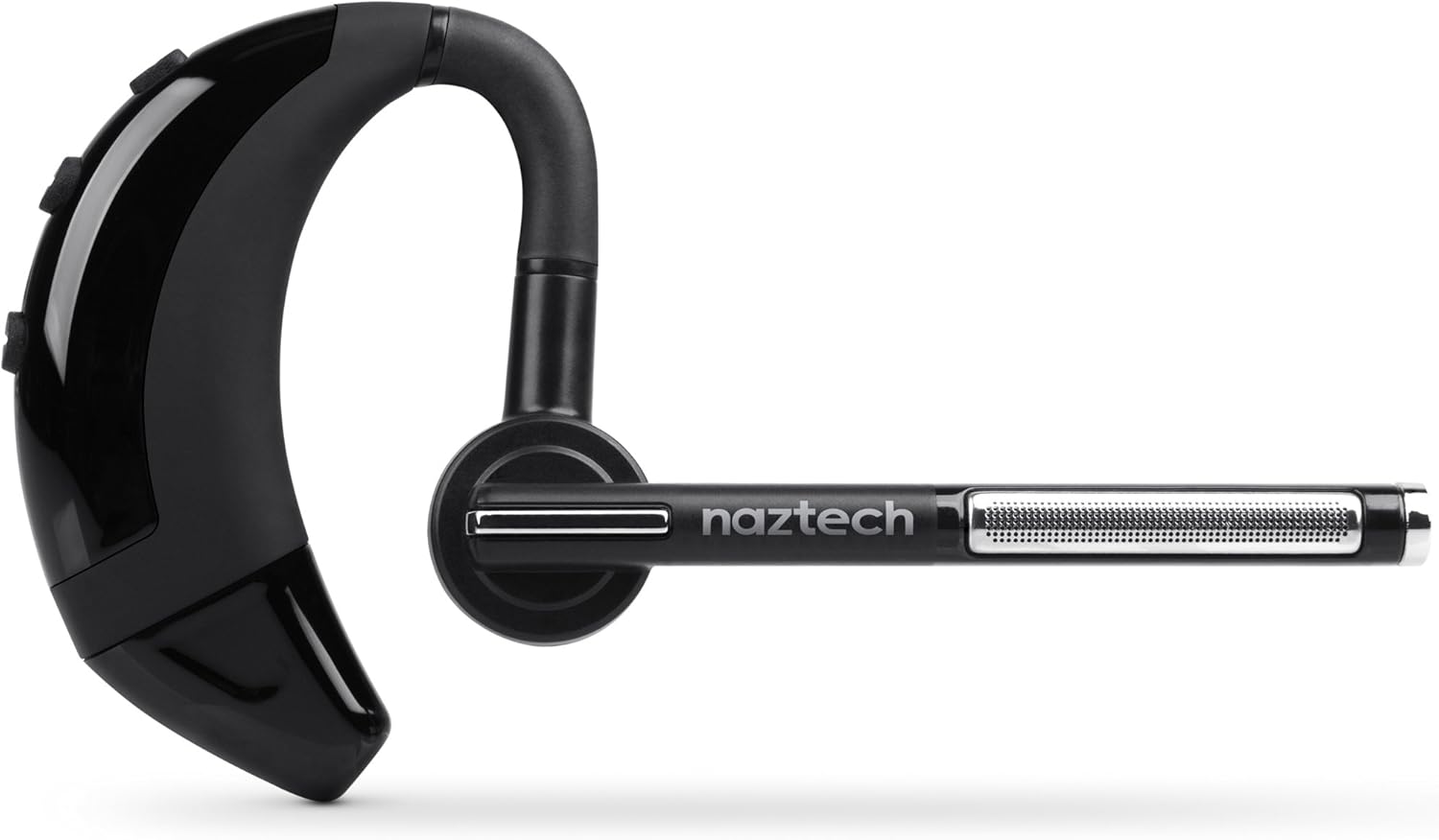
Image: The Naztech N750 Emerge Wireless Bluetooth Headset.
The Naztech N750 Emerge features an ergonomic design for comfortable wear and intuitive controls for easy operation. Key components include the ear hook, main body with control buttons, microphone boom, and ear tip.
Налаштування
1. Заряджання гарнітури
Before first use, fully charge the N750 Emerge headset. Connect the provided Micro USB cable to the charging port on the headset and the other end to a USB power source (e.g., the included car charger, a computer USB port, or a wall adapter). The LED indicator will show charging status and turn off or change color when fully charged.
2. Сполучення з пристроєм Bluetooth
- Переконайтеся, що гарнітуру вимкнено.
- Press and hold the Multi-function Button (MFB) on the headset until the LED indicator flashes blue and red alternately, indicating pairing mode.
- On your smartphone or Bluetooth-enabled device, go to the Bluetooth settings and enable Bluetooth.
- шукати available devices. Select "Naztech N750" from the list.
- Якщо буде запропоновано ввести пароль, введіть «0000» (чотири нулі).
- Після успішного сполучення світлодіодний індикатор повільно блиматиме синім кольором, і ви можете почути звуковий сигнал підтвердження.
3. Носіння гарнітури

Image: The Naztech N750 Emerge headset demonstrating its 180-degree swivel for left or right ear use.
The N750 Emerge is designed for comfortable wear on either the left or right ear. The ear hook swivels 180 degrees to accommodate your preference. Adjust the ear hook and select the appropriate ear gel size (S/M/L) for a secure and comfortable fit. The microphone boom should be positioned towards your mouth for optimal voice pickup.
Інструкція з експлуатації
Увімкнення/вимкнення живлення
- Увімкнення: Press and hold the MFB for approximately 3 seconds until the LED flashes blue.
- Вимкнення живлення: Press and hold the MFB for approximately 5 seconds until the LED flashes red and then turns off.
Управління дзвінками

Image: The headset's advanced call technology automatically pauses music and routes incoming calls.
- Відповісти на дзвінок: Press the MFB once when a call comes in.
- Завершити виклик: Натисніть багатофункціональну кнопку один раз під час дзвінка.
- Відхилити виклик: Press and hold the MFB for approximately 2 seconds when a call comes in.
- Повторний набір останнього номера: Double-press the MFB when the headset is idle.
- Голосовий набір: Press the MFB once when the headset is idle to activate your phone's voice assistant (if supported).
Регулювання гучності
Use the Volume Up (+) and Volume Down (-) buttons on the headset to adjust the call or media volume.
GPS & Voice Prompt / Caller ID Announcement

Image: The headset provides GPS voice prompts and announces caller ID for incoming calls.
The N750 Emerge supports voice prompts for GPS navigation and announces the caller ID for incoming calls, allowing for hands-free information and call management.
Відтворення музики
When connected to a device, the headset can play audio. Use your device's controls for play/pause, skip track, etc. Incoming calls will automatically pause music playback.
Багатоточкова технологія

Image: The headset supports Multipoint Technology for connecting to two devices simultaneously.
The N750 Emerge supports multipoint technology, allowing it to be connected to two Bluetooth devices simultaneously. This enables seamless switching between calls or audio from two different paired devices.
шумозаглушення

Image: The headset utilizes Noisehush Technology for crystal clear conversations with noise cancellation.
The integrated Noisehush® Technology provides ultimate HD clarity and noise cancellation, ensuring crystal clear conversations for both you and your callers by reducing distracting ambient sound.
Технічне обслуговування
- Clean the headset regularly with a soft, dry cloth. Do not use harsh chemicals or abrasive cleaners.
- Avoid exposing the headset to extreme temperatures, moisture, or direct sunlight.
- Зберігайте гарнітуру в прохолодному сухому місці, коли вона не використовується.
- Do not attempt to disassemble or modify the headset, as this will void the warranty and may cause damage.
Усунення несправностей
| проблема | Можлива причина | Рішення |
|---|---|---|
| Гарнітура не вмикається. | Батарея низького заряду або розряджена. | Повністю зарядіть гарнітуру. |
| Не вдається з’єднати пристрій. | Гарнітура не в режимі сполучення; Bluetooth вимкнено на пристрої; пристрій занадто далеко. | Ensure headset is in pairing mode (flashing blue/red). Turn on Bluetooth on your device. Move headset closer to device (within 10 meters). |
| Немає звуку або гучність низька. | Volume too low; headset not connected; incorrect audio output selected. | Increase volume on headset and device. Reconnect headset. Ensure audio is routed to the headset on your device. |
| Poor call quality / Noise. | Weak signal; environmental interference; microphone not positioned correctly. | Move closer to the paired device. Avoid strong electromagnetic interference. Adjust microphone boom towards your mouth. |
Технічні характеристики
- модель: N750 Emerge
- Версія Bluetooth: v4.1
- Технології бездротового зв'язку: Bluetooth
- Технологія підключення: Бездротовий
- Звук шуму: Noisehush® Technology
- Багатоточкова технологія: так
- iOS Battery Tracker: так
- Час розмови: До 8 годин
- Час очікування: До 140 годин
- Батарея: Потрібен 1 літій-іонний акумулятор
- Розміри продукту: 10.16 х 10.16 х 2.54 см
- Вага товару: 22.7 г
- колір: чорний
Гарантія та підтримка
Naztech products are designed and manufactured to the highest quality standards. For warranty information and technical support, please refer to the warranty card included with your product or visit the official Naztech webсайт. Зберігайте чек про покупку як підтвердження покупки для гарантійних претензій.
Ask a question about this manual
Ask about setup, troubleshooting, compatibility, parts, safety, or missing instructions. Manuals+ will review the question and use this page’s manual context to help answer it.