
1. Вступ
This manual provides detailed instructions for the installation, operation, and maintenance of your Alpine CDE-163BT Advanced Bluetooth CD Receiver. Please read this manual thoroughly before using the unit to ensure proper operation and to prevent damage. Keep this manual for future reference.
The Alpine CDE-163BT is a versatile car stereo receiver featuring advanced Bluetooth connectivity for hands-free calling and audio streaming, CD playback, USB input, and FM/AM tuner capabilities. It is designed to deliver high-quality audio performance and user-friendly control.
2. Налаштування та встановлення
2.1 Вміст упаковки
Перед початком встановлення перевірте наявність усіх компонентів:
- Alpine CDE-163BT Head Unit
- Джгут
- Mounting Sleeve and Trim Ring
- Microphone for Bluetooth Hands-Free Calling
- Посібник користувача (цей документ)
- Кріпильні елементи (гвинти, кронштейни)
2.2 Схема підключення
Refer to the wiring diagram provided with the unit's installation guide for specific connections. Key connections include:
- Потужність: Yellow (constant 12V), Red (switched 12V), Black (ground).
- Доповідачі: White/White-Black (Front Left), Gray/Gray-Black (Front Right), Green/Green-Black (Rear Left), Purple/Purple-Black (Rear Right).
- Антена: Blue (power antenna/amplifier remote turn-on).
- Мікрофон: Connect the supplied microphone to the dedicated input for hands-free calling.
Увага: Incorrect wiring can cause damage to the unit or vehicle's electrical system. If you are unsure about any wiring connections, consult a qualified professional installer.
2.3 Початкове ввімкнення
Після встановлення увімкніть запалювання автомобіля. Пристрій має увімкнутися. Дотримуйтесь будь-яких підказок на екрані для початкового налаштування, таких як вибір мови або налаштування годинника.
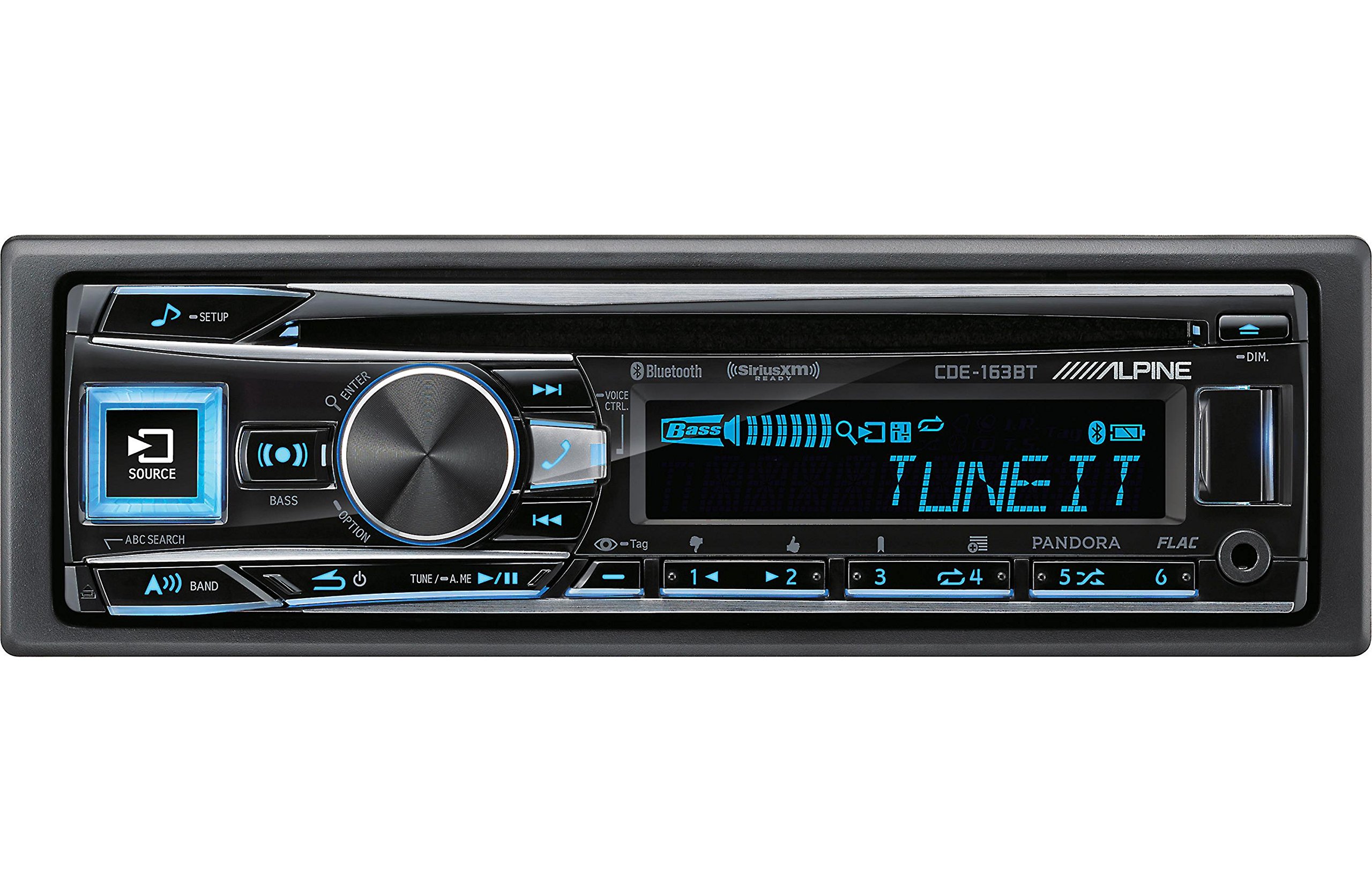
Figure 2.3.1: Front panel of the Alpine CDE-163BT receiver. This image displays the main controls, including the large rotary knob, source button, setup button, and display screen showing "TUNEIT" and "Bass" indicators.
3. Операція
3.1 Елементи керування на передній панеліview
Ознайомтеся з основними елементами керування на передній панелі:
Малюнок 3.1.1: Детально view of the Alpine CDE-163BT front panel. Key controls include the SOURCE button (left, illuminated), SETUP button (top left), large central rotary knob for volume and selection, BASS/OPTION button, VOICE CTRL button, and various preset/track skip buttons along the bottom.
- Кнопка SOURCE: Selects the audio source (CD, Tuner, USB, Bluetooth Audio, AUX).
- Кнопка SETUP: Accesses the main setup menu for system adjustments.
- Rotary Knob (Volume/ENTER): Turns to adjust volume. Press to confirm selections in menus.
- BASS/OPTION Button: Provides quick access to bass settings or other options depending on the current mode.
- VOICE CTRL Button: Activates voice control features on connected smartphones.
- Кнопка BAND: Switches between FM1, FM2, FM3, and AM bands in tuner mode.
- TUNE/A.ME/II Buttons: Used for manual tuning, auto memory, and play/pause functions.
- Track Skip/Preset Buttons (1-6): Used for skipping tracks or selecting radio presets.
- Кнопка DIM: Регулює яскравість дисплея.
3.2 Power On/Off and Source Selection
- Щоб повернути агрегат ON, press any button (e.g., SOURCE or the Rotary Knob).
- Щоб повернути агрегат ВИМКНЕНО, press and hold the power button (often integrated with the TUNE/A.ME button).
- Натисніть ДЖЕРЕЛО button repeatedly to cycle through available audio sources: CD, Tuner, USB, Bluetooth Audio, AUX.
3.3 Регулювання гучності
Rotate the large central Поворотний ручок за годинниковою стрілкою для збільшення гучності та проти годинникової стрілки для зменшення гучності.
3.4 Параметри звуку
Натисніть BASS/OPTION button or navigate through the SETUP menu to adjust audio settings such as Bass, Treble, Balance (left/right), and Fader (front/rear). Use the Rotary Knob to adjust values and press it to confirm.
3.5 Radio Operation (FM/AM Tuner)
- Select "Tuner" as the source using the ДЖЕРЕЛО кнопку.
- Натисніть БЕНД кнопку для перемикання між діапазонами FM1, FM2, FM3 та AM.
- Ручна настройка: Натисніть НАСТРОЙКА buttons (◀ / ▶) to manually tune frequencies.
- Шукати тюнінг: Натисніть і утримуйте НАСТРОЙКА кнопки для автоматичного пошуку наступної станції з сильним сигналом.
- Попередньо встановлені станції: To store a station, tune to the desired frequency, then press and hold one of the numbered preset buttons (1-6) until you hear a beep. To recall a preset, simply press the corresponding numbered button.
3.6 Відтворення CD
- Вставте компакт-диск у дисковод. Пристрій автоматично перемкнеться на джерело компакт-диска та розпочне відтворення.
- Use the ◀ / ▶ buttons to skip tracks.
- Натисніть TUNE/A.ME/II button for Play/Pause.
- Натисніть ABC SEARCH button to search for tracks by name.
3.7 Підключення Bluetooth
The CDE-163BT features built-in Bluetooth for hands-free calling and audio streaming.
3.7.1 Сполучення пристрою Bluetooth
- Переконайтеся, що Bluetooth увімкнено на вашому мобільному пристрої.
- On the CDE-163BT, go to the SETUP menu and select "Bluetooth Setup".
- Choose "Pairing" or "Device Search".
- On your mobile device, search for available Bluetooth devices and select "Alpine CDE-163BT".
- Confirm the pairing code if prompted. Once paired, the Bluetooth icon on the receiver's display will illuminate.
3.7.2 Дзвінки в режимі «вільні руки»
- Коли надходить дзвінок, пристрій відображатиме ідентифікатор абонента. Натисніть кнопку ENTER button (Rotary Knob) to answer.
- Щоб завершити дзвінок, натисніть ENTER кнопку знову.
- Use the supplied microphone for clear communication.
- Натисніть VOICE CTRL button to activate your smartphone's voice assistant.
3.7.3 Потокове передавання аудіо через Bluetooth
- Select "Bluetooth Audio" as the source.
- Start playback on your paired mobile device. Audio will stream through the receiver.
- Use the ◀ / ▶ buttons on the receiver to skip tracks.
3.8 Відтворення з USB
- Connect a USB storage device (e.g., USB flash drive) to the USB port.
- Select "USB" as the source. The unit will automatically detect and begin playing compatible audio files (including FLAC format).
- Use the ◀ / ▶ buttons to skip tracks.
- The unit supports various audio formats.
3.9 Pandora and SiriusXM Ready
- Пандора: Connect your iPhone or Android smartphone via USB or Bluetooth and launch the Pandora app. Select Pandora as the source on the receiver to control the app.
- SiriusXM: This unit is SiriusXM Ready. An optional SiriusXM Connect Vehicle Tuner and subscription are required for satellite radio reception. Connect the tuner and select SiriusXM as the source.
3.10 Налаштування дисплея
- Натисніть DIM button to adjust the display brightness.
- Access the SETUP menu to customize display colors for buttons and the screen.
4. Технічне обслуговування
4.1 Очищення пристрою
Протріть передню панель м’якою сухою тканиною. Для стійких плямampen the cloth lightly with water. Avoid using harsh chemicals, abrasive cleaners, or solvents as they can damage the finish.
4.2 Догляд за диском
Handle CDs by their edges. Keep discs clean and free of scratches. If a disc is dirty, wipe it gently from the center outwards with a soft, lint-free cloth. Do not use solvents or abrasive cleaners on discs.
5. Вирішення проблем
If you experience issues with your CDE-163BT, refer to the table below for common problems and solutions.
| проблема | Можлива причина | Рішення |
|---|---|---|
| Немає живлення | Неправильна проводка; перегорілий запобіжник; вимкнене запалювання автомобіля. | Перевірте підключення живлення; замініть запобіжник; увімкніть запалювання автомобіля. |
| Ні звуку | Занадто низька гучність; увімкнено вимкнення звуку; неправильне підключення динаміків; Ampвимикач вимкнений. | Збільшити гучність; Вимкнути звук; Перевірити підключення динаміків; Перевірити ampживуча сила. |
| Bluetooth не підключається | Пристрій не в режимі сполучення; Bluetooth вимкнено на телефоні; Перешкоди. | Ensure phone Bluetooth is on and discoverable; Re-attempt pairing; Move closer to unit. |
| Компакт-диск пропускає або не відтворюється | Dirty or scratched disc; Disc inserted incorrectly. | Clean disc; Insert disc correctly; Try a different disc. |
| USB-пристрій не розпізнано | Несумісний формат; пошкоджений USB-пристрій; ненадійне з’єднання. | Забезпечити files are compatible; Try a different USB device; Reconnect USB device. |
If the problem persists after attempting these solutions, please contact Alpine customer support.
6. Технічні характеристики
Below are the technical specifications for the Alpine CDE-163BT Advanced Bluetooth CD Receiver:
- Номер моделі: 79380
- Розміри продукту: 5 x 11 x 10 дюймів
- Вага товару: 4.05 фунта (4.1 фунта)
- Технології бездротового зв'язку: Bluetooth
- Технології підключення: Bluetooth
- Особливості: Built-In Bluetooth, FM Tuner
- Інші функції дисплея: Бездротовий
- колір: ЧОРНИЙ
- Виробник: Альпійський
- Технологія підключення: Bluetooth
- Сумісні пристрої: Смартфон
- Тип роз'єму: Роз'єм 3.5 мм, USB
- Режим аудіовиходу: Моно, стерео
- Конфігурація каналу об'ємного звуку: 4 канал
- Wattage: 200 Вт
- Дата першої доступності: 19 січня 2016 р
7. Гарантія та підтримка клієнтів
7.1 Інформація про гарантію
Alpine products are manufactured to the highest quality standards. This product is covered by a limited warranty. Please refer to the separate warranty card included with your purchase for specific terms, conditions, and duration of coverage. Retain your proof of purchase for warranty claims.
7.2 Підтримка клієнтів
Щоб отримати технічну допомогу, усунення несправностей, що виходять за рамки цього посібника, або гарантійне обслуговування, зверніться до служби підтримки клієнтів Alpine:
- Webсайт: Відвідайте офіційний Alpine webсайт із ресурсами підтримки, поширеними запитаннями та контактними формами.
- телефон: Зверніться до Alpine website or your warranty card for regional customer service phone numbers.
- Авторизовані сервісні центри: For repairs, locate an authorized Alpine service center through the official webсайт.
When contacting support, please have your product model number (CDE-163BT) and serial number ready.