
Aja V2ANALOG
AJA V2Analog HD/SD-SDI to Component/Composite Analog Mini-Converter User Manual
Model: V2ANALOG
1. Вступ
The AJA V2Analog is a compact, high-quality mini-converter designed to convert HD/SD-SDI signals to analog component or composite video. This device is engineered for professional video workflows, providing reliable signal conversion for various applications.
Its versatility allows for complete integration into any workflow, making it a valuable asset in any video production environment.

Малюнок 1: спереду та збоку view of the AJA V2Analog Mini-Converter, highlighting input and output ports.
2. Інформація про безпеку
Будь ласка, уважно прочитайте всі інструкції з техніки безпеки перед використанням пристрою. Зберігайте цей посібник для подальшого використання.
- Не піддавайте пристрій впливу дощу, вологи або екстремальних температур.
- Забезпечте належну вентиляцію, щоб запобігти перегріву.
- Use only the specified power supply (5-20 VDC).
- Avoid dropping or subjecting the unit to severe impacts.
- Звертайтеся до кваліфікованого сервісного персоналу.
3. Налаштування та підключення
Follow these steps to set up your AJA V2Analog converter:
- Підключення живлення: Connect the appropriate power supply (5-20 VDC) to the "POWER" input on the converter.
- Вхід SDI: Connect your HD/SD-SDI source to the "SDI IN" BNC connector.
- Аналоговий вихід: Connect the Y/G, Pb/B, and Pr/R BNC outputs to your analog component or composite display/device. Ensure correct color component matching (Y/G for Luminance/Green, Pb/B for Blue Difference, Pr/R for Red Difference).
- USB-підключення (додатково): For firmware updates or configuration, connect a USB cable from the "USB" port on the converter to your computer.
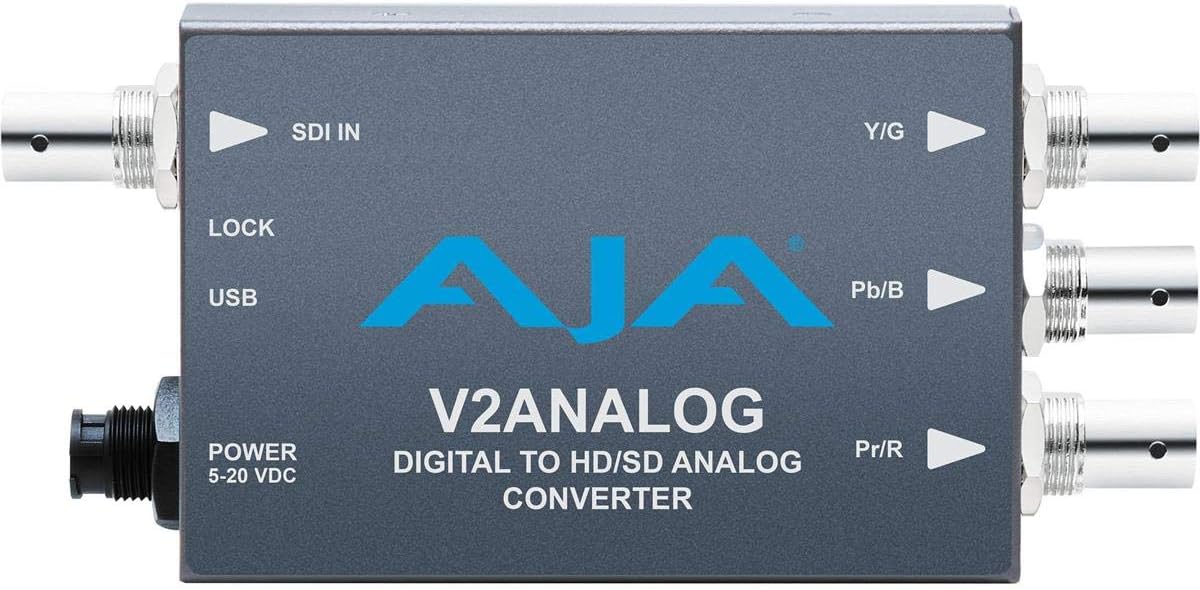
Малюнок 2: Верх view of the AJA V2Analog Mini-Converter, illustrating port labels for connection.
4. Інструкція з експлуатації
Once all connections are made, power on the device. The V2Analog will automatically detect the incoming SDI signal format and convert it to the appropriate analog output. The "LOCK" LED indicator will illuminate when a stable SDI signal is detected and locked.
4.1. Signal Compatibility
The V2Analog supports various HD and SD SDI formats. It is designed to convert these digital signals to standard analog component (YPbPr) or composite (CVBS) outputs.
4.2. Configuration (Advanced)
Advanced configuration options, such as output format selection or color space adjustments, may be available via AJA's Mini-Config software, accessible through the USB port. Refer to the AJA webсайт з найновішим програмним забезпеченням та детальними посібниками з налаштування.
5. Технічне обслуговування
The AJA V2Analog is designed for reliable operation with minimal maintenance. Follow these guidelines:
- Прибирання: Використовуйте м’яку суху тканину для очищення зовнішньої частини пристрою. Не використовуйте рідкі або аерозольні засоби для чищення.
- Оновлення прошивки: Періодично перевіряйте AJA website for firmware updates. Keeping the firmware current ensures optimal performance and compatibility.
- Зберігання: Якщо пристрій не використовується протягом тривалого часу, зберігайте його в прохолодному, сухому місці, подалі від прямих сонячних променів та екстремальних температур.
6. Вирішення проблем
If you encounter issues with your V2Analog, refer to the following common problems and solutions:
| проблема | Можлива причина | Рішення |
|---|---|---|
| Немає відеовиходу | No power; Incorrect SDI input; Incorrect analog output connection; No signal lock. | Check power supply; Verify SDI source is active and connected to "SDI IN"; Ensure Y/G, Pb/B, Pr/R are connected correctly to display; Check "LOCK" LED. |
| Distorted or colored video | Incorrect analog output format; Loose connections. | Ensure display is set to correct input type (component/composite); Tighten all BNC connections. |
| "LOCK" LED not illuminated | No valid SDI input signal. | Verify SDI source is active and sending a compatible signal. Check SDI cable integrity. |
If the problem persists, contact AJA Technical Support for further assistance.
7. Технічні характеристики
| Особливість | Деталь |
|---|---|
| Модель | V2ANALOG |
| Бренд | AJA |
| Введення | HD/SD-SDI (BNC) |
| Вихід | Component (Y/G, Pb/B, Pr/R BNC), Composite (selectable) |
| Тип інтерфейсу | USB, SDI, Component |
| потужність | 5-20 В постійного струму |
| Розміри (Д x Ш x В) | 7.2 x 5.7 x 4.2 дюймів |
| вага | 1.35 фунта |
| UPC | 091131246023 |
8. Підтримка та гарантія
For technical support, product registration, or warranty information, please visit the official AJA website or contact their customer service department. Specific warranty terms and conditions may vary by region and purchase date.
AJA Webсайт: Www.aja.com
Ask a question about this manual
Ask about setup, troubleshooting, compatibility, parts, safety, or missing instructions. Manuals+ will review the question and use this page’s manual context to help answer it.