
RIGEXPERT AA-230
RIGEXPERT AA-230 ZOOM Antenna Analyzer
Посібник користувача
Model: AA-230 | Brand: RIGEXPERT
вступ
The RIGEXPERT AA-230 ZOOM is a powerful antenna analyzer designed for testing, checking, tuning, and repairing antennas and antenna feedlines. It operates within a frequency range of 0.1 to 230 MHz, making it suitable for a wide array of amateur radio and professional applications. This manual provides essential information for the proper setup, operation, and maintenance of your device.
Please read this manual thoroughly before using the AA-230 ZOOM to ensure safe and efficient operation.
Комплектація та налаштування
Before beginning, ensure all components are present and undamaged. Carefully unpack the device and its accessories.

Figure 1: The AA-230 ZOOM antenna analyzer as it appears in its retail packaging, ready for unboxing.

Figure 2: The AA-230 ZOOM device alongside its essential accessories, including the USB cable, N-UHF adapter, and four AAA alkaline batteries.
Включені компоненти:
- RIGEXPERT AA-230 ZOOM Antenna Analyzer Unit
- 4 лужні батарейки типу AAA 1.5 В
- USB кабель
- N-UHF Adapter
- Strap Cover
- Посібник користувача (цей документ)
Установка батареї:
- Locate the battery compartment on the rear of the AA-230 ZOOM unit.
- Відкрийте кришку батарейного відсіку.
- Insert four (4) 1.5V AAA alkaline batteries, ensuring correct polarity (+/-) as indicated inside the compartment.
- Надійно закрийте кришку батарейного відсіку.
Примітка: The device can operate for up to 4 hours of continuous measurement or up to 2 days in standby mode on a full charge of alkaline batteries. Always use fresh alkaline batteries for optimal performance.
Підключення до комп'ютера:
The AA-230 ZOOM features a USB port for connection to a computer, enabling data transfer and potential firmware updates. Use the provided USB cable for this connection.

Figure 3: The bottom of the AA-230 ZOOM, highlighting the USB port for computer connectivity and power input.
Інструкція з експлуатації
This section details the basic operation of your RIGEXPERT AA-230 ZOOM antenna analyzer.
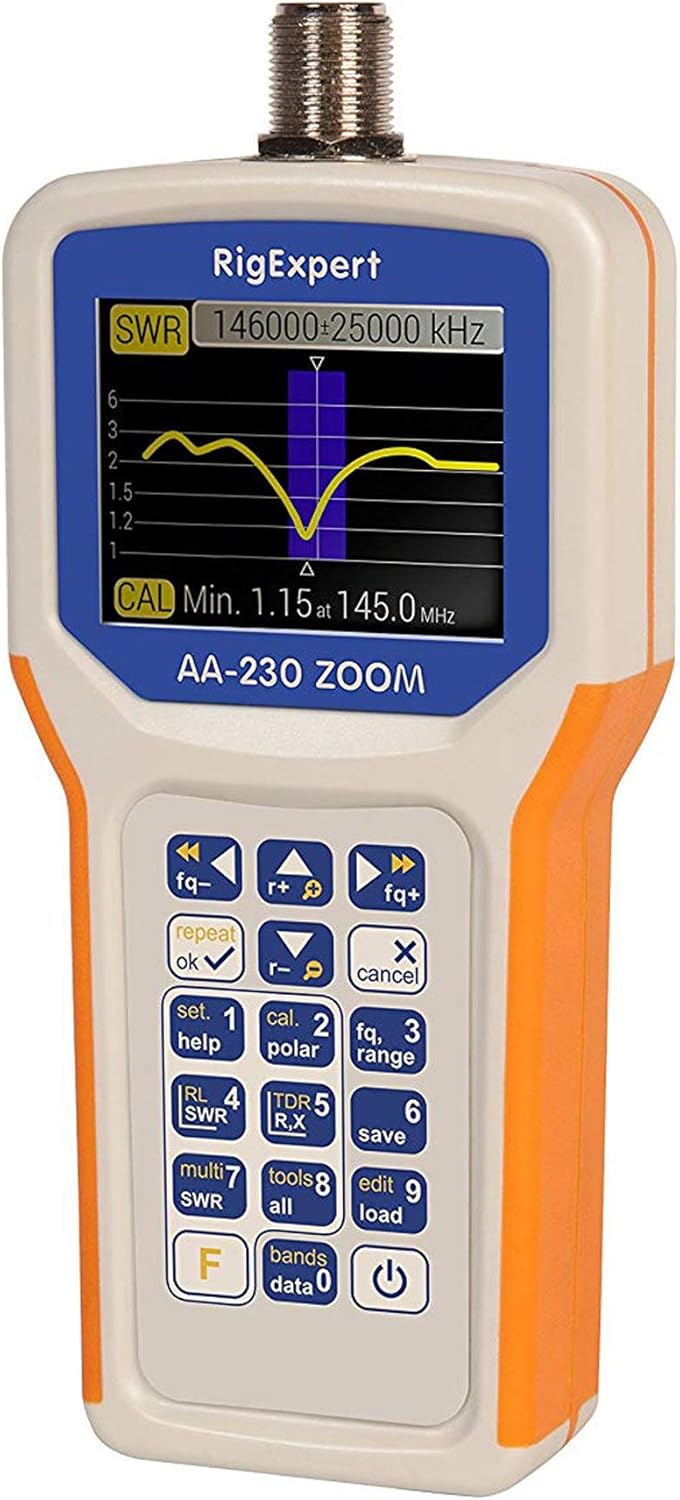
Figure 4: The main display of the AA-230 ZOOM showing an SWR sweep, along with the keypad for navigation and function selection.

Рисунок 5: Детальний view of the AA-230 ZOOM's screen, displaying a numerical SWR reading of 2.3 and corresponding return loss in dB.
Увімкнення/вимкнення:
- Щоб увімкнути пристрій, натисніть і утримуйте потужність button (usually located at the bottom right of the keypad) until the screen illuminates.
- Щоб вимкнути живлення, натисніть і утримуйте кнопку потужність знову натисніть кнопку, доки екран не вимкнеться.
Функції клавіатури:
The AA-230 ZOOM features a tactile keypad for navigating menus and selecting functions. Key functions include:
- Регулювання частоти: Використовуйте fq- і fq+ buttons to adjust the operating frequency.
- OK/Repeat: Confirms selections or repeats the last measurement.
- Cancel/X: Cancels an operation or exits a menu.
- Set/Help (1): Accesses settings or displays help information.
- Cal/Polar (2): Initiates calibration or changes polarization.
- Fq/Range (3): Adjusts frequency range for sweeps.
- RL/SWR (4): Displays Return Loss or SWR.
- TDR/R,X (5): Activates Time Domain Reflectometer mode or displays Resistance and Reactance.
- Save (6): Saves current measurement data.
- Multi SWR (7): For multi-frequency SWR measurements.
- Tools/All (8): Accesses additional tools or displays all parameters.
- Edit/Load (9): Edits saved data or loads configurations.
- Bands/Data (0): Selects frequency bands or accesses stored data.
- F (функція): Доступ до додаткових функцій клавіш.
Performing SWR Measurements:
- Connect the antenna or load to be tested to the N-type connector on the top of the AA-230 ZOOM. Use the N-UHF adapter if necessary.
- Увімкніть пристрій.
- Navigate to the SWR measurement mode using the keypad (e.g., press RL/SWR (4)).
- Adjust the frequency using fq- і fq+ buttons to the desired test frequency.
- The display will show the SWR value numerically and/or graphically.
- For a frequency sweep, use the Fq/Range (3) button to set the start and end frequencies.
Технічне обслуговування
Proper maintenance ensures the longevity and accuracy of your AA-230 ZOOM.
Прибирання:
- Протріть пристрій м’якою сухою тканиною.
- Для стійких забруднень використовуйте злегка damp тканиною з м’яким милом, потім негайно витріть насухо.
- Не використовуйте абразивні засоби для чищення, розчинники або агресивні хімікати, оскільки вони можуть пошкодити casing або екран.
Догляд за акумулятором:
- Вийміть батарейки, якщо пристрій не використовуватиметься протягом тривалого часу, щоб запобігти витіканню.
- Утилізуйте використані батареї відповідно до місцевих правил.
Зберігання:
- Зберігайте пристрій у прохолодному, сухому місці, подалі від прямих сонячних променів та екстремальних температур.
- Use the provided strap cover for protection during storage and transport.

Figure 6: The AA-230 ZOOM with its protective strap cover, which helps shield the device from dust and minor impacts during storage or transport.
Усунення несправностей
If you encounter issues with your AA-230 ZOOM, refer to the following common problems and solutions:
| проблема | Можлива причина | Рішення |
|---|---|---|
| Пристрій не включається. | Розряджені або неправильно встановлені батареї. | Перевірте полярність батарейок. Замініть їх новими лужними батарейками типу AAA. |
| Inaccurate SWR readings. | Improper calibration; faulty cable/connector; external interference. | Perform a calibration. Check all cable connections. Ensure no strong RF sources are nearby. |
| Екран порожній або завислий. | Збій програмного забезпечення; низький заряд батареї. | Remove and reinsert batteries to perform a hard reset. Ensure batteries are charged. |
| Не вдається підключитися до ПК через USB. | Faulty USB cable; driver issue; incorrect port. | Try a different USB port or cable. Install necessary drivers from the RIGEXPERT website if prompted by your PC. |
Технічні характеристики
Detailed technical specifications for the RIGEXPERT AA-230 ZOOM Antenna Analyzer.
| Діапазон частот | від 0.1 до 230 МГц |
| Frequency Step Resolution | 1 кГц |
| Impedance Compatibility | 25, 50, 75, and 100 Ohm systems |
| SWR Measurement Range | 1-100 (numerical mode) / 1-10 (graphical mode) |
| R and X Range | 0-10000, -10000-10000 (numerical) / 0-1000, -1000-1000 (graphical) |
| РЧ вихідний роз'єм | N-типу |
| Signal Output Form | Квадратна хвиля |
| Вихідна потужність | -10 дБм (при навантаженні 50 Ом) |
| Джерело живлення | 4 лужні батарейки типу AAA 1.5 В |
| Термін служби батареї | Up to 4 hours continuous measurement / Up to 2 days standby |
| Дисплей | Color TFT, 290 x 220 pixels |
| Клавіатура | Водостійкий |
| Інтерфейс ПК | порт USB |
| Розміри (В x Ш x Г) | 182 x 82 x 32 мм (7.17 x 3.23 x 1.26 дюймів) |
| вага | 236 г (0.52 фунта) |
| Робоча температура | від 0°C до +40°C (32°F до +104°F) |
| Номер моделі | АА-230 |
| UPC | 644730932592 |
Гарантія та підтримка
For detailed warranty information, please refer to the warranty card included with your product or visit the official RIGEXPERT webсайт. Гарантійні умови можуть відрізнятися залежно від регіону та продавця.
For technical support, software updates, or additional resources, please visit the official RIGEXPERT support page or contact their customer service directly. Always provide your product model (AA-230) and serial number (if applicable) when seeking support.
Official RIGEXPERT Webсайт: www.rigexpert.com
Ask a question about this manual
Ask about setup, troubleshooting, compatibility, parts, safety, or missing instructions. Manuals+ will review the question and use this page’s manual context to help answer it.