
Excelvan EHD11
Excelvan EHD11 Mini LED Projector User Manual
Model: EHD11
1. Вступ
This manual provides detailed instructions for the setup, operation, and maintenance of your Excelvan EHD11 Mini LED Projector. Please read this manual thoroughly before using the projector to ensure proper operation and to extend the product's lifespan. Keep this manual for future reference.
2. Важливі інструкції з техніки безпеки
To prevent fire or electric shock, do not expose this appliance to rain or moisture. Observe the following safety precautions:
- Do not block any ventilation openings. Ensure adequate space around the projector for proper airflow.
- Не ставте проектор на нестійкий візок, підставку або стіл.
- Do not operate the projector near water or moisture.
- Використовуйте лише насадки/аксесуари, зазначені виробником.
- Unplug this projector during lightning storms or when unused for long periods.
- Звертайтеся до кваліфікованого сервісного персоналу.
- Уникайте дивитися прямо в об’єктив проектора, коли lamp увімкнено.
3. Вміст упаковки
Будь ласка, перевірте наявність усіх предметів та їх належний стан:
- Excelvan EHD11 Projector
- Кабель живлення
- Пульт дистанційного керування
- AV-кабель
- Посібник користувача
4. Продукт закінчивсяview
4.1 Projector Front and Top View

Зображення 4.1: Передня та верхня частини view of the Excelvan EHD11 projector, showing the lens, ventilation, and control buttons (Source, Menu).
4.2 Projector Rear View і порти

Зображення 4.2: Ззаду view of the Excelvan EHD11 projector, highlighting the dual built-in speakers and various input/output ports including USB, HDMI, VGA, AV, and audio out.
4.3 Варіанти підключення

Image 4.3: Diagram illustrating the wide range of devices compatible with the projector, such as PCs, smartphones, USB storage, TV set-top boxes, game consoles, DVD players, digital cameras, and external speakers.
5. Налаштування
5.1 Розміщення та відстань проекції
Position the projector on a stable, flat surface. The projection distance directly affects the screen size. Refer to the diagram below for recommended distances and corresponding screen sizes.

Image 5.1: Chart detailing the relationship between projection distance (in meters) and screen size (in inches) for a 16:9 aspect ratio, ranging from 32 inches at 1.2 meters to 200 inches at 6 meters.
5.2 Підключення живлення
Connect the power cable to the projector's power input and then to a power outlet. The power indicator light will illuminate.
5.3 Підключення джерел вхідного сигналу
The projector supports multiple input sources. Connect your desired device (e.g., PC, DVD player, game console, USB drive) to the corresponding port on the rear of the projector using the appropriate cable (HDMI, VGA, AV, USB).
5.4 Фокусування та корекція трапецієподібних спотворень
After powering on, adjust the focus ring around the lens until the image is clear. If the image appears trapezoidal, use the keystone correction dial to square the image. The projector supports a ±15° keystone adjustment.
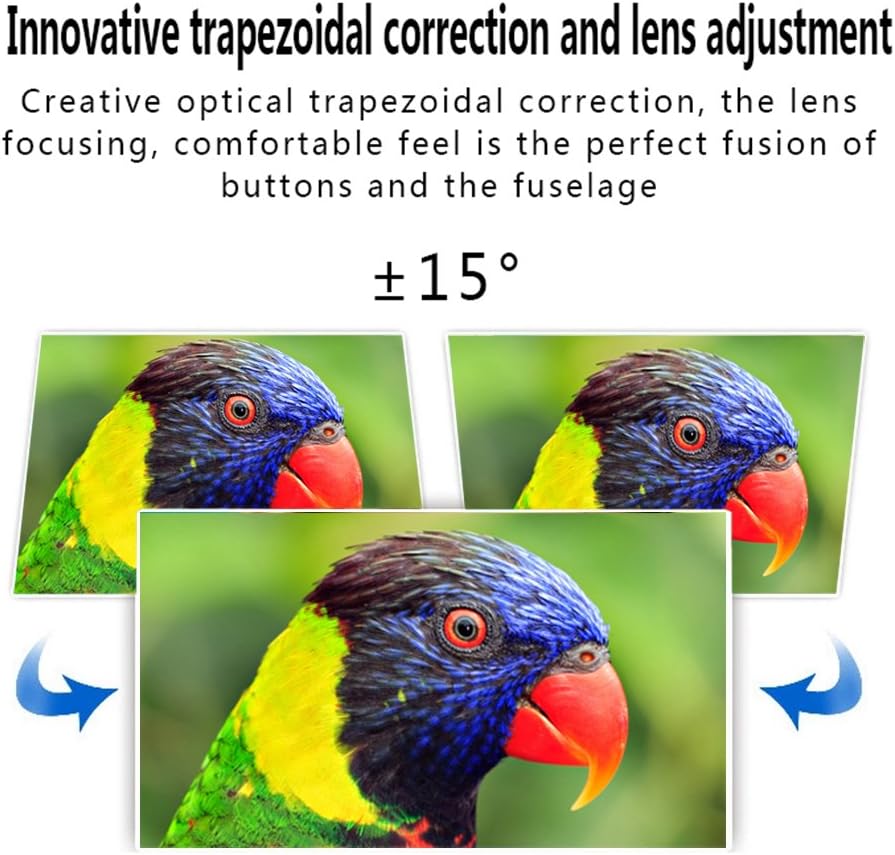
Image 5.4: Visual representation of the ±15° trapezoidal correction and lens adjustment feature, showing how to correct distorted images.
6. Інструкція з експлуатації
6.1 Увімкнення/вимкнення живлення
Натисніть кнопку живлення на проекторі або пульті дистанційного керування, щоб увімкнути або вимкнути пристрій.
6.2 Вибір джерела
Press the 'Source' button on the projector or remote control to cycle through available input sources (HDMI1, HDMI2, USB1, USB2, VGA, AV, YPbPr, TV/DTV). Select the input corresponding to your connected device.
6.3 Навігація по меню
Press the 'Menu' button to access the projector's settings. Use the arrow keys on the projector or remote to navigate, and 'OK' or 'Enter' to confirm selections. Adjust settings such as picture mode, aspect ratio, sound mode, and language.
6.4 Аудіовихід
The projector features built-in speakers. For enhanced audio, connect external speakers to the 'Audio Out' port using a 3.5mm audio cable.
7. Технічне обслуговування
7.1 Очищення об'єктива
Use a soft, lint-free cloth and a specialized lens cleaning solution to gently wipe the projector lens. Avoid abrasive materials or excessive pressure.
7.2 Вентиляція
Regularly check that the projector's ventilation openings are clear of dust and debris. Blocked vents can lead to overheating and affect performance. Do not place the projector on soft surfaces that may obstruct airflow.
8. Вирішення проблем
| проблема | Можлива причина | Рішення |
|---|---|---|
| На екрані немає зображення | Power cable disconnected; Incorrect input source selected; Input device not powered on or connected properly. | Check power connection; Select correct input source; Ensure input device is on and cables are secure. |
| Зображення розмите | Фокус не налаштовано. | Відрегулюйте кільце фокусування на об’єктиві проектора. |
| Image is distorted (trapezoidal) | Трапецеїчне спотворення не відрегульовано. | Відрегулюйте диск корекції трапецієподібного спотворення. |
| Ні звуку | Volume too low; Audio cables not connected; Incorrect audio output selected on source device; External speakers not connected or powered. | Increase volume; Check audio cable connections; Ensure source device is outputting audio; Connect external speakers if desired. |
| Input source needs to be set every time | Projector defaults to a specific input or does not save last setting. | Manually select the desired input source after powering on. Check menu settings for an 'Auto Source' or 'Last Input' option if available. |
9. Технічні характеристики
- Бренд: Ексельван
- модель: EHD11 (FBA_151224-F6)
- Тип дисплея: ЖК
- Роздільна здатність дисплея: 1920 x 1080 (підтримується Full HD)
- Технологія підключення: HDMI, USB, VGA, AV
- Особливість: 3D-Ready, Portable
- Вага товару: 6.49 фунта
- Розміри упаковки: 16.9 x 13.1 x 8.5 дюймів
- Виробник: Ексельван
- Дата першої доступності: 8 листопада 2014 р
10. Гарантія та підтримка
Щоб отримати інформацію про гарантію або технічну підтримку, зверніться до документації, наданої під час покупки, або зверніться до продавця. Зберігайте чек про покупку як підтвердження покупки.
Ask a question about this manual
Ask about setup, troubleshooting, compatibility, parts, safety, or missing instructions. Manuals+ will review the question and use this page’s manual context to help answer it.