
1. Вступ
This manual provides essential instructions for the installation, operation, and maintenance of your HP Compaq 6005 Pro Socket AM3 System Motherboard (P/N 531966-001). This motherboard is designed for use in personal computers and supports AMD Socket AM3 processors. Please read this manual thoroughly before proceeding with installation or operation.
2. Інформація про безпеку
Observe the following safety precautions to prevent damage to the motherboard or personal injury:
- Завжди від’єднуйте блок живлення від розетки перед встановленням або видаленням будь-яких компонентів.
- Одягайте антистатичний браслет і працюйте на антистатичному килимку, щоб запобігти пошкодженню чутливих компонентів електростатичним розрядом (ESD).
- Тримайте материнську плату за краї, уникаючи контакту з компонентами та роз'ємами.
- Забезпечте належну вентиляцію всередині корпусу комп'ютера, щоб запобігти перегріву.
- If you are unsure about any installation step, consult a qualified technician.
3. Motherboard Components Overview
Familiarize yourself with the key components and connectors on your HP Compaq 6005 Pro motherboard.

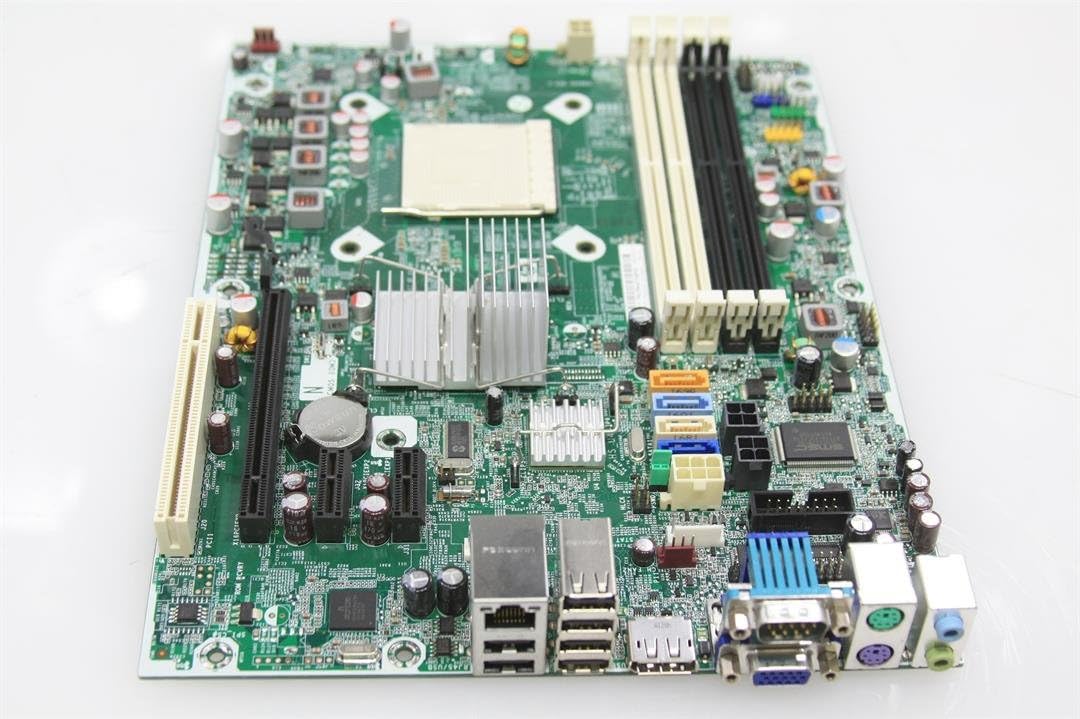
малюнок 3.1: З верху до низу view of the HP Compaq 6005 Pro motherboard, showing the CPU socket, RAM slots, and various chipsets.
The motherboard features an AMD Socket AM3 for compatible processors, four DDR3 DIMM slots for memory, and various expansion slots for additional cards. The rear I/O panel provides connectivity for peripherals.
малюнок 3.2: Rear I/O panel of the HP Compaq 6005 Pro motherboard, featuring VGA, DisplayPort, DVI, USB ports, Ethernet, and audio jacks.
Ключові напрямки включають:
- Роз'єм процесора (AM3): For installing the central processing unit.
- Слоти DIMM: For installing DDR3 memory modules.
- Слоти PCIe: Для відеокарт та інших плат розширення.
- Порти SATA: For connecting storage devices like hard drives and SSDs.
- Роз'єм живлення: Main 24-pin ATX and 4-pin CPU power connectors.
- Роз'єми передньої панелі: For case buttons, LEDs, and front USB/audio ports.

малюнок 3.3: Another perspective of the HP Compaq 6005 Pro motherboard, highlighting expansion slots and internal connectors.
4. Налаштування та встановлення
Follow these steps to properly install your motherboard and its components.
4.1. Контрольний список перед встановленням
- Computer case with appropriate standoffs.
- Compatible AMD Socket AM3 processor.
- DDR3 memory modules.
- CPU cooler with thermal paste.
- Блок живлення (БЖ).
- Screwdriver and anti-static wrist strap.
4.2. Встановлення материнської плати
- Install the I/O shield into the computer case's rear opening.
- Обережно встановіть материнську плату в корпус, суміщаючи отвори для гвинтів з виступами.
- Закріпіть материнську плату гвинтами, переконавшись, що вона міцно закріплена, але не перетягнута.
4.3. Встановлення процесора
- Lift the CPU socket lever.
- Зіставте трикутну позначку на процесорі з відповідною позначкою на сокеті.
- Обережно, не докладаючи зусиль, вставте процесор у роз'єм.
- Опустіть важіль роз'єму, щоб закріпити процесор.
- Apply a thin, even layer of thermal paste to the CPU's surface.
- Install the CPU cooler according to its manufacturer's instructions, ensuring good contact with the CPU.
4.4. Встановлення пам'яті (ОЗП)
- Відкрийте затискачі з обох кінців гнізда DIMM.
- Зіставте виїмку на модулі пам'яті DDR3 з ключем у гнізді DIMM.
- Міцно натисніть на обидва кінці модуля пам’яті, доки затискачі не зафіксуються на місці.
4.5. Підключення живлення
- Connect the 24-pin ATX power cable from the PSU to the main power connector on the motherboard.
- Connect the 4-pin CPU power cable from the PSU to the CPU power connector near the CPU socket.
4.6. Storage Devices and Expansion Cards
- Connect SATA data cables from your storage devices (HDD/SSD) to the SATA ports on the motherboard.
- Install any necessary expansion cards (e.g., graphics card) into the appropriate PCIe slots and secure them with screws.
4.7. Підключення передньої панелі та периферійних пристроїв
- Connect the front panel cables (power button, reset button, HDD LED, power LED, front USB, front audio) to their respective headers on the motherboard. Refer to your case manual for specific pin assignments.
- Connect external peripherals such as keyboard, mouse, monitor, and network cable to the rear I/O ports.
5. Інструкція з експлуатації
5.1. Перше завантаження
- After all components are installed and connected, connect the power cord to the PSU and turn on the power switch.
- Натисніть кнопку живлення на корпусі комп'ютера.
- The system should power on, and you should see a display on your monitor.
5.2. Налаштування BIOS/UEFI
Щоб отримати доступ до утиліти налаштування BIOS/UEFI, натисніть відповідну клавішу (зазвичай F10 or F12 for HP systems) repeatedly during the initial boot sequence. In the BIOS/UEFI, you can configure system settings, boot order, and monitor hardware status.
5.3. Встановлення операційної системи
Once the system is booting correctly, you can proceed with installing your preferred operating system (e.g., Windows 10) from a bootable USB drive or DVD.
6. Технічне обслуговування
6.1. прибирання
Regularly clean dust from the motherboard, CPU cooler, and case fans using compressed air. Ensure the system is powered off and unplugged before cleaning. Avoid using liquid cleaners directly on components.
6.2. Оновлення BIOS
Періодично перевіряйте офіційну службу підтримки HP website for BIOS/firmware updates. BIOS updates can improve system stability, compatibility, and performance. Follow HP's instructions carefully when performing a BIOS update to avoid system damage.
7. Вирішення проблем
Якщо у вас виникли проблеми, зверніться до наступних поширених кроків усунення несправностей:
- Немає живлення: Ensure all power cables (24-pin ATX, 4-pin CPU) are securely connected. Check the PSU switch and wall outlet.
- Немає дисплея: Verify the monitor is connected to the correct video output (VGA, DVI, or DisplayPort) and is powered on. Reseat the graphics card (if applicable) and RAM modules.
- Системні звукові сигнали: Listen for beep codes during startup. These codes often indicate specific hardware issues (e.g., memory failure, graphics card issue). Consult the HP support website for a list of beep codes for your model.
- Нестабільність/збої системи: Check for overheating (monitor temperatures in BIOS). Ensure all drivers are up to date. Test memory modules individually.
- Компонент не виявлено: Reseat the component (e.g., hard drive, expansion card). Check cable connections. Verify BIOS settings.
8. Технічні характеристики
Detailed technical specifications for the HP Compaq 6005 Pro Motherboard (P/N 531966-001).
| Особливість | Специфікація |
|---|---|
| Бренд | HP |
| Назва моделі | HP Compaq 6005 Pro |
| Номер моделі | 531966-001 |
| Гніздо ЦП | AMD Socket AM3 |
| Сумісні процесори | AMD Phenom II, Athlon II, AMD FX |
| Тип чіпсета | AMD 760MP |
| Технологія оперативної пам'яті | DDR3 |
| Доступні слоти пам'яті | 4 слотів DIMM |
| Максимальний розмір оперативної пам'яті | 16 ГБ |
| Тактова частота пам'яті | Up to 2133 MHz (depending on CPU/RAM) |
| Інтерфейс графічної карти | PCI Express x16 |
| Слоти розширення | 1x PCIe x16, 2x PCIe x1, 1x PCI |
| Total SATA Ports | 4x SATA 2.0 |
| Тип основного роз'єму живлення | 24-контактний ATX |
| Задні порти введення/виведення | 6x USB 2.0, 1x VGA, 1x DVI-D, 1x DisplayPort, 1x RJ-45 Ethernet, Audio In/Out/Mic, 2x PS/2 |
| Сумісні пристрої | Персональний комп'ютер |
| Платформа | Windows 10 (і попередні сумісні версії) |
| Форм-фактор | Micro-ATX |
9. Інформація про гарантію
For specific warranty terms and conditions related to your HP Compaq 6005 Pro Motherboard, please refer to the original purchase documentation or contact HP customer support directly. Warranty coverage may vary based on region and point of purchase.
10. Підтримка
For additional assistance, driver downloads, updated documentation, or to contact technical support, please visit the official HP support webсайт:
When contacting support, please have your motherboard model number (531966-001) and any relevant system information ready.