
1. Вступ
Дякуємо за покупкуasing the ipega PG-9057 Wireless Game Controller. This manual provides detailed instructions for setting up, operating, and maintaining your device. Please read this manual carefully before use to ensure optimal performance and longevity of your controller.
2. Особливості продукту
- Бездротове підключення: Enjoy gaming freedom with wireless connection technology.
- Мультиплатформна сумісність: Supports Android devices (smartphones, tablets, TV boxes) and Windows PCs.
- High Durability Buttons: Equipped with high-quality, durable buttons for extended gaming sessions.
- Точність керування: Features a D-pad with pressure sensitivity and a 360-degree joystick with no dead zone for accurate input.
- Ергономічний дизайн: Designed for comfortable grip and prolonged use.
- Вбудований тримач для телефону: Conveniently mount your smartphone for mobile gaming.
3. Вміст упаковки
Будь ласка, перевірте вміст упаковки після розпакування:
- Бездротовий ігровий контролер ipega PG-9057
- USB-кабель для зарядки
- User Manual (Japanese version included)
4. Налаштування
4.1. Заряджання контролера
Before first use, fully charge the controller using the provided USB cable. Connect the small end of the USB cable to the controller's charging port and the other end to a USB power source (e.g., PC, USB wall adapter).
4.2. Device Compatibility Overview
The ipega PG-9057 controller supports various devices and connection methods as shown below:

This image displays the ipega PG-9057 Wireless Game Controller, highlighting its compatibility with various devices including smartphones, tablets, personal computers, and VR headsets.
4.3. Connection Methods and System Environment
The controller offers multiple connection options depending on your device and operating system. Refer to the table below for detailed compatibility.

This table outlines the system requirements and connection methods for the ipega PG-9057 controller, detailing compatibility with Android smartphones, tablets, and TV boxes via Bluetooth 4.0 or USB, and PCs via USB.
4.3.1. Bluetooth Connection (Android Devices)
- Переконайтеся, що контролер заряджений.
- Натисніть і утримуйте ДІМ кнопку та A button simultaneously until the indicator light flashes rapidly. This puts the controller into pairing mode.
- На своєму пристрої Android перейдіть до налаштувань Bluetooth і ввімкніть Bluetooth.
- шукати available devices and select "ipega PG-9057" (or similar name) from the list.
- Після сполучення індикатор на контролері почне світитися постійно.
4.3.2. USB Wired Connection (Windows PC / Android Devices)
- Connect the controller to your Windows PC or Android device using the USB cable.
- The device should automatically recognize the controller. No special drivers are usually required for basic functionality.
5. Інструкція з експлуатації
5.1. Основні елементи керування
The ipega PG-9057 features standard gamepad controls for intuitive gaming.

Детальний view of the ipega PG-9057 controller's D-pad, joystick, and A/B/X/Y buttons, illustrating their high sensitivity and precise input capabilities.
- D-Pad: For directional input, offering pressure sensitivity.
- Лівий/правий джойстики: 360-degree movement with no dead zone for precise control.
- Кнопки A/B/X/Y: Standard action buttons with zero delay response.
- L1/R1, L2/R2 Triggers: Shoulder buttons and triggers for various in-game actions.
- Кнопки ВИБІР/ПУСК: Для навігації та дій у внутрішньоігровому меню.
- Кнопка "Додому: To power on/off the controller or return to the main menu.
5.2. Використання зі смартфоном
The controller includes an integrated holder for smartphones, allowing for a portable gaming experience.
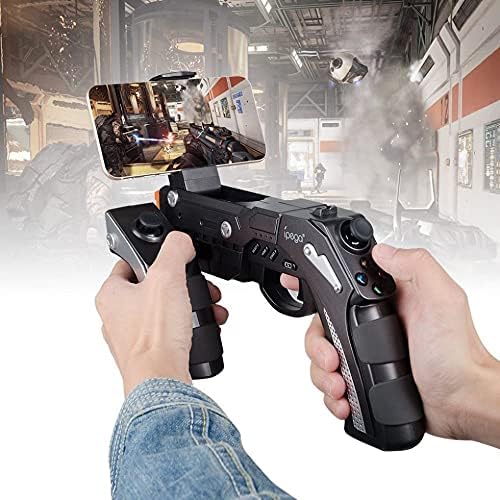
A user is shown holding the ipega PG-9057 Wireless Game Controller with a smartphone securely attached, actively engaged in mobile gaming.
- Extend the phone holder located on the top of the controller.
- Обережно помістіть смартфон у тримач, переконавшись, що він надійно закріплений.
- Connect the controller to your smartphone via Bluetooth as described in Section 4.3.1.
- Launch your desired game and configure controller settings if necessary.
6. Технічне обслуговування
To ensure the longevity and optimal performance of your ipega PG-9057 controller, follow these maintenance guidelines:
- Прибирання: Use a soft, dry cloth to wipe the surface of the controller. Do not use harsh chemicals or abrasive cleaners.
- Зберігання: Зберігайте контролер у прохолодному, сухому місці, подалі від прямих сонячних променів та екстремальних температур.
- Уникайте крапель: Protect the controller from drops and impacts, as this can damage internal components.
- Зарядка: Do not overcharge the battery. Disconnect the charging cable once the controller is fully charged.

The ipega PG-9057 Wireless Game Controller is shown, emphasizing its construction from high-quality, durable ABS material.
7. Вирішення проблем
Якщо у вас виникли проблеми з контролером, зверніться до наступних поширених рішень:
- Контролер не підключається:
- Переконайтеся, що контролер повністю заряджений.
- Verify that Bluetooth is enabled on your device and the controller is in pairing mode.
- Спробуйте перезавантажити і контролер, і пристрій.
- If using USB, ensure the cable is securely connected and try a different USB port.
- Кнопки або джойстики не реагують:
- Check if the controller is properly connected to your device.
- Перезавантажте контролер і знову підключіться.
- Переконайтеся, що гра, в яку ви граєте, підтримує зовнішні контролери.
- Затримка або затримка введення:
- Ensure there are no obstructions or excessive distance between the controller and your device.
- Мінімізуйте перешкоди від інших бездротових пристроїв.
- For critical gaming, consider using a wired USB connection if supported by your device.
8. Технічні характеристики
| Специфікація | Значення |
|---|---|
| Бренд | іпега |
| Модель | ПГ-9057 |
| Сумісні пристрої | Android, Windows |
| Тип контролера | Ігровий планшет |
| Технологія підключення | Бездротовий |
| особливості | Бездротовий |
| Сумісні предмети | Android, Windows |
| Спосіб підключення | Бездротовий |
| Особливості | Бездротовий |
| Апаратна платформа | Приставка |
| Джерело живлення | Працює від батареї |
| Number of Package Items | 1 |
| UPC | 602747571722 |
| ASIN | B018TSBFE4 |
| GTIN | 602747571722 |
9. Гарантія та підтримка
For warranty information and customer support, please refer to the documentation provided with your purchase or visit the official ipega webсайт. Зберігайте чек про покупку для будь-яких гарантійних претензій.