
1. Вступ
This manual provides detailed instructions for the setup, operation, and maintenance of your Excelvan AOK-5019TC Wireless Weather Station. Please read this manual thoroughly before using the device to ensure proper function and longevity.
Вміст упаковки
- 1 x Excelvan AOK-5019TC Weather Station Main Unit
- 1 x Wireless Remote Sensor (433MHz)
- 1 x Посібник користувача (цей документ)

Image 1.1: Contents of the Excelvan AOK-5019TC package, showing the main weather station unit, the wireless remote sensor, and the instruction manual.
2. Ключові характеристики
- Великий світлодіодний дисплей: Easy-to-read display for all weather data.
- Radio-Controlled Clock (DCF77): Automatic time synchronization for precise timekeeping, including automatic Summer/Winter time adjustment.
- Відображення часу: 12/24 hour format with adjustable 24 time zones (+/-12).
- Календар: Displays Day, Month, and Weekday (up to 2099). Weekday display in 7 languages: German, English, Italian, French, Dutch, Spanish, and Danish.
- Dual Alarm with Snooze: Two independent alarms with a 5-minute snooze function.
- Прогноз погоди: 5 weather forecast icons (sunny, partially sunny, cloudy, rainy, stormy) with customizable symbols.
- Історія барометричного тиску: Displays 12-hour history of atmospheric pressure in hPa/inHg. Altitude setting for accurate pressure calculation.
- Температура та вологість у приміщенні/на вулиці: Displays current, maximum, and minimum values with trend indicators.
- Діапазон температур: Indoor: 0℃ to +50℃ (32℉ to 122℉); Outdoor: -20℃ to +60℃ (-4℉ to 140℉). Switchable between ℃ and ℉.
- Попередження про температуру: Programmable alerts for temperature thresholds.
- Фаза Місяця: Відображає поточну фазу місяця.
- Схід/Захід сонця та схід/захід місяця: Provides times for 150 pre-programmed cities.
- Індикатор низького заряду батареї: Сповіщає про необхідність заміни батарейок.
- Blue LED Backlight: For improved visibility in low light conditions.
- Кілька датчиків: Supports up to 3 outdoor sensors (one included).
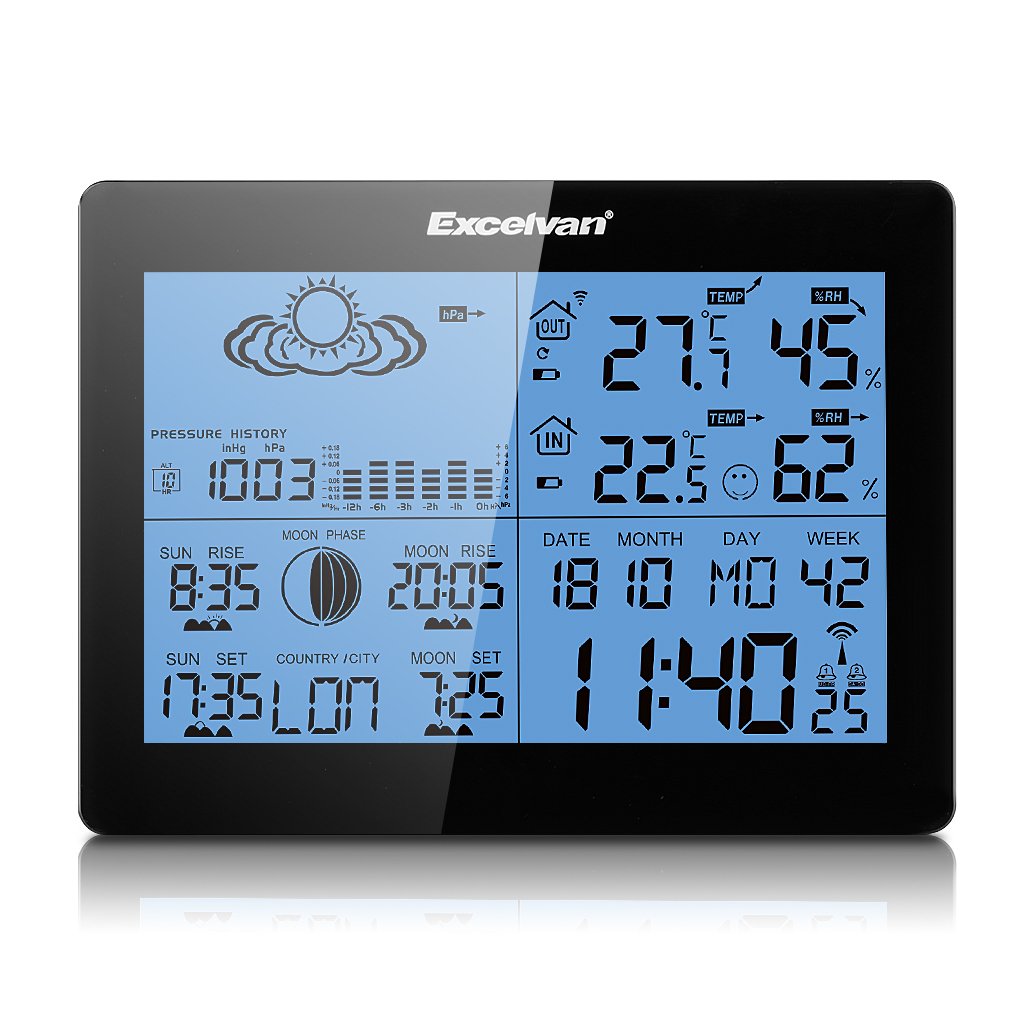
Image 2.1: The Excelvan AOK-5019TC Weather Station main unit displaying various weather parameters and time, alongside its wireless remote sensor.
3. Налаштування
3.1 Встановлення батареї
- Основний блок: Open the battery compartment cover on the back of the main unit. Insert 2 x AA 1.5V batteries (not included), ensuring correct polarity (+/-). Close the cover.
- Датчик дистанційного керування: Open the battery compartment cover on the back of the remote sensor. Insert 2 x AAA 1.5V batteries (not included), ensuring correct polarity (+/-). Close the cover.

Зображення 3.1: Ззаду view of the weather station main unit with the battery compartment open, showing where to insert 2 x AA batteries.
3.2 Розміщення датчика
Place the wireless remote sensor outdoors in a shaded, dry location, protected from direct sunlight and rain. Ensure it is within 50 meters (164 feet) of the main unit for optimal signal reception. Avoid placing it near large metal objects or electrical appliances that may interfere with the signal.
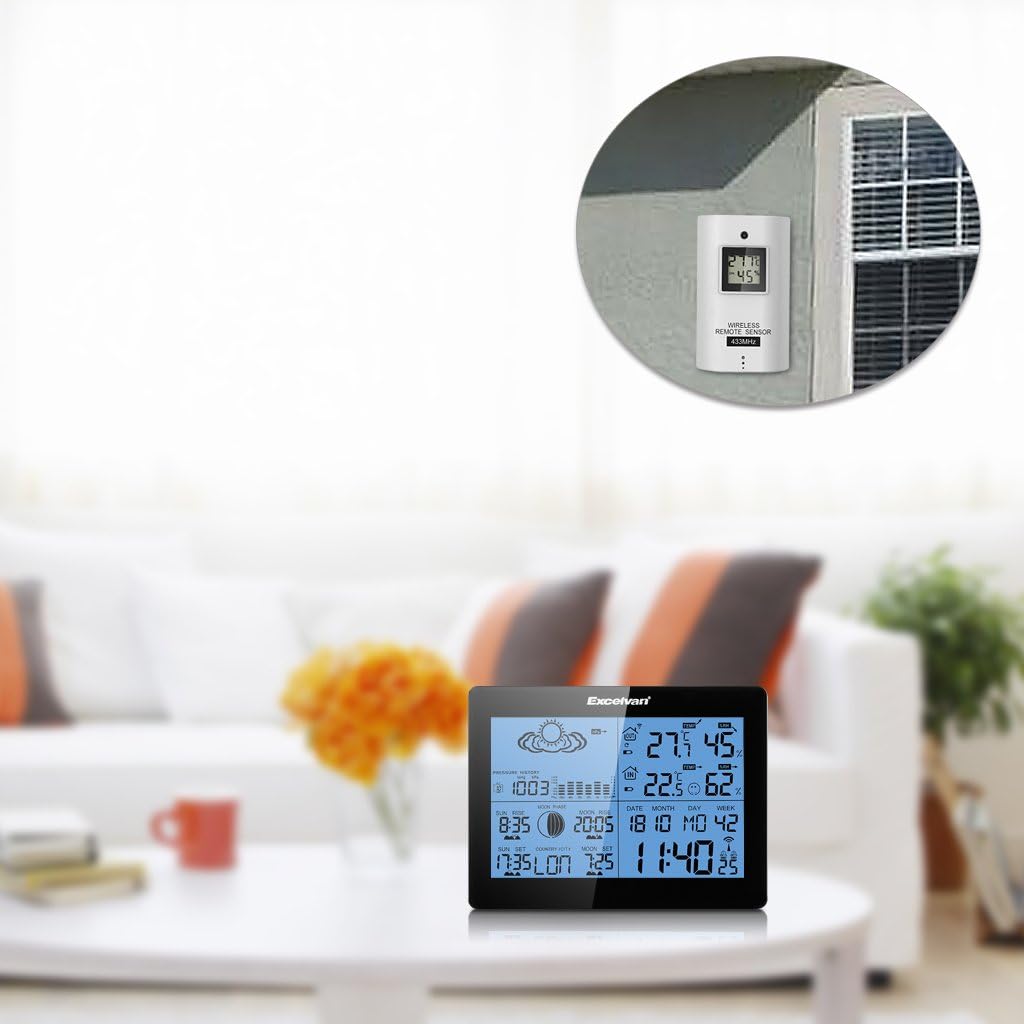
Image 3.2: The weather station main unit displayed indoors, with the remote sensor shown mounted on an exterior wall, illustrating typical placement.
3.3 Початкова синхронізація
After inserting batteries, the main unit will automatically search for the remote sensor signal and the DCF77 radio signal for time synchronization. This process may take several minutes. Ensure both units are close to each other during initial setup. Once connected, the outdoor temperature and humidity will appear on the main unit, and the time will be set automatically.

Image 3.3: The wireless remote sensor, which transmits outdoor temperature and humidity data to the main weather station unit.
4. Інструкція з експлуатації
4.1 Функції кнопок
The main unit features six control buttons on the back and one on the top:
- РЕЖИМ: Натискайте, щоб перемикатися між режимами відображення (наприклад, час, будильник). Натисніть і утримуйте, щоб увійти в режим налаштування.
- +: In setting mode, increases values. In normal mode, switches between ℃/℉ or 12/24 hour format.
- -: In setting mode, decreases values. In normal mode, views min/max temperature/humidity.
- ІСТОРІЯ: Displays the 12-hour barometric pressure history.
- КАНАЛ: Перемикає між каналами зовнішніх датчиків (якщо використовується кілька датчиків).
- SNOOZE / LIGHT: On the top of the unit. Press to activate backlight. When alarm sounds, press to activate snooze function.

Image 4.1: The back of the weather station, highlighting the MODE, +, -, HISTORY, and CHANNEL buttons.

Image 4.2: A close-up of the weather station's top, showing the SNOOZE/LIGHT button.
4.2 Налаштування часу та дати
The weather station automatically synchronizes time via the DCF77 radio signal. If manual adjustment is needed:
- Натисніть і утримуйте РЕЖИМ кнопку, доки не почне блимати дисплей часу.
- Використовуйте + or - кнопки для налаштування години, потім натисніть РЕЖИМ щоб підтвердити та перейти до хвилин.
- Repeat for minutes, year, month, day, and language for the weekday display.
- Прес РЕЖИМ щоб вийти з режиму налаштування.
4.3 Налаштування будильника
- Натисніть РЕЖИМ button repeatedly until "AL1" or "AL2" is displayed.
- Натисніть і утримуйте РЕЖИМ кнопку, доки не почне блимати година будильника.
- Використовуйте + or - кнопки, щоб встановити потрібну годину будильника, потім натисніть РЕЖИМ.
- Повторюйте протягом кількох хвилин.
- Прес РЕЖИМ щоб увімкнути/вимкнути будильник та вийти з режиму налаштування.
4.4 Інтерпретація прогнозу погоди
The weather station provides a forecast based on barometric pressure changes. The icons represent:
- Сонячно
- Partially Sunny
- Хмарно
- Дощова
- Бурхлива
Note that weather forecasts are predictions and may not always be 100% accurate, especially for localized conditions.

Зображення 4.3: Детальний view of the weather station's display, showing weather forecast icons, indoor/outdoor temperature and humidity, time, date, and moon phase.
5. Технічне обслуговування
5.1 Заміна батареї
When the low battery indicator appears on the display, replace the batteries in the main unit or remote sensor as soon as possible. Always replace all batteries in a unit at the same time with new ones of the same type. Do not mix old and new batteries.
5.2 Очищення
Протріть метеостанцію та датчик м’якою тканиноюamp тканиною. Не використовуйте абразивні засоби для чищення або розчинники, оскільки вони можуть пошкодити дисплей абоasing. Переконайтеся, що волога не потрапляє до відсіків для батарейок або інших отворів.
5.3 Екологічні міркування
For optimal performance and longevity, avoid exposing the main unit to extreme temperatures, direct sunlight, or high humidity. The remote sensor is designed for outdoor use but should be protected from direct rain and snow to prevent water ingress and damage.
6. Вирішення проблем
| проблема | Можлива причина | Рішення |
|---|---|---|
| Немає показників зовнішньої температури/вологості | Sensor out of range, low sensor battery, interference. | Move sensor closer to main unit. Replace sensor batteries. Avoid placing near electronic devices. Press CHANNEL button to re-sync. |
| Incorrect time display / Time not synchronizing | Weak DCF77 signal, interference, incorrect time zone setting. | Move main unit to a location with better signal reception (e.g., near a window). Ensure correct time zone is set manually. Allow up to 24 hours for initial synchronization. |
| Неточний прогноз погоди | Forecasts are based on barometric pressure trends, which can be localized and not always precise. Altitude setting may be incorrect. | Understand that forecasts are indicative. Ensure the altitude setting is correct for your location to improve barometric pressure accuracy. |
| Дисплей тьмяний або порожній | Низький заряд батареї головного блоку. | Замініть батарейки основного блоку. |
| Кнопки не реагують | Тимчасовий збій програмного забезпечення. | Вийміть та знову вставте батарейки, щоб перезавантажити пристрій. |
7. Технічні характеристики
- Бренд: EXCELVAN
- модель: AOK-5019TC
- Джерело живлення (головний блок): 2 батарейки AA 1.5 В (не входять в комплект)
- Power Source (Sensor): 2 батарейки типу AAA 1.5 В (не входять до комплекту)
- Діапазон температур у приміщенні: 0℃ до +50℃ (32℉ до 122℉)
- Діапазон зовнішніх температур: від -20 ℉ до +60 ℃ (від -4 ℉ до 140 ℉)
- Діапазон вологості: Від 20% до 95% відносної вологості
- Бездротова частота: 433 МГц
- Бездротовий діапазон: До 50 метрів (164 футів) на відкритому повітрі
- Тип дисплея: LCD, LED backlight
- вага: 291 грами (основний блок)
- колір: чорний
- GTIN: 723120327726
- ASIN: B017YWQ8FC
8. Гарантія та підтримка
Щоб отримати інформацію про гарантію або технічну підтримку, зверніться до документації, наданої під час покупки, або зверніться до продавця. Зберігайте чек про покупку як підтвердження покупки.