
вступ
This manual provides detailed instructions for the setup, operation, and maintenance of your Homtime C12PRO Docking Station Speaker. The C12PRO integrates a Bluetooth speaker, FM radio, alarm clock, and dual USB charging capabilities, designed for convenient everyday use.
Вміст упаковки
Будь ласка, перевірте, чи всі перелічені нижче предмети входять до вашої упаковки:
- 1 x Homtime C12PRO Speaker Unit
- 1 x адаптер живлення
- 1 х посібник користувача
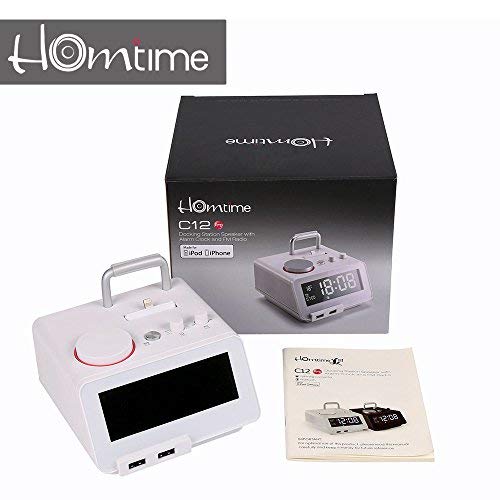
зображення: Contents of the Homtime C12PRO package, showing the main speaker unit, power adapter, and the user manual.
Продукт закінченийview
Familiarize yourself with the various components and controls of your C12PRO unit.

зображення: Фронт view of the Homtime C12PRO with an iPhone docked. The large digital display shows time and temperature, and the front features dual USB charging ports.

зображення: Фронт view of the Homtime C12PRO without a phone docked. This image clearly shows the digital display, the docking connector, and the control buttons on the top surface.
Передня панель та дисплей
- Великий 4.2-дюймовий РК-дисплей: Shows time, alarm status, and room temperature (Celsius or Fahrenheit). Brightness is adjustable.
- Подвійні зарядні порти USB: Located at the front base for convenient charging of external devices.
Елементи керування на верхній панелі
- Док-роз'єм: Apple Certified Lightning connector for iPod/iPhone.
- Кнопки/ручки керування: For setting time, alarm, volume, mode selection, and FM radio tuning.
Підключення задньої панелі
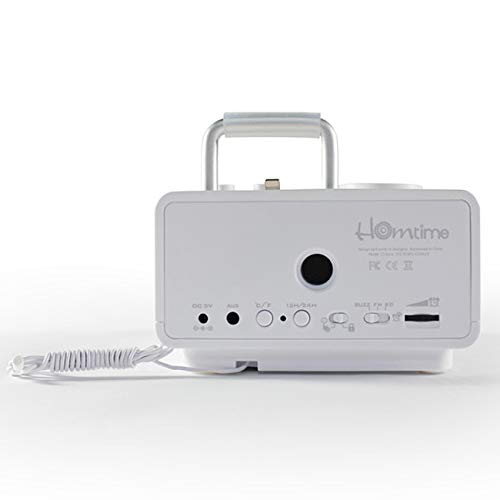
зображення: Задня view of the Homtime C12PRO. This image displays the DC 9V power input, AUX-in port, 12H/24H time format button, and other rear controls.
- Вхідна потужність 9 В постійного струму: Підключіть сюди наданий адаптер живлення.
- Порт AUX-in: 3.5-мм роз'єм для підключення зовнішніх аудіоджерел.
- 12H/24H Button: Toggles between 12-hour and 24-hour time display formats.
- Інші елементи керування: May include snooze/dimmer, alarm on/off, and FM antenna connection.
Налаштування
- Розпакуйте блок: Carefully remove the C12PRO speaker and all accessories from the packaging.
- Підключіть живлення: Insert the DC plug of the power adapter into the DC 9V input port on the rear of the unit. Plug the power adapter into a standard wall outlet. The display will illuminate.
- Початкове налаштування часу:
- Натисніть і утримуйте ВСТАНОВИТИ ЧАС button (location may vary, typically on top or rear).
- Використовуйте +/- buttons or rotary knob to adjust the hour. Press ВСТАНОВИТИ ЧАС знову для підтвердження.
- Adjust the minute using the +/- buttons or rotary knob. Press ВСТАНОВИТИ ЧАС щоб підтвердити та вийти з режиму налаштування часу.
- Щоб переключитися між 12-годинним та 24-годинним форматом, натисніть кнопку 12/24 год кнопку на задній панелі.
- Налаштування яскравості дисплея: Натисніть SNOOZE / DIMMER button (often combined) repeatedly to cycle through brightness levels.
- Встановити одиницю температури: Якщо можливо, натисніть ° C / ° F button to switch between Celsius and Fahrenheit display for room temperature.
Інструкція з експлуатації
Увімкнення/вимкнення живлення
Натисніть ПОТУЖНІСТЬ button to turn the unit on or off. When off, the clock display remains active.
Налаштування будильника
- Натисніть і утримуйте НАБОР ТРИВОГИ кнопка. Година будильника блиматиме.
- Використовуйте +/- buttons or rotary knob to adjust the alarm hour. Press НАБОР ТРИВОГИ для підтвердження.
- Adjust the alarm minute. Press НАБОР ТРИВОГИ для підтвердження.
- Select the alarm source (Buzzer, FM Radio, or Docked Device). Use +/- or rotary knob and press НАБОР ТРИВОГИ для підтвердження.
- Щоб увімкнути/вимкнути будильник, натисніть кнопку ТРИВОГА УВІМК. / ВИМК кнопка. Під час активації на дисплеї з’явиться значок тривоги.
- Коли пролунає будильник, натисніть кнопку СНОЙЗ button to temporarily silence it for a few minutes. Press ПОТУЖНІСТЬ щоб вимкнути будильник на день.
Робота FM-радіо
- Натисніть РЕЖИМ кнопку, доки на дисплеї не з’явиться напис «FM».
- Для автоматичного сканування станцій натисніть і утримуйте ВІДТВОРЕННЯ/ПАУЗА кнопка (або спеціальна СКАНУВАТИ button). The radio will scan and save available stations.
- Щоб налаштувати вручну, використовуйте НАПЕРЕД/ДАЛІ buttons or rotary knob to adjust the frequency.
- To select a saved station, press the PRESET кнопку, а потім скористайтеся НАПЕРЕД/ДАЛІ для навігації.
- Відрегулюйте гучність за допомогою ОБ'ЄМ knob or buttons.
Bluetooth-парування
- Натисніть РЕЖИМ button until "BT" or "Bluetooth" appears on the display. The Bluetooth indicator will flash, indicating pairing mode.
- На мобільному пристрої увімкніть Bluetooth та здійсніть пошук нових пристроїв.
- Select "Homtime C12PRO" from the list of available devices.
- Once paired, the Bluetooth indicator on the C12PRO will stop flashing and remain solid. You can now play audio wirelessly from your device.
- Adjust volume on both the C12PRO and your connected device.
Використання док-станції
The C12PRO features an Apple Certified Lightning connector for compatible iPod/iPhone devices.
- Carefully align your iPhone/iPod with the Lightning connector on the top of the unit.
- Gently push down until the device is securely seated.
- The C12PRO will automatically charge your device and can play audio from it.
- Натисніть РЕЖИМ button to select the docking station as the audio source.
USB зарядка
The unit includes dual USB ports for charging other devices.
- Connect your USB charging cable to one of the USB ports on the front of the C12PRO.
- Connect the other end of the cable to your device (e.g., Android phone, tablet).
- The C12PRO will provide power to charge your device.
AUX-in Connection
Connect external audio players via the 3.5mm AUX-in port.
- Connect a 3.5mm audio cable (not included) from your external audio device's headphone jack to the AUX-in port on the rear of the C12PRO.
- Натисніть РЕЖИМ кнопку, доки на дисплеї не з’явиться напис «AUX».
- Play audio from your external device. Adjust volume on both the C12PRO and the external device.
Технічне обслуговування
- Прибирання: Disconnect the power adapter before cleaning. Use a soft, dry cloth to wipe the exterior surfaces. Do not use abrasive cleaners, waxes, or solvents.
- Зберігання: Якщо пристрій зберігатиметься протягом тривалого часу, від’єднайте його від живлення та зберігайте в прохолодному, сухому місці, подалі від прямих сонячних променів та екстремальних температур.
- Батарея: The unit contains a CR2 battery (included) for clock memory backup. This battery is not user-replaceable for general operation and should only be replaced by qualified service personnel if necessary.
Усунення несправностей
| проблема | Можлива причина | Рішення |
|---|---|---|
| Немає живлення/Дисплей вимкнено | Адаптер живлення не підключений або несправна розетка. | Переконайтеся, що адаптер живлення надійно підключений до пристрою та робочої розетки. |
| Немає звуку з динаміка | Volume too low; incorrect source selected; device not connected properly. | Increase volume. Press РЕЖИМ to select the correct audio source (BT, FM, Dock, AUX). Reconnect Bluetooth device or docked phone. |
| Помилка з’єднання Bluetooth | C12PRO not in pairing mode; device too far; interference. | Ensure C12PRO is in BT mode and flashing. Move device closer. Turn off other Bluetooth devices. |
| Статичний шум/поганий прийом FM-радіо | Слабкий сигнал; антена не висунута. | Extend the FM antenna fully. Reposition the unit for better reception. Perform auto-scan again. |
| Сигналізація не звучить | Сигналізація не активована; гучність будильника занадто низька. | Ensure the alarm icon is visible on the display. Check alarm volume settings. |
| Device not charging via USB/Dock | Cable issue; device not compatible; unit not powered. | Try a different USB cable. Ensure the C12PRO is powered on. Verify device compatibility with the Lightning dock. |
Технічні характеристики

зображення: A table detailing the specifications of the Homtime C12PRO, including driver units, S/N ratio, Bluetooth version, range, radio frequency, power, and dimensions.
| Модель | C12 Pro |
| Блоки драйверів | 2х40 мм |
| Співвідношення S/N | >70 дБ |
| Версія Bluetooth | 2.1 + EDR |
| Діапазон Bluetooth | 10M |
| Діапазон радіочастот | 87.5 МГц - 108 МГц |
| Сумісні пристрої | iPad, iPhone, Android, Windows Phone, Computer |
| Адаптер живлення | AC100-240V, 50/60Hz, DC 5V 3A |
| Вихідна потужність | 3W + 3W (6 Watts total) |
| Розміри (ДxШxВ) | 12.8 х 12.9 х 10.7 см |
| Вага товару | 800 г |
| Джерела звуку | Apple Lightning, USB, Bluetooth, Aux-in |
| Тип дисплея | Digital LCD (4.2 inches) |
| Акумулятори | 1 CR2 battery required (included for clock memory) |
Гарантія та підтримка
Інформація про гарантію
The Homtime C12PRO comes with a 1-річна обмежена гарантія from the date of purchase. This warranty covers manufacturing defects in materials and workmanship under normal use. It does not cover damage caused by misuse, accidents, unauthorized modifications, or external causes.
Зберігайте підтвердження покупки для гарантійних претензій.
Підтримка клієнтів
For technical assistance, troubleshooting not covered in this manual, or warranty inquiries, please contact Homtime customer support. Refer to the contact information provided with your product packaging or visit the official Homtime webсайт для отримання найактуальнішої інформації про підтримку.