
1. Вступ
This manual provides detailed instructions for the installation, operation, and maintenance of your Zmodo ZM-KW1001-O4-1TB HD Camera System. Please read this manual thoroughly before using the product to ensure proper setup and functionality. Keep this manual for future reference.
2. Продукт закінчивсяview
2.1 Основні характеристики
- 720p HD video for clear and sharp images.
- Smartlink wireless configuration for quick setup.
- Motion detection alerts to notify you of activity.
- IP66 rated outdoor cameras for weather resistance.
- Infrared night vision for surveillance in low-light conditions.
- Integrated 1TB hard drive for local video storage.
2.2 Компоненти системи
The Zmodo ZM-KW1001-O4-1TB system typically includes the following components:
- Wireless Network Video Recorder (NVR) with 1TB HDD
- HD Wireless Cameras (quantity may vary, typically 4)
- Адаптери живлення для відеореєстраторів та камер
- Кабель Ethernet
- Монтажні гвинти та анкери
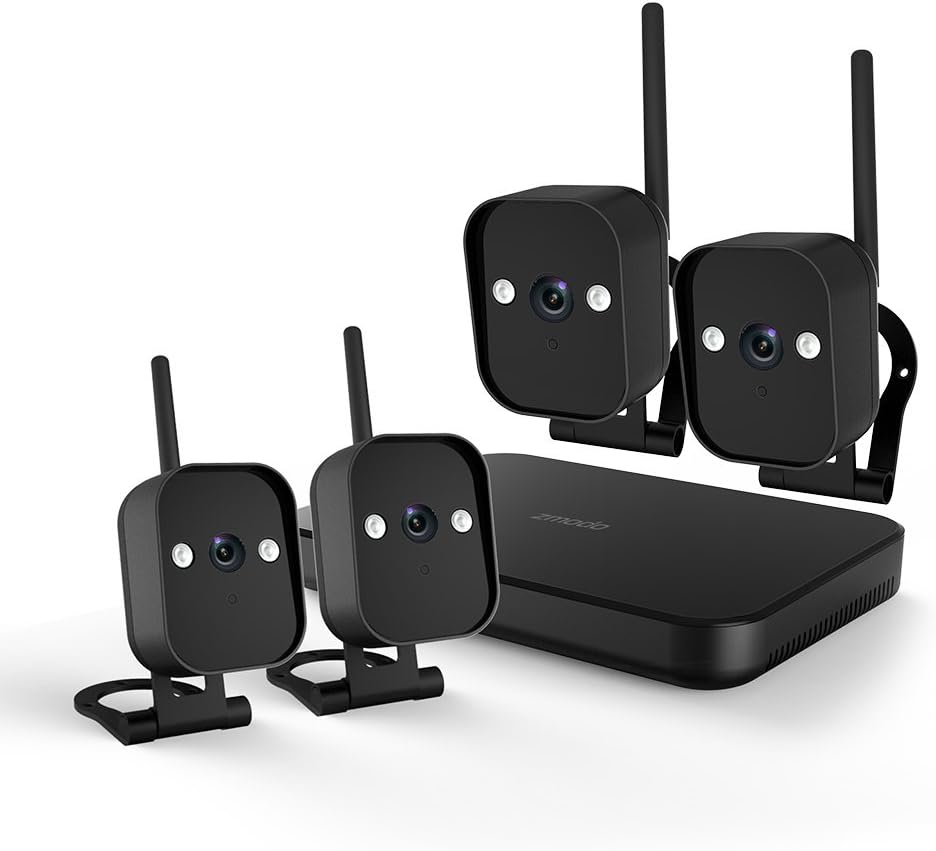
малюнок 1: закінченоview of the Zmodo ZM-KW1001-O4-1TB HD Camera System, showing the NVR unit and four wireless cameras.
3. Інструкції з налаштування
3.1 Розпакування та початковий огляд
Carefully unpack all components and verify that all items listed in Section 2.2 are present and undamaged. If any items are missing or damaged, contact customer support.
3.2 Підключення відеореєстратора
- Підключіть відеореєстратор до розетки за допомогою наданого адаптера живлення.
- For initial setup and optimal performance, connect the NVR to your router using the supplied Ethernet cable.
- Connect the NVR to a monitor via HDMI or VGA cable (not included) if local viewбажано.

малюнок 2: The Zmodo Network Video Recorder (NVR) unit, which stores recordings and manages camera connections.
3.3 Встановлення та сполучення камери
The cameras are designed for both indoor and outdoor use with an IP66 weather-resistant rating. Ensure cameras are placed within range of the NVR's wireless signal.
- Увімкнення камер: Connect each camera to its respective power adapter and plug into a power outlet.
- Smartlink Pairing: The cameras should automatically attempt to pair with the NVR. Follow the on-screen prompts on the connected monitor or use the Zmodo app for Smartlink setup. If pairing fails, refer to the troubleshooting section.
- Монтаж: Choose suitable locations for your cameras. Use the provided screws and anchors to securely mount the cameras. Ensure a clear line of sight and optimal viewкут.

малюнок 3: A Zmodo wireless camera shown with its wall-mounting bracket, suitable for outdoor installation.

малюнок 4: A Zmodo wireless camera shown with its stand mount, ideal for indoor placement on flat surfaces.
3.4 Конфігурація мобільного застосунку
- Download the Zmodo app from the App Store (iOS) or Google Play Store (Android).
- Створіть новий обліковий запис або увійдіть до існуючого.
- Follow the in-app instructions to add your Zmodo NVR system. This typically involves scanning a QR code on the NVR or manually entering device details.
- Once added, you should be able to view live feeds from your cameras.
4. Інструкція з експлуатації
4.1 Живий View
Access the Zmodo app or the NVR's local interface to view live video streams from your cameras. You can typically select individual cameras or view multiple feeds simultaneously.
4.2 Виявлення руху та сповіщення
The system is equipped with motion detection capabilities. When motion is detected, the system can record footage and send alerts to your mobile device.
- Конфігурація: In the Zmodo app or NVR settings, navigate to the motion detection section. You can customize detection zones, sensitivity levels, and alert schedules.
- Сповіщення: Ensure push notifications are enabled for the Zmodo app on your mobile device to receive timely alerts.
4.3 Запис і відтворення
The NVR includes a 1TB hard drive for continuous or motion-activated recording.
- Налаштування запису: Configure recording modes (continuous, scheduled, motion-activated) via the NVR's local interface or the Zmodo app.
- Відтворення: Повторноview записаний footage, access the playback feature in the Zmodo app or directly on the NVR. Select the desired date and time to view події.
4.4 Нічне бачення
The cameras feature infrared night vision, allowing them to capture clear video in low-light or complete darkness. The system automatically switches to night vision mode when ambient light levels are insufficient.
5. Технічне обслуговування
- Чищення камери: Періодично очищуйте об'єктиви камери м'якою губкоюamp тканиною, щоб забезпечити чітке зображення. Уникайте абразивних засобів для чищення.
- Оновлення прошивки: Check the Zmodo app or website regularly for firmware updates. Keeping your system updated ensures optimal performance and security.
- Керування жорстким диском: Жорсткий диск об'ємом 1 ТБ автоматично перезапише найстаріші файлиtage when full. If you need to preserve specific recordings, back them up to an external device before they are overwritten.
- Джерело живлення: Переконайтеся, що всі адаптери живлення надійно підключені та не пошкоджені.
6. Вирішення проблем
- Без відеопотоку:
- Check if the NVR and cameras are powered on.
- Verify network connectivity for the NVR.
- Ensure cameras are within wireless range of the NVR.
- Re-pair cameras if they have lost connection.
- Сповіщення про рух не отримано:
- Confirm motion detection is enabled in the app settings.
- Перевірте зони виявлення руху та чутливість.
- Ensure push notifications are enabled for the Zmodo app on your mobile device.
- Погана якість зображення:
- Очистіть об'єктив камери.
- Переконайтеся, що в полі зору камери немає перешкод view.
- Check for strong interference if using wireless connection.
- Cameras Not Connecting to Wi-Fi:
- Ensure the NVR's Wi-Fi is enabled and functioning.
- Move cameras closer to the NVR to improve signal strength.
- Reset cameras and attempt Smartlink pairing again.
7. Технічні характеристики
| Особливість | Специфікація |
|---|---|
| Номер моделі | ZM-KW1001-O4-1TB |
| Роздільна здатність відео | 720p HD |
| Технологія підключення | Бездротовий |
| Кількість каналів | 4 |
| Ємність зберігання | 1 ТБ (терабайт) |
| Особливості | Wireless, Motion Detection, Night Vision, IP66 Weatherproof |
| Сумісність операційної системи | Android, iOS |
| Джерело живлення | Wireless (Power Adapters for components) |
| Колір | чорний |
| Розміри упаковки | 26.8 х 20 х 16 см |
| Вага товару | 1.5 кілограма |
8. Гарантія та підтримка
Щоб отримати інформацію про гарантію та технічну підтримку, зверніться до офіційного сайту Zmodo. website or contact Zmodo customer service directly. Details regarding warranty periods and service procedures are typically available on the manufacturer's support pages.
Інтернет-підтримка: Visit the Zmodo official webсайт для поширених запитань, посібників з усунення несправностей і контактної інформації.
Звернутися в службу підтримки: If you require further assistance, please have your product model number (ZM-KW1001-O4-1TB) and purchase details ready when contacting support.