
1. Вступ
This manual provides detailed instructions for installing, configuring, and maintaining your GIGABYTE GA-B150M-D3H Micro ATX motherboard. The GA-B150M-D3H is designed to support 6th Generation Intel Core Processors and features Dual Channel DDR4 memory, PCIe Gen3 x4 M.2 connector, SATA Express, and 8-channel HD audio with Audio Noise Guard.
Please read this manual thoroughly before beginning installation to ensure proper setup and operation.
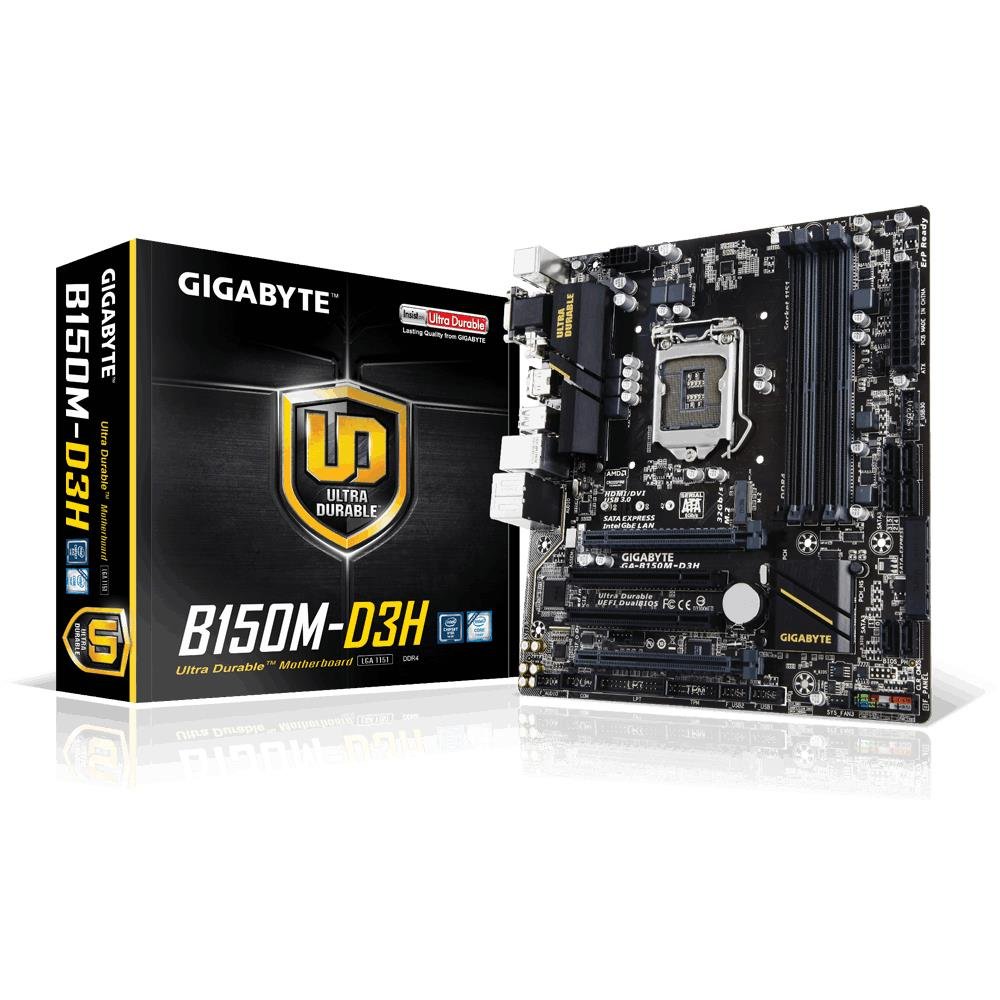
Image 1.1: GIGABYTE GA-B150M-D3H Micro ATX Motherboard. This image displays the overall layout of the motherboard, highlighting its compact Micro ATX form factor and various component slots.
2. Інформація про безпеку
Observe the following safety precautions to prevent damage to the motherboard and injury to yourself:
- Завжди від’єднуйте шнур живлення від розетки, перш ніж торкатися будь-яких компонентів.
- Одягайте антистатичний браслет або часто торкайтеся заземленого металевого предмета, щоб знімати статичну електрику.
- Тримайте материнську плату за краї, щоб не торкатися чутливих компонентів.
- Тримайте материнську плату подалі від вологи та екстремальних температур.
- Забезпечте належну вентиляцію всередині корпусу комп'ютера, щоб запобігти перегріву.
3. Вміст упаковки
Перевірте, чи всі компоненти присутні в упаковці вашої материнської плати:
- GIGABYTE GA-B150M-D3H Motherboard
- Посібник користувача
- I / O Shield
- Кабелі SATA
- Компакт-диск/DVD-диск з драйверами
Примітка: Зміст може дещо відрізнятися залежно від регіону або версії.
4. Компонування материнської плати
Familiarize yourself with the various components and connectors on the GA-B150M-D3H motherboard.
Image 4.1: GIGABYTE GA-B150M-D3H Motherboard Layout. This image provides a visual reference for the location of key components such as the CPU socket, DIMM slots, PCIe slots, SATA ports, and M.2 connector.
Ключові компоненти:
- Роз'єм процесора LGA 1151: For 6th Generation Intel Core Processors.
- DDR4 DIMM Slots (4): Supports Dual Channel DDR4 memory up to 2133 MHz.
- Слоти PCIe: Includes PCIe Gen3 x16 for graphics cards and PCIe x1 slots for expansion.
- M.2 Connector: Supports PCIe NVMe & SATA SSDs with up to 32Gb/s data transfer.
- SATA Express Connector: For up to 16Gb/s data transfer.
- Порти SATA 6 Гбіт/с: For connecting traditional SATA storage devices.
- 24-контактний роз'єм живлення ATX: Основний вхід живлення.
- 8-Pin ATX 12V Power Connector: CPU power input.
- Роз'єми передньої панелі: For power button, reset button, LED indicators, and USB ports.
- Аудіороз'єми: 8-channel HD Audio with high quality capacitors and Audio Noise Guard.
5. Налаштування та встановлення
Виконайте ці кроки для правильного встановлення материнської плати та її компонентів.
5.1. Встановлення процесора
- Знайдіть роз'єм процесора LGA 1151.
- Відкрийте важіль роз'єму процесора та підніміть навантажувальну пластину.
- Обережно вирівняйте процесор із сокетом, переконавшись, що золотий трикутник на процесорі збігається із трикутником на сокеті. Не вставляйте процесор у сокет силою.
- Опустіть вантажну платформу та закріпіть її важелем.
5.2. Встановлення кулера процесора
Refer to your CPU cooler's instruction manual for specific installation steps. Ensure thermal paste is applied correctly between the CPU and cooler base.
5.3. Встановлення пам'яті (ОЗП)
- Відкрийте затискачі з обох кінців слотів DDR4 DIMM.
- Зіставте модуль пам’яті зі слотом, переконавшись, що виїмка на модулі збігається з ключем у слоті.
- Міцно натисніть на обидва кінці модуля пам’яті, доки затискачі не зафіксуються на місці.
- For dual-channel performance, install memory modules in matching colored slots (e.g., DIMM1 and DIMM2).
5.4. Installing Expansion Cards
- Зніміть металевий кронштейн з потрібного слота PCIe на корпусі комп'ютера.
- Align the expansion card with the PCIe slot and press down firmly until it is seated correctly.
- Закріпіть карту гвинтом до корпусу комп'ютера.
5.5. Підключення пристроїв зберігання даних
- Пристрої SATA: Connect one end of the SATA data cable to a SATA 6Gb/s port on the motherboard and the other end to your hard drive or SSD. Connect the SATA power cable from your power supply to the device.
- M.2 SSD: Insert the M.2 SSD into the M.2 slot at an angle, then gently push it down and secure it with the provided screw.
- SATA Express: If using a SATA Express device, connect it to the designated SATA Express connector.
5.6. Підключення роз’ємів передньої панелі
Connect the cables from your computer case's front panel (power button, reset button, HDD LED, power LED, front USB, front audio) to the corresponding headers on the motherboard. Refer to the motherboard layout diagram for exact locations and pin assignments.
5.7. Підключення джерела живлення
- Connect the 24-pin ATX main power connector from your power supply to the 24-pin power socket on the motherboard.
- Connect the 8-pin ATX 12V CPU power connector to the 8-pin socket near the CPU.
- Переконайтеся, що всі підключення живлення надійні.
6. Інструкція з експлуатації
6.1. Перше завантаження
After assembling all components, connect your monitor, keyboard, and mouse. Power on the system. The system should display the GIGABYTE splash screen and then enter the BIOS/UEFI setup or attempt to boot from a connected storage device.
6.2. Налаштування BIOS/UEFI
Щоб увійти до налаштувань BIOS/UEFI, натисніть DEL key repeatedly during the boot process when the GIGABYTE logo appears. Here you can configure system settings, boot order, and monitor hardware status. The GA-B150M-D3H features GIGABYTE UEFI Dual BIOS for enhanced reliability.
6.3. Встановлення драйвера
After installing your operating system, install the necessary drivers for the motherboard components. These can be found on the included driver CD/DVD or downloaded from the official GIGABYTE website. Key drivers include chipset, audio (Realtek ALC892 codec), LAN, and any integrated graphics drivers.
6.4. Встановлення операційної системи
Insert your operating system installation media (USB drive or DVD) and configure the boot order in the BIOS/UEFI to boot from it. Follow the on-screen instructions to install your preferred operating system (e.g., Windows 8.1, Windows 10).
7. Технічне обслуговування
7.1. прибирання
Regularly clean the interior of your computer case to prevent dust buildup, which can lead to overheating. Use compressed air to remove dust from fans, heatsinks, and motherboard components. Ensure the system is powered off and unplugged before cleaning.
7.2. Оновлення BIOS
GIGABYTE періодично випускає оновлення BIOS для покращення стабільності, сумісності та продуктивності системи. Відвідайте офіційний веб-сайт GIGABYTE website for your motherboard model (GA-B150M-D3H) to check for the latest BIOS version and follow the provided instructions for updating. Exercise caution during BIOS updates, as an interruption can render the motherboard inoperable.
8. Вирішення проблем
У цьому розділі розглядаються поширені проблеми, з якими ви можете зіткнутися.
8.1. No Power / System Does Not Turn On
- Check if the power supply is connected correctly to the motherboard (24-pin and 8-pin connectors).
- Переконайтеся, що вимикач живлення знаходиться в положенні УВІМК.
- Перевірте, чи кабель кнопки живлення на передній панелі правильно підключений до роз'єму материнської плати.
- Перевірте блок живлення за допомогою іншої системи або тестера блоків живлення.
8.2. Немає виводу на дисплей
- Ensure the monitor is connected to the correct graphics output (either integrated graphics on the motherboard or a dedicated graphics card).
- Перевстановіть відеокарту та модулі пам'яті.
- Спробуйте завантажитися лише з одним встановленим модулем пам'яті.
- Перевірте, чи монітор увімкнено та чи налаштовано на правильне джерело вхідного сигналу.
8.3. Нестабільність системи / Збої
- Перевірте температуру процесора та графічного процесора, щоб переконатися, що вона знаходиться в безпечних робочих межах.
- Verify that all drivers are installed and up to date.
- Запустіть інструменти діагностики пам'яті, щоб перевірити наявність несправної оперативної пам'яті.
- Ensure the power supply provides sufficient and stable power to all components.
9. Технічні характеристики
Detailed technical specifications for the GIGABYTE GA-B150M-D3H motherboard:
| Особливість | Специфікація |
|---|---|
| Назва моделі | GA-B150M-D3H |
| Форм-фактор | Micro ATX (24.4 см x 22.5 см) |
| Гніздо ЦП | LGA 1151 |
| Сумісні процесори | 6th Generation Intel Core Processors |
| Чіпсет | Чіпсет Intel B150 Express |
| Технологія пам'яті | DDR4 |
| слоти пам'яті | 4 роз'єми DDR4 DIMM (двоканальні) |
| Максимальна ємність пам'яті | 16 ГБ |
| Тактова частота пам'яті | 2133 МГц |
| PCIe слоти | 1 x PCI Express x16, 1 x Total PCIe Ports |
| Інтерфейси зберігання даних | PCIe Gen3 x4 M.2, SATA Express, SATA 6Gb/s |
| Аудіокодек | Realtek ALC892 codec, 8-channel HD Audio |
| USB порти | Всього 8 порти USB (включаючи USB 2.0) |
| Основний роз'єм живлення | 24-контактний ATX |
| Роз'єм живлення процесора | 8-Pin ATX 12V |
| Унікальні особливості | GIGABYTE UEFI Dual BIOS, Audio Noise Guard with LED Trace Path Lighting, App Center (Easy Tune, Cloud Station) |
10. Гарантія та підтримка
For warranty information, please refer to the warranty card included in your product package or visit the official GIGABYTE webсайт. Гарантійні умови можуть відрізнятися залежно від регіону.
For technical support, driver downloads, BIOS updates, and further product information, please visit the GIGABYTE official support webсайт:
https://www.gigabyte.com/Support
When contacting support, please have your motherboard model (GA-B150M-D3H) and serial number ready.