
1. Вступ
This manual provides essential information for the safe and efficient operation of your Philips 40PFL4609/F8 40-inch Full HD LED Smart TV. Please read these instructions carefully before using your television and retain them for future reference.
2. Інформація про безпеку
Завжди дотримуйтесь основних запобіжних заходів під час використання цього телевізора, щоб зменшити ризик пожежі, ураження електричним струмом та травмування.
- Не піддавайте телевізор впливу дощу або вологи.
- Не відкривайте корпус; звертайтеся до кваліфікованого персоналу для проведення будь-яких робіт з обслуговування.
- Забезпечте належну вентиляцію навколо телевізора.
- Захищайте шнур живлення від наступання або защемлення.
- Від’єднуйте телевізор від мережі під час грози або якщо він не використовується протягом тривалого часу.
3. Вміст упаковки
Перевірте наявність усіх елементів у коробці:
- Philips 40PFL4609/F8 40-inch Full HD LED Smart TV
- Пульт дистанційного керування (потрібні 2 батарейки типу AAA, в комплекті)
- Шнур живлення
- Tabletop Stand and Screws
- Короткий посібник користувача (не входить до цього цифрового посібника)
- Посібник користувача (цей документ)
4. Налаштування
4.1 Розпакування та розміщення
Carefully remove the television from its packaging. Inspect the TV for any physical damage. Place the television on a stable, flat surface or mount it on a wall using a compatible VESA 200x200mm wall mount (sold separately).
4.2 Збірка підставки
If using the tabletop stand:
- Покладіть телевізор екраном донизу на м’яку, чисту поверхню, щоб запобігти пошкодженню екрана.
- Вирівняйте підставку з монтажними отворами на нижній панелі телевізора.
- Закріпіть підставку гвинтами з комплекту.
4.3 Підключення живлення
Connect the power cord to the TV's power input, then plug the other end into a 110 VAC, 60 Hz electrical outlet.
4.4 Підключення зовнішніх пристроїв
Ваш телевізор Philips пропонує різні варіанти підключення зовнішніх пристроїв.
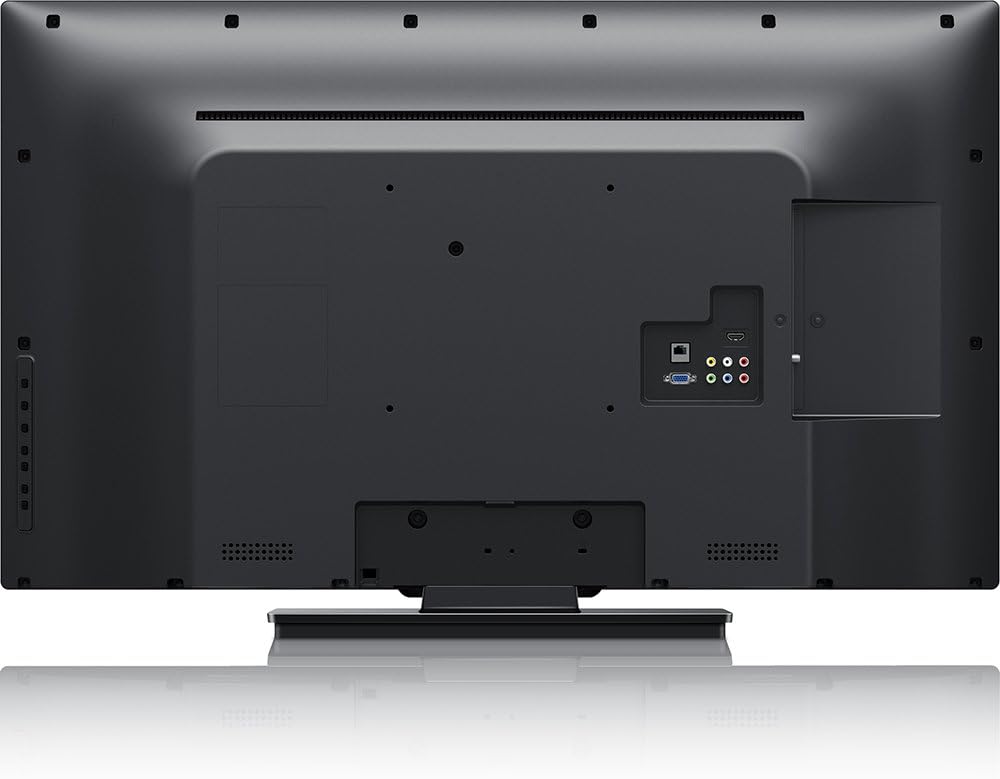
зображення: Задня view of the Philips 40PFL4609/F8 television, highlighting the input ports including HDMI, DVI, and other audio/video connections.
- HDMI: Connect Blu-Ray players, game consoles, or other HDMI-enabled devices. This model has 1 HDMI port.
- DVI: Connect computers or other DVI-enabled devices.
- USB: Connect USB storage devices for media playback. This model has 1 USB 2.0 port.
- Антена/кабель: Підключіть антену або кабельне телебачення для трансляції каналів.
4.5 Майстер початкового налаштування
Після першого ввімкнення телевізор проведе вас через процес початкового налаштування:
- Вибір мови: Виберіть бажану мову.
- Підключення до мережі: Connect to your home Wi-Fi network. The TV supports Wi-Fi connectivity.
- Сканування каналів: Scan for available broadcast channels (if an antenna or cable is connected).
5. Керування телевізором
5.1 Дистанційне керуванняview
The included remote control allows you to navigate menus, adjust settings, and control playback. Insert two AAA batteries into the remote control, ensuring correct polarity.
5.2 Основні функції
- Потужність: Натисніть кнопку живлення, щоб увімкнути або вимкнути телевізор.
- обсяг: Використовуйте кнопки гучності, щоб відрегулювати рівень звуку.
- канал: Використовуйте кнопки каналів для перемикання телеканалів.
- введення: Press the input button to select connected devices (HDMI, DVI, etc.).
5.3 Smart TV Features (Net TV)
Your Philips TV features Net TV, providing access to online content and applications.
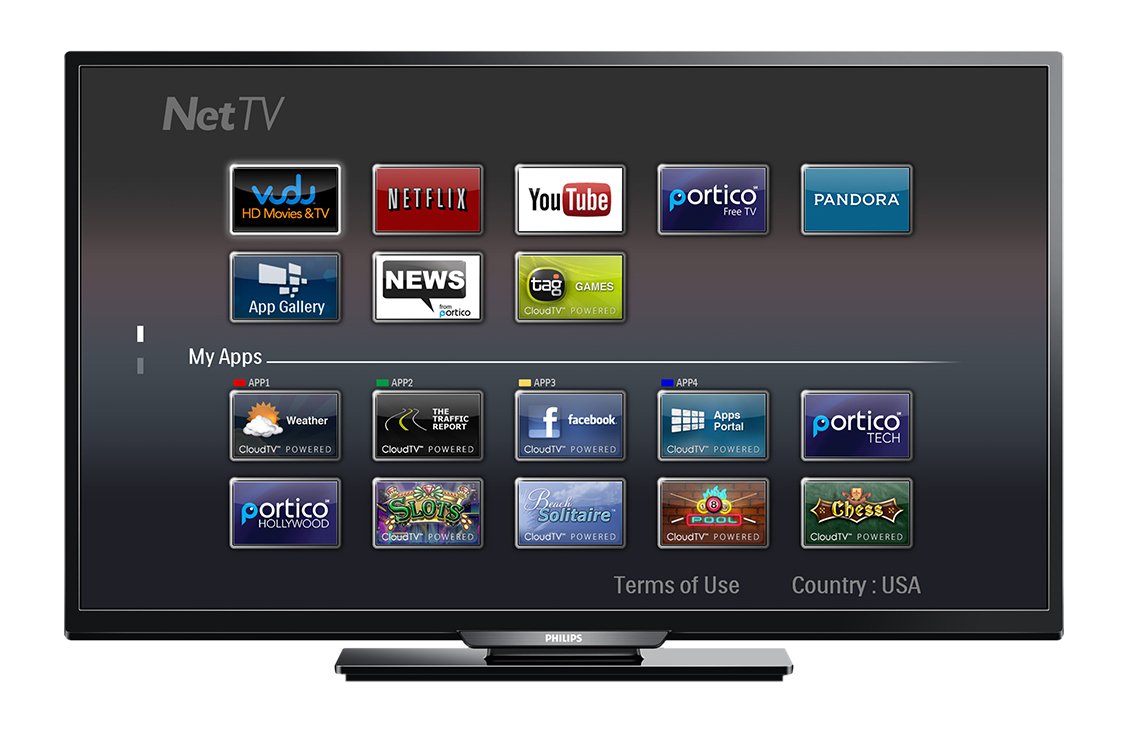
зображення: Фронт view of the Philips 40PFL4609/F8 television, showing the Net TV interface with various application icons such as Netflix, YouTube, and other streaming services.
- Доступ до програм: Use the remote control to navigate to the Net TV menu and select applications like Netflix and YouTube.
- З'єднання Wi-Fi: Ensure your TV is connected to a stable Wi-Fi network for optimal Smart TV performance.
5.4 Налаштування зображення
Adjust picture settings to enhance your viewдосвід роботи:
- Pixel Plus HD: This video engine enhances detail, depth, and clarity.
- 120Hz PMR (Perfect Motion Rate): Provides sharp images in fast-moving scenes.
- Access the picture menu to adjust brightness, contrast, color, and sharpness.
5.5 Параметри звуку
Оптимізація аудіовиходу:
- SRS TruSurround: Enjoy immersive sound with this integrated surround sound format.
- Access the audio menu to adjust bass, treble, and sound modes.
5.6 Відтворення медіафайлів через USB
Connect a USB storage device to the TV's USB 2.0 port to view фотографії, відтворювати музику або дивитися відео.
6. Технічне обслуговування
6.1 Очищення екрана
Обережно протріть екран м’якою тканиною без ворсу. Для стійких плям, dampen the cloth with a small amount of water or a specialized screen cleaner. Do not spray liquid directly onto the screen.
6.2 Очищення Casing
Протріть телевізорasinм’якою сухою тканиною. Уникайте використання абразивних засобів для чищення або розчинників.
6.3 Оновлення програмного забезпечення
This model may not support automatic software updates via the internet. Check the Philips support website for information on manual firmware updates, if available, to ensure optimal performance and access to the latest features.
7. Вирішення проблем
Якщо у вас виникли проблеми з телевізором, зверніться до наступних поширених рішень:
- Немає живлення: Ensure the power cord is securely plugged into both the TV and the electrical outlet. Check the power outlet with another device.
- Немає зображення/звуку: Verify the correct input source is selected. Check all cable connections (HDMI, DVI, antenna).
- Немає мережевого підключення: Ensure your Wi-Fi router is working correctly. Re-enter your Wi-Fi password if necessary.
- Net TV Limitations: Some users have reported that the Net TV functionality on this model can be basic or limited in terms of additional app installation or software updates. If you find the built-in Smart TV features insufficient, consider connecting an external streaming device.
- Фізичні пошкодження: Upon unboxing, carefully inspect the screen and casing for any damage, especially along the edges, which could affect display quality. Contact your retailer immediately if damage is found.
- Пульт дистанційного керування не працює: Замініть батарейки типу AAA. Переконайтеся, що між пультом дистанційного керування та ІЧ-датчиком телевізора немає перешкод.
8. Технічні характеристики

зображення: сторона view of the Philips 40PFL4609/F8 television, illustrating its slim profile and side-mounted connectivity options.
| Особливість | опис |
|---|---|
| Назва моделі | PHILIPS 40PFL4609/F8 |
| Розмір екрана | 40 дюймів (100.3 сантиметрів) |
| Технологія дисплея | Світлодіодний, РК-дисплей |
| роздільна здатність | 1080p Full HD |
| Частота оновлення | 120 Hz (120Hz PMR) |
| Співвідношення сторін | 16:9 |
| Технологія підключення | Wi-Fi |
| Сумісні інтернет-сервіси | Netflix, YouTube |
| Особливості | Blu-Ray compatible, DVI Input, HDMI Input, Full HD, HD Compatible, Internet, Surround Sound |
| Порти HDMI | 1 |
| Порти USB 2.0 | 1 |
| Режим аудіовиходу | Stereo, Surround Sound |
| Integrated Surround Sound Format | SRS TruSurround |
| Опис спікера | SRS TruSurround |
| Споживана потужність | 89 Вт |
| томtage | 110 В змінного струму 60 Гц |
| Вага товару | 8200 грамів |
| Стандарт кріплення VESA | 200 х 200 мм |
| Колір | чорний |
| Сумісні пристрої | Laptop, Tablet, Game Console, Headphones |
| Рік моделі | 2016 |
9. Інформація про гарантію
This Philips television comes with a 12-місячна обмежена гарантія provided by the manufacturer. Please retain your proof of purchase for warranty claims. The warranty covers manufacturing defects under normal use conditions.
10. Підтримка клієнтів
For further assistance, technical support, or warranty inquiries, please contact Philips customer service. Refer to the official Philips website or your product packaging for contact details specific to your region.