
1. Вступ
The ASUS Z170-DELUXE is a high-performance desktop motherboard designed for Intel Z170 chipset and LGA 1151 socket processors. It offers advanced features for enhanced speed, stability, and connectivity, making it suitable for demanding computing tasks and gaming. This manual provides essential information for setting up, operating, and maintaining your motherboard.
Ключові особливості:
- 5-Way Optimization: Dynamic system tuning for performance, efficiency, digital power, fan control, and networking.
- ASUS PRO Clock Technology: Dedicated base-clock generator for extended overclocking margins.
- Кришталевий звук 3: Advanced audio solution for clear and immersive sound.
- 3x3 Dual-Band 802.11ac Wi-Fi + BT4.0: Integrated high-speed wireless connectivity.
- NVME U.2 Device Support and Hyper M.2 x4 Mini Card Support: Next-generation storage options for ultra-fast data transfer.
- USB 3.1 Type-A and Type-C Ports: High-speed USB connectivity with reversible Type-C.
- 5X Protection II: Hardware-level safeguards for long-term durability and reliability.
- Intel Ethernet: Optimized network performance with reduced CPU overhead.
2. Налаштування та встановлення
This section guides you through the physical installation of the ASUS Z170-DELUXE motherboard and its components.
2.1. Підготовка системи
- Ensure your power supply is disconnected from the wall outlet.
- Prepare your computer case and ensure adequate space for installation.
- Gather necessary tools, including a Phillips head screwdriver.
2.2. Встановлення материнської плати
- Carefully place the motherboard into your computer case, aligning it with the standoffs.
- Закріпіть материнську плату гвинтами.
- Install the CPU (Intel LGA 1151) into the socket, ensuring correct orientation.
- Нанесіть термопасту та встановіть кулер процесора.
- Install DDR4 RAM modules into the designated slots (4 available). For optimal performance, refer to your CPU and RAM manufacturer's guidelines for dual-channel configuration.
- Connect the 24-Pin main power connector and the 8-Pin CPU power connector from your power supply to the motherboard.
- Connect front panel headers (power button, reset button, USB ports, audio jacks) using the provided Q-Connector for easier installation.

Figure 1: ASUS Z170-DELUXE Motherboard layout.
2.3. Встановлення карт пам'яті та розширення
- Пристрої SATA: Connect SATA storage drives (HDDs/SSDs) to the available SATA 3 ports (6 total).
- M.2/U.2 Devices: For NVMe M.2 SSDs, insert the module into the M.2 slot and secure it. The motherboard supports NVMe U.2 devices via an adapter (sold separately).
- Карти PCIe: Install graphics cards or other expansion cards into the appropriate PCIe slots (7 total).
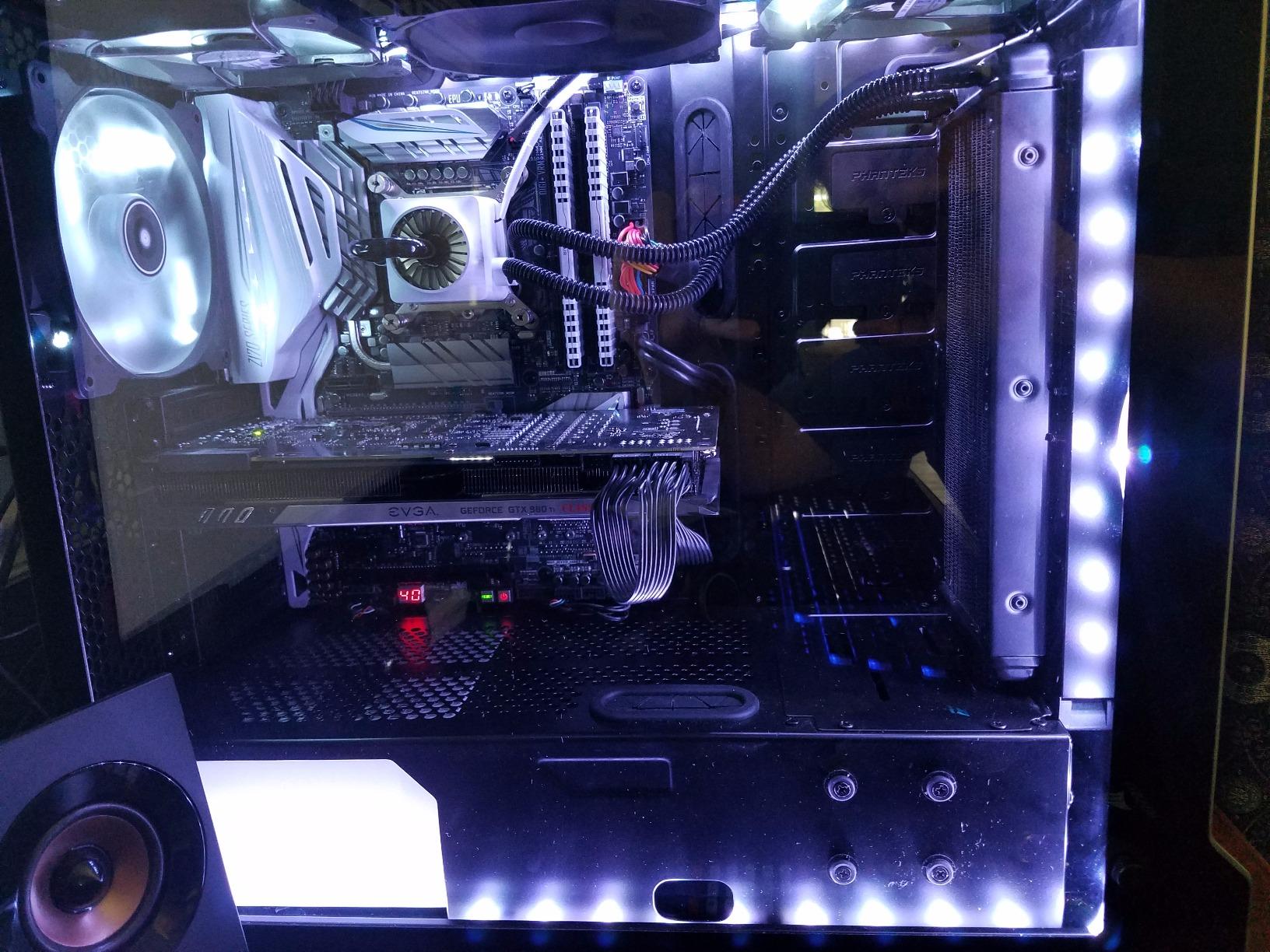
Figure 2: ASUS Z170-DELUXE Motherboard installed in a system, showcasing component layout.
3. Інструкція з експлуатації
This section covers the basic operation and key features of your ASUS Z170-DELUXE motherboard.
3.1. Початкове завантаження та налаштування BIOS
- Після підключення всіх компонентів та периферійних пристроїв увімкніть систему.
- Натисніть DEL or F2 key during startup to enter the UEFI BIOS.
- In the BIOS, you can configure boot order, enable XMP for RAM, adjust fan speeds, and manage other system settings.
- The ASUS UEFI BIOS provides an intuitive interface for easy navigation and configuration.
3.2. Установка програмного забезпечення та драйверів
- Install your operating system (e.g., Windows 10).
- Install the latest drivers for the Z170 chipset, audio, LAN, Wi-Fi, and other integrated components from the ASUS support webсайт або наданий диск з драйверами.
- Utilize ASUS utilities like AI Suite 3, що включає FAN Expert for advanced fan control and 5-Way Optimization for system tuning.
3.3. Функції підключення
- USB 3.1: Utilize the high-speed USB 3.1 Type-A and reversible Type-C ports for fast data transfer with compatible devices.
- Wi-Fi і Bluetooth: Connect to wireless networks using the integrated 3x3 Dual-Band 802.11ac Wi-Fi. Bluetooth 4.0 allows connection to wireless peripherals.
- Intel Ethernet: Benefit from stable and high-throughput wired network connections.
4. Технічне обслуговування
Правильне обслуговування забезпечує довговічність та оптимальну продуктивність вашої материнської плати.
- Тримати в чистоті: Regularly clean dust from the motherboard and case interior using compressed air. Ensure fans are free of obstructions.
- Оновлення BIOS: Періодично перевіряйте службу підтримки ASUS website for BIOS updates. Updating the BIOS can improve compatibility, stability, and performance. Use the ASUS EZ Flash utility for safe BIOS updates.
- Оновлення драйверів: Keep all drivers (chipset, audio, LAN, etc.) updated to their latest versions for optimal performance and security.
- Джерело живлення: Ensure your power supply provides stable and sufficient power to all components. Unstable power can lead to system instability.
5. Вирішення проблем
This section addresses common issues you might encounter with your ASUS Z170-DELUXE motherboard.
- No POST (Power-On Self-Test) / Error Code 55:
- Error code 55 typically indicates a memory issue.
- Переконайтеся, що модулі оперативної пам'яті повністю встановлені у свої слоти.
- Try booting with only one RAM stick, testing each slot and module individually to identify a faulty stick or slot.
- Verify RAM compatibility with the motherboard's QVL (Qualified Vendor List) on the ASUS webсайт.
- Update the BIOS to the latest version, as this often includes memory compatibility improvements.
- Немає відеовиходу:
- Ensure your monitor is connected to the correct video output (integrated graphics or dedicated graphics card).
- If using integrated graphics with a 4K display at 60Hz via HDMI, you might experience a blank screen. The integrated HDMI port on the Z170 chipset may be limited to 30Hz at 4K resolution. Consider using a DisplayPort connection or a dedicated graphics card for 4K 60Hz output.
- Reseat your graphics card if applicable.
- Перевірте вибір входу монітора.
- Нестабільність системи / Збої:
- Переконайтеся, що всі роз'єми живлення надійно підключені.
- Перевірте температуру процесора та графічного процесора. Перегрів може спричинити нестабільність.
- Перевірте стабільність оперативної пам'яті за допомогою інструментів діагностики пам'яті.
- If using RAID, ensure Intel Rapid Storage Technology (IRST) drivers are compatible. Some IRST driver versions (e.g., 14.8.1.1042 or 15.2.0.1020) have been reported to cause issues with certain configurations. Try using an older stable version (e.g., 14.0.0.1143 or 14.5.0.1081) or uninstall IRST if not using RAID.
- Ensure your power supply is sufficient for your components.
- Периферійний пристрій не виявлено:
- Перевірте фізичні з'єднання.
- Встановіть або оновіть відповідні драйвери.
- Test the peripheral on another port or system.
6. Технічні характеристики
| Особливість | Деталь |
|---|---|
| Бренд | ASUS |
| Назва моделі | Z170-DELUXE |
| Гніздо ЦП | LGA 1151 |
| Тип чіпсета | Intel Z170 |
| Сумісні процесори | Intel Celeron, Core i7 (and other LGA 1151 compatible CPUs) |
| Технологія оперативної пам'яті | DDR4 |
| Тактова частота пам'яті | 2133 MHz (Base, supports higher via XMP) |
| Доступні слоти пам'яті | 4 |
| Максимальний розмір оперативної пам'яті | 64 ГБ |
| Total SATA Ports | 6 |
| Загальна кількість портів USB | 15 (including USB 3.1 Type-A and Type-C) |
| Кількість портів Ethernet | 2 (Intel Ethernet) |
| Total Number of HDMI Ports | 1 |
| Total PCIe Ports | 7 |
| Інтерфейс графічної карти | Інтегрований, PCI Express |
| Вага товару | 0.8 кілограма |
7. Гарантія та підтримка
Щоб отримати детальну інформацію про гарантію, зверніться до гарантійного талона, що додається до вашого продукту, або відвідайте офіційну службу підтримки ASUS. website. ASUS provides technical support and resources to assist with any product-related inquiries.
- Підтримка ASUS Webсайт: www.asus.com/support/
- Контактна інформація: Зверніться до ASUS website for regional contact details and customer service options.
Note: Warranty terms and conditions may vary by region. Please retain your proof of purchase for warranty claims.