
вступ
Дякуємо за покупкуasing the STOGA Ubox STV040 Dual Lens Car DVR Camera. This manual provides detailed instructions for the proper installation, operation, and maintenance of your device. Please read this manual thoroughly before using the product to ensure optimal performance and safety.
Вміст упаковки
Будь ласка, перевірте вміст упаковки після відкриття. Якщо будь-які елементи відсутні або пошкоджені, зверніться до продавця.
- 1 x STOGA Ubox STV040 Car DVR Camera
- 1 х автомобільний зарядний пристрій
- 1 x Car Mount
- 1 x External GPS Module
- 1 х посібник користувача
Продукт закінченийview
Familiarize yourself with the components and features of your STOGA Ubox STV040 Car DVR Camera.

малюнок 1: Фронт view of the DVR camera with the display screen active.

малюнок 2: Фронт view detailing the dual wide-angle lenses and surrounding controls.
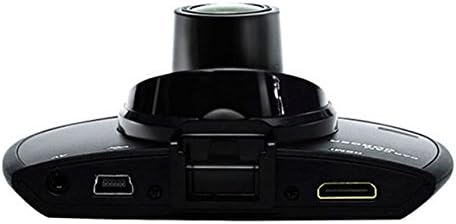
малюнок 3: Топ view illustrating the connectivity ports (HDMI, USB, AV).
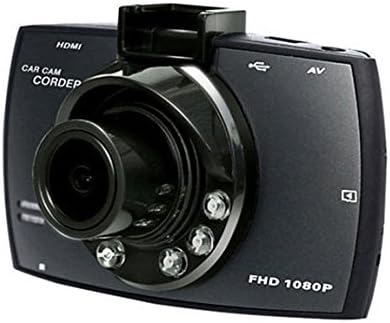
малюнок 4: Angled perspective of the DVR camera, showing its compact design.
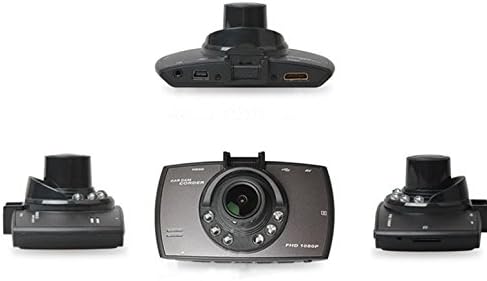
малюнок 5: Комплексний view of the DVR camera from various angles.
Налаштування
1. Installing the Micro SD Card
Insert a Micro SD card (Class 6 or higher, 4GB-32GB) into the designated slot on the DVR camera. Ensure the card is inserted correctly until it clicks into place. The device supports continuous loop recording and emergency event recording.
2. Монтаж камери
- Attach the car mount to the windshield in a position that does not obstruct your view.
- Securely attach the DVR camera to the car mount.
- Adjust the camera angle to ensure both lenses capture the desired view (front and interior/side). The dual lenses are 180-degree rotatable.
3. Підключення живлення
Connect the car charger to the DVR camera's power input and plug the other end into your vehicle's 12V power outlet (cigarette lighter socket). The camera will typically power on automatically when the vehicle starts and power off when the vehicle is turned off.
4. GPS Module Connection (Optional)
Connect the external GPS module to the designated GPS port on the DVR camera. This enables GPS logging, recording location data along with video footage.
Інструкція з експлуатації
Увімкнення/вимкнення живлення
- Автоматично: The camera powers on and starts recording automatically when the car engine starts. It powers off automatically when the engine is turned off.
- Інструкція з експлуатації: Press and hold the power button to manually turn the device on or off.
Режими запису
- Циклічний запис: The camera continuously records video in segments. When the memory card is full, it automatically overwrites the oldest unlocked footage.
- Екстрений запис (G-сенсор): The built-in G-Sensor detects sudden impacts or collisions. In such an event, the current video segment is automatically locked and protected from being overwritten.
Навігація по меню
Use the control buttons located on the device to navigate through the menu options on the 2.0" TFT LCD screen. Adjust settings such as video resolution, date/time stamp, language (English, Chinese, Japanese, Russian), and G-Sensor sensitivity.
Відтворення
- Stop recording if currently active.
- Enter playback mode via the menu.
- Виберіть потрібне відео file for playback on the device screen.
- Alternatively, remove the Micro SD card and insert it into a computer to view files.
Захист паролем
The device supports password protection to prevent unauthorized access to recordings. Refer to the on-screen menu for setting up and managing this feature.
Технічне обслуговування
- Прибирання: Use a soft, dry cloth to clean the camera lenses and screen. Avoid abrasive cleaners or solvents.
- Micro SD Card: Format the Micro SD card regularly (e.g., once a month) to ensure optimal performance and prevent data corruption. Back up important files перед форматуванням.
- температура: Уникайте тривалого перебування пристрою під екстремальними температурами, прямими сонячними променями або високою вологістю.
- Оновлення прошивки: Перевірте виробника website periodically for any available firmware updates to improve performance and add features.
Усунення несправностей
| проблема | Можлива причина / рішення |
|---|---|
| Камера не вмикається. |
|
| Запис несподівано зупиняється. |
|
| Погана якість відео. |
|
| GPS не працює. |
|
| Акумулятор не тримає заряд. |
|
Технічні характеристики
| Особливість | Деталь |
|---|---|
| Номер моделі | Ubox STV040 |
| Дисплей | 2.0" TFT LCD (960 x 240 pixels) |
| Лінзи | Dual 140-degree A+ wide-angle, 180-degree rotatable |
| датчик | CMOS |
| Роздільна здатність відео | 1280 x 480 @ 30 fps, 640 x 480 @ 30 fps |
| Формат відео | AVI |
| Формат зображення | M-JPG |
| Нічне бачення | Функція інфрачервоного нічного бачення |
| Зберігання | Micro TF (SD HC) card, 4GB-32GB, Class 6 and above |
| GPS | Supports external GPS module |
| G-сенсор | Integrated, supports emergency event recording lock |
| Мікрофон/динамік | Інтегрований |
| Вихід | CVBS (Video Output) |
| Акумулятор | 3.7V 700mA Lithium-Polymer battery |
| Сумісність операційної системи | Windows 2000/XP/Vista/Windows 7 |
| Підтримувані мови | English, Chinese, Japanese, Russian |
Гарантія та підтримка
For warranty information and technical support, please refer to the documentation provided with your purchase or contact your retailer. Keep your purchase receipt as proof of purchase for warranty claims.
For further assistance, you may also visit the official STOGA website (if available) or contact their customer service department.