
1. Вступ
The Argox AS8520 is a high-performance cordless imager designed for efficient barcode scanning. It features advanced wireless communication technology, allowing for a data transmission range of up to 100 meters. Equipped with a long-lasting Li-ion battery and an IP42 sealing level, the AS8520 is built for durability and mobility across various environments, including offices, supermarkets, warehouses, and manufacturing facilities.
2. Продукт закінчивсяview
The AS8520 barcode scanner is designed for comfortable handling and robust performance. Key components include the scanning window, trigger button, and ergonomic grip.
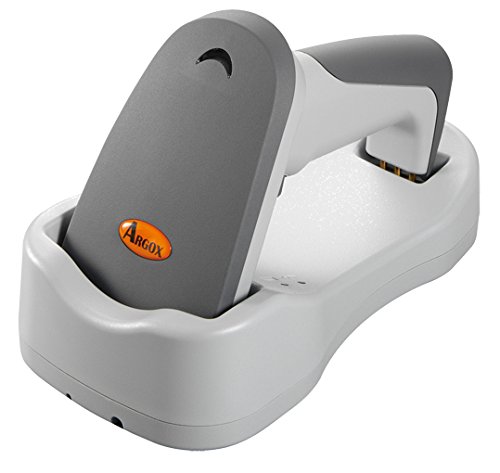
малюнок 2.1: сторона view of the Argox AS8520 Barcode Scanner, showing the ergonomic handle and trigger button.
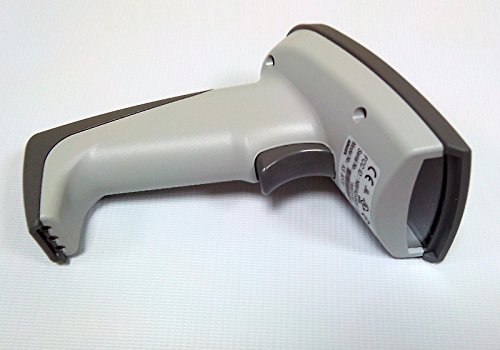
малюнок 2.2: Фронт view of the Argox AS8520 Barcode Scanner, highlighting the scanning window and product labels.
3. Посібник із налаштування
3.1. Встановлення та зарядка акумулятора
- Ensure the scanner is powered off before installing or removing the battery.
- Locate the battery compartment on the scanner handle.
- Insert the Li-ion battery pack, ensuring correct polarity.
- Надійно закрийте батарейний відсік.
- Connect the scanner to its charging base or power adapter using the provided cable. Allow the battery to fully charge before first use.
3.2. Підключення до хост-пристрою
The Argox AS8520 can connect wirelessly to various host devices, including desktops, laptops, and smartphones. Refer to the separate quick start guide for specific pairing instructions for your operating system or device type.
4. Інструкція з експлуатації
4.1. Базове сканування
- Ensure the scanner is powered on and successfully paired with your host device.
- Направте вікно сканування на штрих-код, який потрібно відсканувати.
- Press and hold the trigger button. A red LED light source (630nm Visible Red LED) will illuminate the barcode.
- Position the scanner at an appropriate distance (the AS8520 offers superior depth of field up to 40 inches on 40-mil codes) until the barcode is successfully read. A successful scan is typically indicated by an audible beep and/or a visual indicator.
- Відпустіть кнопку курка.
4.2. Розширені функції сканування
- Rapid Scan Rate: The AS8520 provides a rapid scan rate of 450 scans/sec for efficient data capture.
- Barcode Symbology Support: Supports GS1 Databar (RSS) and CS (Composite Symbology) barcodes.
- Sunlight Readability: Designed to be readable under direct sunlight conditions.
5. Технічне обслуговування
5.1. Очищення сканера
- Перед чищенням переконайтеся, що сканер вимкнено.
- Злегка протріть м’якою тканиною без ворсу dampened with water or a mild cleaning solution to wipe the exterior of the scanner.
- For the scanning window, use a lens cleaning cloth to avoid scratches.
- Do not use abrasive cleaners, solvents, or immerse the scanner in liquid. The IP42 sealing level protects against dust and light water splashes, but not full immersion.
5.2. Догляд за акумулятором
- To maximize battery life, avoid fully discharging the Li-ion battery frequently.
- Зберігайте сканер у прохолодному, сухому місці, якщо він не використовується протягом тривалого часу.
- If the battery performance degrades significantly, consider replacing it with an authorized Argox replacement battery.
6. Вирішення проблем
| проблема | Можлива причина | Рішення |
|---|---|---|
| Сканер не вмикається. | Акумулятор розряджений або неправильно встановлений. | Зарядіть акумулятор. Переконайтеся, що акумулятор правильно встановлено у своєму відсіку. |
| Сканер не зчитує штрих-коди. | Barcode is damaged, scanner is too far/close, or incorrect symbology settings. | Ensure the barcode is clear. Adjust scanning distance. Check scanner programming for supported barcode types. |
| Дані не передаються на хост-пристрій. | Scanner not paired or out of range. | Re-pair the scanner with the host device. Ensure the scanner is within the 100-meter transmission range. |
| Scanner is unresponsive. | Тимчасовий збій програмного забезпечення. | Perform a soft reset by powering off and then on the scanner. If issues persist, consult the manufacturer's support. |
7. Технічні характеристики
| Особливість | Специфікація |
|---|---|
| Модель | AS8520 |
| Швидкість сканування | 450 сканувань/сек |
| Джерело світла | 630nm Visible Red LED |
| Продуктивність сканування | Starting at 0.1mm (4 mil) |
| Глибина різкості | Up to 40 inches on 40-mil codes |
| Діапазон передачі даних | 100 метрів (бездротовий зв'язок) |
| Сумісні пристрої | Настільний комп'ютер, ноутбук, смартфон |
| Джерело живлення | Battery Powered (Li-ion battery pack) |
| Робоча температура | 0°C до 50°C (32°F до 122°F) |
| Температура зберігання | Від -20°C до 70°C (від -4°F до 158°F) |
| Вологість | Відносна вологість від 10% до 90%, без конденсації |
| Рівень світла | До 70,000 XNUMX люкс |
| Current - Operating | 225 мА @ 4.2 В постійного струму |
| Current - Standby | 32 мА @ 4.2 В постійного струму |
| Power - Operating | 900 мВт |
| Power - Standby | 150 мВт |
| Reliability (Trigger) | 1,000,000 рази |
| Reliability (Cable) | 320,000 times (90° bend) |
| Специфікація падіння | 1.5 метр |
| Sealing Level | IP42 |
| Вага товару | 1.3 кг |
| GTIN/UPC | 702563636336 |
8. Гарантія та підтримка
For detailed warranty information, please refer to the warranty card included with your product or visit the official Argox website. For technical support, service, or replacement parts, please contact your authorized Argox reseller or Argox customer service directly.