
1. Вступ
This manual provides essential information for setting up, operating, maintaining, and troubleshooting your ASUS UN62-E093X Mini PC. Please read this manual thoroughly before using the device to ensure proper and safe operation.
The ASUS UN62-E093X is a compact and versatile mini PC designed for various computing needs, offering robust performance in a small form factor.

Малюнок 1: Верх view of the ASUS UN62-E093X Mini PC, featuring the ASUS logo and the power button.
2. Налаштування
Follow these steps to set up your ASUS UN62-E093X Mini PC.
- Розпакування: Carefully remove all components from the packaging. Ensure the following items are present: ASUS UN62-E093X Mini PC, power adapter, and documentation.
- Підключення периферійних пристроїв:
- Connect your monitor(s) to the HDMI or DisplayPort outputs on the rear of the Mini PC.
- Підключіть клавіатуру та мишу до доступних USB-портів.
- For wired network access, connect an Ethernet cable to the LAN port.
- Якщо ви використовуєте зовнішні динаміки або навушники, підключіть їх до аудіороз'єму.

Малюнок 2: Задня частина view of the ASUS UN62-E093X Mini PC, illustrating the various connectivity ports.
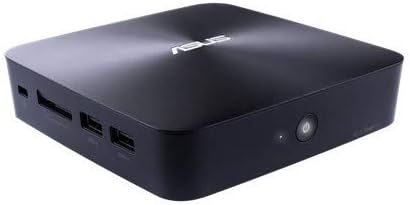
Рисунок 3: Кутова передня частина view of the ASUS UN62-E093X Mini PC, highlighting front-accessible ports.
- Підключення живлення: Connect the power adapter to the DC-in port on the Mini PC, then plug the power cord into a wall outlet.
- Увімкнення живлення: Натисніть кнопку живлення, розташовану на передній панелі міні-ПК. Індикатор живлення засвітиться.
- Початкове налаштування: Follow the on-screen instructions to complete the operating system setup, including language selection, network configuration, and user account creation.
3. Операційна
This section covers basic operation of your Mini PC.
- Увімкнення/вимкнення живлення: Press the power button to turn the device on. To turn off, use the operating system's shutdown function. A short press of the power button can put the device to sleep.
- Перезапуск: Use the operating system's restart function to reboot the Mini PC.
- Підключення до мережі:
- Провідний: Connect an Ethernet cable to the LAN port for a stable wired connection.
- Бездротовий: The Mini PC supports Wi-Fi. Access network settings in your operating system to connect to a wireless network.
- Порти USB: Utilize the USB ports for connecting external devices such as USB drives, external hard drives, and other peripherals.
- Відеовихід: The Mini PC supports dual display output via HDMI and DisplayPort, allowing for extended desktop or mirrored display configurations.
- Аудіо: Connect headphones or speakers to the audio jack for sound output.
4. Технічне обслуговування
Правильне обслуговування забезпечує довговічність та оптимальну продуктивність вашого міні-ПК.
- Прибирання: Use a soft, dry cloth to clean the exterior of the Mini PC. For dust accumulation in vents, use compressed air. Не використовуйте рідкі засоби для чищення безпосередньо на пристрої.
- Оновлення програмного забезпечення: Regularly update your operating system and drivers to ensure security and performance improvements. Visit the official ASUS support webсайт з останніми драйверами.
- Вентиляція: Ensure the Mini PC is placed in a well-ventilated area. Do not block the ventilation openings to prevent overheating.
- Зберігання: When not in use for extended periods, store the Mini PC in a cool, dry place, away from direct sunlight and extreme temperatures.
5. Вирішення проблем
У цьому розділі наведено рішення поширених проблем, з якими ви можете зіткнутися.
- Немає живлення:
- Перевірте, чи адаптер живлення надійно підключено як до міні-ПК, так і до розетки.
- Переконайтеся, що розетка справна, перевіривши її за допомогою іншого пристрою.
- Спробуйте іншу розетку.
- Немає дисплея:
- Verify that the monitor is powered on and the video cable (HDMI/DisplayPort) is securely connected to both the Mini PC and the monitor.
- Переконайтеся, що на моніторі вибрано правильне джерело вхідного сигналу.
- Try connecting to a different monitor or using a different video cable.
- Немає мережевого підключення:
- Провідний: Check if the Ethernet cable is properly connected and the router/modem is working.
- Бездротовий: Ensure Wi-Fi is enabled in your operating system and you are connected to the correct network with the correct password. Restart your router/modem.
- Система зависає/не реагує:
- Натисніть і утримуйте кнопку живлення протягом 5-10 секунд, щоб примусово вимкнути міні-ПК, а потім перезавантажте його.
- If the issue persists, consider checking for software conflicts or performing a system restore.
6. Технічні характеристики
Key technical specifications for the ASUS UN62-E093X Mini PC:
| Особливість | Специфікація |
|---|---|
| Бренд | Asus |
| Модель | UN62-E093X |
| Марка процесора | Intel |
| Розмір встановленої оперативної пам'яті | 4 ГБ |
| Максимальний розмір оперативної пам'яті | 4 ГБ |
| Технологія оперативної пам'яті | DDR4 |
| Розмір жорсткого диска | 4 ГБ |
| Graphics Description | Інтегрований |
| Роздільна здатність дисплея | 1920 x 1080 пікселів |
| Форм-фактор | Все-в-одному |
| Розміри продукту | 5.84 х 32.77 х 21.08 см; 1.22 кг |
| ASIN | B00SQG1OS2 |
| Дата першої доступності | 22 березня 2015 року |
7. Гарантія та підтримка
Your ASUS UN62-E093X Mini PC comes with a standard manufacturer's warranty. Please refer to the warranty card included with your product for specific terms and conditions, including warranty period and coverage details.
Для отримання технічної підтримки, завантаження драйверів, відповіді на поширені запитання та додаткової допомоги відвідайте офіційний сайт підтримки ASUS. website or contact ASUS customer service. You can find more information and resources at the ASUS Brand Store on Amazon.