
вступ
Дякуємо за покупкуasing the GPX 9-inch Portable DVD Player, Model PD901BDLP. This manual provides essential information for the safe and efficient operation of your device. Please read it thoroughly before use and retain it for future reference.
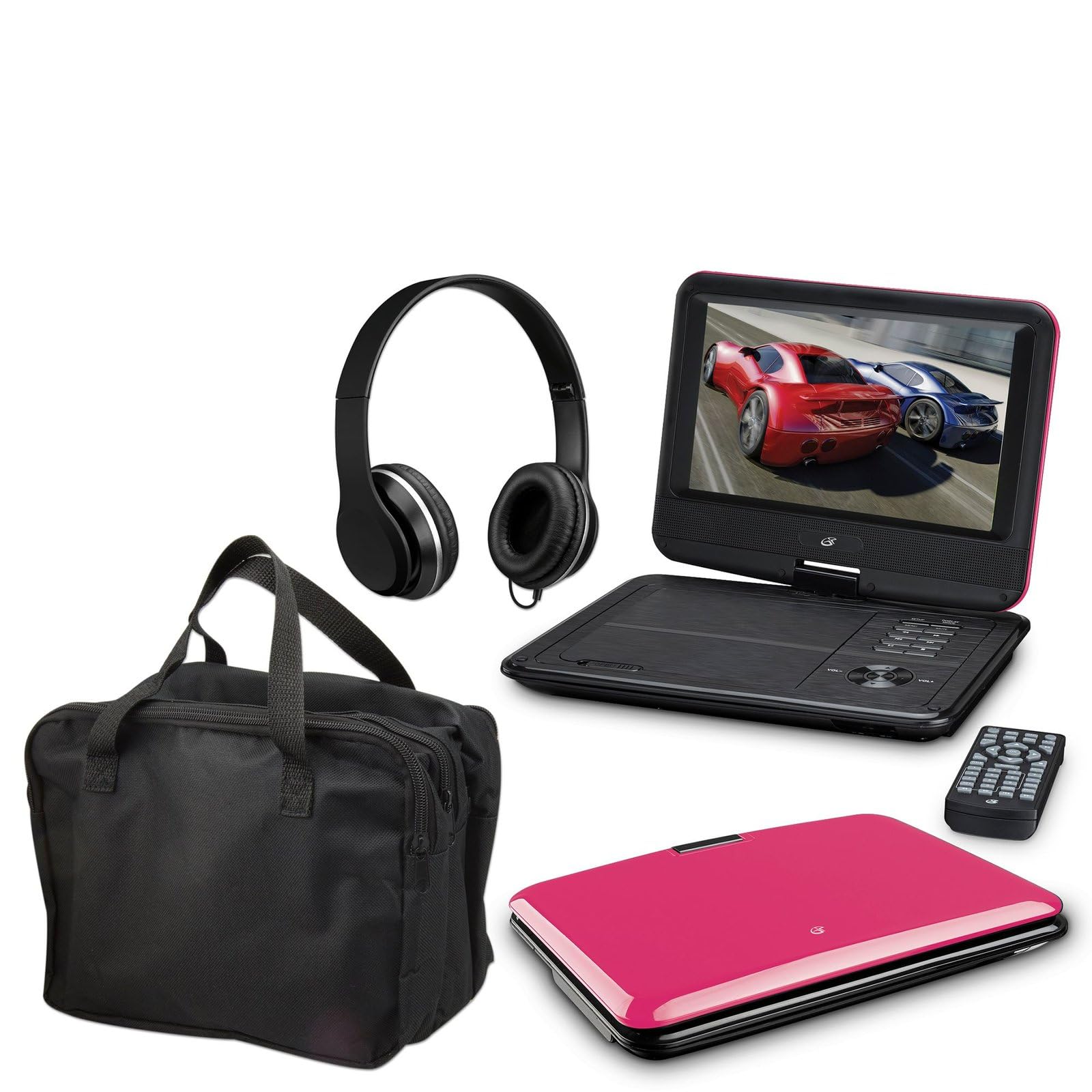
Image: The GPX 9-inch Portable DVD Player in its closed position, showcasing its vibrant pink top casing and sleek design.
Вміст упаковки
Перевірте, чи всі перелічені нижче предмети входять до вашої упаковки:
- GPX 9-inch Portable DVD Player (Model PD901BDLP)
- Пульт дистанційного керування (потрібні 2 батарейки ААА, входять в комплект)
- Адаптер змінного/постійного струму
- Автомобільний адаптер 12В
- 3.5mm-to-RCA audio/video cable
- Чохол для транспортування
- Навушники
- Інструкція з експлуатації (цей документ)
Особливості продукту
- 9-inch 800x480 LCD screen
- Screen tilts and swivels for versatile viewкути
- Rechargeable lithium polymer battery with up to 2 hours of battery life
- Вбудовані стереодинаміки
- Роз'єм для навушників для приватного прослуховування
- RCA output for connection to external displays
- Supports DVD, DVD-R/RW, DVD+R/RW, CD, CD-R/RW, JPEG, MP3 formats
Налаштування
1. Зарядка батареї
Before first use, fully charge the internal lithium polymer battery. Connect the AC/DC power adapter to the DC IN port on the DVD player and plug the other end into a standard wall outlet. The charging indicator light will illuminate. Charging typically takes approximately 3-4 hours for a full charge, providing up to 2 hours of playback.
2. Встановлення батарейок пульта дистанційного керування
Відкрийте батарейний відсік на задній панелі пульта дистанційного керування. Вставте дві (2) батарейки типу AAA, дотримуючись правильної полярності (+/-). Щільно закрийте відсік.
3. Connecting to a Television (Optional)
до view content on a larger screen, use the included 3.5mm-to-RCA audio/video cable. Connect the 3.5mm end to the AV OUT port on the DVD player. Connect the RCA (red, white, yellow) ends to the corresponding AV INPUT ports on your television. Select the correct AV input source on your TV.
4. Using the Car Adapter (Optional)
For in-car use, connect the 12V car adapter to the DC IN port on the DVD player and plug the other end into your vehicle's cigarette lighter socket.
Інструкція з експлуатації
1. Увімкнення/вимкнення живлення
Натисніть і утримуйте ПОТУЖНІСТЬ button on the player or remote control to turn the device on or off.
2. Вставлення DVD-диска
- Gently open the DVD player lid.
- Place a DVD disc onto the spindle with the label side facing up.
- Обережно натисніть на центр диска, доки він не клацне на місці.
- Close the lid. The player will automatically begin reading the disc.
3. Налаштування екрана
The LCD screen can be tilted and swiveled to achieve the optimal viewing angle. Carefully adjust the screen to your preferred position.
4. Основні елементи керування відтворенням
- ВІДТВОРЕННЯ/ПАУЗА: Press to start or pause playback.
- СТІЙ: Натисніть, щоб зупинити відтворення.
- SKIP (<< / >>): Press to skip to the previous or next chapter/track.
- FF/REW: Press and hold to fast forward or rewind.
- ГРОМКОСТЬ (+/-): Налаштування гучності звуку.
5. Використання навушників
Plug the included headphones into the НАВУШНИКИ jack for private listening. The built-in speakers will automatically mute when headphones are connected.
Технічне обслуговування
- Очищення екрану: Use a soft, lint-free cloth to gently wipe the LCD screen. Do not use liquid cleaners or abrasive materials.
- Cleaning the Disc Tray: Keep the disc tray free of dust and debris. Use a soft brush or compressed air if necessary.
- Догляд за акумулятором: To prolong battery life, avoid fully discharging the battery frequently. If storing the player for an extended period, charge it periodically.
- Зберігання: Store the DVD player in a cool, dry place away from direct sunlight and extreme temperatures. Use the included carrying case for protection during transport.
Усунення несправностей
| проблема | Рішення |
|---|---|
| Плеєр не вмикається. | Ensure the battery is charged or the AC/DC adapter is securely connected to a working power outlet. Check the power switch. |
| Диск не виявлено. | Verify the disc is inserted correctly with the label side up and seated properly on the spindle. Ensure the disc is clean and free of scratches. Try a different disc. |
| Ні звуку. | Check the volume level. Ensure headphones are not plugged in if you intend to use the built-in speakers. If connected to a TV, check the TV's volume and input settings. |
| Не працює пульт дистанційного керування. | Check and replace the AAA batteries in the remote. Ensure there are no obstructions between the remote and the player's IR sensor. |
| Picture is distorted or blurry. | Clean the disc. Adjust the screen angle. If connected to a TV, check the AV cable connections. |
Технічні характеристики
- модель: PD901BDLP
- Розмір екрана: 9 дюймів
- Тип дисплея: ЖК
- Рідна роздільна здатність: 800 х 480
- Тип носія: DVD, DVD-R/RW, DVD+R/RW, CD, CD-R/RW, JPEG, MP3
- Батарея: Акумуляторна літієва полімерна
- Термін служби батареї: До 2 годин
- Підключення: 3.5mm AV Out, Headphone Jack, DC In
- Споживана потужність: AC/DC Adapter, 12V Car Adapter
- вага: Приблизно 1.9 фунтів (0.86 кг)
- колір: Рожевий
- UPC: 047323179044
Гарантія та підтримка
This GPX Portable DVD Player is covered by a 90-денна обмежена гарантія виробника з дати першої покупки. Ця гарантія поширюється на дефекти матеріалів та виготовлення за умов нормального використання.
For warranty service or technical support, please refer to the contact information provided with your product packaging or visit the official GPX webсайт. Зберігайте чек про покупку як підтвердження покупки.
Для отримання додаткової інформації ви можете відвідати GPX Store on Amazon.