
1. Вступ
The McKesson LUMEON Electronic Thermometer, Model 3074, is designed for accurate and rapid temperature measurement via oral or axillary (underarm) methods. This device provides reliable readings with an intuitive interface and a flexible probe for user comfort and accuracy. Please read this manual thoroughly before use to ensure proper operation and to maintain the device's longevity.
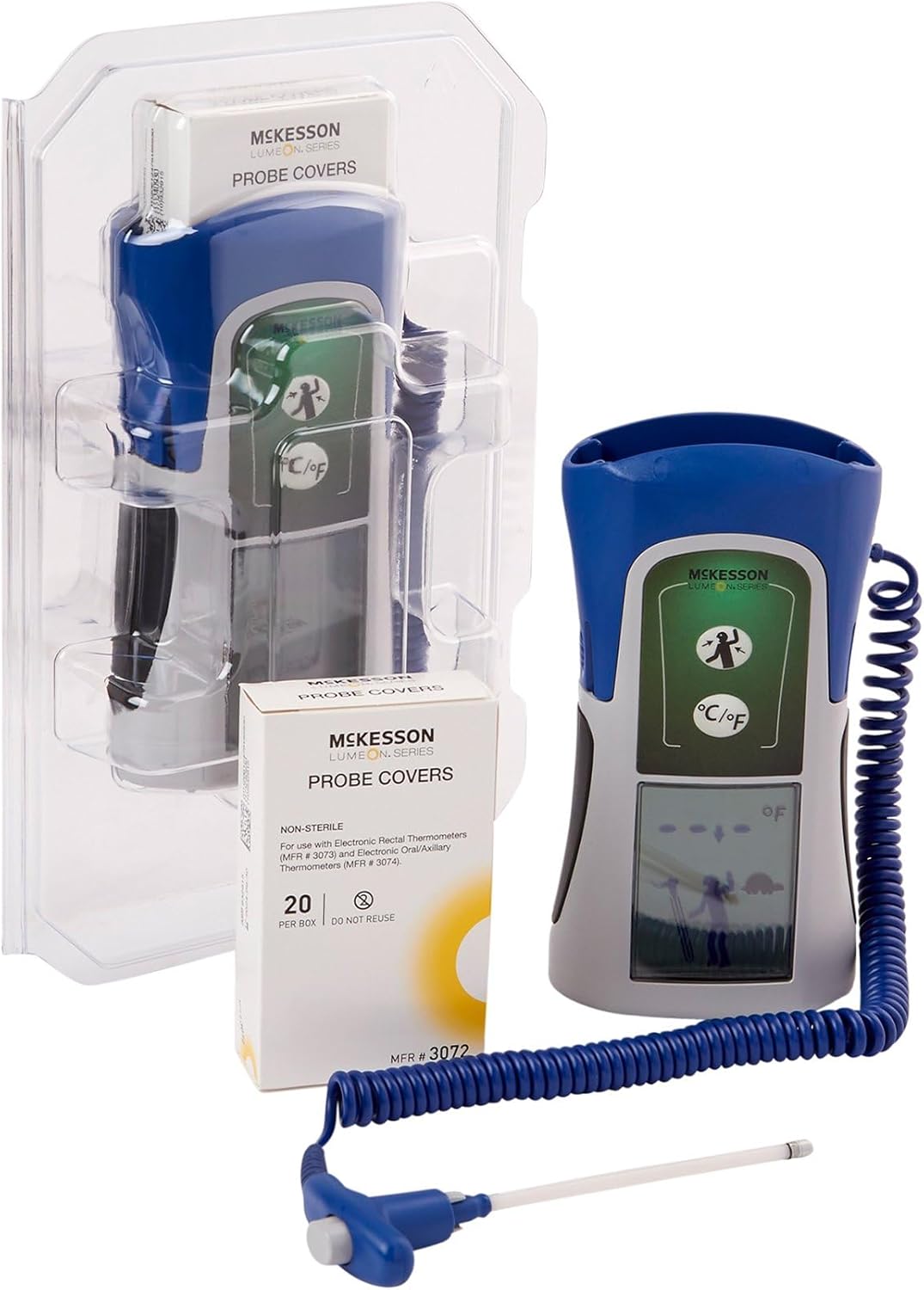
The McKesson LUMEON Electronic Thermometer, shown with its flexible probe and a box of probe covers, packaged in clear plastic.
2. Інформація про безпеку
- This thermometer is intended for oral and axillary use only. Do not use for rectal temperature measurement.
- Always use a new, disposable probe cover for each measurement to prevent cross-contamination.
- Зберігайте пристрій у недоступному для дітей місці. Дрібні деталі можуть становити небезпеку задухи.
- Не кусайте зонд.
- Avoid exposing the thermometer to direct sunlight, extreme temperatures, or moisture.
- Do not attempt to disassemble or repair the device. Contact customer support if service is required.
- Заяви щодо дієтичних добавок не були оцінені FDA і не призначені для діагностики, лікування, лікування або запобігання будь-якій хворобі чи стану здоров’я.
3. Особливості продукту
- Provides quick, accurate readings in approximately 4 seconds.
- Features a dual measuring scale with Fahrenheit (°F) and Celsius (°C) capabilities.
- Intuitive, icon-based interface for simple operation and reliable readings.
- Flexible probe enhances durability and helps minimize technique-related errors.
- Equipped with an easy-to-read LCD screen with backlight.
- Extended battery life supports up to 6,000 readings.
4. Вміст упаковки
- McKesson LUMEON Electronic Thermometer (Model 3074)
- Probe Covers (20 per box, MFR #3072)
- Посібник користувача

Close-up of the McKesson LUMEON Probe Covers packaging, showing the barcode (01206124791958551120081321A2053479) and manufacturing details.
5. Налаштування
5.1 Встановлення батареї
The thermometer requires 4 AA batteries for operation. To install or replace batteries:
- Знайдіть кришку відсіку для батареї на задній панелі пристрою.
- Відкрийте кришку.
- Вставте 4 батарейки типу АА, дотримуючись правильної полярності (+/-).
- Надійно закрийте кришку батарейного відсіку.
5.2 Unit Selection (°F / °C)
The thermometer can display temperatures in Fahrenheit (°F) or Celsius (°C). To switch between units:
- With the thermometer off, press and hold the power button for approximately 3 seconds until the unit changes on the display.
- Release the button when the desired unit is shown. The device will remember this setting for future use.
6. Інструкція з експлуатації
Always ensure the thermometer is clean and a new probe cover is attached before each use.

The McKesson LUMEON Electronic Thermometer displaying a temperature reading of 91.1°F, with its flexible probe and a box of probe covers.
6.1 Oral Temperature Measurement
- Attach a new, disposable probe cover to the thermometer tip.
- Натисніть кнопку живлення, щоб увімкнути термометр.
- Place the covered probe tip under the tongue, as far back as comfortable, and close the mouth.
- Hold the thermometer in place until a stable reading is displayed (approximately 4 seconds). A beep will indicate completion.
- Зчитайте температуру на РК-екрані.
- Discard the used probe cover and turn off the thermometer.
6.2 Axillary (Underarm) Temperature Measurement
- Attach a new, disposable probe cover to the thermometer tip.
- Натисніть кнопку живлення, щоб увімкнути термометр.
- Place the covered probe tip in the center of the armpit, ensuring good skin contact.
- Hold the arm firmly against the body to keep the probe in place.
- Wait until a stable reading is displayed (this method may take slightly longer than oral). A beep will indicate completion.
- Зчитайте температуру на РК-екрані.
- Discard the used probe cover and turn off the thermometer.
7. Reading Interpretation
The thermometer will display the measured temperature on its LCD screen. Normal body temperature varies by individual, age, and measurement site. Consult a healthcare professional for guidance on interpreting temperature readings, especially if you have concerns about fever or hypothermia.

The McKesson LUMEON Electronic Thermometer placed on a desk, demonstrating its compact size and readiness for use.
8. Технічне обслуговування
8.1 Очищення
After each use, and after removing the disposable probe cover, wipe the thermometer probe and body with a soft cloth dampened with isopropyl alcohol or a mild disinfectant. Do not immerse the thermometer in water or any cleaning solution. Allow the device to air dry completely before storage.
8.2 Зберігання
Store the thermometer in its protective case in a cool, dry place, away from direct sunlight and extreme temperatures. Remove batteries if the device will not be used for an extended period.

сторона view of the McKesson LUMEON Electronic Thermometer, highlighting its ergonomic design and flexible probe with a probe cover.
9. Вирішення проблем
| проблема | Можлива причина | Рішення |
|---|---|---|
| Немає дисплея при включенні | Розряджені або неправильно встановлені батареї | Replace batteries with 4 new AA batteries, ensuring correct polarity. |
| Неточні показання | Improper placement of probe; used probe cover; environmental factors | Ensure correct probe placement; use a new probe cover; avoid taking temperature immediately after eating, drinking, or exercising. |
| Відображення кодів помилок | Device malfunction; out of temperature range | Refer to the specific error code in the full product documentation or contact McKesson customer support. Ensure ambient temperature is within operating range. |
10. Технічні характеристики
| Особливість | Деталь |
|---|---|
| Номер моделі | 3074 |
| Час вимірювання | Приблизно 4 секунд |
| Діапазон вимірювання | 90°F до 110°F (32°C до 43.3°C) |
| Дисплей | Цифровий LCD з підсвічуванням |
| Джерело живлення | 4 батарейки АА |
| Термін служби батареї | До 6,000 XNUMX читань |
| Розміри продукту | 10.6 x 6.6 x 3.7 дюймів |
| вага | 1.41 фунта |
| матеріал | пластик |
| Відповідність | Відповідає FDA |
11. Гарантія та підтримка
For warranty information or technical support regarding your McKesson LUMEON Electronic Thermometer, please refer to the warranty card included with your product or contact McKesson customer service directly. Contact details can typically be found on the product packaging or the official McKesson website. Please have your model number (3074) and purchase information available when contacting support.