
Rii Mini i7
Rii Mini i7 Wireless Gyro Mouse Remote Control User Manual
Model: Mini i7 (RT-MWK07)
1. Вступ
Thank you for choosing the Rii Mini i7 Wireless Gyro Mouse Remote Control. This device combines the functionality of a traditional remote control with a precise gyro mouse, offering versatile control for a wide range of devices. It is designed for use with Smart TVs, game consoles (Xbox 360, Xbox ONE), PCs (Windows, Mac, Linux), Mini PCs, and Android Tablets, providing an intuitive and efficient user experience.

Figure 1: Rii Mini i7 Wireless Gyro Mouse Remote Control, front view.
2. Вміст упаковки
- 1 x Rii Mini i7 Wireless Gyro Mouse Remote Control
- 1 x USB-приймач
- Посібник користувача (цей документ)
Note: 2 AAA batteries are required and are not included in the package.
3. Продукт закінчивсяview
Familiarize yourself with the layout and functions of your Rii Mini i7 remote control.
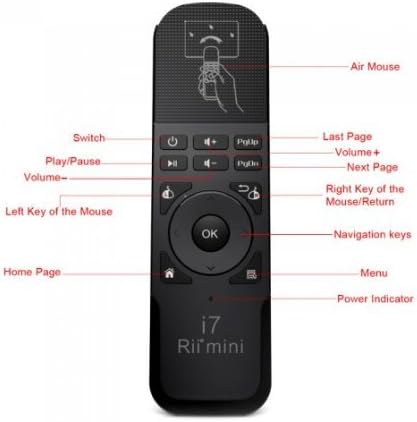
Малюнок 2: Спереду view of the Rii Mini i7 remote control with labeled buttons.
- Кнопка живлення: Turns the connected device on/off or puts it into standby.
- Гучність +/-: Регулює гучність.
- Відтворення/пауза: Керує відтворенням медіа.
- PgUp/PgDn: Page Up/Page Down functionality.
- Left Mouse Key: Функціонує як клацання лівою кнопкою миші.
- Right Mouse Key/Return: Functions as a right-click or back/return button.
- Кнопка ОК: Підтверджує вибір.
- Клавіші навігації: Вгору, вниз, вліво, вправо для навігації по меню.
- Home Page Button: Повернення на головний екран.
- Кнопка меню: Відкриває контекстні меню.
- Індикатор живлення: LED light indicating power status.
- Повітряна миша: Activates/deactivates the gyro mouse function.

Малюнок 3: Задня частина view of the Rii Mini i7 remote control, showing the battery compartment and USB receiver storage.
4. Інструкції з налаштування
4.1. Встановлення батарей
- Знайдіть батарейний відсік на задній панелі пульта дистанційного керування.
- Відкрийте кришку акумулятора.
- Insert two (2) AAA alkaline batteries, ensuring correct polarity (+/-).
- Надійно закрийте кришку акумулятора.

Figure 4: Open battery compartment showing placement for AAA batteries and the USB receiver.
4.2. Підключення USB-приймача
- USB-приймач для зручності зберігається всередині батарейного відсіку. Обережно вийміть його.
- Plug the USB receiver into an available USB port on your Smart TV, PC, game console, Mini PC, or Android Tablet.
- The device should automatically detect and install the necessary drivers. This may take a few moments.
- Once the drivers are installed, the remote control is ready for use.
5. Інструкція з експлуатації
5.1. Основні функції дистанційного керування
Most buttons on the Rii Mini i7 function similarly to a standard remote control. Press the corresponding button for power, volume adjustment, media playback (play/pause), and navigation within menus.
5.2. Using the Gyro Mouse (Air Mouse)
- To activate the gyro mouse function, press the dedicated Повітряна миша button (often indicated by a hand icon or mouse cursor icon).
- Once activated, move the remote control in the air to control the on-screen cursor. The cursor will follow your hand movements.
- Натисніть Left Mouse Key to click on items.
- Натисніть Right Mouse Key for right-click functionality or to go back in some applications.
- To deactivate the gyro mouse and return to standard button navigation, press the Повітряна миша кнопку знову.
5.3. Сумісність
The Rii Mini i7 is compatible with various operating systems and devices. For optimal performance, ensure your device's software is up to date. While generally plug-and-play, some advanced functions may vary depending on the specific device and application.
6. Технічне обслуговування
6.1. Заміна батареї
When the remote control's performance degrades or the power indicator light does not illuminate, it is time to replace the batteries. Follow the steps in Section 4.1 to replace the two AAA batteries.
6.2. прибирання
To clean the remote control, use a soft, dry cloth. For stubborn dirt, a slightly damp Можна використовувати тканину, але переконайтеся, що волога не потрапляє всередину пристрою. Не використовуйте агресивні хімікати або абразивні засоби для чищення.
7. Вирішення проблем
- Пульт не відповідає:
- Перевірте, чи правильно вставлені батарейки та чи достатньо заряджені. За потреби замініть їх.
- Ensure the USB receiver is securely plugged into the device's USB port.
- Verify that the remote control is within the operating range (up to 10 meters) and there are no significant obstructions between the remote and the receiver.
- Спробуйте підключити USB-приймач до іншого USB-порту на вашому пристрої.
- Gyro mouse cursor is erratic or not moving smoothly:
- Ensure the remote is held steady when activating the gyro mouse.
- Try recalibrating the gyro mouse by placing the remote on a flat surface for a few seconds, then picking it up and moving it.
- Перевірте наявність потенційних перешкод від інших бездротових пристроїв.
- Певні кнопки не працюють:
- Some buttons may have different functionalities or may not be supported by all applications or operating systems. Refer to your device's software settings.
- Ensure the remote is not in a significant distance from the receiver.
8. Технічні характеристики
| Особливість | Деталь |
|---|---|
| Назва моделі | Mini i7 |
| Номер моделі | RT-MWK07 |
| Бренд | Rii (Riitek) |
| Технологія підключення | Radiofrequency (Wireless) |
| Робочий діапазон | До 10 метрів |
| Сумісні пристрої | Smart TV, Game Consoles (Xbox 360, Xbox ONE), PC (Windows, Mac, Linux), Mini PC, Android Tablet |
| Кількість кнопок | 10 |
| Тип контролера | Button Control, Gyro Mouse |
| Потрібні батареї | 2 лужні батарейки типу ААА |
| Розміри продукту | 13.2 х 2.2 х 4 см |
| вага | 65 грами |
9. Гарантія та підтримка
For warranty information and technical support, please refer to the documentation provided with your purchase or contact your retailer. You may also visit the official Riitek webсайт для подальшої допомоги.
Ask a question about this manual
Ask about setup, troubleshooting, compatibility, parts, safety, or missing instructions. Manuals+ will review the question and use this page’s manual context to help answer it.